





Czesc,
Mam problem z makrem, ktorego zadaniem jest: gdy zmienia sie status produktu wysyla sie email, do przypisanej jej osoby.
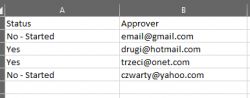
niestety w kodzie jaki napisalam, jako email (zmienna .to) bierze ostatni email wpisany w kolumnie B. probowalam jakos odniesc sie Offsetem i opcja Value. ale wtedy wstawial puste pola. Kod jest dosc prosty, bo niestety nie jestem asem w VBA
Oto Kod:
Sub Petla()
Dim Approver As Range
Dim Status As Range
Dim komorka As Range
'Set Approver = Sheets("Balance").Range("$B$2:$B$4")
'dla ka¿dej komórki z zakresu
w = Cells(Rows.Count, 1).End(xlUp).Row
Set Status = Cells(w, 1)
Set komorka = Status.Offset(0, 1)
Set Approver = Cells(w, 2)
For Each Status In Range("$A$2:$A$5") 'na razie na sztywno tylko do testow
If Status.Value = "Yes" Then
Dim OutApp As Object
Dim OutMail As Object
Set OutApp = CreateObject("Outlook.Application")
Set OutMail = OutApp.CreateItem(0)
With OutMail
.To = Approver.Value 'komorka.Value 'odbiorca 'Chr(59) - srednik
.CC = "" 'odbiorca do wiadomosci
.BCC = "" 'odbiorca do ukrytej wiadomosci
.Subject = "Rec needs your approval" 'temat e-maila
.Body = "Wyslano przesylke " ' tresc emaila
'Html.body - edytcja w html
'.Attachments.Add ("C:\plik.txt") 'jesli chcemy dodac zalacznik
.Display 'ostatecznie bedzie Send
End With
Set OutMail = Nothing
Set OutApp = Nothing
End If
Next Status
End Sub
Mam problem z makrem, ktorego zadaniem jest: gdy zmienia sie status produktu wysyla sie email, do przypisanej jej osoby.
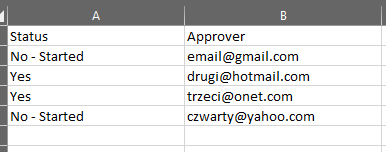
niestety w kodzie jaki napisalam, jako email (zmienna .to) bierze ostatni email wpisany w kolumnie B. probowalam jakos odniesc sie Offsetem i opcja Value. ale wtedy wstawial puste pola. Kod jest dosc prosty, bo niestety nie jestem asem w VBA
Oto Kod:
Sub Petla()
Dim Approver As Range
Dim Status As Range
Dim komorka As Range
'Set Approver = Sheets("Balance").Range("$B$2:$B$4")
'dla ka¿dej komórki z zakresu
w = Cells(Rows.Count, 1).End(xlUp).Row
Set Status = Cells(w, 1)
Set komorka = Status.Offset(0, 1)
Set Approver = Cells(w, 2)
For Each Status In Range("$A$2:$A$5") 'na razie na sztywno tylko do testow
If Status.Value = "Yes" Then
Dim OutApp As Object
Dim OutMail As Object
Set OutApp = CreateObject("Outlook.Application")
Set OutMail = OutApp.CreateItem(0)
With OutMail
.To = Approver.Value 'komorka.Value 'odbiorca 'Chr(59) - srednik
.CC = "" 'odbiorca do wiadomosci
.BCC = "" 'odbiorca do ukrytej wiadomosci
.Subject = "Rec needs your approval" 'temat e-maila
.Body = "Wyslano przesylke " ' tresc emaila
'Html.body - edytcja w html
'.Attachments.Add ("C:\plik.txt") 'jesli chcemy dodac zalacznik
.Display 'ostatecznie bedzie Send
End With
Set OutMail = Nothing
Set OutApp = Nothing
End If
Next Status
End Sub
