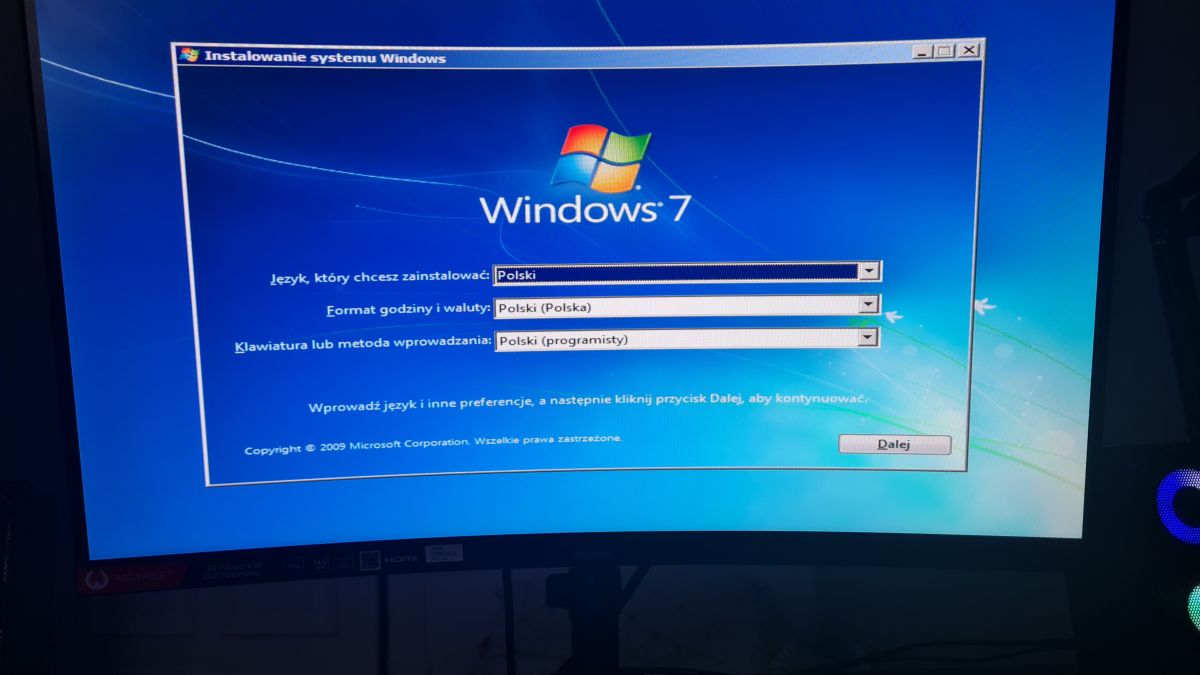
Mam taki problem że nie działa mi instalacja windows 7. Mam pendrive więc zainstalowałem nośnik instalacyjny Windows 7 plik ISO i pobrałem oprogramowanie do "wypakowywania" pliku ISO na pendrive. I mi to nie działa tylko ekran sie zatrzymuje i wyłącza mi sie wtedy myszka i klawiatura. Co mam zrobić?
W zdjęciu jest pokazane w jakim miejscu zatrzymuje mi sie ekran i nie moge nic zrobic
Proszę podać specyfikację lub model laptopa. Jak został przygotowany nośnik? Jak jest skonfigurowany sprzęt BIOS/UEFI, MBR/GPT? (Ogólnie na nowym sprzęcie instalacja Windows 7 graniczy z cudem.)
Chyba już znam problem. Wydaje mi się, że to wina tego, że Windows 7 nie wspiera mojej klawiatury oraz myszki i musiałbym sobie kupić klawiaturę z kablem PS/2 lub adapter PS/2.
* Procesory Matisse, Picasso & Raven Ridge wspierają tylko Microsoft® Windows® 10 64-bit.
* This motherboard does not support Windows 7 officially. If you install Windows 7 with Vermeer / Matisse / Cezanne / Renoir and Picasso processors, some functions may not work properly.
Proste... Nie masz sterowników do USB3 w obrazach i tylko dla tego to nie działa. Brak ich na pewno w bootwim, a pewnie też i w wim. Więc nawet po zainstalowaniu przez sztuczki z instalacją z HDD wewnętrznego i nienadzorowanymi instalkami, USB i tak będzie martwe.
I najważniejsze - jakie CPU i MoBo?
Dla Ryzenów jest sztuczka z przebiciem numerów DEV w pliku inf sterownika. Niekompatybilność jest sztucznie wywołana i idzie to odkręcić.
Dla intela nie mam dobrych rad, bo nie korzystam od kiedy co gen jest nowa podstawka.
Załączam instrukcję jak to wykonać dla Ryzenów i sugeruję najpierw przeczytać to od deski do deski, a potem kombinować.
Prawidłowo wykonane - działa i wbrew temu co piszą, wstrzykiwałem też sterowniki USB do głównego WIM i... Działa.
No i kolejne odstępstwo - wstrzykiwałem wszystko programikiem NTLite.
Nie zrażać się jak nie zadziała... Mi się udało te same pliki prawidłowo wstrzyknąć w obraz dopiero za którymś razem - moddowałem obraz typu combo ze wszystkimi wersjami i to mi skomplikowało życie
Spoiler:
Ryzen works fine on Windows 7. I run Windows 7 64 bit, and have an R7 2700X.
Just be aware that you have to do a couple of steps to make it work, and in the correct order. Number one, when you first install Windows, if you attempt to go to Windows Update for the first time without putting the patch in first, you will discover that it will continue to say "searching for updates" for hours on end. This is being done by Microsoft on purpose. Microsoft is trying to stop people from using Windows 7, and they are doing this by attempting to stop you from getting the updates. There is an easy way around this. For this, you install this patch below first, as soon as you get on your desktop, and before you use Windows Update. It is KB3102810-x64 at the link. I repeat, do not go to Windows Update yet when you first get on your desktop after installing Windows. If you do this, you will end up never being able to get Windows Updates ever. As soon as you install Windows, and get to your desktop, Install this update below first.
Install this, and then reboot. After rebooting, now go to Windows Update. You will now find that when you go to Windows Update, it will discover the updates. Download, and install all the updates, and then reboot. Now, go back to Windows Update to attempt to get the next set of updates. You will now discover that after you have updated Windows partially by installing the entire first set of updates that Microsoft will now claim that your Ryzen hardware is not supported. At this point, you now install this at the link below. After this, reboot the computer again.
Now, when you go back to Windows Update, all the other updates will now be available.
_____________________________________________
Also, you need to have Windows 7 on a thumb drive with the added in USB 3.0 drivers for your Windows install. Asus and Gigabyte both offer a tool that you can use to add the USB 3.0 drivers to your Windows ISO. If you do not add these USB 3.0 drivers, your keyboard and mouse will not work during your install of Windows. If you have an NVME drive, the tool also allows for those drivers to be added. You can pick either one at the links below.
My Ryzen 9 3900X works fine on Windows 7, however I seemed to have lost all my USB ports on the back of my motherboard since the on-die Matisse USB 3.0 controller is not supported on Windows 7 and has no drivers from AMD.
However, with a bit of hacky-whacky, I managed to get it working by tricking Windows 7 into using the Ryzen 1000/2000 driver anyway. I figured AMD wouldn't have changed the on-die USB controller significantly. It should work on all pre-x570 motherboards, since the controller is standalone and on-die. I'll tell you how to do it, however;
DISCLAIMER: This workaround is at your own risk. I have not extensively tested it except for that it now works and I'm typing this post in Windows 7 on the Matisse USB 3.0 Controller.
Now, without further ado:
Foolproof Matisse Windows 7 USB tutorial:
Plug keyboard/mouse in front-usb so you can navigate Windows 7
Download the latest AMD Chipset Windows 7 drivers from AMD: www.amd.com/en/support/chipsets/amd-socket-am4/x370
Start the installation such that the installer extracts its contents into C:\AMD. You don't need to finish the installation, but it can't do harm either.
Browse to C:\AMD\Chipset_Driver_Installer\AMD_Chipset_Drivers\MSIFiles\program files\AMD\Chipset_IODrivers\USBController Driver\Win7\x64 and open 'amdxhc.inf' in notepad.
We're going to trick Windows into installing drivers for Ryzen 1- and 2000 for the 3000 series. Find this block:
Go to device manager, right click the unrecognized USB controller "Universal Serial Bus (USB) Controller" and choose "Update driver software"
Choose "Browse my computer for driver software"
Click "Browse" and direct it to C:\AMD, and make sure to check the checkbox "Include subfolders". It should now search for your modified .inf file. Alternatively, you can direct it all the way to C:\AMD\Chipset_Driver_Installer\AMD_Chipset_Drivers\MSIFiles\program files\AMD\Chipset_IODrivers\USBController Driver\Win7\x64
You will be prompted to install the driver software. Choose "Install anyway"
Yes, only editing the inf files is enough to works well on X570 + ZEN2 CPUs and don't need to modify amdxhci.sys and amdhub3.sys.
But you must have ps/2 mouse orkeyboard to intsall the AMD chips driver first,and than install the mod usb driver.
I test on Asus X370-I and MSI X570 gaming plus, they both can work.
There are something that need to note:
1? WIN7 install.win must include KB3033929.
2?Do not Inject the USB Driver to install.win.
3?Before you install the USB driver, you must AMD chips driver first.
If you do not do that 3 points , you will miss BOSD.
------------
If the mainboard don’t have PS/2,you need a PCI-E to USB 2.0 card from ebay or similar ( ~ 4 € )
Przeciez producent udostepnil:
Windows 7 USB Patcher ver:2.0.21
U mnie też ten patcher nie zrobił tego co miał i też mam MoBo firmy ASRock zestawione z R7 2700x.
Dla tego zniesmaczony, zakasałem rękawa i sam integrowałem via NTLite.
No i bardzo ważne przy Ryzenach - dointegrować kolejno: KB3033929 (na podpisy cyfrowe sterowników - bez tego tylko w trybie testu sprzęt zadziała), KB3020369 (łatka na WU by weszła kolejna aktualizacja) i następnie KB3125574-v4 (taki mały SP2).
I dopiero dodawać sterowniki USB.
Ja akurat nie musiałem moddować plików inf, bo ID sprzętu mam zgodne z tym co jest w sterowniku z patcherem, jednak OP ma R5 3xxxG i należy sprawdzić ID z managera urządzeń z plikami inf sterownika.
USB patcher teraz mi zadziałał, ale za to jest teraz inny problem i chodzi tu o to, że gdy chcę wybrać partycję, na której ma mi się zainstalować Windows 7, to nie pokazuje mi się żadna partycja.
Proste... Nie masz sterowników do USB3 w obrazach i tylko dla tego to nie działa. Brak ich na pewno w bootwim
Kiermasz napisał:
Dla Ryzenów jest sztuczka z przebiciem numerów DEV w pliku inf sterownika. Niekompatybilność jest sztucznie wywołana i idzie to odkręcić.
Nie trzeba przebijać żadnych numerów DEV. Ja używam boot.wim Win7 do instalacji WinXP 64-bit:
WinXP 64-bit on a modern PC (ISO boot.wim + install.wim) W tutorialu masz jak zbudować boot.wim ze wsparciem USB3 i NVMe od podstaw używając WAIK. Nie trzeba tylu aktualizacji - absolutne minimum co trzeba dodać do boot.wim to:
✨ Użytkownik ma problem z instalacją systemu Windows 7 z pendrive'a, gdzie ekran zatrzymuje się, a myszka i klawiatura przestają działać. Po analizie problemu, sugerowane są różne rozwiązania, w tym użycie narzędzia Windows 7 USB Patcher, które jest dostępne na stronie producenta ASRock. Użytkownik zidentyfikował, że problem może wynikać z braku wsparcia dla USB 3.0 w instalatorze Windows 7. Wskazówki dotyczące integracji sterowników USB oraz aktualizacji systemowych są również podane, a użytkownik ostatecznie rozwiązał problem poprzez pobranie USB Patcher. W trakcie dyskusji poruszono również kwestie związane z konfiguracją BIOS/UEFI oraz specyfikacją sprzętową, w tym procesor AMD Ryzen 5 3400G i płytę główną ASRock B450 Pro4. Podsumowanie wygenerowane przez AI na podstawie treści dyskusji.