logo elektroda
logo elektroda
X
logo elektroda
REKLAMA
REKLAMA
Adblock/uBlockOrigin/AdGuard mogą powodować znikanie niektórych postów z powodu nowej reguły.

xxexmodulap.exe - blokada stron i poczty, jak usunąć?

radziejsz 08 Mar 2006 22:09 2080 11
REKLAMA
  • #1 2391742
    radziejsz
    Poziom 16  
    Posty: 261
    Pomógł: 5
    Ocena: 5
    od pewnego czasu włacza mi sie jakies syfidło xxexmodulap.exe gdzie xx na poczatku to liczba jakas zawsze inna .. po właczeniu tego nie wczytauja sie stronki i blokuje sie odbieranie poczty , ale gg dzała czyli blokuje jakies porty .. zaden natywir nie chce mi tego znalesc moze ktos wie coo to i jak sie pozbyc ?? zaznaczam ze po wyłaczeniu tego wszytsko wraca do normy
    pomocy !!
  • REKLAMA
  • #2 2391762
    Kolobos
    Spec od komputerów
    Posty: 85169
    Pomógł: 17166
    Ocena: 10445
    Wklej log z hijackthis na poczatek.
  • Pomocny post
    #3 2391766
    paweliw
    Spec od komputerów
    Posty: 4914
    Pomógł: 710
    Ocena: 229
    Wklej log z hiajckthis na forum.
    Hijackthis ściągnij stąd http://www.spywarewarrior.com/uiuc/merijn/HijackThis.exe, po rozpakowaniu uruchom program i wykonaj: "Do a system scan and save a logfile". Log wklej w treść wiadomości, nie jako załącznik.
  • REKLAMA
  • #4 2392562
    radziejsz
    Poziom 16  
    Posty: 261
    Pomógł: 5
    Ocena: 5
    Running processes:
    C:\WINDOWS\System32\smss.exe
    C:\WINDOWS\system32\winlogon.exe
    C:\WINDOWS\system32\services.exe
    C:\WINDOWS\system32\lsass.exe
    C:\WINDOWS\system32\svchost.exe
    C:\WINDOWS\System32\svchost.exe
    C:\WINDOWS\system32\spoolsv.exe
    C:\Program Files\Symantec_Client_Security\Symantec AntiVirus\DefWatch.exe
    C:\Program Files\Symantec_Client_Security\Symantec AntiVirus\Rtvscan.exe
    C:\WINDOWS\system32\nvsvc32.exe
    C:\WINDOWS\system32\svchost.exe
    C:\WINDOWS\Explorer.EXE
    C:\Program Files\D-Tools\daemon.exe
    C:\Program Files\Java\jre1.5.0_06\bin\jusched.exe
    C:\Program Files\Symantec_Client_Security\Symantec AntiVirus\vptray.exe
    C:\WINDOWS\SOUNDMAN.EXE
    C:\WINDOWS\system32\RUNDLL32.EXE
    C:\Program Files\Winamp\winampa.exe
    C:\Program Files\MSI\PC Alert 4\PCAlert4.exe
    C:\Program Files\AVerTV2K\QuickTV.exe
    D:\dysk\instalki\S2kCtl.exe
    C:\WINDOWS\system32\svchost.exe
    D:\dysk\eMule\emule.exe
    C:\Program Files\Gadu-Gadu\gg.exe
    C:\DOCUME~1\radziej\USTAWI~1\Temp\90exmodulap.exe
    C:\PROGRA~1\MOZILL~1\FIREFOX.EXE
    C:\Documents and Settings\radziej\Pulpit\HijackThis.exe

    R1 - HKCU\Software\Microsoft\Internet Connection Wizard,ShellNext = http://wp.pl/
    R0 - HKCU\Software\Microsoft\Internet Explorer\Toolbar,LinksFolderName = Łącza
    O2 - BHO: SSVHelper Class - {761497BB-D6F0-462C-B6EB-D4DAF1D92D43} - C:\Program Files\Java\jre1.5.0_06\bin\ssv.dll
    O2 - BHO: IeCatch2 Class - {A5366673-E8CA-11D3-9CD9-0090271D075B} - C:\PROGRA~1\FlashGet\jccatch.dll
    O3 - Toolbar: FlashGet Bar - {E0E899AB-F487-11D5-8D29-0050BA6940E3} - C:\PROGRA~1\FlashGet\fgiebar.dll
    O3 - Toolbar: Easy-WebPrint - {327C2873-E90D-4c37-AA9D-10AC9BABA46C} - C:\Program Files\Canon\Easy-WebPrint\Toolband.dll
    O4 - HKLM\..\Run: [NvCplDaemon] RUNDLL32.EXE C:\WINDOWS\system32\NvCpl.dll,NvStartup
    O4 - HKLM\..\Run: [nwiz] nwiz.exe /install
    O4 - HKLM\..\Run: [NeroFilterCheck] C:\WINDOWS\system32\NeroCheck.exe
    O4 - HKLM\..\Run: [DAEMON Tools-1033] "C:\Program Files\D-Tools\daemon.exe" -lang 1033
    O4 - HKLM\..\Run: [SunJavaUpdateSched] C:\Program Files\Java\jre1.5.0_06\bin\jusched.exe
    O4 - HKLM\..\Run: [vptray] C:\Program Files\Symantec_Client_Security\Symantec AntiVirus\vptray.exe
    O4 - HKLM\..\Run: [SoundMan] SOUNDMAN.EXE
    O4 - HKLM\..\Run: [NvMediaCenter] RUNDLL32.EXE C:\WINDOWS\system32\NvMcTray.dll,NvTaskbarInit
    O4 - HKLM\..\Run: [WinampAgent] C:\Program Files\Winamp\winampa.exe
    O4 - HKLM\..\Run: [.nvsvc] C:\WINDOWS\system\smss.exe /w
    O4 - HKLM\..\Run: [MSConfig] C:\WINDOWS\PCHealth\HelpCtr\Binaries\MSConfig.exe /auto
    O4 - HKCU\..\Run: [Gadu-Gadu] "C:\Program Files\Gadu-Gadu\gg.exe" /tray
    O4 - HKCU\..\Run: [CWK (Czasowy Wyłącznik Komputera) 1] "C:\Program Files\Damian Pasternak\CWK\CWK.exe" 3
    O4 - Startup: Skrót do S2kCtl.lnk = ?
    O4 - Global Startup: PC Alert 4.lnk = C:\Program Files\MSI\PC Alert 4\PCAlert4.exe
    O4 - Global Startup: QuickTV.lnk = C:\Program Files\AVerTV2K\QuickTV.exe
    O8 - Extra context menu item: Download All by FlashGet - C:\Program Files\FlashGet\jc_all.htm
    O8 - Extra context menu item: Download using FlashGet - C:\Program Files\FlashGet\jc_link.htm
    O8 - Extra context menu item: E&ksport do programu Microsoft Excel - res://C:\PROGRA~1\MICROS~2\OFFICE11\EXCEL.EXE/3000
    O8 - Extra context menu item: Easy-WebPrint Add To Print List - res://C:\Program Files\Canon\Easy-WebPrint\Resource.dll/RC_AddToList.html
    O8 - Extra context menu item: Easy-WebPrint High Speed Print - res://C:\Program Files\Canon\Easy-WebPrint\Resource.dll/RC_HSPrint.html
    O8 - Extra context menu item: Easy-WebPrint Preview - res://C:\Program Files\Canon\Easy-WebPrint\Resource.dll/RC_Preview.html
    O8 - Extra context menu item: Easy-WebPrint Print - res://C:\Program Files\Canon\Easy-WebPrint\Resource.dll/RC_Print.html
    O9 - Extra button: (no name) - {08B0E5C0-4FCB-11CF-AAA5-00401C608501} - C:\Program Files\Java\jre1.5.0_06\bin\ssv.dll
    O9 - Extra 'Tools' menuitem: Sun Java Console - {08B0E5C0-4FCB-11CF-AAA5-00401C608501} - C:\Program Files\Java\jre1.5.0_06\bin\ssv.dll
    O9 - Extra button: Badanie - {92780B25-18CC-41C8-B9BE-3C9C571A8263} - C:\PROGRA~1\MICROS~2\OFFICE11\REFIEBAR.DLL
    O9 - Extra button: FlashGet - {D6E814A0-E0C5-11d4-8D29-0050BA6940E3} - C:\PROGRA~1\FlashGet\flashget.exe
    O9 - Extra 'Tools' menuitem: &FlashGet - {D6E814A0-E0C5-11d4-8D29-0050BA6940E3} - C:\PROGRA~1\FlashGet\flashget.exe
    O9 - Extra button: Messenger - {FB5F1910-F110-11d2-BB9E-00C04F795683} - C:\Program Files\Messenger\msmsgs.exe
    O9 - Extra 'Tools' menuitem: Windows Messenger - {FB5F1910-F110-11d2-BB9E-00C04F795683} - C:\Program Files\Messenger\msmsgs.exe
    O16 - DPF: {7584C670-2274-4EFB-B00B-D6AABA6D3850} (Microsoft RDP Client Control (redist)) - https://mail.unia.com.pl/Remote/msrdp.cab
    O16 - DPF: {92ECE6FA-AC2E-4042-BFAE-0C8608E52A43} (SignActivX Control) - https://www.bph.pl/pi/components/SignActivX.cab
    O16 - DPF: {FDDBE2B8-6602-4AD8-946D-94C5A32FA6C1} (GameDesire Pool 8) - http://67.15.101.3/g_bin/pl/billard8_2_0_0_24.cab
    O20 - Winlogon Notify: NavLogon - C:\WINDOWS\system32\NavLogon.dll
    O23 - Service: DefWatch - Symantec Corporation - C:\Program Files\Symantec_Client_Security\Symantec AntiVirus\DefWatch.exe
    O23 - Service: Symantec AntiVirus Client (Norton AntiVirus Server) - Symantec Corporation - C:\Program Files\Symantec_Client_Security\Symantec AntiVirus\Rtvscan.exe
    O23 - Service: NVIDIA Display Driver Service (NVSvc) - NVIDIA Corporation - C:\WINDOWS\system32\nvsvc32.exe
    O23 - Service: Windows Log - Unknown owner - C:\WINDOWS\system32\nvsvcd.exe
  • Pomocny post
    #5 2392763
    misk
    Poziom 16  
    Posty: 133
    Pomógł: 15
    Ocena: 1
    C:\DOCUME~1\radziej\USTAWI~1\Temp\90exmodulap.exe tu siedzi ten plik, wywal go w awaryjnym trybie. Pełna scieżka to: C:\Documents and Settings\nazwa_profilu\Ustawienia lokalne\Temp (plik może być ukryty, więc musisz odkryć wszystkie pliki ukryte i systemowe)

    O16 - DPF: {FDDBE2B8-6602-4AD8-946D-94C5A32FA6C1} (GameDesire Pool 8) - http://67.15.101.3/g_bin/pl/billard8_2_0_0_24.cab wywal to też.
  • Pomocny post
    #6 2392959
    Kolobos
    Spec od komputerów
    Posty: 85169
    Pomógł: 17166
    Ocena: 10445
    W menadzerze zadan zakoncz:
    C:\DOCUME~1\radziej\USTAWI~1\Temp\90exmodulap.exe
    Nastepnie usun wszystkie pliki z temp.

    W hijackthis usun:
    O4 - HKLM\..\Run: [.nvsvc] C:\WINDOWS\system\smss.exe /w <- plik usun z dysku

    Usluga do kasacji:
    O23 - Service: Windows Log - Unknown owner - C:\WINDOWS\system32\nvsvcd.exe <- po usunieciu uslugi, usun plik z dysku.

    Start->Uruchom->sc stop "Windows Log"
    oraz: sc delete "Windows Log"

    Zrob tez skan tym:
    http://linorg.ciagri.usp.br/ftp/pub/windows/anti-spyware/ssfsetup1_0.exe
    http://download.ewido.net/ewido-setup.exe
    Przed skanowaniem zrob update definicji, po przeskanowaniu odinstaluj oba programy.

    Gdzie jest poczatek log'a? Masz uaktualnienia do systemu i przegladarki? Jezeli nie to zamknij jeszcze porty w wwdc:
    http://www.firewallleaktester.com/tools/wwdc.exe
  • #7 2393584
    radziejsz
    Poziom 16  
    Posty: 261
    Pomógł: 5
    Ocena: 5
    Logfile of HijackThis v1.99.1
    Scan saved at 07:17:32, on 2006-03-09
    Platform: Windows XP Dodatek SP2 (WinNT 5.01.2600)
    MSIE: Internet Explorer v6.00 SP2 (6.00.2900.2180)

    tu jest poczatek tylko ze uzywam fire foxa , liki juz usunałem .. ale nic nie dało dalej jest .. hhmm zaraz sprobuje jeszcze raz
  • REKLAMA
  • REKLAMA
  • #9 2393932
    radziejsz
    Poziom 16  
    Posty: 261
    Pomógł: 5
    Ocena: 5
    Logfile of HijackThis v1.99.1
    Scan saved at 15:07:38, on 2006-03-09
    Platform: Windows XP Dodatek SP2 (WinNT 5.01.2600)
    MSIE: Internet Explorer v6.00 SP2 (6.00.2900.2180)

    Running processes:
    C:\WINDOWS\System32\smss.exe
    C:\WINDOWS\system32\winlogon.exe
    C:\WINDOWS\system32\services.exe
    C:\WINDOWS\system32\lsass.exe
    C:\WINDOWS\system32\svchost.exe
    C:\WINDOWS\System32\svchost.exe
    C:\WINDOWS\system32\spoolsv.exe
    C:\WINDOWS\Explorer.EXE
    C:\Program Files\Symantec_Client_Security\Symantec AntiVirus\DefWatch.exe
    C:\Program Files\D-Tools\daemon.exe
    C:\Program Files\Java\jre1.5.0_06\bin\jusched.exe
    C:\Program Files\Symantec_Client_Security\Symantec AntiVirus\vptray.exe
    C:\Program Files\Symantec_Client_Security\Symantec AntiVirus\Rtvscan.exe
    C:\WINDOWS\SOUNDMAN.EXE
    C:\WINDOWS\system32\RUNDLL32.EXE
    C:\Program Files\Winamp\winampa.exe
    C:\Program Files\Gadu-Gadu\gg.exe
    C:\Program Files\MSI\PC Alert 4\PCAlert4.exe
    C:\Program Files\AVerTV2K\QuickTV.exe
    C:\WINDOWS\system32\nvsvc32.exe
    D:\dysk\instalki\S2kCtl.exe
    C:\WINDOWS\system32\svchost.exe
    C:\WINDOWS\system32\wscntfy.exe
    D:\dysk\eMule\emule.exe
    C:\Program Files\AVerTV2K\AVerTV2K.exe
    C:\Program Files\Microsoft Office\OFFICE11\OUTLOOK.EXE
    C:\Program Files\Microsoft Office\OFFICE11\WINWORD.EXE
    C:\PROGRA~1\MOZILL~1\FIREFOX.EXE
    C:\Documents and Settings\radziej\Pulpit\HijackThis.exe

    R1 - HKCU\Software\Microsoft\Internet Connection Wizard,ShellNext = http://wp.pl/
    R0 - HKCU\Software\Microsoft\Internet Explorer\Toolbar,LinksFolderName = Łącza
    O2 - BHO: SSVHelper Class - {761497BB-D6F0-462C-B6EB-D4DAF1D92D43} - C:\Program Files\Java\jre1.5.0_06\bin\ssv.dll
    O2 - BHO: IeCatch2 Class - {A5366673-E8CA-11D3-9CD9-0090271D075B} - C:\PROGRA~1\FlashGet\jccatch.dll
    O3 - Toolbar: FlashGet Bar - {E0E899AB-F487-11D5-8D29-0050BA6940E3} - C:\PROGRA~1\FlashGet\fgiebar.dll
    O3 - Toolbar: Easy-WebPrint - {327C2873-E90D-4c37-AA9D-10AC9BABA46C} - C:\Program Files\Canon\Easy-WebPrint\Toolband.dll
    O4 - HKLM\..\Run: [NvCplDaemon] RUNDLL32.EXE C:\WINDOWS\system32\NvCpl.dll,NvStartup
    O4 - HKLM\..\Run: [nwiz] nwiz.exe /install
    O4 - HKLM\..\Run: [NeroFilterCheck] C:\WINDOWS\system32\NeroCheck.exe
    O4 - HKLM\..\Run: [DAEMON Tools-1033] "C:\Program Files\D-Tools\daemon.exe" -lang 1033
    O4 - HKLM\..\Run: [SunJavaUpdateSched] C:\Program Files\Java\jre1.5.0_06\bin\jusched.exe
    O4 - HKLM\..\Run: [vptray] C:\Program Files\Symantec_Client_Security\Symantec AntiVirus\vptray.exe
    O4 - HKLM\..\Run: [SoundMan] SOUNDMAN.EXE
    O4 - HKLM\..\Run: [NvMediaCenter] RUNDLL32.EXE C:\WINDOWS\system32\NvMcTray.dll,NvTaskbarInit
    O4 - HKLM\..\Run: [WinampAgent] C:\Program Files\Winamp\winampa.exe
    O4 - HKCU\..\Run: [Gadu-Gadu] "C:\Program Files\Gadu-Gadu\gg.exe" /tray
    O4 - HKCU\..\Run: [CWK (Czasowy Wyłącznik Komputera) 1] "C:\Program Files\Damian Pasternak\CWK\CWK.exe" 3
    O4 - Startup: Skrót do S2kCtl.lnk = ?
    O4 - Global Startup: PC Alert 4.lnk = C:\Program Files\MSI\PC Alert 4\PCAlert4.exe
    O4 - Global Startup: QuickTV.lnk = C:\Program Files\AVerTV2K\QuickTV.exe
    O8 - Extra context menu item: Download All by FlashGet - C:\Program Files\FlashGet\jc_all.htm
    O8 - Extra context menu item: Download using FlashGet - C:\Program Files\FlashGet\jc_link.htm
    O8 - Extra context menu item: E&ksport do programu Microsoft Excel - res://C:\PROGRA~1\MICROS~2\OFFICE11\EXCEL.EXE/3000
    O8 - Extra context menu item: Easy-WebPrint Add To Print List - res://C:\Program Files\Canon\Easy-WebPrint\Resource.dll/RC_AddToList.html
    O8 - Extra context menu item: Easy-WebPrint High Speed Print - res://C:\Program Files\Canon\Easy-WebPrint\Resource.dll/RC_HSPrint.html
    O8 - Extra context menu item: Easy-WebPrint Preview - res://C:\Program Files\Canon\Easy-WebPrint\Resource.dll/RC_Preview.html
    O8 - Extra context menu item: Easy-WebPrint Print - res://C:\Program Files\Canon\Easy-WebPrint\Resource.dll/RC_Print.html
    O9 - Extra button: (no name) - {08B0E5C0-4FCB-11CF-AAA5-00401C608501} - C:\Program Files\Java\jre1.5.0_06\bin\ssv.dll
    O9 - Extra 'Tools' menuitem: Sun Java Console - {08B0E5C0-4FCB-11CF-AAA5-00401C608501} - C:\Program Files\Java\jre1.5.0_06\bin\ssv.dll
    O9 - Extra button: Badanie - {92780B25-18CC-41C8-B9BE-3C9C571A8263} - C:\PROGRA~1\MICROS~2\OFFICE11\REFIEBAR.DLL
    O9 - Extra button: FlashGet - {D6E814A0-E0C5-11d4-8D29-0050BA6940E3} - C:\PROGRA~1\FlashGet\flashget.exe
    O9 - Extra 'Tools' menuitem: &FlashGet - {D6E814A0-E0C5-11d4-8D29-0050BA6940E3} - C:\PROGRA~1\FlashGet\flashget.exe
    O9 - Extra button: Messenger - {FB5F1910-F110-11d2-BB9E-00C04F795683} - C:\Program Files\Messenger\msmsgs.exe
    O9 - Extra 'Tools' menuitem: Windows Messenger - {FB5F1910-F110-11d2-BB9E-00C04F795683} - C:\Program Files\Messenger\msmsgs.exe
    O16 - DPF: {7584C670-2274-4EFB-B00B-D6AABA6D3850} (Microsoft RDP Client Control (redist)) - https://mail.unia.com.pl/Remote/msrdp.cab
    O16 - DPF: {92ECE6FA-AC2E-4042-BFAE-0C8608E52A43} (SignActivX Control) - https://www.bph.pl/pi/components/SignActivX.cab
    O16 - DPF: {FDDBE2B8-6602-4AD8-946D-94C5A32FA6C1} (GameDesire Pool 8) - http://67.15.101.3/g_bin/pl/billard8_2_0_0_24.cab
    O20 - Winlogon Notify: NavLogon - C:\WINDOWS\system32\NavLogon.dll
    O23 - Service: DefWatch - Symantec Corporation - C:\Program Files\Symantec_Client_Security\Symantec AntiVirus\DefWatch.exe
    O23 - Service: Symantec AntiVirus Client (Norton AntiVirus Server) - Symantec Corporation - C:\Program Files\Symantec_Client_Security\Symantec AntiVirus\Rtvscan.exe
    O23 - Service: NVIDIA Display Driver Service (NVSvc) - NVIDIA Corporation - C:\WINDOWS\system32\nvsvc32.exe
    Załączniki:
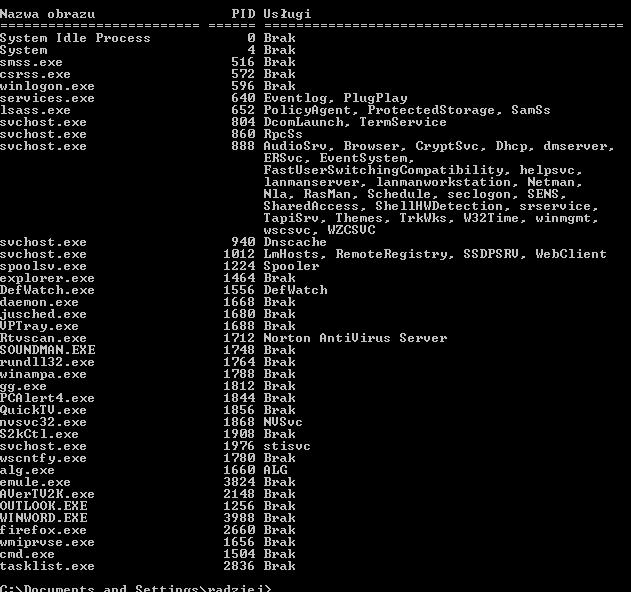
    • xxexmodulap.exe - blokada stron i poczty, jak usunąć? task.JPG (66.12 KB) Musisz być zalogowany, aby pobrać ten załącznik.
  • #10 2393965
    radziejsz
    Poziom 16  
    Posty: 261
    Pomógł: 5
    Ocena: 5
    "Silent Runners.vbs", revision 43, http://www.silentrunners.org/
    Operating System: Windows XP SP2
    Output limited to non-default values, except where indicated by "{++}"


    Startup items buried in registry:
    ---------------------------------

    HKCU\SOFTWARE\Microsoft\Windows\CurrentVersion\Run\ {++}
    "Gadu-Gadu" = ""C:\Program Files\Gadu-Gadu\gg.exe" /tray" ["sms-express.com"]
    "CWK (Czasowy Wyłącznik Komputera) 1" = ""C:\Program Files\Damian Pasternak\CWK\CWK.exe" 3" ["Damian Pasternak"]

    HKLM\SOFTWARE\Microsoft\Windows\CurrentVersion\Run\ {++}
    "NvCplDaemon" = "RUNDLL32.EXE C:\WINDOWS\system32\NvCpl.dll,NvStartup" [MS]
    "nwiz" = "nwiz.exe /install" ["NVIDIA Corporation"]
    "NeroFilterCheck" = "C:\WINDOWS\system32\NeroCheck.exe" ["Ahead Software Gmbh"]
    "DAEMON Tools-1033" = ""C:\Program Files\D-Tools\daemon.exe" -lang 1033" ["DAEMON'S HOME"]
    "SunJavaUpdateSched" = "C:\Program Files\Java\jre1.5.0_06\bin\jusched.exe" ["Sun Microsystems, Inc."]
    "vptray" = "C:\Program Files\Symantec_Client_Security\Symantec AntiVirus\vptray.exe" ["Symantec Corporation"]
    "SoundMan" = "SOUNDMAN.EXE" ["Realtek Semiconductor Corp."]
    "NvMediaCenter" = "RUNDLL32.EXE C:\WINDOWS\system32\NvMcTray.dll,NvTaskbarInit" [MS]
    "WinampAgent" = "C:\Program Files\Winamp\winampa.exe" [null data]

    HKLM\Software\Microsoft\Windows\CurrentVersion\Explorer\Browser Helper Objects\
    {761497BB-D6F0-462C-B6EB-D4DAF1D92D43}\(Default) = "SSVHelper Class" [from CLSID]
    -> {CLSID}\InProcServer32\(Default) = "C:\Program Files\Java\jre1.5.0_06\bin\ssv.dll" ["Sun Microsystems, Inc."]
    {A5366673-E8CA-11D3-9CD9-0090271D075B}\(Default) = "IeCatch2 Class" [from CLSID]
    -> {CLSID}\InProcServer32\(Default) = "C:\PROGRA~1\FlashGet\jccatch.dll" ["Amaze Soft"]

    HKLM\Software\Microsoft\Windows\CurrentVersion\Shell Extensions\Approved\
    "{42071714-76d4-11d1-8b24-00a0c9068ff3}" = "Rozszerzenie CPL kadrowania wyświetlania"
    -> {CLSID}\InProcServer32\(Default) = "deskpan.dll" [file not found]
    "{88895560-9AA2-1069-930E-00AA0030EBC8}" = "Rozszerzenie ikony HyperTerminalu"
    -> {CLSID}\InProcServer32\(Default) = "C:\WINDOWS\system32\hticons.dll" ["Hilgraeve, Inc."]
    "{A70C977A-BF00-412C-90B7-034C51DA2439}" = "NvCpl DesktopContext Class"
    -> {CLSID}\InProcServer32\(Default) = "C:\WINDOWS\system32\nvcpl.dll" ["NVIDIA Corporation"]
    "{1CDB2949-8F65-4355-8456-263E7C208A5D}" = "Desktop Explorer"
    -> {CLSID}\InProcServer32\(Default) = "C:\WINDOWS\system32\nvshell.dll" ["NVIDIA Corporation"]
    "{1E9B04FB-F9E5-4718-997B-B8DA88302A47}" = "Desktop Explorer Menu"
    -> {CLSID}\InProcServer32\(Default) = "C:\WINDOWS\system32\nvshell.dll" ["NVIDIA Corporation"]
    "{1E9B04FB-F9E5-4718-997B-B8DA88302A48}" = "nView Desktop Context Menu"
    -> {CLSID}\InProcServer32\(Default) = "C:\WINDOWS\system32\nvshell.dll" ["NVIDIA Corporation"]
    "{00020D75-0000-0000-C000-000000000046}" = "Microsoft Office Outlook Desktop Icon Handler"
    -> {CLSID}\InProcServer32\(Default) = "C:\PROGRA~1\MICROS~2\OFFICE11\MLSHEXT.DLL" [MS]
    "{0006F045-0000-0000-C000-000000000046}" = "Microsoft Office Outlook Custom Icon Handler"
    -> {CLSID}\InProcServer32\(Default) = "C:\PROGRA~1\MICROS~2\OFFICE11\OLKFSTUB.DLL" [MS]
    "{42042206-2D85-11D3-8CFF-005004838597}" = "Microsoft Office HTML Icon Handler"
    -> {CLSID}\InProcServer32\(Default) = "C:\Program Files\Microsoft Office\OFFICE11\msohev.dll" [MS]
    "{B41DB860-8EE4-11D2-9906-E49FADC173CA}" = "WinRAR shell extension"
    -> {CLSID}\InProcServer32\(Default) = "C:\Program Files\WinRAR\rarext.dll" [null data]
    "{BDA77241-42F6-11d0-85E2-00AA001FE28C}" = "LDVP Shell Extensions"
    -> {CLSID}\InProcServer32\(Default) = "C:\Program Files\Common Files\Symantec Shared\SSC\vpshell2.dll" ["Symantec Corporation"]
    "{21569614-B795-46b1-85F4-E737A8DC09AD}" = "Shell Search Band"
    -> {CLSID}\InProcServer32\(Default) = "C:\WINDOWS\system32\browseui.dll" [MS]
    "{640167b4-59b0-47a6-b335-a6b3c0695aea}" = "Portable Media Devices"
    -> {CLSID}\InProcServer32\(Default) = "C:\WINDOWS\system32\Audiodev.dll" [MS]
    "{cc86590a-b60a-48e6-996b-41d25ed39a1e}" = "Portable Media Devices Menu"
    -> {CLSID}\InProcServer32\(Default) = "C:\WINDOWS\system32\Audiodev.dll" [MS]
    "{FFB699E0-306A-11d3-8BD1-00104B6F7516}" = "Play on my TV helper"
    -> {CLSID}\InProcServer32\(Default) = "C:\WINDOWS\system32\nvcpl.dll" ["NVIDIA Corporation"]
    "{B8323370-FF27-11D2-97B6-204C4F4F5020}" = "SmartFTP Shell Extension DLL"
    -> {CLSID}\InProcServer32\(Default) = "C:\Program Files\SmartFTP Client 2.0\smarthook.dll" ["SmartFTP"]

    HKLM\Software\Microsoft\Windows NT\CurrentVersion\Winlogon\Notify\
    INFECTION WARNING! NavLogon\DLLName = "C:\WINDOWS\system32\NavLogon.dll" [null data]

    HKLM\Software\Classes\PROTOCOLS\Filter\
    INFECTION WARNING! text/xml\CLSID = "{807553E5-5146-11D5-A672-00B0D022E945}"
    -> {CLSID}\InProcServer32\(Default) = "C:\Program Files\Common Files\Microsoft Shared\OFFICE11\MSOXMLMF.DLL" [MS]

    HKLM\Software\Classes\*\shellex\ContextMenuHandlers\
    LDVPMenu\(Default) = "{BDA77241-42F6-11d0-85E2-00AA001FE28C}"
    -> {CLSID}\InProcServer32\(Default) = "C:\Program Files\Common Files\Symantec Shared\SSC\vpshell2.dll" ["Symantec Corporation"]
    WinRAR\(Default) = "{B41DB860-8EE4-11D2-9906-E49FADC173CA}"
    -> {CLSID}\InProcServer32\(Default) = "C:\Program Files\WinRAR\rarext.dll" [null data]

    HKLM\Software\Classes\Directory\shellex\ContextMenuHandlers\
    WinRAR\(Default) = "{B41DB860-8EE4-11D2-9906-E49FADC173CA}"
    -> {CLSID}\InProcServer32\(Default) = "C:\Program Files\WinRAR\rarext.dll" [null data]

    HKLM\Software\Classes\Folder\shellex\ContextMenuHandlers\
    LDVPMenu\(Default) = "{BDA77241-42F6-11d0-85E2-00AA001FE28C}"
    -> {CLSID}\InProcServer32\(Default) = "C:\Program Files\Common Files\Symantec Shared\SSC\vpshell2.dll" ["Symantec Corporation"]
    WinRAR\(Default) = "{B41DB860-8EE4-11D2-9906-E49FADC173CA}"
    -> {CLSID}\InProcServer32\(Default) = "C:\Program Files\WinRAR\rarext.dll" [null data]


    Active Desktop and Wallpaper:
    -----------------------------

    Active Desktop is disabled at this entry:
    HKCU\Software\Microsoft\Windows\CurrentVersion\Explorer\ShellState

    HKCU\Control Panel\Desktop\
    "Wallpaper" = "C:\Documents and Settings\radziej\Ustawienia lokalne\Dane aplikacji\Microsoft\Wallpaper1.bmp"


    Startup items in "radziej" & "All Users" startup folders:
    ---------------------------------------------------------

    C:\Documents and Settings\radziej\Menu Start\Programy\Autostart
    "Skrót do S2kCtl" -> shortcut to: "D:\dysk\instalki\S2kCtl.exe" ["TwinSSoft"]

    C:\Documents and Settings\All Users\Menu Start\Programy\Autostart
    "PC Alert 4" -> shortcut to: "C:\Program Files\MSI\PC Alert 4\PCAlert4.exe" [empty string]
    "QuickTV" -> shortcut to: "C:\Program Files\AVerTV2K\QuickTV.exe" ["AVerMedia Technologies, Inc."]


    Winsock2 Service Provider DLLs:
    -------------------------------

    Namespace Service Providers

    HKLM\System\CurrentControlSet\Services\Winsock2\Parameters\NameSpace_Catalog5\Catalog_Entries\ {++}
    000000000001\LibraryPath = "%SystemRoot%\System32\mswsock.dll" [MS]
    000000000002\LibraryPath = "%SystemRoot%\System32\winrnr.dll" [MS]
    000000000003\LibraryPath = "%SystemRoot%\System32\mswsock.dll" [MS]

    Transport Service Providers

    HKLM\System\CurrentControlSet\Services\Winsock2\Parameters\Protocol_Catalog9\Catalog_Entries\ {++}
    0000000000##\PackedCatalogItem (contains) DLL [Company Name], (at) ## range:
    %SystemRoot%\system32\mswsock.dll [MS], 01 - 03, 06 - 19
    %SystemRoot%\system32\rsvpsp.dll [MS], 04 - 05


    Toolbars, Explorer Bars, Extensions:
    ------------------------------------

    Toolbars

    HKLM\Software\Microsoft\Internet Explorer\Toolbar\
    "{E0E899AB-F487-11D5-8D29-0050BA6940E3}" = "FlashGet Bar"
    -> {CLSID}\InProcServer32\(Default) = "C:\PROGRA~1\FlashGet\fgiebar.dll" ["Amaze Soft"]

    "{327C2873-E90D-4C37-AA9D-10AC9BABA46C}" = "Easy-WebPrint"
    -> {CLSID}\InProcServer32\(Default) = "C:\Program Files\Canon\Easy-WebPrint\Toolband.dll" [null data]

    Extensions (Tools menu items, main toolbar menu buttons)

    HKLM\Software\Microsoft\Internet Explorer\Extensions\
    {08B0E5C0-4FCB-11CF-AAA5-00401C608501}\
    "MenuText" = "Sun Java Console"
    "CLSIDExtension" = "{CAFEEFAC-0015-0000-0006-ABCDEFFEDCBC}"
    -> {CLSID}\InProcServer32\(Default) = "C:\Program Files\Java\jre1.5.0_06\bin\npjpi150_06.dll" ["Sun Microsystems, Inc."]

    {92780B25-18CC-41C8-B9BE-3C9C571A8263}\
    "ButtonText" = "Badanie"

    {D6E814A0-E0C5-11D4-8D29-0050BA6940E3}\
    "ButtonText" = "FlashGet"
    "MenuText" = "&FlashGet"
    "Exec" = "C:\PROGRA~1\FlashGet\flashget.exe" ["Amaze Soft"]

    {FB5F1910-F110-11D2-BB9E-00C04F795683}\
    "ButtonText" = "Messenger"
    "MenuText" = "Windows Messenger"
    "Exec" = "C:\Program Files\Messenger\msmsgs.exe" [MS]


    Running Services (Display Name, Service Name, Path {Service DLL}):
    ------------------------------------------------------------------

    DefWatch, DefWatch, ""C:\Program Files\Symantec_Client_Security\Symantec AntiVirus\DefWatch.exe"" ["Symantec Corporation"]
    NVIDIA Display Driver Service, NVSvc, "C:\WINDOWS\system32\nvsvc32.exe" ["NVIDIA Corporation"]
    Symantec AntiVirus Client, Norton AntiVirus Server, ""C:\Program Files\Symantec_Client_Security\Symantec AntiVirus\Rtvscan.exe"" ["Symantec Corporation"]


    Print Monitors:
    ---------------

    HKLM\System\CurrentControlSet\Control\Print\Monitors\
    Canon BJ Language Monitor PIXMA iP2000\Driver = "CNMLM66.DLL" ["CANON INC."]
    Microsoft Document Imaging Writer Monitor\Driver = "mdimon.dll" [MS]


    ----------
    + This report excludes default entries except where indicated.
    + To see *everywhere* the script checks and *everything* it finds,
    launch it from a command prompt or a shortcut with the -all parameter.
    + To search all directories of local fixed drives for DESKTOP.INI
    DLL launch points and all Registry CLSIDs for dormant Explorer Bars,
    use the -supp parameter or answer "No" at the first message box.
    ---------- (total run time: 50 seconds, including 3 seconds for message boxes)
  • #11 2395686
    Kolobos
    Spec od komputerów
    Posty: 85169
    Pomógł: 17166
    Ocena: 10445
    Mogles to wkleic w jednym poscie (log z silent w zalaczniku), a do tego po co ten screen? Nie mogles zaznaczyc tekstu i wkleic normalnie?

    Logi wygladaja ok, wiec czemu piszesz, ze jest tak samo jak bylo?!
  • #12 2395763
    radziejsz
    Poziom 16  
    Posty: 261
    Pomógł: 5
    Ocena: 5
    dałem screena poniewaz nie dało sie zaznaczyc w cmd i wkleic.. a dwocch postach poniewaz zrobiłem to chwiile pozniej , zeby nie było ze chciałem sobie nabuc posta czy cos , teraz juz wyglada w pozadku , ale jak pisałem ze nic nie dało to nie było roznicy, napisałem ze zroobie eszcze raz i zrobiłem no i wyglada ze juz jest ok w takim razie dzieki za pomoc punkty pomogł juz poszły :)

Podsumowanie tematu

✨ Użytkownik zgłasza problem z procesem xxexmodulap.exe (gdzie "xx" to zmienna liczba), który uruchamia się i blokuje dostęp do stron internetowych oraz odbiór poczty, prawdopodobnie blokując porty sieciowe. Antywirus nie wykrywa zagrożenia. Wskazano lokalizację pliku w katalogu Temp profilu użytkownika (C:Documents and Settingsnazwa_profiluUstawienia lokalneTemp), zalecając usunięcie pliku w trybie awaryjnym oraz wyczyszczenie folderu Temp. Dodatkowo wykryto podejrzane wpisy w rejestrze i usługi, takie jak fałszywy proces smss.exe w katalogu systemowym oraz usługę "Windows Log" z plikiem nvsvcd.exe, które należy zatrzymać i usunąć. Rekomendowano użycie narzędzi HijackThis do analizy i usuwania wpisów autostartu oraz skanery antyspyware (SSF, Ewido) z aktualizacją definicji. Po wykonaniu tych kroków i ponownym skanowaniu problem został rozwiązany. W dyskusji pojawiły się także wskazówki dotyczące zamykania portów i usuwania kontrolki ActiveX powiązanej z GameDesire Pool 8.
Podsumowanie wygenerowane przez AI na podstawie treści dyskusji.
REKLAMA