


logo elektroda
logo elektroda
X
logo elektroda
REKLAMA
REKLAMA
Adblock/uBlockOrigin/AdGuard mogą powodować znikanie niektórych postów z powodu nowej reguły.

Sound Blaster X-Fi - Opis złącz wewnętrznych i podłączenie napędu CD/DVD

skiba220v 09 Paź 2006 23:41 3590 1
REKLAMA
  • #1 3102138
    skiba220v
    Poziom 15  
    Posty: 182
    Pomógł: 2
    Ocena: 9
    Witam!!!

    Czy ktos moze mi przyblizyc opis złacz na tej karcie, oczywiscie wewnetrznych bo te zewnetrze sa mi znane. Interesuje mie gdzie móglbym podlaczyc bezposrednio naped CD i DVD oraz czy karta ta ma wejscie na oddzielne zasilanie. Dodam ze udalo mi sie wcisnac wtyczke 4 pinową zasilania [tą od flopiego] do gniazda na karcie ale nie jestem pewien czy to naprawde gniazdo zasilania, a wiecie ze nie chce uszkodzic sprzetu. Prosze o informacje. Z gory dzieki za pomoc.

    Pozdro
  • REKLAMA
  • Pomocny post
    #2 3102222
    fruuu
    Poziom 14  
    Posty: 152
    Pomógł: 7
    Ocena: 17
    Sound Blaster X-Fi - Opis złącz wewnętrznych i podłączenie napędu CD/DVD
    Kliknij aby powiększyć! TONI_2003

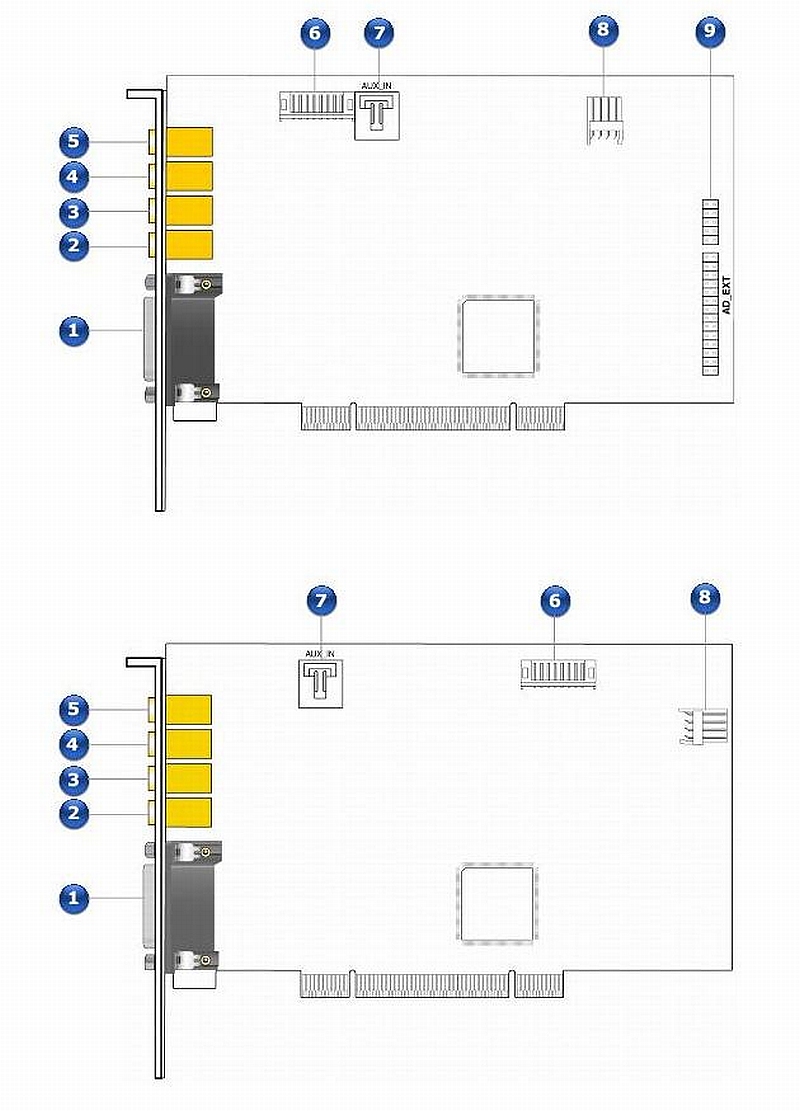
    1. AD_Link connector - Connect one end of the AD_Link cable to this connector. Connect the other end to the AD_Link (26 pin) connector on the X-Fi I/O Console*.
    2. Line Out 3 jack - Connect the following inputs on powered analog speakers or a home theater receiver to this jack:
    On 5.1 systems: Front Center and Subwoofer
    On 6.1 systems: Front Center, Subwoofer and Rear Center
    On 7.1 systems: Front Center, Subwoofer and Side Left
    3. Line Out 2 jack - Connect the following inputs on powered analog speakers or a home theater receiver to this jack:
    On 4.1, 5.1 and 6.1 systems: Rear Left and Rear Right
    On 7.1 systems: Rear Left, Rear Right and Side Right
    4. Line Out 1 jack - Connect the Front Left and Front Right inputs on powered analog speakers or a home theater receiver to this jack. You can also connect your stereo headphones with a 3.50 mm (1/8-inch) plug to this jack.
    5. FlexiJack - Performs a 3-in-1 function, supporting Microphone-in, Line-in and Digital I/O connections.
    Connect one of the following to this jack:
    analog devices like cassette players and other line-level sources a microphone the Digital I/O Module* external digital audio devices that accept stereo PCM or compressed Dolby Digital/DTS Bitstream from the S/PDIF output
    6. Creative Proprietary connector - Provides a proprietary connection for Creative devices. Do not use this connector unless instructed to do so.
    7. Aux In connector - Connect an analog CD cable (available separately) from the analog output on an audio device like a TV tuner to this connector.
    8. Power connector - Powers the X-Fi I/O Console* via the AD_Link connector. Connect a power cable from your computer's power supply to this connector.
    9. AD_EXT connector - Connect one end of the AD_EXT cable to this connector. Connect the other end to the AD_EXT connector on the X-Fi I/O Drive*.
REKLAMA