krzychupar napisał: Otwórz wiersz polecenia jako administrator i wpisz komendę winsat formal -v lub w/g tego
Link.
Więc tak
po wpisaniu winsat - v w wierszu poleceń przez jakiś czas coś się testowało....po zakończeniu uruchomiłem komputer ponownie ale niestety testu nie dało nie przeprowadzić.
Drugi sposób:
Method 1: Using the Group Policy Editor
•Click Start, type GPEDIT.MSC and press ENTER. This opens the Group Policy Editor.
•Navigate to the following branch:
Computer Configuration | Administrative Templates | System | Performance Control Panel
•Double-click Turn off access to the performance center core section
•Set it to Not configured
If it's already set to Not Configured, set it to Enabled and click Apply. Then revert back the setting to Not Configured. This resets the registry based policy if set already.
•Repeat the steps in this branch as well:
User Configuration | Administrative Templates | System | Performance Control Panel
•Exit the Group Policy Editor.
Note: Group Policy Editor is not available in certain versions of Windows Vista. If your version of Windows Vista does not have the Group Policy Editor, follow the registry editing method instead, which is listed below.
Po przeprowadzeniu tych wskazówek w miejscu gdzie przeprowadza się odświeżanie indeksu systemu windows wszystko znikło....został tylko przycisk którym się odświeża, test się robił ale efekt ten sam.
trzeci sposób:
To automate the following steps, download perfcpl_enable.reg file attached at the end of this article. Download the REG file and save to Desktop. Right-click on the file and choose Merge.
•Click Start, type regedit.exe and press ENTER
•Navigate to the following location:
HKEY_LOCAL_MACHINE \ SOFTWARE \ Policies \ Microsoft \ Windows \ Control Panel \ Performance Control Panel
•In the right-pane, delete the value named PerfcplEnabled (if found).
•Repeat the same in the following key:
HKEY_CURRENT_USER \ SOFTWARE \ Policies \ Microsoft \ Windows \ Control Panel \ Performance Control Panel
•Exit Registry Editor.
Note: If one of the above locations does not exist, skip to the next step
niestety nie mam w rejestrze według tej ścieżki dostępu takiego klucza Performance Control Panel. Przeszukałem rejestr przez dostępną tam wyszukiwarkę wpisując Performance Control Panel, wyszukiwarka znalazł ten klucz ale w całkiem innej ścieżce ale i tak nie można było usunąć tego klucza.
 Dodano po 44 [minuty]:
 Kristoff10 napisał: Ściągnij ze strony nVidii paczkę sterowników do tej karty i zainstaluj... to co system wykrył to ok, ale nowsze by się przydały...
Sterowniki najnowsze zainstalowałem i nic teraz wgrałem sterowniki z orginalnej płyty która była z kartą i też nie pomaga....może to wina sterowników directx niby mam najnowszą bibliotekę ale sam już nie wiem






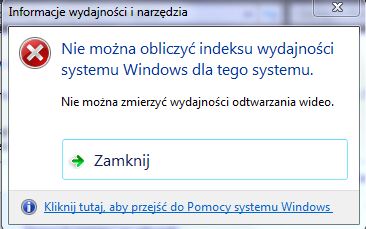
 Komputer to już stary sprzęt
  wcześniej miałem Radeona 9600Pro a teraz GeForce 6200. Sterowniki do karty zainstalowały się automatycznie czyli Windows sam wyszukał i zainstalował sterowniki. Odinstalowałem oprogramowanie od ATI Catalyst i usunąłem ręcznie wszystko co było od ATI na dysku C: może gdzieś jeszcze trzeba usunąć ? nie wiem
