logo elektroda
logo elektroda
X
logo elektroda
Adblock/uBlockOrigin/AdGuard mogą powodować znikanie niektórych postów z powodu nowej reguły.

Czy warto ratować dysk Hitachi HTS542525K9SA00 z błędami SMART?

ZDV12 04 Gru 2012 13:45 3534 15
  • #1 11609200
    ZDV12
    Poziom 15  
    Posty: 148
    Pomógł: 14
    Ocena: 8
    Witam,

    Mam w laptopie dysk twardy Hitachi HTS542525K9SA00. Jako, że były błędy na dysku, zerknąłem na SMART i nie napawa on optymizmem. Zrobiłem więc kopię posektorową przy pomocy ddrescue - także dane mam w większości zabezpieczone i do najważniejszych mam dostęp. Pytanie moje jest następujące, czy jeśli SMART raportuje w ten sposób (załączam poniżej) to można ratować ten dysk czy to już po prostu jego koniec i nie ma sensu robić żadnych remapów/zerowań?

    === START OF INFORMATION SECTION ===
    Model Family:     Hitachi Travelstar 5K250
    Device Model:     Hitachi HTS542525K9SA00
    Serial Number:    080716BB6F00WDEWDHDF
    LU WWN Device Id: 5 000cca 539e8a3f0
    Firmware Version: BBFOC31P
    User Capacity:    250,059,350,016 bytes [250 GB]
    Sector Size:      512 bytes logical/physical
    Device is:        In smartctl database [for details use: -P show]
    ATA Version is:   8
    ATA Standard is:  ATA-8-ACS revision 3f
    Local Time is:    Thu Jan 24 16:07:39 2008 CET
    SMART support is: Available - device has SMART capability.
    SMART support is: Enabled
    
    === START OF READ SMART DATA SECTION ===
    SMART overall-health self-assessment test result: FAILED!
    Drive failure expected in less than 24 hours. SAVE ALL DATA.
    See vendor-specific Attribute list for failed Attributes.
    
    General SMART Values:
    Offline data collection status:  (0x82)	Offline data collection activity
    					was completed without error.
    					Auto Offline Data Collection: Enabled.
    Self-test execution status:      (   0)	The previous self-test routine completed
    					without error or no self-test has ever 
    					been run.
    Total time to complete Offline 
    data collection: 		(  645) seconds.
    Offline data collection
    capabilities: 			 (0x5b) SMART execute Offline immediate.
    					Auto Offline data collection on/off support.
    					Suspend Offline collection upon new
    					command.
    					Offline surface scan supported.
    					Self-test supported.
    					No Conveyance Self-test supported.
    					Selective Self-test supported.
    SMART capabilities:            (0x0003)	Saves SMART data before entering
    					power-saving mode.
    					Supports SMART auto save timer.
    Error logging capability:        (0x01)	Error logging supported.
    					General Purpose Logging supported.
    Short self-test routine 
    recommended polling time: 	 (   2) minutes.
    Extended self-test routine
    recommended polling time: 	 ( 107) minutes.
    SCT capabilities: 	       (0x003d)	SCT Status supported.
    					SCT Error Recovery Control supported.
    					SCT Feature Control supported.
    					SCT Data Table supported.
    
    SMART Attributes Data Structure revision number: 16
    Vendor Specific SMART Attributes with Thresholds:
    ID# ATTRIBUTE_NAME          FLAG     VALUE WORST THRESH TYPE      UPDATED  WHEN_FAILED RAW_VALUE
      1 Raw_Read_Error_Rate     0x000b   046   046   062    Pre-fail  Always   FAILING_NOW 1445986304
      2 Throughput_Performance  0x0005   109   109   040    Pre-fail  Offline      -       4372
      3 Spin_Up_Time            0x0007   236   236   033    Pre-fail  Always       -       1
      4 Start_Stop_Count        0x0012   098   098   000    Old_age   Always       -       3838
      5 Reallocated_Sector_Ct   0x0033   097   097   005    Pre-fail  Always       -       0
      7 Seek_Error_Rate         0x000b   100   100   067    Pre-fail  Always       -       0
      8 Seek_Time_Performance   0x0005   130   130   040    Pre-fail  Offline      -       35
      9 Power_On_Hours          0x0012   075   075   000    Old_age   Always       -       11165
     10 Spin_Retry_Count        0x0013   100   100   060    Pre-fail  Always       -       0
     12 Power_Cycle_Count       0x0032   098   098   000    Old_age   Always       -       3804
    191 G-Sense_Error_Rate      0x000a   100   100   000    Old_age   Always       -       0
    192 Power-Off_Retract_Count 0x0032   099   099   000    Old_age   Always       -       333
    193 Load_Cycle_Count        0x0012   098   098   000    Old_age   Always       -       28265
    194 Temperature_Celsius     0x0002   183   183   000    Old_age   Always       -       30 (0 65 255 255 0)
    196 Reallocated_Event_Count 0x0032   100   100   000    Old_age   Always       -       136
    197 Current_Pending_Sector  0x0022   100   100   000    Old_age   Always       -       417
    198 Offline_Uncorrectable   0x0008   100   100   000    Old_age   Offline      -       0
    199 UDMA_CRC_Error_Count    0x000a   200   200   000    Old_age   Always       -       0
    223 Load_Retry_Count        0x000a   100   100   000    Old_age   Always       -       0
    
    SMART Error Log Version: 1
    ATA Error Count: 26309 (device log contains only the most recent five errors)
    	CR = Command Register [HEX]
    	FR = Features Register [HEX]
    	SC = Sector Count Register [HEX]
    	SN = Sector Number Register [HEX]
    	CL = Cylinder Low Register [HEX]
    	CH = Cylinder High Register [HEX]
    	DH = Device/Head Register [HEX]
    	DC = Device Command Register [HEX]
    	ER = Error register [HEX]
    	ST = Status register [HEX]
    Powered_Up_Time is measured from power on, and printed as
    DDd+hh:mm:SS.sss where DD=days, hh=hours, mm=minutes,
    SS=sec, and sss=millisec. It "wraps" after 49.710 days.
    
    Error 26309 occurred at disk power-on lifetime: 11163 hours (465 days + 3 hours)
      When the command that caused the error occurred, the device was active or idle.
    
      After command completion occurred, registers were:
      ER ST SC SN CL CH DH
      -- -- -- -- -- -- --
      40 51 01 e0 f2 a3 e2  Error: UNC 1 sectors at LBA = 0x02a3f2e0 = 44298976
    
      Commands leading to the command that caused the error were:
      CR FR SC SN CL CH DH DC   Powered_Up_Time  Command/Feature_Name
      -- -- -- -- -- -- -- --  ----------------  --------------------
      c8 00 01 e0 f2 a3 e2 08   1d+10:28:59.300  READ DMA
      27 00 00 00 00 00 e0 08   1d+10:28:59.300  READ NATIVE MAX ADDRESS EXT
      ec 00 00 00 00 00 a0 08   1d+10:28:59.300  IDENTIFY DEVICE
      ef 03 46 00 00 00 a0 08   1d+10:28:59.300  SET FEATURES [Set transfer mode]
      27 00 00 00 00 00 e0 08   1d+10:28:59.300  READ NATIVE MAX ADDRESS EXT
    
    Error 26308 occurred at disk power-on lifetime: 11163 hours (465 days + 3 hours)
      When the command that caused the error occurred, the device was active or idle.
    
      After command completion occurred, registers were:
      ER ST SC SN CL CH DH
      -- -- -- -- -- -- --
      40 51 01 e0 f2 a3 e2  Error: UNC 1 sectors at LBA = 0x02a3f2e0 = 44298976
    
      Commands leading to the command that caused the error were:
      CR FR SC SN CL CH DH DC   Powered_Up_Time  Command/Feature_Name
      -- -- -- -- -- -- -- --  ----------------  --------------------
      c8 00 01 e0 f2 a3 e2 08   1d+10:28:55.100  READ DMA
      27 00 00 00 00 00 e0 08   1d+10:28:55.100  READ NATIVE MAX ADDRESS EXT
      ec 00 00 00 00 00 a0 08   1d+10:28:55.100  IDENTIFY DEVICE
      ef 03 46 00 00 00 a0 08   1d+10:28:55.100  SET FEATURES [Set transfer mode]
      27 00 00 00 00 00 e0 08   1d+10:28:55.100  READ NATIVE MAX ADDRESS EXT
    
    Error 26307 occurred at disk power-on lifetime: 11163 hours (465 days + 3 hours)
      When the command that caused the error occurred, the device was active or idle.
    
      After command completion occurred, registers were:
      ER ST SC SN CL CH DH
      -- -- -- -- -- -- --
      40 51 01 e0 f2 a3 e2  Error: UNC 1 sectors at LBA = 0x02a3f2e0 = 44298976
    
      Commands leading to the command that caused the error were:
      CR FR SC SN CL CH DH DC   Powered_Up_Time  Command/Feature_Name
      -- -- -- -- -- -- -- --  ----------------  --------------------
      c8 00 01 e0 f2 a3 e2 08   1d+10:28:50.900  READ DMA
      27 00 00 00 00 00 e0 08   1d+10:28:50.900  READ NATIVE MAX ADDRESS EXT
      ec 00 00 00 00 00 a0 08   1d+10:28:50.900  IDENTIFY DEVICE
      ef 03 46 00 00 00 a0 08   1d+10:28:50.900  SET FEATURES [Set transfer mode]
      27 00 00 00 00 00 e0 08   1d+10:28:50.900  READ NATIVE MAX ADDRESS EXT
    
    Error 26306 occurred at disk power-on lifetime: 11163 hours (465 days + 3 hours)
      When the command that caused the error occurred, the device was active or idle.
    
      After command completion occurred, registers were:
      ER ST SC SN CL CH DH
      -- -- -- -- -- -- --
      40 51 01 e0 f2 a3 e2  Error: UNC 1 sectors at LBA = 0x02a3f2e0 = 44298976
    
      Commands leading to the command that caused the error were:
      CR FR SC SN CL CH DH DC   Powered_Up_Time  Command/Feature_Name
      -- -- -- -- -- -- -- --  ----------------  --------------------
      c8 00 01 e0 f2 a3 e2 08   1d+10:28:46.700  READ DMA
      27 00 00 00 00 00 e0 08   1d+10:28:46.700  READ NATIVE MAX ADDRESS EXT
      ec 00 00 00 00 00 a0 08   1d+10:28:46.600  IDENTIFY DEVICE
      ef 03 46 00 00 00 a0 08   1d+10:28:46.600  SET FEATURES [Set transfer mode]
      27 00 00 00 00 00 e0 08   1d+10:28:46.600  READ NATIVE MAX ADDRESS EXT
    
    Error 26305 occurred at disk power-on lifetime: 11163 hours (465 days + 3 hours)
      When the command that caused the error occurred, the device was active or idle.
    
      After command completion occurred, registers were:
      ER ST SC SN CL CH DH
      -- -- -- -- -- -- --
      40 51 01 e0 f2 a3 e2  Error: UNC 1 sectors at LBA = 0x02a3f2e0 = 44298976
    
      Commands leading to the command that caused the error were:
      CR FR SC SN CL CH DH DC   Powered_Up_Time  Command/Feature_Name
      -- -- -- -- -- -- -- --  ----------------  --------------------
      c8 00 01 e0 f2 a3 e2 08   1d+10:28:42.500  READ DMA
      27 00 00 00 00 00 e0 08   1d+10:28:42.500  READ NATIVE MAX ADDRESS EXT
      ec 00 00 00 00 00 a0 08   1d+10:28:42.400  IDENTIFY DEVICE
      ef 03 46 00 00 00 a0 08   1d+10:28:42.400  SET FEATURES [Set transfer mode]
      27 00 00 00 00 00 e0 08   1d+10:28:42.400  READ NATIVE MAX ADDRESS EXT
    
    SMART Self-test log structure revision number 1
    Num  Test_Description    Status                  Remaining  LifeTime(hours)  LBA_of_first_error
    # 1  Short offline       Completed: read failure       30%     11129         43405159
    
    SMART Selective self-test log data structure revision number 1
     SPAN  MIN_LBA  MAX_LBA  CURRENT_TEST_STATUS
        1        0        0  Not_testing
        2        0        0  Not_testing
        3        0        0  Not_testing
        4        0        0  Not_testing
        5        0        0  Not_testing
    Selective self-test flags (0x0):
      After scanning selected spans, do NOT read-scan remainder of disk.
    If Selective self-test is pending on power-up, resume after 0 minute delay.
  • Pomocny post
    #2 11609509
    linuks
    Spec od komputerów
    Posty: 10981
    Pomógł: 1473
    Ocena: 491
    Wyzeruj i remap można robić. Jeszcze nie ma realokowanych sektorów.
    Pozdrawiam
  • #3 11612868
    ZDV12
    Poziom 15  
    Posty: 148
    Pomógł: 14
    Ocena: 8
    Dzięki kolego, Twoja podpowiedź była jak najbardziej trafna. Przy pomocy MHDD 4.6 dokonałem z DOS'u najpierw zerowania całego dysku, potem remapu. Sprawdziłem SMART i niestabilne sektory zniknęły:
    === START OF INFORMATION SECTION ===
    Model Family:     Hitachi Travelstar 5K250
    Device Model:     Hitachi HTS542525K9SA00
    Serial Number:    080716BB6F00WDEWDHDF
    LU WWN Device Id: 5 000cca 539e8a3f0
    Firmware Version: BBFOC31P
    User Capacity:    250,059,350,016 bytes [250 GB]
    Sector Size:      512 bytes logical/physical
    Device is:        In smartctl database [for details use: -P show]
    ATA Version is:   8
    ATA Standard is:  ATA-8-ACS revision 3f
    Local Time is:    Thu Jan 24 23:10:26 2008 CET
    SMART support is: Available - device has SMART capability.
    SMART support is: Enabled
    
    === START OF READ SMART DATA SECTION ===
    SMART overall-health self-assessment test result: PASSED
    
    General SMART Values:
    Offline data collection status:  (0x82)	Offline data collection activity
    					was completed without error.
    					Auto Offline Data Collection: Enabled.
    Self-test execution status:      (   0)	The previous self-test routine completed
    					without error or no self-test has ever 
    					been run.
    Total time to complete Offline 
    data collection: 		(  645) seconds.
    Offline data collection
    capabilities: 			 (0x5b) SMART execute Offline immediate.
    					Auto Offline data collection on/off support.
    					Suspend Offline collection upon new
    					command.
    					Offline surface scan supported.
    					Self-test supported.
    					No Conveyance Self-test supported.
    					Selective Self-test supported.
    SMART capabilities:            (0x0003)	Saves SMART data before entering
    					power-saving mode.
    					Supports SMART auto save timer.
    Error logging capability:        (0x01)	Error logging supported.
    					General Purpose Logging supported.
    Short self-test routine 
    recommended polling time: 	 (   2) minutes.
    Extended self-test routine
    recommended polling time: 	 ( 107) minutes.
    SCT capabilities: 	       (0x003d)	SCT Status supported.
    					SCT Error Recovery Control supported.
    					SCT Feature Control supported.
    					SCT Data Table supported.
    
    SMART Attributes Data Structure revision number: 16
    Vendor Specific SMART Attributes with Thresholds:
    ID# ATTRIBUTE_NAME          FLAG     VALUE WORST THRESH TYPE      UPDATED  WHEN_FAILED RAW_VALUE
      1 Raw_Read_Error_Rate     0x000b   100   100   062    Pre-fail  Always       -       0
      2 Throughput_Performance  0x0005   109   109   040    Pre-fail  Offline      -       4372
      3 Spin_Up_Time            0x0007   236   236   033    Pre-fail  Always       -       1
      4 Start_Stop_Count        0x0012   098   098   000    Old_age   Always       -       3839
      5 Reallocated_Sector_Ct   0x0033   100   100   005    Pre-fail  Always       -       0
      7 Seek_Error_Rate         0x000b   100   100   067    Pre-fail  Always       -       0
      8 Seek_Time_Performance   0x0005   130   130   040    Pre-fail  Offline      -       35
      9 Power_On_Hours          0x0012   075   075   000    Old_age   Always       -       11170
     10 Spin_Retry_Count        0x0013   100   100   060    Pre-fail  Always       -       0
     12 Power_Cycle_Count       0x0032   098   098   000    Old_age   Always       -       3805
    191 G-Sense_Error_Rate      0x000a   100   100   000    Old_age   Always       -       0
    192 Power-Off_Retract_Count 0x0032   099   099   000    Old_age   Always       -       333
    193 Load_Cycle_Count        0x0012   098   098   000    Old_age   Always       -       28287
    194 Temperature_Celsius     0x0002   110   110   000    Old_age   Always       -       50 (0 65 255 255 0)
    196 Reallocated_Event_Count 0x0032   097   097   000    Old_age   Always       -       552
    197 Current_Pending_Sector  0x0022   100   100   000    Old_age   Always       -       0
    198 Offline_Uncorrectable   0x0008   100   100   000    Old_age   Offline      -       0
    199 UDMA_CRC_Error_Count    0x000a   200   200   000    Old_age   Always       -       0
    223 Load_Retry_Count        0x000a   100   100   000    Old_age   Always       -       0
    
    SMART Error Log Version: 1
    ATA Error Count: 26315 (device log contains only the most recent five errors)
    	CR = Command Register [HEX]
    	FR = Features Register [HEX]
    	SC = Sector Count Register [HEX]
    	SN = Sector Number Register [HEX]
    	CL = Cylinder Low Register [HEX]
    	CH = Cylinder High Register [HEX]
    	DH = Device/Head Register [HEX]
    	DC = Device Command Register [HEX]
    	ER = Error register [HEX]
    	ST = Status register [HEX]
    Powered_Up_Time is measured from power on, and printed as
    DDd+hh:mm:SS.sss where DD=days, hh=hours, mm=minutes,
    SS=sec, and sss=millisec. It "wraps" after 49.710 days.
    
    Error 26315 occurred at disk power-on lifetime: 11167 hours (465 days + 7 hours)
      When the command that caused the error occurred, the device was active or idle.
    
      After command completion occurred, registers were:
      ER ST SC SN CL CH DH
      -- -- -- -- -- -- --
      40 51 01 df e1 59 e2  Error: UNC at LBA = 0x0259e1df = 39444959
    
      Commands leading to the command that caused the error were:
      CR FR SC SN CL CH DH DC   Powered_Up_Time  Command/Feature_Name
      -- -- -- -- -- -- -- --  ----------------  --------------------
      24 00 01 df e1 59 e0 51      01:51:49.000  READ SECTOR(S) EXT
      42 00 ff e8 e0 59 e0 00      01:51:44.700  READ VERIFY SECTOR(S) EXT
      42 00 ff e9 df 59 e0 00      01:51:44.700  READ VERIFY SECTOR(S) EXT
      42 00 ff ea de 59 e0 00      01:51:44.700  READ VERIFY SECTOR(S) EXT
      42 00 ff eb dd 59 e0 00      01:51:44.700  READ VERIFY SECTOR(S) EXT
    
    Error 26314 occurred at disk power-on lifetime: 11167 hours (465 days + 7 hours)
      When the command that caused the error occurred, the device was active or idle.
    
      After command completion occurred, registers were:
      ER ST SC SN CL CH DH
      -- -- -- -- -- -- --
      40 51 08 df e1 59 e2  Error: UNC at LBA = 0x0259e1df = 39444959
    
      Commands leading to the command that caused the error were:
      CR FR SC SN CL CH DH DC   Powered_Up_Time  Command/Feature_Name
      -- -- -- -- -- -- -- --  ----------------  --------------------
      42 00 ff e8 e0 59 e0 00      01:51:44.700  READ VERIFY SECTOR(S) EXT
      42 00 ff e9 df 59 e0 00      01:51:44.700  READ VERIFY SECTOR(S) EXT
      42 00 ff ea de 59 e0 00      01:51:44.700  READ VERIFY SECTOR(S) EXT
      42 00 ff eb dd 59 e0 00      01:51:44.700  READ VERIFY SECTOR(S) EXT
      42 00 ff ec dc 59 e0 00      01:51:44.700  READ VERIFY SECTOR(S) EXT
    
    Error 26313 occurred at disk power-on lifetime: 11167 hours (465 days + 7 hours)
      When the command that caused the error occurred, the device was active or idle.
    
      After command completion occurred, registers were:
      ER ST SC SN CL CH DH
      -- -- -- -- -- -- --
      40 51 01 c0 20 42 e1  Error: UNC at LBA = 0x014220c0 = 21110976
    
      Commands leading to the command that caused the error were:
      CR FR SC SN CL CH DH DC   Powered_Up_Time  Command/Feature_Name
      -- -- -- -- -- -- -- --  ----------------  --------------------
      24 00 01 c0 20 42 e0 51      01:45:46.500  READ SECTOR(S) EXT
      42 00 ff ee 1f 42 e0 00      01:45:42.500  READ VERIFY SECTOR(S) EXT
      42 00 ff ef 1e 42 e0 00      01:45:42.500  READ VERIFY SECTOR(S) EXT
      42 00 ff f0 1d 42 e0 00      01:45:42.500  READ VERIFY SECTOR(S) EXT
      42 00 ff f1 1c 42 e0 00      01:45:42.500  READ VERIFY SECTOR(S) EXT
    
    Error 26312 occurred at disk power-on lifetime: 11167 hours (465 days + 7 hours)
      When the command that caused the error occurred, the device was active or idle.
    
      After command completion occurred, registers were:
      ER ST SC SN CL CH DH
      -- -- -- -- -- -- --
      40 51 2d c0 20 42 e1  Error: UNC at LBA = 0x014220c0 = 21110976
    
      Commands leading to the command that caused the error were:
      CR FR SC SN CL CH DH DC   Powered_Up_Time  Command/Feature_Name
      -- -- -- -- -- -- -- --  ----------------  --------------------
      42 00 ff ee 1f 42 e0 00      01:45:42.500  READ VERIFY SECTOR(S) EXT
      42 00 ff ef 1e 42 e0 00      01:45:42.500  READ VERIFY SECTOR(S) EXT
      42 00 ff f0 1d 42 e0 00      01:45:42.500  READ VERIFY SECTOR(S) EXT
      42 00 ff f1 1c 42 e0 00      01:45:42.500  READ VERIFY SECTOR(S) EXT
      42 00 ff f2 1b 42 e0 00      01:45:42.500  READ VERIFY SECTOR(S) EXT
    
    Error 26311 occurred at disk power-on lifetime: 11167 hours (465 days + 7 hours)
      When the command that caused the error occurred, the device was active or idle.
    
      After command completion occurred, registers were:
      ER ST SC SN CL CH DH
      -- -- -- -- -- -- --
      40 51 01 61 18 d6 e0  Error: UNC at LBA = 0x00d61861 = 14030945
    
      Commands leading to the command that caused the error were:
      CR FR SC SN CL CH DH DC   Powered_Up_Time  Command/Feature_Name
      -- -- -- -- -- -- -- --  ----------------  --------------------
      24 00 01 61 18 d6 e0 51      01:41:16.000  READ SECTOR(S) EXT
      42 00 ff 11 18 d6 e0 00      01:41:11.700  READ VERIFY SECTOR(S) EXT
      42 00 ff 12 17 d6 e0 00      01:41:11.700  READ VERIFY SECTOR(S) EXT
      42 00 ff 13 16 d6 e0 00      01:41:11.700  READ VERIFY SECTOR(S) EXT
      42 00 ff 14 15 d6 e0 00      01:41:11.700  READ VERIFY SECTOR(S) EXT
    
    SMART Self-test log structure revision number 1
    Num  Test_Description    Status                  Remaining  LifeTime(hours)  LBA_of_first_error
    # 1  Short offline       Completed without error       00%     11170         -
    # 2  Short offline       Completed: read failure       30%     11129         43405159
    
    SMART Selective self-test log data structure revision number 1
     SPAN  MIN_LBA  MAX_LBA  CURRENT_TEST_STATUS
        1        0        0  Not_testing
        2        0        0  Not_testing
        3        0        0  Not_testing
        4        0        0  Not_testing
        5        0        0  Not_testing
    Selective self-test flags (0x0):
      After scanning selected spans, do NOT read-scan remainder of disk.
    If Selective self-test is pending on power-up, resume after 0 minute delay.
    Po ponownym przeskanowaniu powierzchni wszystko było OK. Co mnie zdziwiło to fakt, że mimo zerowania dane na dysku pozostały nietknięte a zawsze zdawało mi się, że zerowanie kasuje dane (nadpisuje je). Ale, jestem pewien, że wykonałem zerowanie - leciało koło dwóch godzin i na sektorach w których były problemy pojawiały się znaczki "W". Tak czy siak pozostało mi tylko odratować Vistę. Dziękuję raz jeszcze za poradę.
  • #4 11612916
    helmud7543
    Poziom 43  
    Posty: 12624
    Pomógł: 1216
    Ocena: 1563
    Bo nie zrobiłeś zerowania całego dysku tylko remapowanie sektorów z problemami z odczytem. Stąd też wzrosła wartość prób realokacji, czego by nie było, gdyby sektory uszkodzone logicznie były wcześniej wyzerowane (niepotrzebnie zaśmieciło SMART ale to już trudno). Jeśli odczyty są ok to teraz pozostaje ustalenie przyczyny powstawania uszkodzeń logicznych - bo trochę ich było i nie ignorowałbym tego. Nie mam pojęcia co to może być. Zabrudzone styki? Uszkodzone zasilanie?
  • #5 11612990
    ZDV12
    Poziom 15  
    Posty: 148
    Pomógł: 14
    Ocena: 8
    Na pewno problemy z zasilaniem, laptopa dostałem z baterią, która trzyma kilka sekund i wyrobionym gniazdem zasilania (przy ruszaniu kabla zasilającego osadzonego w gnieździe laptopa na boki potrafi przestać podawać zasilanie). Natomiast dzięki za wyjaśnienie skąd mój problem - na przyszłość dowiem się jak zrobić pełne zerowanie (wykonałem po prostu F4 -> erase delays -> F4, potem to samo tylko z remap). Dzięki za zwrócenie uwagi. Pozdrawiam.
  • Pomocny post
    #6 11613042
    helmud7543
    Poziom 43  
    Posty: 12624
    Pomógł: 1216
    Ocena: 1563
    Przy czym w tym wypadku Erase Delays nie zadziałało (w manualu pisze że nie z każdym dyskiem działa). W zasadzie to i lepiej że nie zrobiłeś zerowania (w tym konkretnym przypadku) bo zachowałeś dane, tylko niepotrzebnie SMART zaśmieciłeś i taka procedura ma mniejszą wartość diagnostyczną niż pełna. Tym niemniej przyczynę już uszkodzeń logicznych wyjaśniłeś, więc dysk jest sprawny i zostaje zreperować zasilanie.
  • #7 11639821
    ZDV12
    Poziom 15  
    Posty: 148
    Pomógł: 14
    Ocena: 8
    Witam ponownie,

    Jako że dysk nie daje mi dalej spokoju znów zwracam się do Was. Niestety z partycji recovery nie udało mi się wgrać Visty. Proces staje cały czas w tym samym miejscu. Okazało się, że problemem mogą być bad sektory (tak wynikało z opisu numeru błędu). Zrobiłem zatem chkdsk i okazało się, że są jakieś problemy. Więc ponownie wyzerowałem dysk w MHDD (tym razem komendą erase, a nie poprzez 2xF4) i wyzerował prawidłowo cały HDD (nic na nim nie było), zrobiłem remap i pojawiły się już problemy (sektory oznaczone jako bad sektory), znów w Current Pending Sectors wartość z 0 wskoczyła na kilkadziesiąt. Operację powtarzałem kilkukrotnie. SMART po zerowaniu był ok, po remapie znów Current Pending Sectors było dalekie od zera. I tak w kółko - co najlepsze - za każdym razem były to inne sektory. Raz na jednym nawet MHDD się zawiesił (podczas remap) podając błąd UNCR. Po kolejnym włączeniu komputera + MHDD ten sektor był już ok.

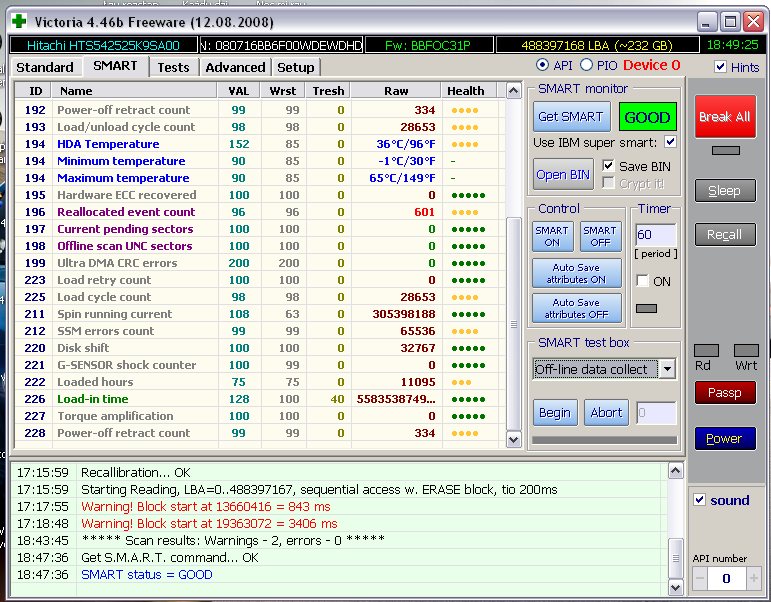
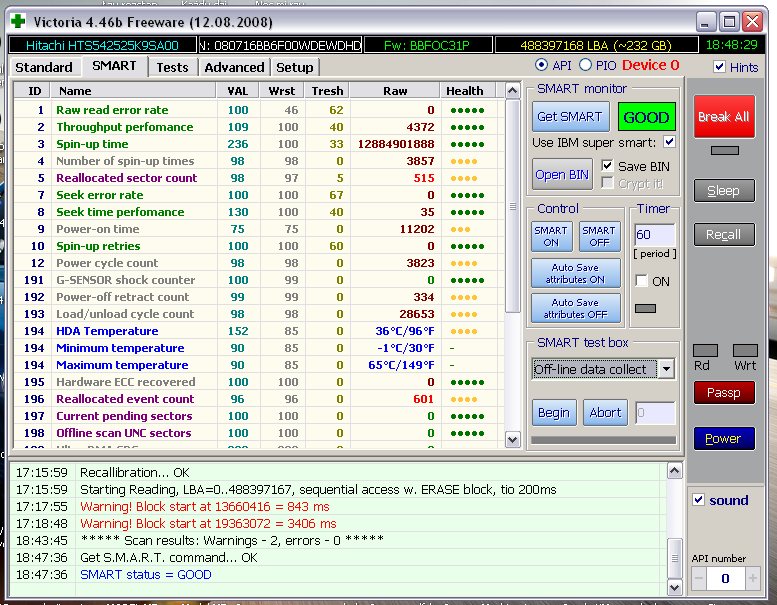
    Pamięć RAM w tym laptopie jest OK. Testowana kilkoma programami. Przełożyłem zatem ten dysk do mojego komputera stacjonarnego. Uruchomiłem Victorię i sprawdzając SMART zamarłem:
    Czy warto ratować dysk Hitachi HTS542525K9SA00 z błędami SMART?

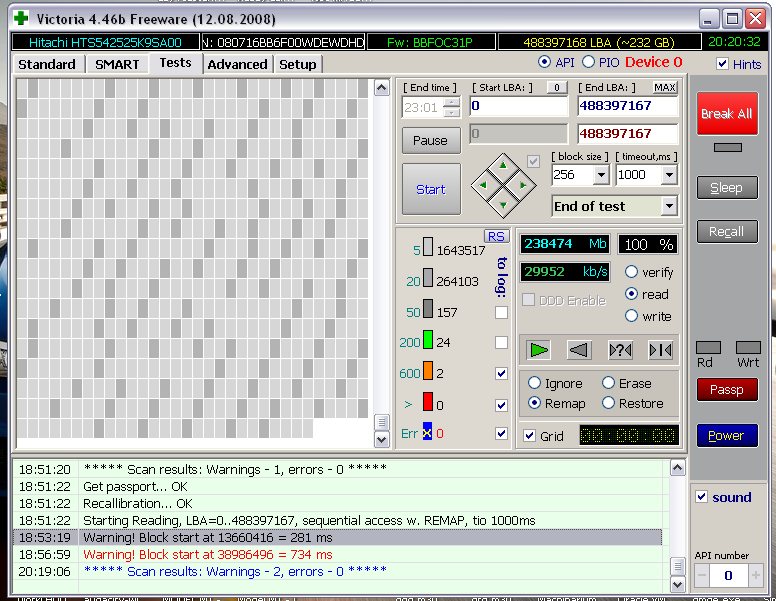
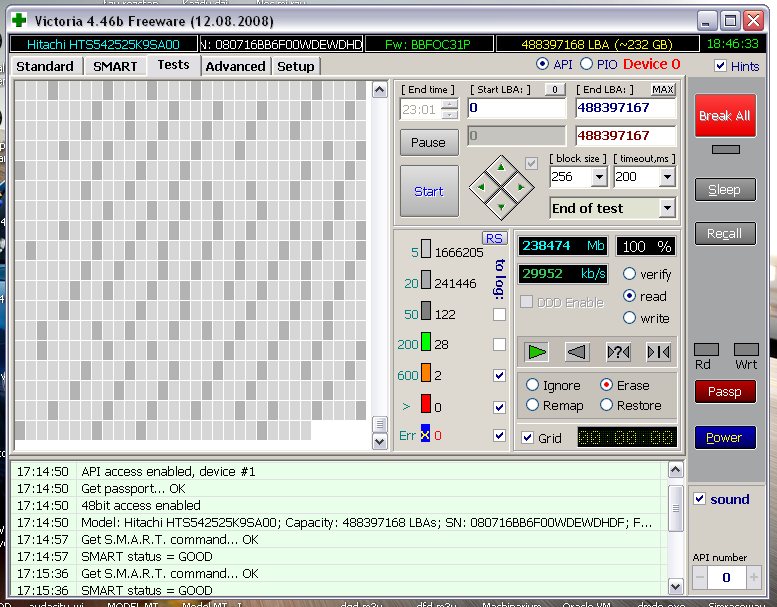
    Jest inny niż ten który pokazuje MHDD gdy dysk jest wpięty w laptopie (a w dodatku tragiczna jest wartość Reallocated Sector Count - mimo iż Victoria pokazuje status dysku Good). Uruchomiłem w Victorii Scan+Erase i oto wyniki:
    Czy warto ratować dysk Hitachi HTS542525K9SA00 z błędami SMART?

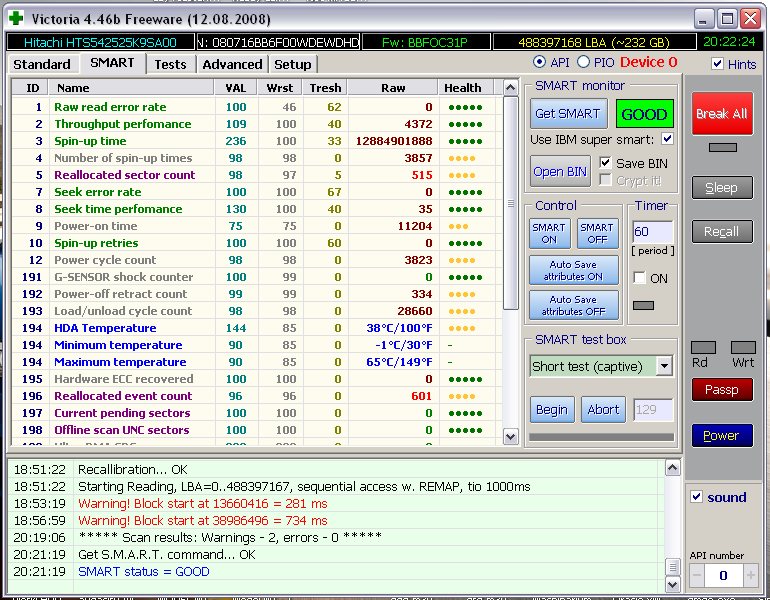
    Sprawdziłem po tym raz jeszcze SMART:
    Czy warto ratować dysk Hitachi HTS542525K9SA00 z błędami SMART? Czy warto ratować dysk Hitachi HTS542525K9SA00 z błędami SMART?

    Zrobiłem Remap:
    Czy warto ratować dysk Hitachi HTS542525K9SA00 z błędami SMART?

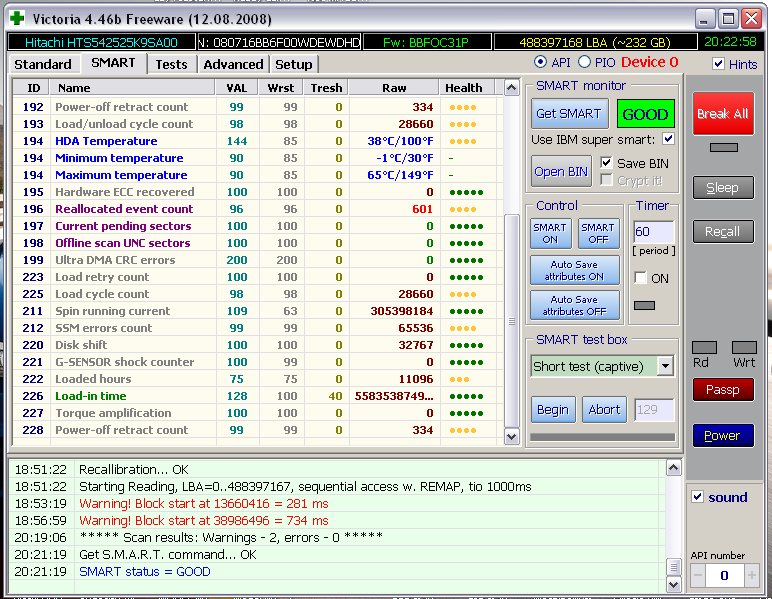
    I raz jeszcze SMART:
    Czy warto ratować dysk Hitachi HTS542525K9SA00 z błędami SMART? Czy warto ratować dysk Hitachi HTS542525K9SA00 z błędami SMART?

    Czy macie jakieś sugestie skąd te zmiany w SMART? I jak mam traktować ten dysk? Jako uszkodzony czy to laptop (zasilanie/kontroler) sprawiają problemy? Temperatury w laptopie w normie. Zasilanie (wtyczka) jest stabilnie osadzona. RAM OK.
  • #8 11640177
    helmud7543
    Poziom 43  
    Posty: 12624
    Pomógł: 1216
    Ocena: 1563
    Tym razem ujawniło się fizyczne uszkodzenie dysku. Do wymiany. Nie wiem tylko jaka jest natura uszkodzenia - wędrujące błędy odczytu sugerują problem z głowicą ale tu pewności nie mam.
  • #9 11640748
    ZDV12
    Poziom 15  
    Posty: 148
    Pomógł: 14
    Ocena: 8
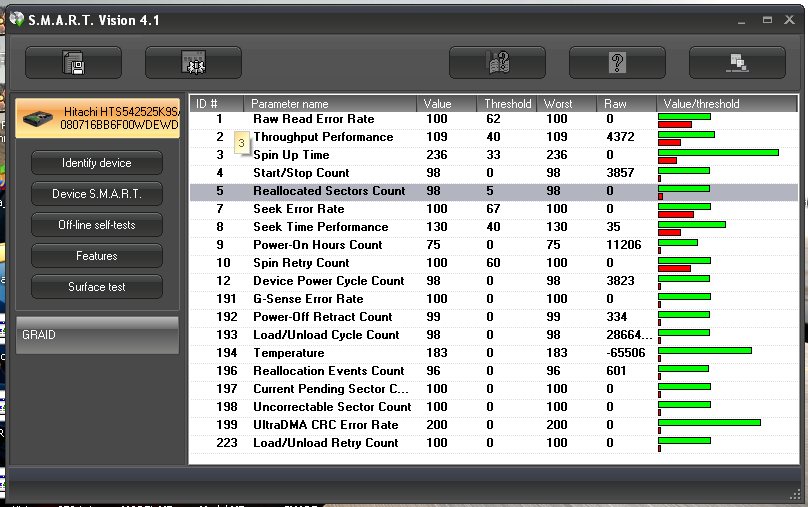
    Bez wyłączania komputera, po skanowaniu w Victorii status SMART nie zmienił się, wyłączam Victorię, włączam SMART Vision i...
    Czy warto ratować dysk Hitachi HTS542525K9SA00 z błędami SMART?
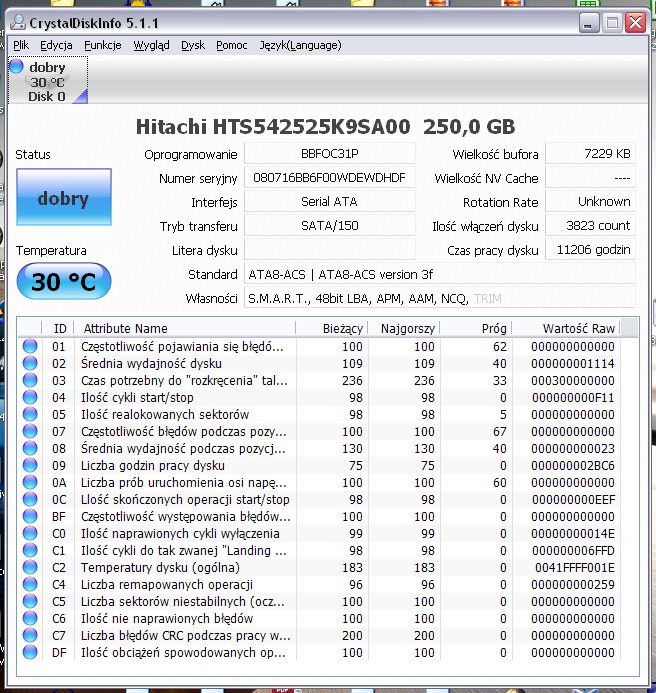
    Pozostaje pytanie, któremu programowi mam wierzyć jak każdy pokazuje to na co ma ochotę? Chodzi mi o parametr Reallocated Sector Count.
    Czy warto ratować dysk Hitachi HTS542525K9SA00 z błędami SMART?
  • #10 11640794
    artaa
    Poziom 43  
    Posty: 15069
    Pomógł: 1814
    Ocena: 1693
    ZDV12 napisał:
    Pozostaje pytanie, któremu programowi mam wierzyć jak każdy pokazuje to na co ma ochotę? Chodzi mi o parametr Reallocated Sector Count.

    Przecież oba pokazują 0??
  • #11 11640839
    ZDV12
    Poziom 15  
    Posty: 148
    Pomógł: 14
    Ocena: 8
    Tak kolego, a Victoria powyżej?
  • #13 11642650
    helmud7543
    Poziom 43  
    Posty: 12624
    Pomógł: 1216
    Ocena: 1563
    "Jako że dysk nie daje mi dalej spokoju znów zwracam się do Was. Niestety z partycji recovery nie udało mi się wgrać Visty. Proces staje cały czas w tym samym miejscu. Okazało się, że problemem mogą być bad sektory (tak wynikało z opisu numeru błędu). Zrobiłem zatem chkdsk i okazało się, że są jakieś problemy." - to nie wina błędnego odczytu w Victorii. Albo jakiś pin na elektronice dysku lub na płycie głównej nie łączy albo pada firmware dysku.
  • #14 11647304
    ZDV12
    Poziom 15  
    Posty: 148
    Pomógł: 14
    Ocena: 8
    Do kolegi artaa:
    PM pokazuje parametr 05 z wartością zero, to samo program Smart Vision. Także Victoria coś myli w odczycie.

    Do kolegi helmud7543:
    Twoje rokowania mnie martwią, jest to dysk SATA więc ciężko w nim obłamać pin, na płycie głównej wszystko jest ok, tym bardziej że był podpinany pod dwie. Mało tego laptop nie nosi śladów upadku a dysk był w nim przykręcony. Także uszkodzenie fizyczne odpada i obawiam się, że jest to druga opcja którą wymieniałeś czyli padający firmware - domyślam się, że nie bardzo jest jakiś sposób aby ten firmware (nie wiem czy chodzi o SA czy o jakiś czip na PCB) reanimować? Albo chociaż sprawdzić jego poprawność?
  • #16 11649051
    pidar
    Poziom 43  
    Posty: 11355
    Pomógł: 1569
    Ocena: 3580
    "196 Reallocated_Event_Count 0x0032 097 097 000 Old_age Always - 552" -> teraz mamy 601 (96)!
    Włącz na stałe (sprawdź) obserwację tego parametru w programie S.M.A.R.T Vision Ver.4.1.

Podsumowanie tematu

✨ Dysk twardy Hitachi HTS542525K9SA00 wykazywał błędy SMART, co skłoniło użytkownika do wykonania kopii posektorowej i analizy stanu dysku. Po zerowaniu i remapowaniu sektorów, problemy z niestabilnymi sektorami zniknęły, jednak pojawiły się nowe bad sektory, co sugerowało fizyczne uszkodzenie dysku. Użytkownik zauważył, że problemy z zasilaniem laptopa mogły wpływać na błędy dysku. W dalszej diagnostyce pojawiły się różnice w odczycie parametrów SMART między różnymi programami, co wprowadzało niepewność co do stanu dysku. Ostatecznie, użytkownik rozważał możliwość uszkodzenia firmware'u jako przyczyny problemów.
Wygenerowane przez model językowy.
REKLAMA