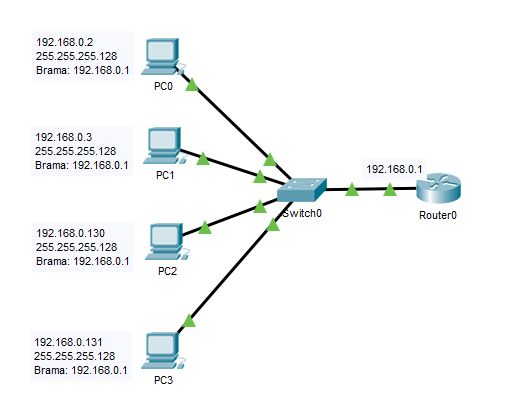
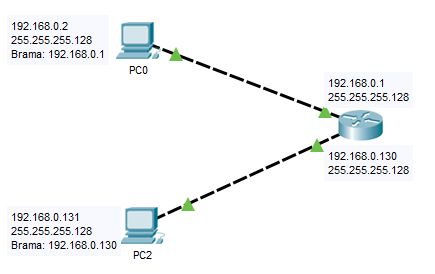
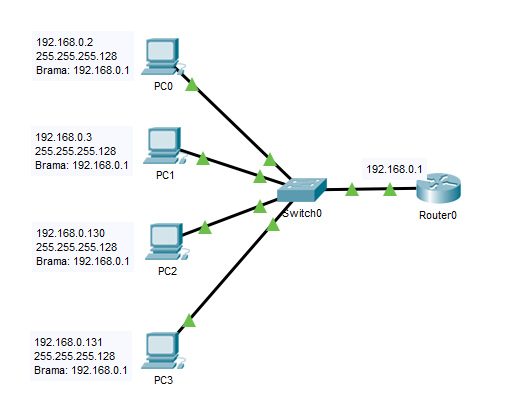
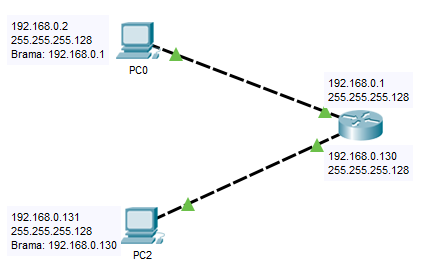
Nick-on napisał: Nurtuje mnie fizyczny sposob podzielenia sieci na podsieci. Czy robi sie to za pomocą samego adresowania hostow - czesc z nich adresujac numerami z zakresu 1-127, a druga grupa przyjmuje pulę 129-254, potem całość idzie przez switch do jednego portu routera, czy moze samo wydzielenie robi sie na interface'ach routera, prowadzac juz od niego podzial na switch i hosty? Proszę o doprecyzowanie jak to robi sie w praktyce bo jiz rece mi opadają

Nie można tego inaczej rozwiazac niz przez podany access list?
Aby działała komunikacja IP to należy poprawnie zadresować wszystkie urządzenia. I dokładnie tak, adresuje się port na routerze i hosty w sieci. Hosty w sieci mozna adresować ręcznie lub za pomocą DHCP.
Jeśli ma być separacja to można to stworzyć na kilka innych sposobów.
Na routerze mozna utworzyć routery wirtualne (w technologii Cisco nazywa się to VRF), ale jest to bez sensu, gdy wszystkie podsieci mają się komunikowac z tym samym wyjściem internetowym. Access List są najrozsądniejsze i jednocześnie najprostsze.
Również mozna zastosować FireWall (np Cisco ASA seria 5000).
Można również zastosować NAT, ale jest to bez sensu z punktu widzenia administartora zarządzającego np drukarkami.
A teraz odpowiedzi na pytania:
1. Jak podzielisz segment 192.168.0.0/16 zależy tylko i wyłącznie od twojej fantazji i potrzeb projektowych.
Najczęściej tworzy się 256 sieci /24, ale nic nie stoi na przeszkodzie utworzyć 1024 sieci /26 lub dwie sieci /17. Pamiętaj, że mozna zatosować również zakres 10.0.0.0/8 lub 172.16.0.0/12
2. Najsensowniej nie dzielić w ogóle, bo patrz punkt 3.
3. wtedy, gdy z jednej sieci fizycznej korzystają różne organizacje. I dajmy na to w budynku jest firma A, B, C i D. Każdej dajemy dostęp do Internetu. I wtedy dla każdej z firm możemy przydzielić oddzielny adres publiczny z puli. Zaletą jest to, że jak dana firma coś głupiego zrobi w Internecie to na pytanie organów - kto ma taki to a taki adres i w tym a w tym dniu popełnił wpis na stronie o adresie W.X.Y.Z - odpowiadasz: Firma A.
Tak, router musi mieć już adresację, bez tego ani rusz.
Poniżej jest przykład prostej sieci, gdzie są dwa routery wirtualne oraz siec glowna (do zarządzania). Drugi przyklad jest bardzo rozbudowany, ale hosty z routera wirtualnego (VRF Firma-drill-opt) bez problemo mogą pingować siebie pomiędzy sieciami, bo nikomu i niczemu nie szkodzi.
Oba przykłady sciągnięte z pracujących routerów, wyrzuciłem wrażliwe informacje.
version 15.4
no service pad
service tcp-keepalives-in
service tcp-keepalives-out
service timestamps debug datetime msec localtime show-timezone
service timestamps log datetime msec localtime show-timezone
service password-encryption
service sequence-numbers
!
hostname Przyklad-ce01
!
boot-start-marker
boot-end-marker
!
!
security authentication failure rate 10 log
logging buffered 100000
logging rate-limit 10 except critical
no logging console
no logging monitor
enable secret ***
!
aaa new-model
!
!
aaa group server tacacs+ Prowider_TACACS
 server name EMEA
 server name AMES
 ip tacacs source-interface Loopback100
!
aaa authentication login default group Prowider_TACACS local enable
aaa authentication enable default group Prowider_TACACS enable line none
aaa authorization config-commands
aaa authorization exec default group Prowider_TACACS local none
aaa authorization commands 15 default group Prowider_TACACS local none
aaa accounting send stop-record authentication failure
aaa accounting update newinfo
aaa accounting exec default start-stop group Prowider_TACACS
aaa accounting commands 1 default start-stop group Prowider_TACACS
aaa accounting commands 15 default start-stop group Prowider_TACACS
aaa accounting connection default start-stop group Prowider_TACACS
aaa accounting system default start-stop group Prowider_TACACS
!
!
!
!
!
aaa session-id common
clock timezone GMT 0 0
network-clock-participate wic 0
!
!
no ip source-route
no ip gratuitous-arps
!
!
!
!
!
ip vrf abz-inet
!
ip vrf iTalk
!
no ip dhcp use vrf connected
ip dhcp bootp ignore
!
!
!
no ip bootp server
ip domain name Prowider.net
ip name-server 64.19.255.250
ip cef
no ipv6 cef
!
frame-relay switching
!
!
!
!
multilink bundle-name authenticated
!
!
voice rtp send-recv
voice vrf iTalk
!
voice service voip
 ip address trusted list
  ipv4 10.225.0.0 255.255.0.0
  ipv4 212.39.175.0 255.255.255.0
  ipv4 129.87.145.0 255.255.255.0
  ipv4 62.92.160.64 255.255.255.240
  ipv4 212.39.166.170 255.255.255.255
 allow-connections sip to sip
 fax protocol t38 version 0 ls-redundancy 0 hs-redundancy 0 fallback none
 h323
  call service stop
 sip
  bind control source-interface Loopback225
  bind media source-interface Loopback225
  no call service stop
!
voice class codec 10
 codec preference 1 g729r8 bytes 40
 codec preference 2 g729br8
!
!
!
!
!
!
!
voice-card 0
!
license udi pid C881-V-K9 sn FCZ2214E2FR
!
!
username ***
!
!
!
!
!
!
!
!
!
!
!
!
!
!
!
!
interface Loopback100
 description ops-mgmt Source
 ip address 10.169.0.57 255.255.255.255
!
interface Loopback225
 description iTalk SIP Bind
 ip vrf forwarding iTalk
 ip address 10.225.95.91 255.255.255.255
!
interface BRI1
 no ip address
 shutdown
!
interface BRI2
 no ip address
 shutdown
!
interface FastEthernet0
 description -= Vessel lan =-
 switchport access vlan 800
 no ip address
!
interface FastEthernet1
 description -= Vessel lan =-
 switchport access vlan 800
 no ip address
!
interface FastEthernet2
 description -= Vessel lan =-
 switchport access vlan 800
 no ip address
!
interface FastEthernet3
 description -= Vessel lan =-
 switchport access vlan 800
 no ip address
!
interface FastEthernet4
 description -= To iDirect X7 =-
 no ip address
 load-interval 30
 duplex auto
 speed auto
!
interface FastEthernet4.1
 description -= iDirect Default vlan =-
 encapsulation dot1Q 1 native
 ip vrf forwarding abz-inet
 ip address 192.168.10.3 255.255.255.0
!
interface FastEthernet4.220
 description -= ops-mgmt =-
 encapsulation dot1Q 220
 ip address 10.169.11.90 255.255.255.252
!
interface FastEthernet4.225
 description -= Voice =-
 encapsulation dot1Q 225
 ip vrf forwarding iTalk
 ip address 10.225.105.82 255.255.255.252
!
interface FastEthernet4.862
 description -= abz-inet PtoP =-
 encapsulation dot1Q 862
 ip vrf forwarding abz-inet
 ip address 10.250.161.90 255.255.255.252
!
interface Vlan1
 no ip address
!
interface Vlan800
 description -= Vessel lan =-
 ip vrf forwarding abz-inet
 ip address 10.252.22.105 255.255.255.248
!
ip forward-protocol nd
no ip http server
no ip http secure-server
!
!
ip route 0.0.0.0 0.0.0.0 10.169.11.89 name ops-mgmt_default
ip route vrf abz-inet 0.0.0.0 0.0.0.0 10.250.161.89 name abz-inet_Default
ip route vrf iTalk 0.0.0.0 0.0.0.0 10.225.105.81 name iTalk_Default
!
ip access-list standard VTY_Access
 permit 10.169.40.141
 permit 10.169.40.133
 permit 10.222.192.3
 permit 10.20.255.254
 permit 10.255.221.2
 permit 10.208.2.247
 permit 10.170.3.254
 permit 10.225.17.165
 permit 10.128.4.6
 permit 10.152.0.6
 permit 10.169.40.29
 permit 10.128.4.24
 permit 10.146.0.61
 permit 10.169.40.37
 permit 10.176.2.10
 permit 10.176.2.11
 permit 10.225.0.50
 permit 10.225.18.10
 permit 10.169.40.125
 permit 10.169.40.117
 permit 137.237.56.0 0.0.0.255
 permit 10.255.253.112 0.0.0.7
 permit 172.31.255.0 0.0.0.255
 permit 172.30.255.0 0.0.0.255
 permit 89.254.10.0 0.0.0.255
 deny   any log
!
logging facility syslog
logging source-interface Loopback100
logging host 89.254.10.34
!
snmp-server group SW-Prowider-RO-002 v3 auth
snmp-server group SW-Prowider-RW-002 v3 auth write SWView
snmp-server view SWView iso included
snmp-server ifindex persist
tacacs-server directed-request
tacacs server AMES
 address ipv4 10.255.128.10
 key 7 ***
tacacs server EMEA
 address ipv4 10.255.128.140
 key 7 ***
access-list 10 remark Solarwinds Reporting ACL
access-list 10 permit 89.254.10.0 0.0.0.255
access-list 10 permit 137.237.55.0 0.0.0.255
access-list 10 permit 137.237.56.0 0.0.3.255
access-list 10 permit 137.237.40.0 0.0.1.255
access-list 10 permit 137.237.42.0 0.0.0.255
access-list 10 permit 137.237.18.0 0.0.1.255
access-list 10 permit 137.237.20.0 0.0.3.255
access-list 10 deny   any log
access-list 31 permit 10.147.133.10
access-list 31 remark NTP Peers
access-list 31 permit 10.179.9.226
access-list 31 permit 10.208.100.10
access-list 32 remark NTP Clients
access-list 32 deny   any
!
!
!
control-plane
!
!
voice-port 1
 description *** Spare BRI ***
!
voice-port 2
 description *** Spare BRI ***
!
voice-port 3
 station-id name tel1
 station-id number 123456789
 caller-id enable
!
voice-port 4
 station-id name tel2
 station-id number 123456788
 caller-id enable
!
voice-port 5
 shutdown
 description *** Spare FXS ***
!
voice-port 6
 shutdown
 description *** Spare FXS ***
!
voice-port 7
 shutdown
 description *** Spare FXO ***
!
mgcp behavior rsip-range tgcp-only
mgcp behavior comedia-role none
mgcp behavior comedia-check-media-src disable
mgcp behavior comedia-sdp-force disable
!
mgcp profile default
!
!
!
!
dial-peer cor custom
!
!
dial-peer voice 20 voip
 description Outbound SIP1
 preference 1
 destination-pattern .T
 session protocol sipv2
 session target ipv4:10.225.0.164
 voice-class codec 10
 dtmf-relay rtp-nte
 fax-relay ecm disable
 fax rate 7200
 fax nsf 000000
 no vad
!
dial-peer voice 21 voip
 description Outbound SIP2
 huntstop
 preference 2
 destination-pattern .T
 session protocol sipv2
 session target ipv4:10.225.0.134
 voice-class codec 10
 dtmf-relay rtp-nte
 fax-relay ecm disable
 fax rate 7200
 fax nsf 000000
 no vad
!
dial-peer voice 10 voip
 description ***INBOUND SIP***
 session protocol sipv2
 incoming called-number .
 voice-class codec 10
 dtmf-relay sip-notify
 no vad
!
dial-peer voice 30 pots
 description gatekeeper registration NR1
 destination-pattern 123456789
 clid network-number 123456789
 port 3
!
dial-peer voice 31 pots
 description gatekeeper registration NR2
 destination-pattern 123456788
 clid network-number 123456788
 port 4
!
!
gateway
 timer receive-rtp 1200
!
sip-ua
 retry invite 2
 timers trying 1000
 timers connect 1000
 timers disconnect 1000
 timers notify 1000
 g729-annexb override
!

configuration mode exclusive
!
line con 0
 session-timeout 15
 exec-timeout 15 0
 logging synchronous
 no modem enable
 transport preferred none
 transport output none
line aux 0
 exec-timeout 0 1
 no exec
 transport preferred none
 transport output none
line vty 0 4
 session-timeout 15
 access-class VTY_Access in
 exec-timeout 15 0
 logging synchronous
 transport preferred none
 transport input ssh
 transport output telnet ssh
line vty 5 15
 session-timeout 15
 access-class VTY_Access in
 exec-timeout 15 0
 logging synchronous
 transport preferred none
 transport input ssh
 transport output telnet ssh
!
scheduler allocate 20000 1000
ntp authentication-key ***
ntp authenticate
ntp trusted-key 5
ntp source Loopback100
ntp access-group peer 31
ntp access-group serve 32
ntp update-calendar
ntp server 10.208.100.10 key 5
ntp server 10.147.133.10 key 5
ntp server 10.179.9.226 key 5
!
end
version 15.5
service timestamps debug datetime msec
service timestamps log datetime msec
no platform punt-keepalive disable-kernel-core
!
hostname Przyklad-ce01
!
boot-start-marker
boot-end-marker
!
!
vrf definition Mgmt-intf
 !
 address-family ipv4
 exit-address-family
 !
 address-family ipv6
 exit-address-family
!
vrf definition iTalk
 description iTalk
 rd 5666:1220
 !
 address-family ipv4
 exit-address-family
!
vrf definition Firma-drill-opt
 description Firma Drilling Optimized
 rd 5666:7524
 !
 address-family ipv4
 exit-address-family
!
enable secret ***
!
aaa new-model
!
!
aaa group server tacacs+ prowider_TACACS
 server name EMEA
 server name AMES
!
aaa authentication login default group prowider_TACACS local enable
aaa authentication enable default group prowider_TACACS enable line none
aaa authorization config-commands
aaa authorization exec default group prowider_TACACS local none
aaa authorization commands 15 default group prowider_TACACS local none
aaa accounting send stop-record authentication failure
aaa accounting update newinfo
aaa accounting exec default start-stop group prowider_TACACS
aaa accounting commands 1 default start-stop group prowider_TACACS
aaa accounting commands 15 default start-stop group prowider_TACACS
aaa accounting connection default start-stop group prowider_TACACS
aaa accounting system default start-stop group prowider_TACACS
!
!
!
!
!
!
aaa session-id common
!
ip vrf abz-inet
 rd 862:862
!
ip vrf lon-inet
!
!
!
!
!
!
!
!
!
!
!


ip domain name prowider.com
no ip dhcp use vrf connected
ip dhcp excluded-address 10.169.144.193 10.169.144.195
ip dhcp excluded-address 10.252.58.1 10.252.58.3
ip dhcp excluded-address 172.30.46.123 172.30.46.126
ip dhcp excluded-address 172.30.46.1 172.30.46.50
ip dhcp excluded-address 172.30.46.125 172.30.46.126
ip dhcp excluded-address 172.30.46.129
ip dhcp excluded-address 172.30.46.142
ip dhcp excluded-address 172.30.46.145
ip dhcp excluded-address 172.30.46.161
ip dhcp excluded-address 172.30.46.177
ip dhcp excluded-address 172.30.46.241
ip dhcp excluded-address 10.225.202.1 10.225.202.3
ip dhcp excluded-address 10.225.106.241 10.225.106.243
ip dhcp excluded-address 10.252.139.1 10.252.139.10
ip dhcp excluded-address 10.252.94.1 10.252.94.3
ip dhcp excluded-address 10.252.94.65 10.252.94.67
ip dhcp excluded-address 10.252.94.97 10.252.94.99
!
!
ip dhcp pool lon-inet
 network 10.252.58.0 255.255.255.0
 dns-server 10.250.250.250 10.250.250.251
 default-router 10.252.58.1
!
ip dhcp pool Meraki-MGMT
 network 10.169.144.192 255.255.255.224
 default-router 10.169.144.193
 dns-server 8.8.8.8 8.8.4.4
!
ip dhcp pool Firma-Corp-Data
 network 172.30.46.0 255.255.255.128
 default-router 172.30.46.1
 dns-server 172.30.46.18 172.16.10.63
!
ip dhcp pool Firma-Corp-Training
 network 172.30.46.128 255.255.255.240
 default-router 172.30.46.129
 dns-server 172.30.46.18 172.16.10.63
!
ip dhcp pool Firma-Corp-Librestream
 network 172.30.46.160 255.255.255.248
 default-router 172.30.46.161
 dns-server 172.30.2.18 172.16.10.63
!
ip dhcp pool Firma-Corp-AMPS
 network 172.30.46.176 255.255.255.240
 default-router 172.30.46.177
 dns-server 172.30.46.18 172.16.10.63
!
ip dhcp pool Firma-Corp-USB-Scan
 network 172.30.46.144 255.255.255.240
 default-router 172.30.46.145
 dns-server 172.30.46.18 172.16.10.63
!
ip dhcp pool Firma-Corp-Kiosk
 network 172.30.46.240 255.255.255.240
 default-router 172.30.46.241
 dns-server 172.30.46.18 172.16.10.63
!
ip dhcp pool iTalkPhones
 network 10.225.202.0 255.255.255.192
 default-router 10.225.202.1
 option 150 ip 10.225.0.141 10.225.0.12
!
ip dhcp pool Firma2-Phones
 network 10.225.106.240 255.255.255.240
 default-router 10.225.106.241
 option 150 ip 212.39.175.3 212.39.175.2
!
ip dhcp pool Firma2-Corp
 network 10.252.139.0 255.255.255.0
 dns-server 10.250.250.250 10.250.250.251
 default-router 10.252.139.1
!
ip dhcp pool Firma2-Crew
 network 10.252.94.0 255.255.255.192
 dns-server 10.250.250.250 10.250.250.251
 default-router 10.252.94.1
!
ip dhcp pool Firma2-SLB
 network 10.252.94.64 255.255.255.224
 dns-server 10.250.250.250 10.250.250.251
 default-router 10.252.94.64
!
ip dhcp pool Firma2-3rdParty
 network 10.252.94.96 255.255.255.224
 dns-server 10.250.250.250 10.250.250.251
 default-router 10.252.94.97
!
!
!
!
!
!
!
!
!
!
subscriber templating
!
multilink bundle-name authenticated
!
!
!
!
license udi pid ISR4331/K9 sn FDO223303TC
license boot suite FoundationSuiteK9
!
spanning-tree extend system-id
!
username ***
!
redundancy
 mode none
!
!
!
!
!
vlan internal allocation policy ascending
!
track 220 ip sla 220
!
!
!
!
!
!
!
!
!
!
!
!
!
!
!
!
!
!
!
!
!
!
!
!
!
interface GigabitEthernet0/0/0
 description to Switch
 no ip address
 negotiation auto
!
interface GigabitEthernet0/0/0.200
 description -= Firma2 iTalk LAN =-
 encapsulation dot1Q 200
 vrf forwarding iTalk
 ip address 10.225.106.242 255.255.255.224
 vrrp 200 ip 10.225.106.243
 vrrp 200 priority 250
!
interface GigabitEthernet0/0/0.220
 description -= Ops-MGMT WAN =-
 encapsulation dot1Q 220
 ip address 10.169.50.147 255.255.255.248 secondary
 ip address 10.169.50.178 255.255.255.248 secondary
 ip address 10.169.50.139 255.255.255.248
 vrrp 1 ip 10.169.50.138
 vrrp 1 ip 10.169.50.146 secondary
 vrrp 1 priority 250
!
interface GigabitEthernet0/0/0.225
 description -= iTalk WAN =-
 encapsulation dot1Q 225
 vrf forwarding iTalk
 ip address 10.225.10.187 255.255.255.248 secondary
 ip address 10.225.10.179 255.255.255.248
 vrrp 225 ip 10.225.10.178
 vrrp 225 ip 10.225.10.186 secondary
 vrrp 225 priority 250
!
interface GigabitEthernet0/0/0.330
 description -= Firma Drilling WAN =-
 encapsulation dot1Q 330
 vrf forwarding Firma-drill-opt
 ip address 172.30.253.35 255.255.255.248 secondary
 ip address 172.30.253.27 255.255.255.248
 vrrp 33 ip 172.30.253.26
 vrrp 33 ip 172.30.253.34 secondary
 vrrp 33 priority 250
!
interface GigabitEthernet0/0/0.862
 description -= Firma2 abz-inet =-
 encapsulation dot1Q 862
 ip vrf forwarding abz-inet
 ip address 10.250.192.75 255.255.255.248 secondary
 ip address 10.250.192.67 255.255.255.248
 vrrp 3 ip 10.250.192.66
 vrrp 3 ip 10.250.192.74 secondary
 vrrp 3 priority 250
!
interface GigabitEthernet0/0/0.864
 description -= Test lon-inet =-
 encapsulation dot1Q 864
 ip vrf forwarding lon-inet
 ip address 10.250.189.155 255.255.255.248
 vrrp 3 ip 10.250.189.154
 vrrp 3 priority 250
!
interface GigabitEthernet0/0/0.1800
 description -= Firma2 Corp LAN =-
 encapsulation dot1Q 1800
 ip vrf forwarding abz-inet
 ip address 10.252.139.2 255.255.255.0
 vrrp 180 ip 10.252.139.1
 vrrp 180 priority 250
!
interface GigabitEthernet0/0/0.1801
 description -= Firma2 Crew LAN =-
 encapsulation dot1Q 1801
 ip vrf forwarding abz-inet
 ip address 10.252.94.2 255.255.255.192
 vrrp 181 ip 10.252.94.1
 vrrp 181 priority 250
!
interface GigabitEthernet0/0/0.1802
 description -= Firma2 SLB LAN =-
 encapsulation dot1Q 1802
 ip vrf forwarding abz-inet
 ip address 10.252.94.66 255.255.255.224
 vrrp 182 priority 250
 vrrp 183 ip 10.252.94.65
 vrrp 183 priority 250
!
interface GigabitEthernet0/0/0.1803
 description -= Firma2 3rdParty LAN =-
 encapsulation dot1Q 1803
 ip vrf forwarding abz-inet
 ip address 10.252.94.98 255.255.255.224
 vrrp 183 ip 10.252.94.97
 vrrp 183 priority 250
!
interface GigabitEthernet0/0/0.1864
 description -= lon-inet LAN =-
 encapsulation dot1Q 1864
 ip vrf forwarding lon-inet
 ip address 10.252.58.2 255.255.255.0
 vrrp 4 ip 10.252.58.1
 vrrp 4 priority 250
!
interface GigabitEthernet0/0/0.2200
 description -= Ops-MGMT LAN =-
 encapsulation dot1Q 2200
 ip address 192.168.1.10 255.255.255.0 secondary
 ip address 10.169.119.66 255.255.255.192
 vrrp 220 ip 10.169.119.65
 vrrp 220 priority 250
!
interface GigabitEthernet0/0/0.2201
 description -= Ops-MGMT LAN Meraki =-
 encapsulation dot1Q 2201
 ip address 10.169.144.194 255.255.255.224
 vrrp 2 ip 10.169.144.193
 vrrp 2 priority 250
!
interface GigabitEthernet0/0/0.2202
 description -= Sailor 900 Mgmt =-
 encapsulation dot1Q 13
 ip address 192.168.11.10 255.255.255.0
!
interface GigabitEthernet0/0/0.2250
 description -= iTalk LAN =-
 encapsulation dot1Q 2250
 vrf forwarding iTalk
 ip address 10.225.202.2 255.255.255.192
 vrrp 226 ip 10.225.202.1
 vrrp 226 priority 250
!
interface GigabitEthernet0/0/1
 description -= To RB WAN 0_0 =-
 no ip address
 negotiation auto
!
interface GigabitEthernet0/0/1.10
 description -= Firma Drilling LAN | Corp Data =-
 encapsulation dot1Q 10
 vrf forwarding Firma-drill-opt
 ip address 172.30.46.125 255.255.255.128
 vrrp 10 ip 172.30.46.1
 vrrp 10 priority 250
!
interface GigabitEthernet0/0/1.15
 description -= Firma Drilling LAN | Training =-
 encapsulation dot1Q 15
 vrf forwarding Firma-drill-opt
 ip address 172.30.46.129 255.255.255.240
!
interface GigabitEthernet0/0/1.20
 description -= Firma Drilling LAN | USB Scanner =-
 encapsulation dot1Q 20
 vrf forwarding Firma-drill-opt
 ip address 172.30.46.145 255.255.255.240
!
interface GigabitEthernet0/0/1.25
 description -= Firma Drilling LAN | Librestream Camera =-
 encapsulation dot1Q 25
 vrf forwarding Firma-drill-opt
 ip address 172.30.46.161 255.255.255.248
!
interface GigabitEthernet0/0/1.30
 description -= Firma Drilling LAN | AMPS =-
 encapsulation dot1Q 30
 vrf forwarding Firma-drill-opt
 ip address 172.30.46.177 255.255.255.240
 service-policy input Firma-vlan30-filter
!
interface GigabitEthernet0/0/1.35
 description -= Firma Drilling LAN | ABB =-
 encapsulation dot1Q 35
 vrf forwarding Firma-drill-opt
 ip address 172.30.46.193 255.255.255.248
!
interface GigabitEthernet0/0/1.40
 description -= Firma Drilling LAN | Security =-
 encapsulation dot1Q 40
 vrf forwarding Firma-drill-opt
 ip address 172.30.46.201 255.255.255.248
!
interface GigabitEthernet0/0/1.45
 description -= Firma Drilling LAN | Kiosk  =-
 encapsulation dot1Q 45
 vrf forwarding Firma-drill-opt
 ip address 172.30.46.241 255.255.255.240
!
interface GigabitEthernet0/0/1.870
 description -= Firma Drilling LAN |MPD IOT Edge GW =-
 encapsulation dot1Q 870
 vrf forwarding Firma-drill-opt
 ip address 172.16.62.1 255.255.255.248
!
interface GigabitEthernet0/0/2
 no ip address
 shutdown
 negotiation auto
!
interface GigabitEthernet0
 vrf forwarding Mgmt-intf
 no ip address
 shutdown
 negotiation auto
!
interface Vlan1
 no ip address
 shutdown
!
ip forward-protocol nd
no ip http server
no ip http secure-server
ip tftp source-interface GigabitEthernet0
ip route 0.0.0.0 0.0.0.0 10.169.50.137 50 name default_modem_b track 220
ip route vrf iTalk 0.0.0.0 0.0.0.0 10.225.10.177 50 name default_modem_b track 220
ip route vrf Firma-drill-opt 0.0.0.0 0.0.0.0 172.30.253.25 50 name default_modem_b track 220
ip route vrf abz-inet 0.0.0.0 0.0.0.0 10.250.192.65 50 name default_modem_a track 220
ip route 0.0.0.0 0.0.0.0 10.169.50.145 100 name default_modem_a
ip route 10.170.100.193 255.255.255.255 10.169.50.137 name sla-modem-b
ip route vrf iTalk 0.0.0.0 0.0.0.0 10.225.10.185 100 name default_modem_a
ip route vrf Firma-drill-opt 0.0.0.0 0.0.0.0 172.30.253.33 100 name default_modem_a
ip route vrf lon-inet 0.0.0.0 0.0.0.0 10.250.189.153
ip route vrf abz-inet 0.0.0.0 0.0.0.0 10.250.192.73 100 name default_modem_b
ip tacacs source-interface GigabitEthernet0/0/0.2200
!
!
ip access-list standard VTY_Access
 ! lista usunieta
 deny   any log
!
ip sla 220
 icmp-echo 10.170.100.193 source-ip 10.169.50.139
 frequency 5
ip sla schedule 220 life forever start-time now
ip sla responder
!

snmp-server view SWView iso included
snmp ifmib ifindex persist
!
tacacs-server directed-request
tacacs server AMES
 address ipv4 10.255.128.10
 key 7 ***
tacacs server EMEA
 address ipv4 10.255.128.140
 key 7 ***
!
!
!
control-plane
!

configuration mode exclusive
!
line con 0
 session-timeout 15
 exec-timeout 15 0
 logging synchronous
 transport preferred none
 transport output none
 stopbits 1
line aux 0
 exec-timeout 0 1
 no exec
 transport preferred none
 transport output none
 stopbits 1
line vty 0 4
 session-timeout 15
 access-class VTY_Access in
 exec-timeout 15 0
 logging synchronous
 transport preferred none
 transport input ssh
 transport output all
line vty 5 15
 session-timeout 15
 access-class VTY_Access in
 exec-timeout 15 0
 logging synchronous
 transport preferred none
 transport input ssh
 transport output all
!
ntp authentication-key 5 md5 ***
ntp authenticate
ntp trusted-key 5
ntp server 10.147.133.10 key 5
ntp server 10.208.100.10 key 5
ntp server 10.179.9.226 key 5
!
end