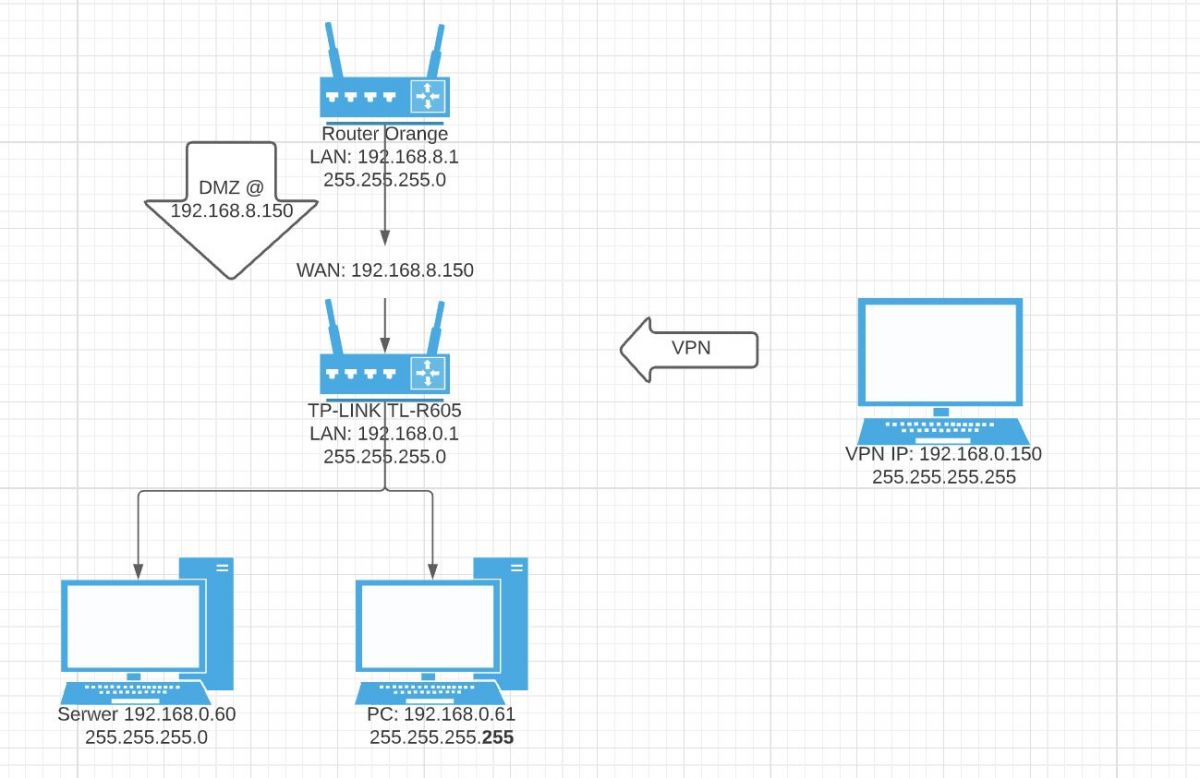
Dzięki za odpowiedź i próbę pomocy
czuker napisał: Komputer z którego się łączysz ma normalnie adres z sieci 192.168.0.x/24?
Mam 192.168.1.x/24. Spróbowałem 192.168.0.x/24 to faktycznie nic już nie działało.
czuker napisał: Przyjrzałbym się tablicom ARP i routingu w każdym z przypadków.
Na moje oko pcha wszystko w tunel (zaznaczyłem istotne wiersze "!!!!!"):
C:\Users\tomek>ipconfig

Windows IP Configuration


PPP adapter VPN:

   Connection-specific DNS Suffix  . :
   IPv4 Address. . . . . . . . . . . : 192.168.0.153
   Subnet Mask . . . . . . . . . . . : 255.255.255.255
   Default Gateway . . . . . . . . . : 0.0.0.0

Wireless LAN adapter Połączenie lokalne* 1:

   Media State . . . . . . . . . . . : Media disconnected
   Connection-specific DNS Suffix  . :

Wireless LAN adapter Wi-Fi:

   Connection-specific DNS Suffix  . :
   Link-local IPv6 Address . . . . . : fe80::397c:d219:c682:ddc1%2
   IPv4 Address. . . . . . . . . . . : 192.168.1.101
   Subnet Mask . . . . . . . . . . . : 255.255.255.0
   Default Gateway . . . . . . . . . : 192.168.1.1

Ethernet adapter Połączenie sieciowe Bluetooth:

   Media State . . . . . . . . . . . : Media disconnected
   Connection-specific DNS Suffix  . :

C:\Users\tomek>ping 192.168.0.60

Pinging 192.168.0.60 with 32 bytes of data:
Reply from 192.168.0.60: bytes=32 time=80ms TTL=126
Reply from 192.168.0.60: bytes=32 time=37ms TTL=126
Reply from 192.168.0.60: bytes=32 time=57ms TTL=126
Reply from 192.168.0.60: bytes=32 time=53ms TTL=126

Ping statistics for 192.168.0.60:
    Packets: Sent = 4, Received = 4, Lost = 0 (0% loss),
Approximate round trip times in milli-seconds:
    Minimum = 37ms, Maximum = 80ms, Average = 56ms

C:\Users\tomek>ping 192.168.0.61

Pinging 192.168.0.61 with 32 bytes of data:
Request timed out.
Request timed out.
Request timed out.
Request timed out.

Ping statistics for 192.168.0.61:
    Packets: Sent = 4, Received = 0, Lost = 4 (100% loss),

C:\Users\tomek>arp -a

Interface: 192.168.1.101 --- 0x2
  Internet Address      Physical Address      Type
  192.168.1.1           18-d6-c7-81-d6-40     dynamic
  192.168.1.255         ff-ff-ff-ff-ff-ff     static
  224.0.0.2             01-00-5e-00-00-02     static
  224.0.0.22            01-00-5e-00-00-16     static
  224.0.0.251           01-00-5e-00-00-fb     static
  224.0.0.252           01-00-5e-00-00-fc     static
  239.255.255.250       01-00-5e-7f-ff-fa     static
  255.255.255.255       ff-ff-ff-ff-ff-ff     static

Interface: 192.168.0.153 --- 0x24
  Internet Address      Physical Address      Type
  0.0.0.0                                     static
  2.19.123.156                                static
  13.107.4.52                                 static
  23.53.169.239                               static
  34.98.74.57                                 static
  35.186.224.11                               static
  35.186.224.25                               static
  35.186.224.47                               static
  35.190.243.59                               static
  37.252.224.71                               static
  37.252.253.102                              static
  40.126.9.66                                 static
  51.144.227.73                               static
  52.113.194.132                              static
  52.114.128.71                               static
  52.142.114.176                              static
  52.217.73.30                                static
  52.232.106.174                              static
  80.80.80.80                                 static
  93.184.220.29                               static
  95.101.95.43                                static
  104.16.62.16                                static
  104.40.183.236                              static
  138.91.136.108                              static
  142.250.185.66                              static
  142.250.185.74                              static
  142.250.185.77                              static
  142.250.185.106                             static
  142.250.185.138                             static
  142.250.185.170                             static
  142.250.185.202                             static
  142.250.185.234                             static
  142.250.186.34                              static
  142.250.186.42                              static
  142.250.186.97                              static
  142.250.186.138                             static
  142.250.186.170                             static
  151.101.14.248                              static
  157.240.21.20                               static
  159.8.88.140                                static
  161.156.67.103                              static
  161.156.67.106                              static
  172.217.16.138                              static
  172.217.18.106                              static
  172.217.22.10                               static
  172.217.23.106                              static
  185.60.216.15                               static
  185.60.216.19                               static
  188.65.76.135                               static
  188.93.173.17                               static
  188.172.192.102                             static
  188.172.223.103                             static
  188.172.233.173                             static
  192.168.0.1                                 static
  192.168.0.60                                static            !!!!!
  192.168.0.61                                static            !!!!!
  192.228.79.201                              static
  199.232.138.248                             static
  213.227.168.134                             static
  216.58.206.10                               static
  216.58.207.74                               static
  216.58.210.10                               static
  216.58.212.170                              static
  217.146.21.136                              static
  224.0.0.2                                   static
  224.0.0.22                                  static
  224.0.0.251                                 static
  239.255.255.250                             static
  255.255.255.255                             static
Ja bardziej (może błędnie) patrzę na drugą stronę. No bo dlaczego adres 192.168.0.60 mi odpowiada, a 192.168.0.61 nie? Jedyna różnica jest w konfiguracji maski tam, czyli jest:
C:\Users\Admin>ipconfig

Windows IP Configuration


Ethernet adapter Ethernet:

   Connection-specific DNS Suffix  . :
   Link-local IPv6 Address . . . . . : fe80::3584:9fbf:b0a8:d779%14
   IPv4 Address. . . . . . . . . . . : 192.168.0.60
   Subnet Mask . . . . . . . . . . . : 255.255.255.255
   Default Gateway . . . . . . . . . : 192.168.0.1
i
C:\Users\User>ipconfig

Windows IP Configuration


Ethernet adapter Ethernet:

   Connection-specific DNS Suffix  . :
   Link-local IPv6 Address . . . . . : fe80::55ff:322:80ba:1855%3
   IPv4 Address. . . . . . . . . . . : 192.168.0.61
   Subnet Mask . . . . . . . . . . . : 255.255.255.0
   Default Gateway . . . . . . . . . : 192.168.0.1
I ta maska jest jedyną różnicą, która powoduje, że działa, albo i nie. Ja generalnie zastanawiam się, co zmienia zmiana maski na taką. Router jest omijany? Jakaś jego blokada ruchu przestaje działać? Bo szczerze - nie rozumiem tego...
Dodano po 7 [godziny] 4 [minuty]:Okey, doinstalowałem kontroler Omada do TP-LINK. Z niego jak wyklikałem to poszło. Istotne jest to, że nie pozwolił mi do VPN przydzielić tej samej puli adresów, co sieć docelowa (192.168.0.x/24). Zrobiłem zatem 192.168.2.x/24. Zastanawiam się, czy jak taką pulę przydzielę ręcznie (z przeglądarki, bez Omada) to czy też zadziała. Stąd wątek zostawiam otwarty - będę testował w weekend, dam znaka dla potomnych i zamknę wątek.