Witam
Sciągnołem sobie taki samouczek programowania c++. W tym samouczku jest napisane że najlepszy jest ten właśnie kompilator.
Czy ma ktoś jakąś stronkę gdzie można to ściągnąć "Microsoft Visual C++ 7" bo juz chyba szukałem na większości stron próbowałem ściagnąć prpgramami P2P: Kazą, dc++, soul seek i eMule. w tym ostatnim nawet znalazłem (ale wiecie jakto sie tym ściąga ) ale ni stety nie udało mi sie ściągnąc może ktos mi doradzi gdzie to można znaleźć
Jak masz DVD to sobie zamów Visual Studio 2005 Beta z Microsoftu (podobno przysyłają za darmo).
A jak zaczynasz z C++ to możesz też próbować coś robić w Borland C++ Compiler 5.5 (legalnie do ściągnięcia ze stron Borlanda) - ale tam nie ma IDE.
Jest też DevC++.
Zakładam, że nie masz linuxa (wtedy problemu by w ogóle nie było).
A co to za samouczek?
mam borlanda 6 ale podobno borland bardziej poasuje do tworzenia programów a mnie by interesowało tworzenie gier. A co do tego samouczka to znajduje sie na stronie:
http://www.avocado.risp.pl/ polecam
mam borlanda 6 ale podobno borland bardziej poasuje do tworzenia programów a mnie by interesowało tworzenie gier.
Z tym bym się nie zgodził. Jeśli piszesz grę, to najpewniej korzystasz z jakiejś specjalizowanej biblioteki, np. SDL, OpenGL, i olewasz to, co wiąże się z kompilatorem (VCL, MFC, .NET framework). Najlepiej jeszcze, jak piszesz bez wstawek asemblerowych. Wtedy, jak się trochę postarasz, uzyskujesz przenośny kod, który możesz skompilować borlandem, visualem, gcc, pod różnymi systemami, w tym pod linuxem.
w jaki sposób w borland builder6 można uruchomić kompilacje tak aby po wpisaniu prostego kodu np.:
// First - pierwszy program w C++
#include <iostream>
#include <conio.h>
void main()
{
std::cout << "Hurra! Napisalem pierwszy program w C++!" << std::endl;
getch();
}
wyświetliło sie winowdsowskie okienko z tym właśnie napisem "Hurra! Napisalem pierwszy program w C++!" bez tych wszyskich formatek czy jak ją tam zwał. chyba nie wysłowiłem sie za dobrze chodzi mi o to żeby przeprowadzić kompilacje kodu źródłowego na maszynowy i ma sie uruchomić okienko windowsowskie czy dosowskie i ma mi wyświetlić ten napis tak jak w pascalu
Dodano po 1 [godziny] 18 [minuty]:
A z kąd mogę ściagnąć pełną wersje microsoft visual studio 2003 lub nowsza??
Okey Po ciężkich próbach udało mi sie otrzymać MicroSoft Visual studio 2003 Ale jak to teraz zainstalować pomocy!!!!
jest tam też instrukcja instalaci ale nawet siostra która uczy w szkole nie wie jak to zainstalować a oto ta instrukcja:
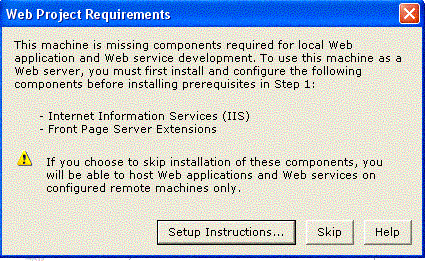
Microsoft Visual Studio .NET Prerequisites
Web Project Requirements for Windows XP
If you want to create Web projects on this machine, you must first install additional components. To create Web projects, both Internet Information Services (IIS) and FrontPage Server Extensions (FPSE) must be installed and configured. You can, however, create Web projects on remote machines that have these components installed and configured.
Note: It is recommended that you print or bookmark this page before installing the components listed below. This page does not automatically display after a machine restart.
Securing Your Machine for Installation
Securing Your Machine for Installation on Windows XP
Download and save the latest security updates from http://msdn.microsoft.com/vstudio/security/ to your desktop.
Note: Do not install the security updates now. You will be manually applying these security updates in a later stage of the instructions below. If you have problems, please see your system administrator.
Obtain your Windows operating system CD/DVD.
Note: Please contact your system administrator if you installed the Windows operating system over the network and you do not have the Windows operating system CD/DVD readily available.
Convert your FAT16 or FAT32 file system to NTFS. This is strongly recommended but not required to continue setup.
Note: Running FrontPage Server Extensions on a FAT file system allows any anonymous user to author on your web server. Go to http://www.microsoft.com/technet/treeview/def...odtechnol/winntas/tips/techrep/filesyst.asp#K for additional information on converting file systems.
Disconnect your machine from ALL network connections.
Note: If you do not disconnect, your machine could be susceptible to viruses between installing the components and applying the latest security updates.
Remove the Visual Studio CD/DVD from your machine now.
Install Internet Information Services (IIS)
To install Internet Information Services on Windows XP
On the Start menu, choose Run.
In the Open dialog box, type appwiz.cpl, and then click OK to open the Add/Remove Programs dialog box; you can also access this dialog box from the Control Panel.
In the Add/Remove Programs dialog box, choose Add/Remove Windows Components on the left side of the dialog box.
In the Windows Component Wizard, check Internet Information Services (IIS).
Choose Next to begin installing IIS.
Click Finish when installation is complete.
Close the Add/Remove Programs dialog box.
Install FrontPage Server Extensions (FPSE)
To install FrontPage Server Extensions on Windows XP
On the Start menu, choose Run.
In the Open dialog box, type appwiz.cpl, and then click OK to open the Add/Remove Programs dialog box.
In the Add/Remove Programs dialog box, choose Add/Remove Windows Components on the left side of the dialog box.
In the Windows Component Wizard, select Internet Information Services (IIS).
With Internet Information Services (IIS) selected, choose Details.
If FrontPage 2000 Server Extensions are not already selected, check the check box.
Click OK to close the Internet Information Services (IIS) box.
Choose Next to begin installing.
After installation completes, click Finish to close the Windows Component Wizard.
Configure FrontPage Server Extensions (FPSE)
To configure FrontPage Server Extensions on Windows XP
On the Start menu, choose Run.
In the Open dialog box, type compmgmt.msc \s, and then click OK to open the Computer Management dialog box.
In the Computer Management dialog box, expand Services and Applications.
Under Services and Applications, expand Internet Information Services.
Under the Internet Information Services, expand Web sites.
Right-click Default Web Site, choose All Tasks, and then choose Configure Server Extensions.
Note: You can skip to Install Security Updates below if the Configure Server Extensions menu command is missing. If the Configure Server Extensions menu command is missing, then FrontPage Server Extensions are already installed and configured.
Choose Next on the first page of the Server Extensions Configuration Wizard.
Choose Yes in the Warning dialog box.
Choose No for configuring the mail server settings, and then choose Next.
Choose Finish.
Install Security Updates
Run the security updates you downloaded in step 1, "Download Security Updates", from your desktop.
Connect to Network
If you disconnected from the network in step 2, "Disconnect Network", you can safely reconnect to the network after applying the security updates.
Return to setup
You are now ready to return to setup. Please re-insert CD1 or the DVD of the Visual Studio product you are installing and run setup.
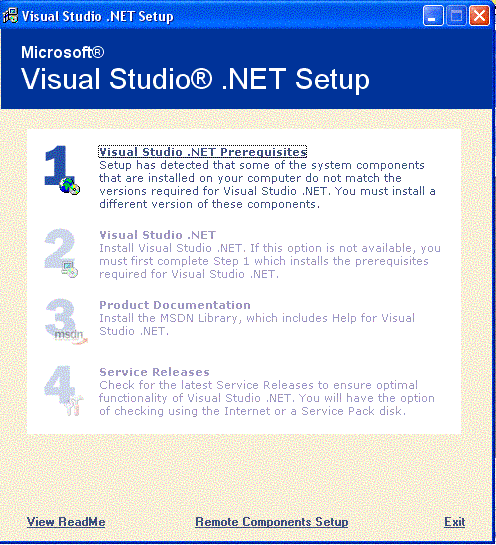
Ależ to nie jeste takie proste jak by sie wydawało instaluje i nic wyświetlają mi sie jakieś punkty których nie rozumiem (jak by ktoś chciał to mogę wysłać "print screen") szłyszałem ze trzeba zainstalować serwce pack 2 czy to prawda???
jar-jar17:
Raczej nie trzeba servis packa 2 instalowac( domyslam sie chodzi ci o windows XP ). Kiedy wydali microsoft visual .net studio 2003 byl chyba tylko 1.
Podeslij screna ( screnny ) moze sie cos z tego uda wymyslic. i napisz dokladnie jaki masz system itd.
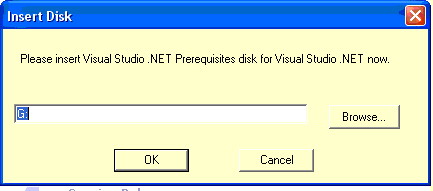
Rozumiem ze Ty nie masz tego dysku "Visual Studio .Net Prerequisites" ?. Sprawdzales wszystkie plytki ?. Jesli nawet jej nie masz to nie powinno byc tragedi ( tak mi sie wydaje ).
Na tej plytce znajduje sie:
- dotNetFramework
- IE60SP1
- JSharpRedistCore ( mysle ze to jest dla Ciebie zbedne )
- MDAC27SP1
- NTSP6a ( zbedne )
- jakies bibloteki (np gdi+ ).
- WindowsInstaller
Generalnie wszystkie te rzeczy mozna sciagnac od m$ za darmo. ( teraz chyba troche trudniej bo chyba chca kod - chociaz nie wszedzie ).
Sprawdz jeszcze raz wszystkie plytki. Calkiem mozliwe ze ktos nie dal jej nazwy Visual Studio .Net Prerequisites a jakis kolejny numer.
dobra daruje sobie ten visual ale nie ktoś mi powie bo zainstalowałem siebie linuxa i tam znajduje sie możliwość programowania c++ czy mogą tam być takie same kody źródłowe czy coś trzeba zmieniać jeśli tak to co.
Jest tam jeszcze qpp co to jest????
Wsysko działa pięknie tylko jeżeli już coś próbuje zmienić wkodzie np.
std::cout << "Podaj pierwsza liczbe: "; np na
std::cout << "Podaj pierwsza liczbe12: "; wtedy pojawia sie komunikat :
Proste obliczenia.cpp
e:\program files\microsoft visual studio 8\vc\include\ostream(469) : error C2059: syntax error : '{'
e:\program files\microsoft visual studio 8\vc\include\ostream(581) : see reference to class template instantiation 'std::basic_ostream<_Elem,_Traits>' being compiled
e:\program files\microsoft visual studio 8\vc\include\ostream(469) : error C2334: unexpected token(s) preceding '{'; skipping apparent function body
e:\program files\microsoft visual studio 8\vc\include\ostream(469) : error C2059: syntax error : '{'
e:\program files\microsoft visual studio 8\vc\include\ostream(639) : see reference to class template instantiation 'std::basic_ostream<_Elem,_Traits>' being compiled
with
[
_Elem=char,
_Traits=std::char_traits<char>
]
e:\program files\microsoft visual studio 8\vc\include\ostream(469) : error C2334: unexpected token(s) preceding '{'; skipping apparent function body
e:\program files\microsoft visual studio 8\vc\include\ostream(469) : error C2059: syntax error : '{'
e:\program files\microsoft visual studio 8\vc\include\ostream(640) : see reference to class template instantiation 'std::basic_ostream<_Elem,_Traits>' being compiled
with
[
_Elem=wchar_t,
_Traits=std::char_traits<wchar_t>
]
e:\program files\microsoft visual studio 8\vc\include\ostream(469) : error C2334: unexpected token(s) preceding '{'; skipping apparent function body
g:\visual studio 2005\projects\proste obliczenia\proste obliczenia\proste obliczenia.cpp(18) : fatal error C1075: end of file found before the left brace '{' at 'g:\visual studio 2005\projects\proste obliczenia\proste obliczenia\proste obliczenia.cpp(9)' was matched
Build log was saved at "file://g:\Visual Studio 2005\Projects\Proste obliczenia\Proste obliczenia\Debug\BuildLog.htm"
Proste obliczenia - 7 error(s), 0 warning(s)
========== Build: 0 succeeded, 1 failed, 0 up-to-date, 0 skipped ==========
czym moze to być spowodowane bo wcześniej tego nie było
✨ Poszukiwano legalnego źródła do pobrania Microsoft Visual C++ 7, jednak znalezienie wersji tej jest trudne. Zamiast tego polecano nowsze wersje Visual Studio, takie jak 2002, 2003 lub 2005 Beta, które można zamówić lub pobrać z oficjalnych źródeł Microsoftu. Alternatywnie sugerowano użycie innych kompilatorów C++, np. Borland C++ Builder 5.5 lub 6, DevC++, a także rozważenie środowisk Linux z gcc. Dyskusja poruszała także kwestie instalacji Visual Studio 2003, w tym wymagania dotyczące komponentów systemowych (IIS, FrontPage Server Extensions) oraz problemów z instalacją pirackiej wersji i konieczności posiadania odpowiednich płyt instalacyjnych. Użytkownik otrzymał wskazówki dotyczące tworzenia projektów konsolowych i wyświetlania komunikatów w Windows za pomocą MessageBox z biblioteki windows.h. Poruszono także temat przenośności kodu C++ między systemami oraz różnic w bibliotekach i kompilatorach. W końcowej fazie autor zainstalował Visual Studio 2003 i napisał prosty kalkulator w C++, jednak napotkał błędy składniowe przy modyfikacji kodu, co wskazuje na potrzebę dokładnej analizy składni i środowiska programistycznego. Wygenerowane przez model językowy.