Witam serdecznie od dłuższego czasu mam problem z połączeniem Wifi. Ogólnie internet zasuwa, ale co jakiś czas spada prędkość połączenia. ISP - TOYA.
Na speedtescie wychodzi zazwyczaj
Ping - 12ms
DL - 30MB/s (taki mam pakiet od ISP)
UP - 6MB/s (taki mam pakiet od ISP)
Jak jest problem, to ping spada do 300ms, strony bardzo wolno się ładują, filmy na YT przycinają się. Po jakimś czasie wszystko wraca do normy.
Mój obecny system to WIN 10 (na WIN 7 był podobny problem)
Laptop ASUS R556LJ
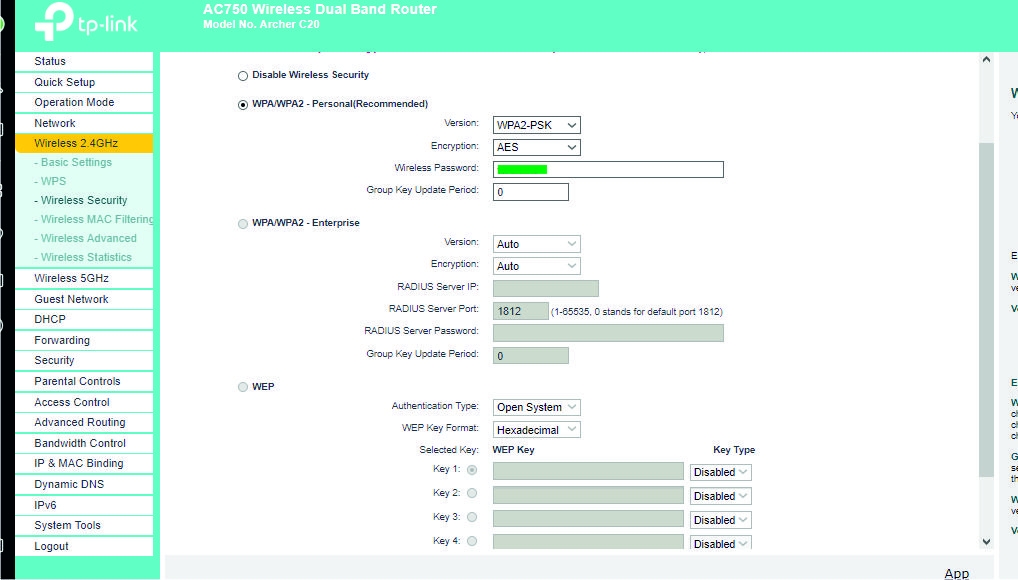
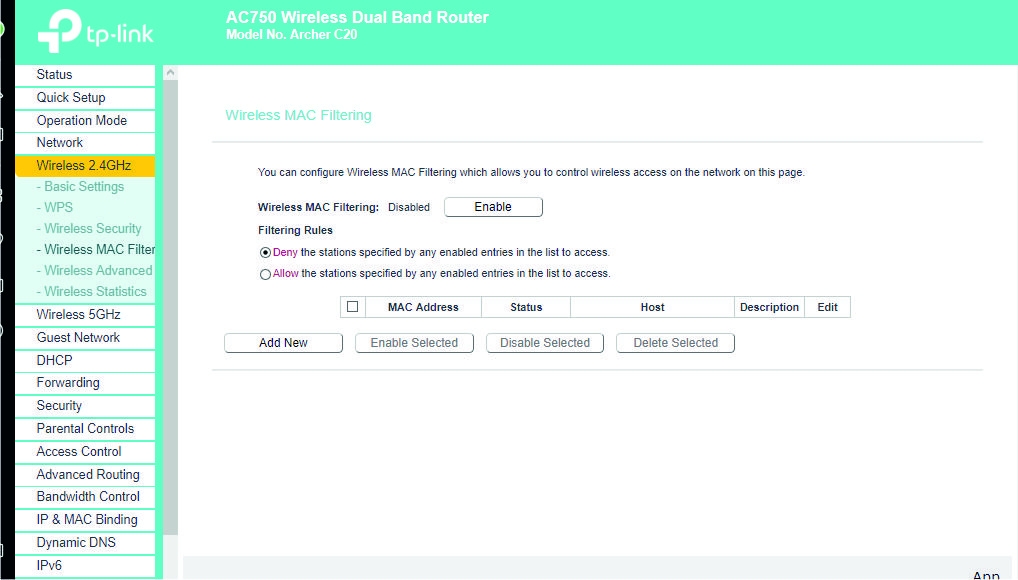
Router TP-Link Archer C20 2.4/5Ghz, trzy anteny, oddalony o około 6 metrów.
(wcześniej miałem Pentagram Cerberus - problem ten sam)
Modem Cisco EPC3008 (z TOYA)
Karta Wifi Mediatek MT7630E - sterownik zainstalował się sam podczas stawiania Windowsa 10. Na stronie Link nie ma nic o karcie Mediatek (?)
Wszystko mam na ustawieniach fabrycznych, tylko ostatnio DNS ustawiłem na 9.9.9.9. i 1.1.1.1., ale niewiele pomogło.
Ogólnie podejrzewam kartę Wfi w laptopie, ale jak udostępnię sobie Hotspota na telefonie komórkowym to mi internet na laptopie się nie przycina, a przynajmniej nie zauważyłem.
I teraz kilka ciekawostek. To samo działo się kiedy mieszkałem w innym miejscu i miałem innego dostawce internetu, ale ten sam laptop. Na starszym laptopie działało dobrze. Stąd podejrzenia na kartę Wifi w nowym laptopie. Może jednak sterownik?
Jak to sprawdzić i zdiagnozować problem?
Proszę o pomoc.
Pozostałe informacje:
----------------------------------------------------------------------------------------
MODEM
Model: EPC3008
Hardware Revision: 1.0
Serial Number: 262710044
MAC Address: e4:48:c7:c0:e6:20
Bootloader Revision: 2.3.1_R3
Current Software Revision: e3000-c1000r5593-170428c
Firmware Name: e3000-c1000r5593-170428c.bin
Firmware Build Time: Apr 28 11:11:50 2017
Cable Modem Status: Operational
Cable Modem State
DOCSIS Downstream Scanning: Completed
DOCSIS Ranging: Completed
DOCSIS DHCP: Completed
DOCSIS TFTP: Completed
DOCSIS Data Reg Complete: Completed
DOCSIS Privacy: Enabled
---------------------------------------------------------------------------------------
ROUTER
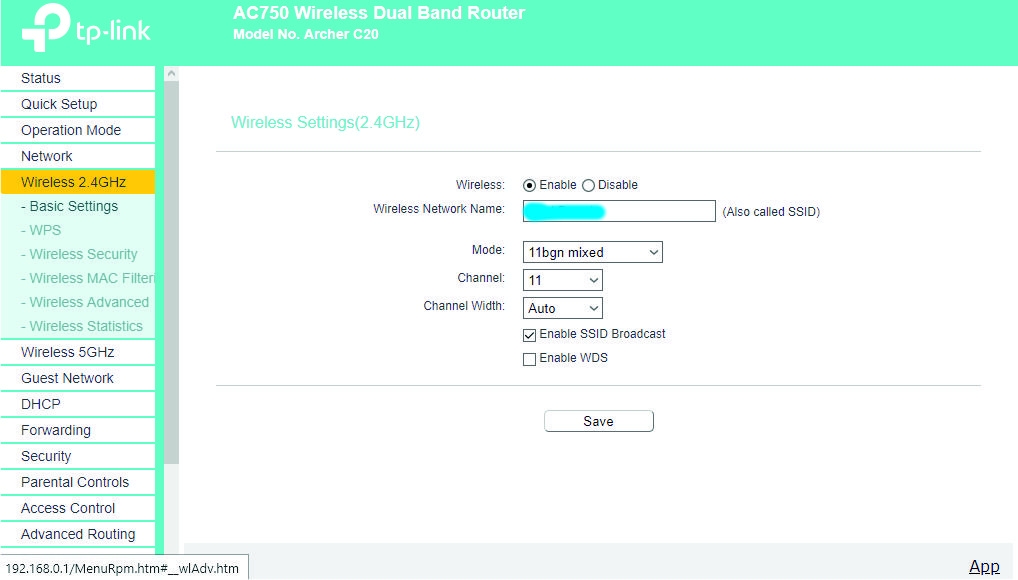
WIFI 2.4GHz
Operation Mode:Router
Wireless Radio:Enabled
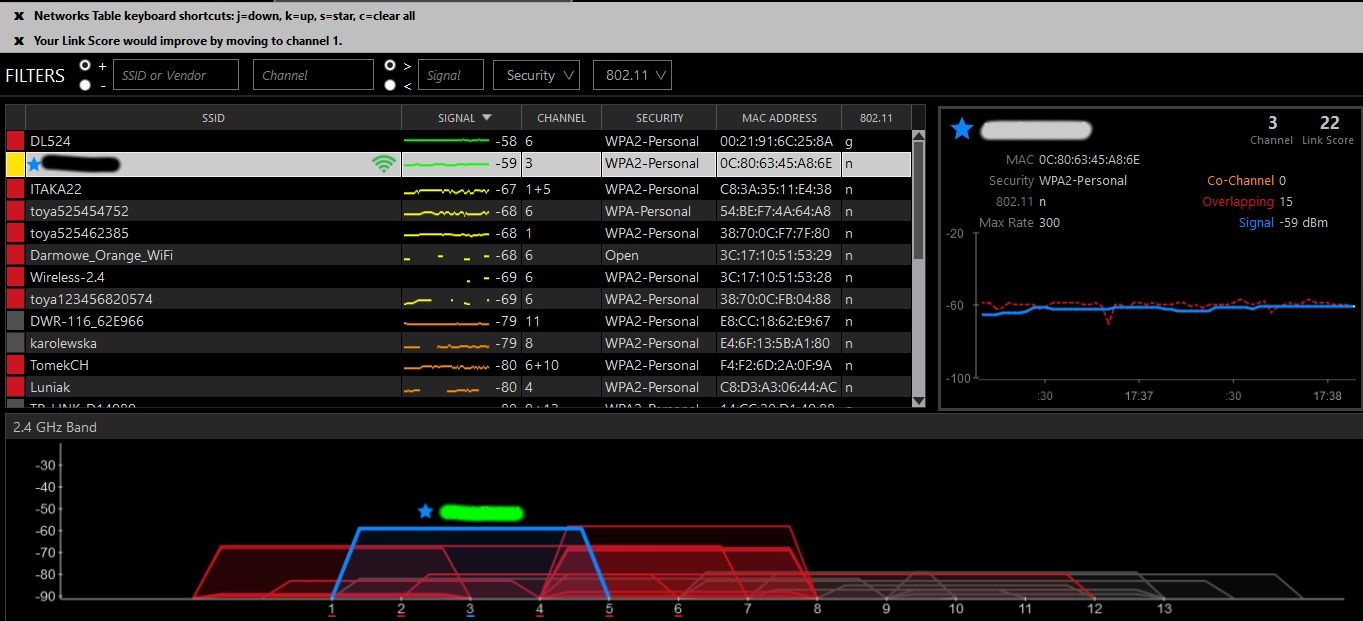
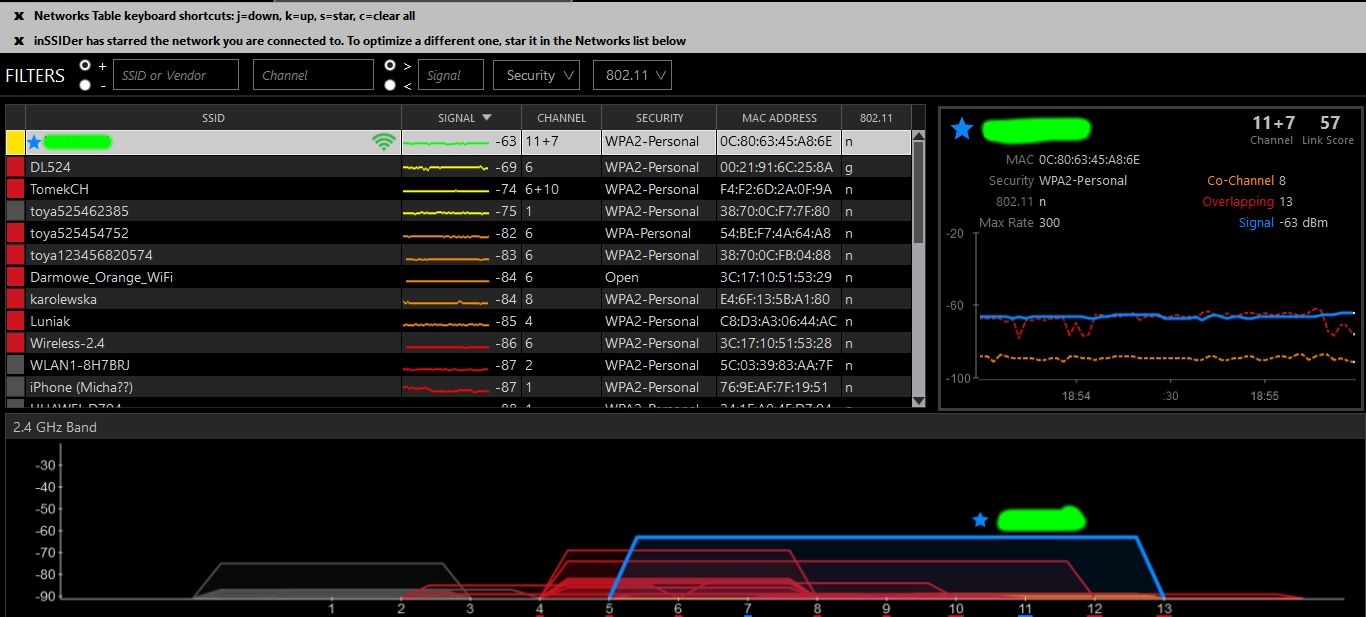
Name(SSID):**************
Mode:11bgn mixed
Channel:Auto(Channel 3)
Channel Width:Auto
MAC Address:0C:80:63:45:A8:6E
WDS Status:Disabled
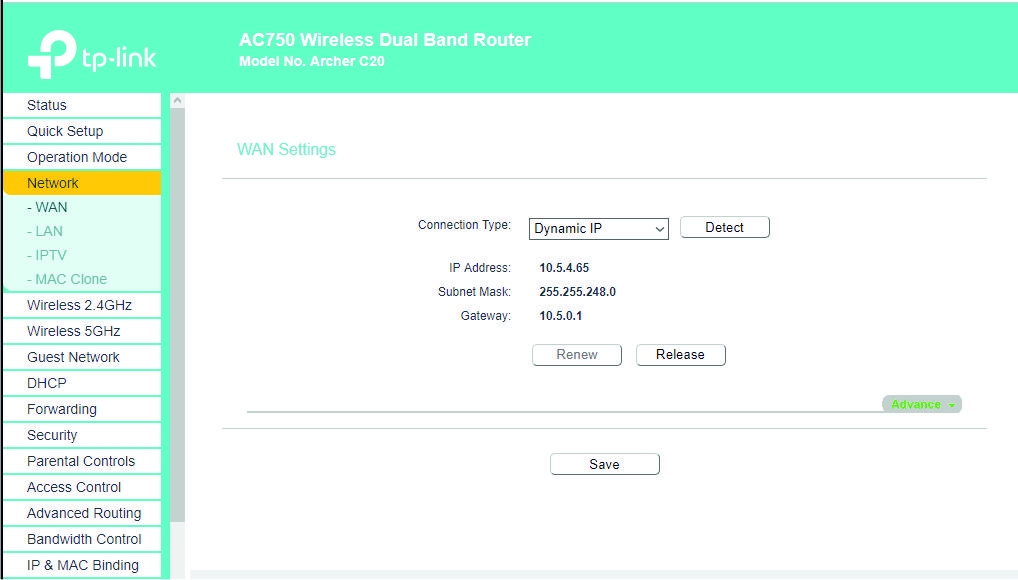
WAN
MAC Address:0C:80:63:45:A8:6F
IP Address:10.5.4.65(Dynamic IP)
Subnet Mask:255.255.248.0
Default Gateway:10.5.0.1
DNS Server:217.113.224.35 217.113.224.135
WAN MAC Address:
0C:80:63:45:A8:6F
Your PC's MAC Address:
40:B8:9A:00:24:EB
--------------------------------------------------------------------------------------------
IPCONFIG /ALL
Windows IP Configuration
Host Name . . . . . . . . . . . . : DESKTOP-N13G8O8
Primary Dns Suffix . . . . . . . :
Node Type . . . . . . . . . . . . : Hybrid
IP Routing Enabled. . . . . . . . : No
WINS Proxy Enabled. . . . . . . . : No
Ethernet adapter Ethernet:
Media State . . . . . . . . . . . : Media disconnected
Connection-specific DNS Suffix . :
Description . . . . . . . . . . . : Realtek PCIe GBE Family Controller
Physical Address. . . . . . . . . : 1C-B7-2C-8F-E2-0A
DHCP Enabled. . . . . . . . . . . : Yes
Autoconfiguration Enabled . . . . : Yes
Wireless LAN adapter Połączenie lokalne* 1:
Media State . . . . . . . . . . . : Media disconnected
Connection-specific DNS Suffix . :
Description . . . . . . . . . . . : Microsoft Wi-Fi Direct Virtual Adapter
Physical Address. . . . . . . . . : 40-B8-9A-00-24-ED
DHCP Enabled. . . . . . . . . . . : Yes
Autoconfiguration Enabled . . . . : Yes
Wireless LAN adapter Połączenie lokalne* 2:
Media State . . . . . . . . . . . : Media disconnected
Connection-specific DNS Suffix . :
Description . . . . . . . . . . . : Microsoft Wi-Fi Direct Virtual Adapter #2
Physical Address. . . . . . . . . : 40-B8-9A-00-24-EE
DHCP Enabled. . . . . . . . . . . : Yes
Autoconfiguration Enabled . . . . : Yes
Wireless LAN adapter Wi-Fi:
Connection-specific DNS Suffix . :
Description . . . . . . . . . . . : Mediatek MT7630E 802.11bgn Wi-Fi Adapter
Physical Address. . . . . . . . . : 40-B8-9A-00-24-EB
DHCP Enabled. . . . . . . . . . . : Yes
Autoconfiguration Enabled . . . . : Yes
Link-local IPv6 Address . . . . . : fe80::826:f407:1e67:89ec%18(Preferred)
IPv4 Address. . . . . . . . . . . : 192.168.0.102(Preferred)
Subnet Mask . . . . . . . . . . . : 255.255.255.0
Lease Obtained. . . . . . . . . . : poniedziałek, 7 stycznia 2019 15:19:08
Lease Expires . . . . . . . . . . : poniedziałek, 7 stycznia 2019 23:19:16
Default Gateway . . . . . . . . . : 192.168.0.1
DHCP Server . . . . . . . . . . . : 192.168.0.1
DHCPv6 IAID . . . . . . . . . . . : 155236506
DHCPv6 Client DUID. . . . . . . . : 00-01-00-01-23-B9-53-29-1C-B7-2C-8F-E2-0A
DNS Servers . . . . . . . . . . . : 9.9.9.9
1.1.1.1
NetBIOS over Tcpip. . . . . . . . : Enabled
Ethernet adapter Połączenie sieciowe Bluetooth:
Media State . . . . . . . . . . . : Media disconnected
Connection-specific DNS Suffix . :
Description . . . . . . . . . . . : Bluetooth Device (Personal Area Network)
Physical Address. . . . . . . . . : 40-B8-9A-00-24-EC
DHCP Enabled. . . . . . . . . . . : Yes
Autoconfiguration Enabled . . . . : Yes
Na speedtescie wychodzi zazwyczaj
Ping - 12ms
DL - 30MB/s (taki mam pakiet od ISP)
UP - 6MB/s (taki mam pakiet od ISP)
Jak jest problem, to ping spada do 300ms, strony bardzo wolno się ładują, filmy na YT przycinają się. Po jakimś czasie wszystko wraca do normy.
Mój obecny system to WIN 10 (na WIN 7 był podobny problem)
Laptop ASUS R556LJ
Router TP-Link Archer C20 2.4/5Ghz, trzy anteny, oddalony o około 6 metrów.
(wcześniej miałem Pentagram Cerberus - problem ten sam)
Modem Cisco EPC3008 (z TOYA)
Karta Wifi Mediatek MT7630E - sterownik zainstalował się sam podczas stawiania Windowsa 10. Na stronie Link nie ma nic o karcie Mediatek (?)
Wszystko mam na ustawieniach fabrycznych, tylko ostatnio DNS ustawiłem na 9.9.9.9. i 1.1.1.1., ale niewiele pomogło.
Ogólnie podejrzewam kartę Wfi w laptopie, ale jak udostępnię sobie Hotspota na telefonie komórkowym to mi internet na laptopie się nie przycina, a przynajmniej nie zauważyłem.
I teraz kilka ciekawostek. To samo działo się kiedy mieszkałem w innym miejscu i miałem innego dostawce internetu, ale ten sam laptop. Na starszym laptopie działało dobrze. Stąd podejrzenia na kartę Wifi w nowym laptopie. Może jednak sterownik?
Jak to sprawdzić i zdiagnozować problem?
Proszę o pomoc.
Pozostałe informacje:
----------------------------------------------------------------------------------------
MODEM
Model: EPC3008
Hardware Revision: 1.0
Serial Number: 262710044
MAC Address: e4:48:c7:c0:e6:20
Bootloader Revision: 2.3.1_R3
Current Software Revision: e3000-c1000r5593-170428c
Firmware Name: e3000-c1000r5593-170428c.bin
Firmware Build Time: Apr 28 11:11:50 2017
Cable Modem Status: Operational
Cable Modem State
DOCSIS Downstream Scanning: Completed
DOCSIS Ranging: Completed
DOCSIS DHCP: Completed
DOCSIS TFTP: Completed
DOCSIS Data Reg Complete: Completed
DOCSIS Privacy: Enabled
---------------------------------------------------------------------------------------
ROUTER
WIFI 2.4GHz
Operation Mode:Router
Wireless Radio:Enabled
Name(SSID):**************
Mode:11bgn mixed
Channel:Auto(Channel 3)
Channel Width:Auto
MAC Address:0C:80:63:45:A8:6E
WDS Status:Disabled
WAN
MAC Address:0C:80:63:45:A8:6F
IP Address:10.5.4.65(Dynamic IP)
Subnet Mask:255.255.248.0
Default Gateway:10.5.0.1
DNS Server:217.113.224.35 217.113.224.135
WAN MAC Address:
0C:80:63:45:A8:6F
Your PC's MAC Address:
40:B8:9A:00:24:EB
--------------------------------------------------------------------------------------------
IPCONFIG /ALL
Windows IP Configuration
Host Name . . . . . . . . . . . . : DESKTOP-N13G8O8
Primary Dns Suffix . . . . . . . :
Node Type . . . . . . . . . . . . : Hybrid
IP Routing Enabled. . . . . . . . : No
WINS Proxy Enabled. . . . . . . . : No
Ethernet adapter Ethernet:
Media State . . . . . . . . . . . : Media disconnected
Connection-specific DNS Suffix . :
Description . . . . . . . . . . . : Realtek PCIe GBE Family Controller
Physical Address. . . . . . . . . : 1C-B7-2C-8F-E2-0A
DHCP Enabled. . . . . . . . . . . : Yes
Autoconfiguration Enabled . . . . : Yes
Wireless LAN adapter Połączenie lokalne* 1:
Media State . . . . . . . . . . . : Media disconnected
Connection-specific DNS Suffix . :
Description . . . . . . . . . . . : Microsoft Wi-Fi Direct Virtual Adapter
Physical Address. . . . . . . . . : 40-B8-9A-00-24-ED
DHCP Enabled. . . . . . . . . . . : Yes
Autoconfiguration Enabled . . . . : Yes
Wireless LAN adapter Połączenie lokalne* 2:
Media State . . . . . . . . . . . : Media disconnected
Connection-specific DNS Suffix . :
Description . . . . . . . . . . . : Microsoft Wi-Fi Direct Virtual Adapter #2
Physical Address. . . . . . . . . : 40-B8-9A-00-24-EE
DHCP Enabled. . . . . . . . . . . : Yes
Autoconfiguration Enabled . . . . : Yes
Wireless LAN adapter Wi-Fi:
Connection-specific DNS Suffix . :
Description . . . . . . . . . . . : Mediatek MT7630E 802.11bgn Wi-Fi Adapter
Physical Address. . . . . . . . . : 40-B8-9A-00-24-EB
DHCP Enabled. . . . . . . . . . . : Yes
Autoconfiguration Enabled . . . . : Yes
Link-local IPv6 Address . . . . . : fe80::826:f407:1e67:89ec%18(Preferred)
IPv4 Address. . . . . . . . . . . : 192.168.0.102(Preferred)
Subnet Mask . . . . . . . . . . . : 255.255.255.0
Lease Obtained. . . . . . . . . . : poniedziałek, 7 stycznia 2019 15:19:08
Lease Expires . . . . . . . . . . : poniedziałek, 7 stycznia 2019 23:19:16
Default Gateway . . . . . . . . . : 192.168.0.1
DHCP Server . . . . . . . . . . . : 192.168.0.1
DHCPv6 IAID . . . . . . . . . . . : 155236506
DHCPv6 Client DUID. . . . . . . . : 00-01-00-01-23-B9-53-29-1C-B7-2C-8F-E2-0A
DNS Servers . . . . . . . . . . . : 9.9.9.9
1.1.1.1
NetBIOS over Tcpip. . . . . . . . : Enabled
Ethernet adapter Połączenie sieciowe Bluetooth:
Media State . . . . . . . . . . . : Media disconnected
Connection-specific DNS Suffix . :
Description . . . . . . . . . . . : Bluetooth Device (Personal Area Network)
Physical Address. . . . . . . . . : 40-B8-9A-00-24-EC
DHCP Enabled. . . . . . . . . . . : Yes
Autoconfiguration Enabled . . . . : Yes