


logo elektroda
logo elektroda
X
logo elektroda
REKLAMA
REKLAMA
Adblock/uBlockOrigin/AdGuard mogą powodować znikanie niektórych postów z powodu nowej reguły.

Firmware do Telefunken D43F287M4CW z MB130 i VESDUN43D_NF - reset ustawień obrazu

alsalepiramez 27 Mar 2025 09:45 603 7
REKLAMA
  • #1 21497195
    alsalepiramez
    Poziom 2  
    Posty: 4
    Hello,
    I’m looking for the original or compatible firmware for a Telefunken TV, model D43F287M4CW, based on MB130 mainboard and panel VESDUN43D_NF.

    The TV is currently not saving any picture settings. Every time it turns off, all image adjustments (color, white balance, etc.) are reset. Even after enabling Flash Write Debug in the service menu, the issue persists.

    I couldn’t find any update from the manufacturer (Vestel), and they confirmed they don’t provide software updates for this model.

    Any help with a working firmware or a dump file from a similar TV with MB130 and FHD panel would be very appreciated.

    Thanks in advance!


    AI: Could you please provide the current firmware version installed on your Telefunken TV?
    Firmware: V.7.53.83 (SVN: 252.85)
    UI Name: titanium
    Panel: VESDUN43D_NF
    MB: MB130

    AI: Have you tried any other troubleshooting steps besides enabling Flash Write Debug in the service menu? If so, what were they?
    Yes, I tried:
    - Resetting picture settings
    - Factory reset from service menu
    - Adjusting color settings and white balance manually
    - Enabling “Flash Write Debug”
    Still, no changes are saved after turning off the TV.
  • REKLAMA
  • #2 21497233
    yokoono51
    Poziom 29  
    Posty: 838
    Pomógł: 176
    Ocena: 322
    Panel VESDUN43D_NF ????.
  • REKLAMA
  • #3 21497270
    alsalepiramez
    Poziom 2  
    Posty: 4
    >>21497233

    Yes, the panel is VESDUN43D_NF. I double-checked it in the service menu.
    Thank you for your attention and support!
  • REKLAMA
  • #4 21497312
    yokoono51
    Poziom 29  
    Posty: 838
    Pomógł: 176
    Ocena: 322
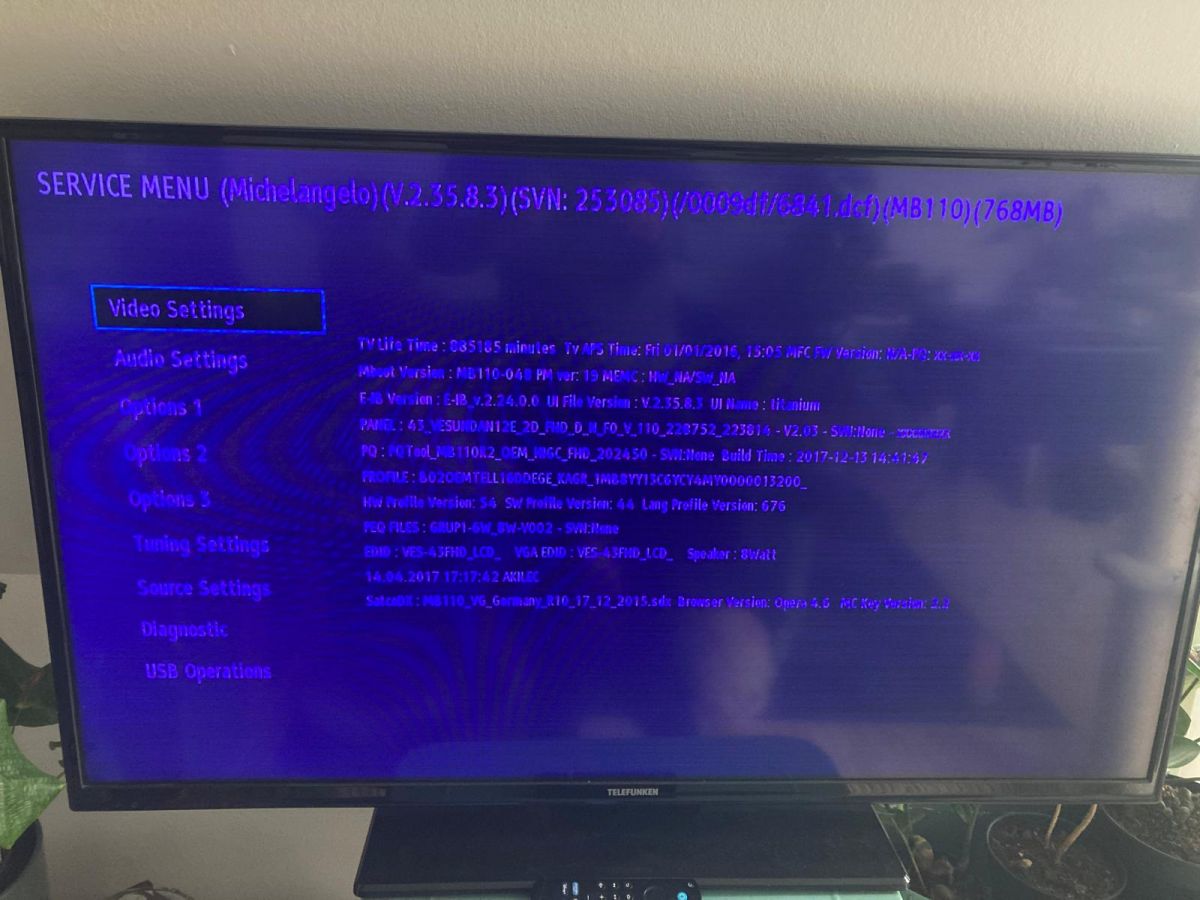
    Post a picture of the service menu.
  • REKLAMA
  • #5 21497337
    alsalepiramez
    Poziom 2  
    Posty: 4
    Here is the picture of the service menu from my Telefunken D43F287M4CW TV.

    Mainboard: MB110
    Firmware Version: V2.35.8.3
    Panel: 43_VESDUNIAN12E_2D_FHD_D_N_F_V
    UI Name: Titanium
    PQ: PQTool_MB1102_OEM_HIGC_FHD
    Build Time: 2017-12-13
    Browser Version: Opera 4.6

    Let me know if you need any other information. Thank you again for your help!


    Menu serwisowe Telefunken D43F287M4CW pokazane na ekranie telewizora.
  • #6 21497427
    yokoono51
    Poziom 29  
    Posty: 838
    Pomógł: 176
    Ocena: 322
    1. Main is 17MB110 not 17MB130
    2. Panel is VES430UNDA-2D-N12 not VESDUN43D_NF
    3. Software version is 2.35.8.3 not V.7.53.83
    The image is blue. You have backlight problems.

    I have this. It installs with MENU 1505. Unarchived. Try at your own risk.
    Załączniki:
    • 17MB110 titaniumV.2.35.36.0.zip (107.61 MB) Musisz być zalogowany, aby pobrać ten załącznik.
  • #7 21498710
    alsalepiramez
    Poziom 2  
    Posty: 4
    Hi again, thank you for your help so far.
    I followed your instructions and flashed the USB with the firmware file (upgrade_mb110.bin), then connected it to the TV and powered it on.
    However, the TV just booted normally — it didn’t enter the update mode.

    I also opened the back of the TV to look for a button labeled “SW2” or any reset/update button on the mainboard, but I couldn’t find any visible switch. It seems like my MB110 board doesn’t have a physical SW2 button, or it’s not labeled.

    Do you know if there’s any other way to trigger the firmware update on this board? Maybe a key combination or a hidden method?

    Thanks again for your support!
  • #8 21498742
    yokoono51
    Poziom 29  
    Posty: 838
    Pomógł: 176
    Ocena: 322
    I wrote:It installs with MENU 1505.

Podsumowanie tematu

LABEL_AI_GENERATED
Dyskusja dotyczy problemu z telewizorem Telefunken D43F287M4CW, wyposażonym w główną płytę MB130 i panel VESDUN43D_NF, który nie zapisuje ustawień obrazu po wyłączeniu. Użytkownik poszukuje oryginalnego lub kompatybilnego firmware’u, gdyż producent (Vestel) nie udostępnia aktualizacji. Po weryfikacji okazało się, że faktyczna płyta główna to MB110, a panel to VES430UNDA-2D-N12, a wersja oprogramowania to 2.35.8.3, a nie podane pierwotnie dane. Zdiagnozowano problem z podświetleniem i nieprawidłowym wyświetlaniem obrazu (niebieska barwa). Zaproponowano firmware dla płyty MB110, który instaluje się poprzez menu serwisowe (MENU 1505). Użytkownik próbował aktualizacji przez USB, jednak telewizor nie wszedł w tryb aktualizacji, a na płycie nie znaleziono fizycznego przycisku resetu/aktualizacji (SW2). Wskazano, że instalacja firmware wymaga uruchomienia menu 1505, jednak brak jest potwierdzenia skuteczności tej metody w dyskusji.
Podsumowanie AI na podstawie dyskusji. Może zawierać błędy.
REKLAMA