







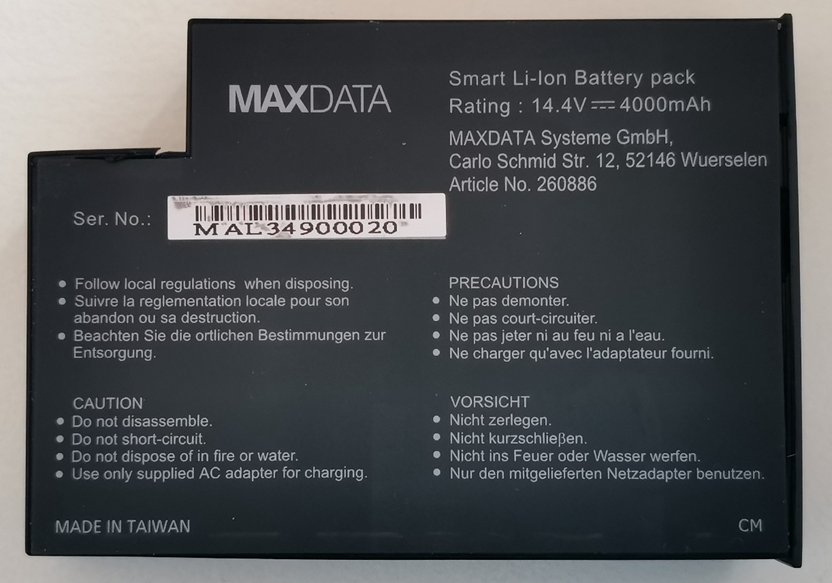
This was my first time replacing battery cells, so it wasn't an easy job. First, I was looking for affordable and high-quality 18615 cells. I decided not to buy cells on Aliexpress.com and other Chinese platforms. Among European e-shops, I was interested in NKON.nl, which has great prices and good reviews. The delivery time was longer, but I chose cells for a good price with the largest capacity that were not in stock. I tried to buy as cheaply as possible because I didn't know if the battery would work after replacing the cells. So I chose cells with a capacity of 3400mAh, compared to the original battery capacity of 4000mAh.
The threads on this forum helped me with programming the battery driver, and especially the user Misiozol, to whom I would like to thank.
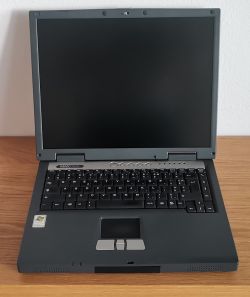
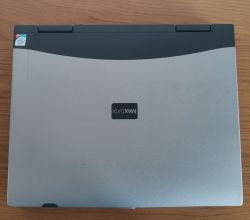
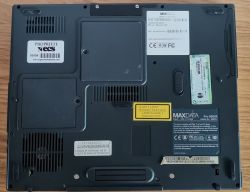
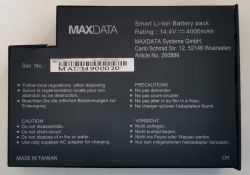
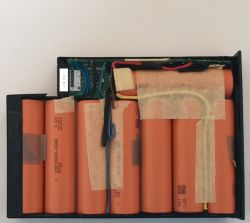
Here is my procedure for replacing battery cells:
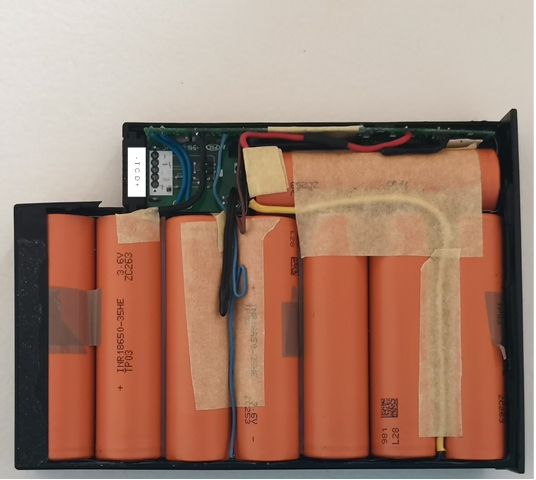
1. Disassemble the old battery.
2. Although the battery is mostly dead, the old cells need to be desoldered in this order:
PLUS (LP1)
LP2
LP3
LP4
MINUS (LP5)
3. Now we need to find out the battery information
Voltage: 14.4V
Capacity: 4000mAh
Cells: Li-On
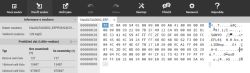
4. Now we need to find out the controller information
Driver: BQ2060
EEPROM: Atmel 24C01
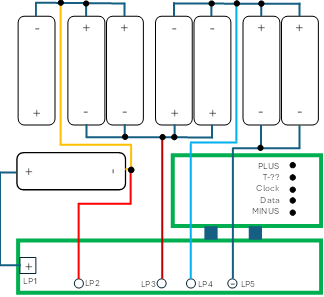
5. Connecting the cells in the battery
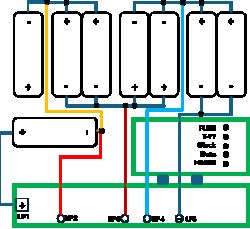
6. After desoldering the cells, assemble a new set of cells of the same capacity, ideally from fully charged cells.
7. Now we need to read the old data from the Atmel 24C01 EEPROM. To read the data I used Arduino UNO in collaboration with Google AI, which created the scripts.
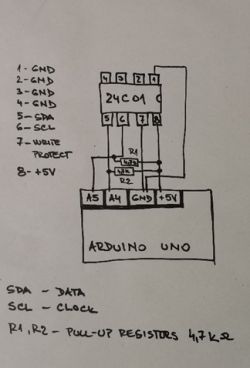
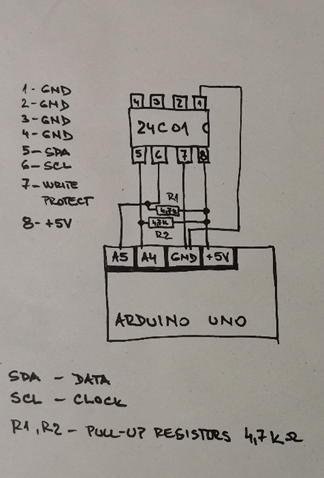
8. To read the data, you need to solder wires to the EEPROM. Use this schematic to connect the Arduino and Eeprom
a. If I want to write data to the EEPROM, I need to connect pin7 (WP – write protection) on the EEPROM to the GND pin on the Arduino UNO.
9. Connect Arduino to PC using USB cable.
Use this script to read data from EEPROM
file: 1_reading_original_data_from_EEPROM_atmel_24C01
10. The data needs to be converted to a file.bin
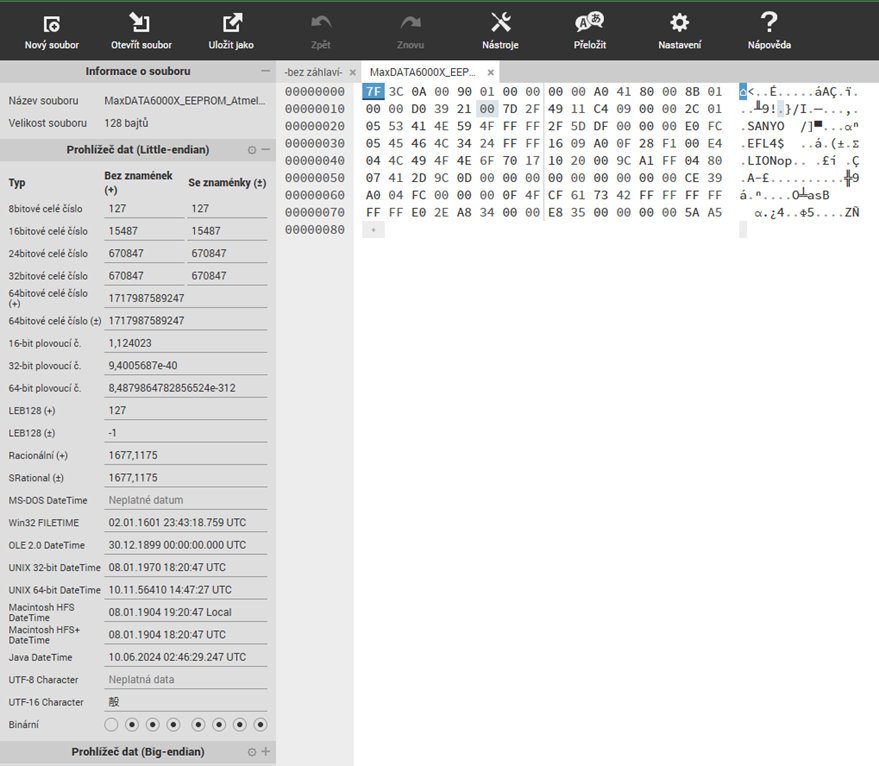
I couldn't find a better way than to find a similar bin file that was read from a driver based on the BQ2060 and Atmel 24C01. I opened this bin file in the web application hexed.it and manually overwrote the values that I read from the Arduino. Then I saved the file.
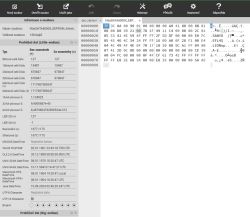
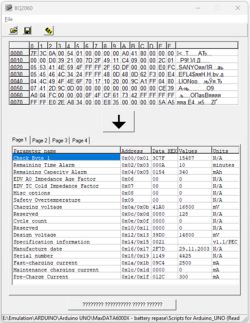
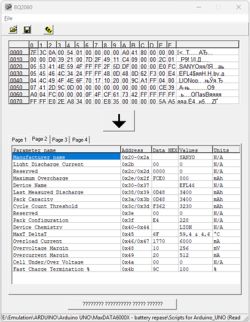
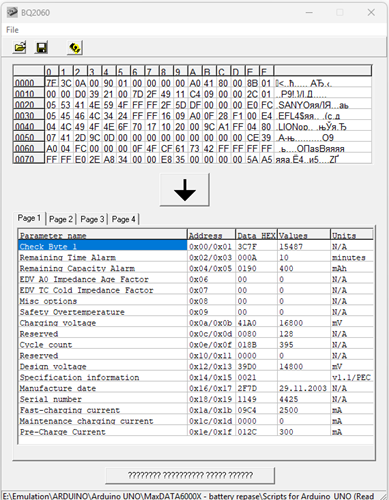
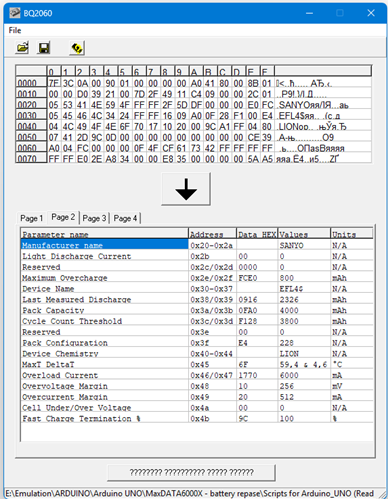
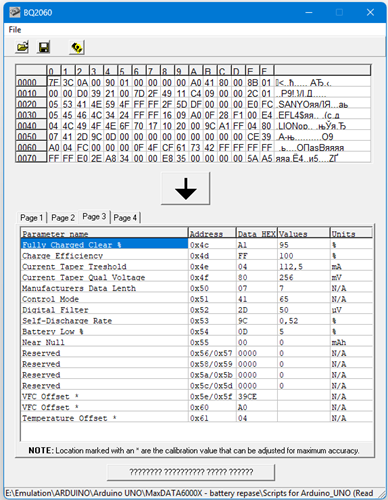
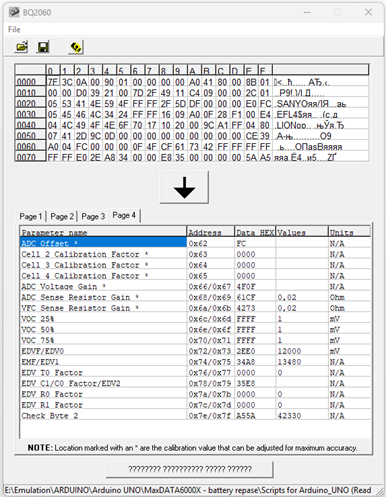
11. Then I used the BQ2060.exe program to interpret the bin file with battery data.
file: MaxDataPro6000X_EEPROM_Atmel24C01_original_dump.bin
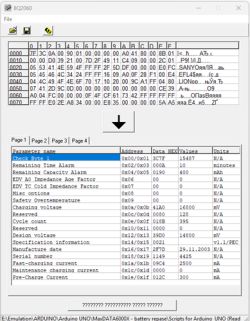
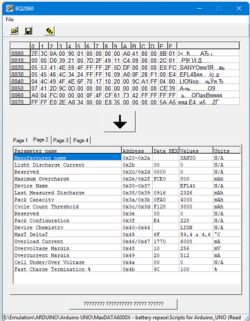
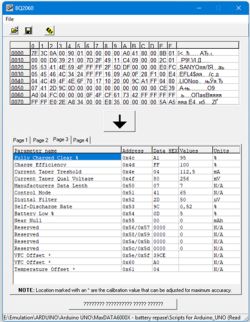
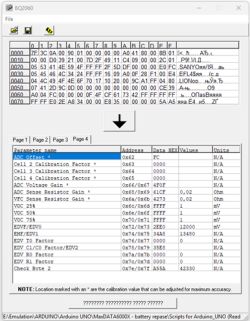
12. In my case, I need to edit this items
Cycle Count – from 395 to 0
Pack Capacity – from 4000 to 3400 (I have 3400mAh cells)
Last Measured discharge – from 2326 to 3400
Cycle Count Treshhold – from 3800 to 3230
Remaining Capacity Alarm – from 400 to 340
The values need to be converted to HEX and written to the addresses in the correct order if the value is inserted into two addresses. Google AI mode helped me with the calculation. Or in a trial and error way.
Please note, the Cycle Count Treshhold value is calculated as 65536 – 61736 = 3800
13. Make a copy of the file MaxDataPro6000X_EEPROM_Atmel24C01_original_dump.bin and rename to MaxDataPro6000X_EEPROM24C01_reset_dump.bin
14.Open the file in hexed.it, overwrite the necessary values, then save.
15. Open the file in the BQ2060.exe program and check all values.
16. If everything is OK, write the values to the EEPROM using Arduino together with the script 3_writing_reset_data_to_EEPROM_atmel_24C01.ino
The script reads the original data, writes the changes, and then reads the entire modified EEPROM. I compare this data with the data I wrote using hexed.it.
If they are identical, everything is fine.
17. Then I carefully soldered the battery cells back to the driver in the reverse order of how I had unsoldered the cells at the beginning:
MINUS (LP5)
LP4
LP3
LP2
PLUS (LP1)
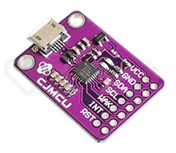
18. To check that EEPROM data is readable from the battery connector, I also read the data with the DJI Battery Killer program using the CP2112 module.
19. I saved the data to a file
3_writing_reset_data_to_EEPROM_atmel_24C01_-_DJI_Battery_Killer.txt
The data is not exact, but we read it directly from the battery connector.
Connect these contacts together
Battery CP2112
GND - GND
DATA - SDA
CLOCK - SCL
Caution! Do not connect the VCC terminal and the +5V terminal on the battery.
This is just to verify that the battery is communicating correctly. If an error occurs while reading data using DJI Battery Killer, the battery will not communicate with the laptop and the driver may blow the thermal fuse for safety reasons.
20. If everything is fine, I insert the battery into the laptop. I connect the laptop to the power source. But I do not turn the laptop on and let the battery charge like this. If the battery is charged, I can turn the laptop on. After the first turn on the battery shows 100%. I let the battery discharge 3 times to the point where the laptop turns off. This calibrates the battery.
All files :
The threads on this forum helped me with programming the battery driver, and especially the user Misiozol, to whom I would like to thank.
Here is my procedure for replacing battery cells:
1. Disassemble the old battery.
2. Although the battery is mostly dead, the old cells need to be desoldered in this order:
PLUS (LP1)
LP2
LP3
LP4
MINUS (LP5)
3. Now we need to find out the battery information
Voltage: 14.4V
Capacity: 4000mAh
Cells: Li-On
4. Now we need to find out the controller information
Driver: BQ2060
EEPROM: Atmel 24C01
5. Connecting the cells in the battery
6. After desoldering the cells, assemble a new set of cells of the same capacity, ideally from fully charged cells.
7. Now we need to read the old data from the Atmel 24C01 EEPROM. To read the data I used Arduino UNO in collaboration with Google AI, which created the scripts.
8. To read the data, you need to solder wires to the EEPROM. Use this schematic to connect the Arduino and Eeprom
a. If I want to write data to the EEPROM, I need to connect pin7 (WP – write protection) on the EEPROM to the GND pin on the Arduino UNO.
9. Connect Arduino to PC using USB cable.
Use this script to read data from EEPROM
file: 1_reading_original_data_from_EEPROM_atmel_24C01
10. The data needs to be converted to a file.bin
I couldn't find a better way than to find a similar bin file that was read from a driver based on the BQ2060 and Atmel 24C01. I opened this bin file in the web application hexed.it and manually overwrote the values that I read from the Arduino. Then I saved the file.
11. Then I used the BQ2060.exe program to interpret the bin file with battery data.
file: MaxDataPro6000X_EEPROM_Atmel24C01_original_dump.bin
12. In my case, I need to edit this items
Cycle Count – from 395 to 0
Pack Capacity – from 4000 to 3400 (I have 3400mAh cells)
Last Measured discharge – from 2326 to 3400
Cycle Count Treshhold – from 3800 to 3230
Remaining Capacity Alarm – from 400 to 340
The values need to be converted to HEX and written to the addresses in the correct order if the value is inserted into two addresses. Google AI mode helped me with the calculation. Or in a trial and error way.
Please note, the Cycle Count Treshhold value is calculated as 65536 – 61736 = 3800
13. Make a copy of the file MaxDataPro6000X_EEPROM_Atmel24C01_original_dump.bin and rename to MaxDataPro6000X_EEPROM24C01_reset_dump.bin
14.Open the file in hexed.it, overwrite the necessary values, then save.
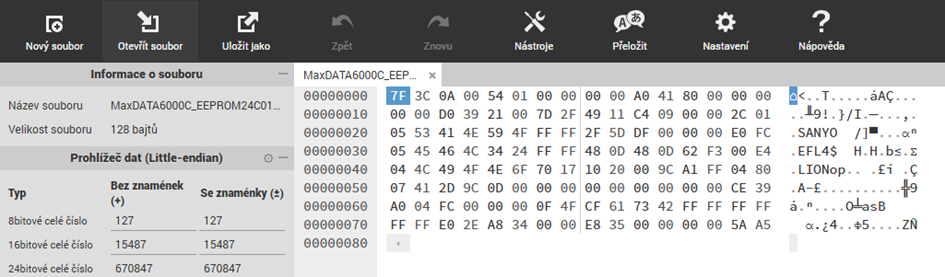
15. Open the file in the BQ2060.exe program and check all values.
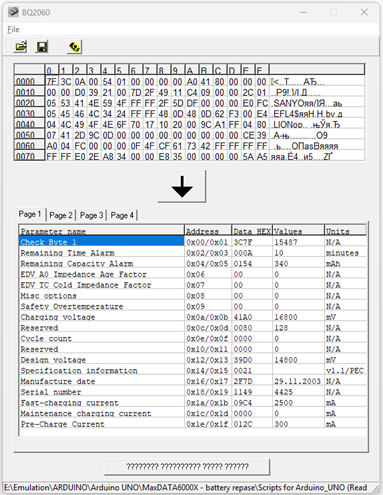
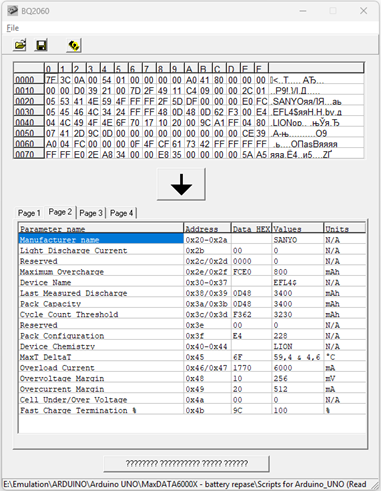
16. If everything is OK, write the values to the EEPROM using Arduino together with the script 3_writing_reset_data_to_EEPROM_atmel_24C01.ino
The script reads the original data, writes the changes, and then reads the entire modified EEPROM. I compare this data with the data I wrote using hexed.it.
If they are identical, everything is fine.
17. Then I carefully soldered the battery cells back to the driver in the reverse order of how I had unsoldered the cells at the beginning:
MINUS (LP5)
LP4
LP3
LP2
PLUS (LP1)
18. To check that EEPROM data is readable from the battery connector, I also read the data with the DJI Battery Killer program using the CP2112 module.
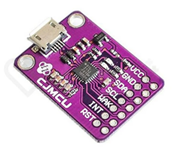
19. I saved the data to a file
3_writing_reset_data_to_EEPROM_atmel_24C01_-_DJI_Battery_Killer.txt
The data is not exact, but we read it directly from the battery connector.
Connect these contacts together
Battery CP2112
GND - GND
DATA - SDA
CLOCK - SCL
Caution! Do not connect the VCC terminal and the +5V terminal on the battery.
This is just to verify that the battery is communicating correctly. If an error occurs while reading data using DJI Battery Killer, the battery will not communicate with the laptop and the driver may blow the thermal fuse for safety reasons.
20. If everything is fine, I insert the battery into the laptop. I connect the laptop to the power source. But I do not turn the laptop on and let the battery charge like this. If the battery is charged, I can turn the laptop on. After the first turn on the battery shows 100%. I let the battery discharge 3 times to the point where the laptop turns off. This calibrates the battery.
All files :
