1. Napisz program / zdobądź wsad do procka *.hex.
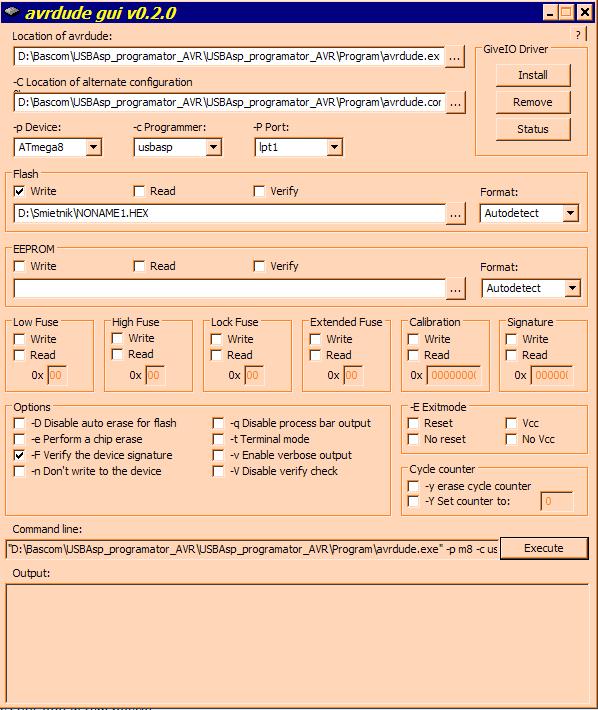
2. Uruchom nakładkę na AVRdude - avrdude-gui.exe.
3. Podaj ścieżki dostępu do dude i do pliku konfiguracyjnego.
4. Wybierz proca i programator.
5. Podaj ścieżkę do hex'a.
6. Kliknij Execute.
7. Poczekaj do końca programowania.
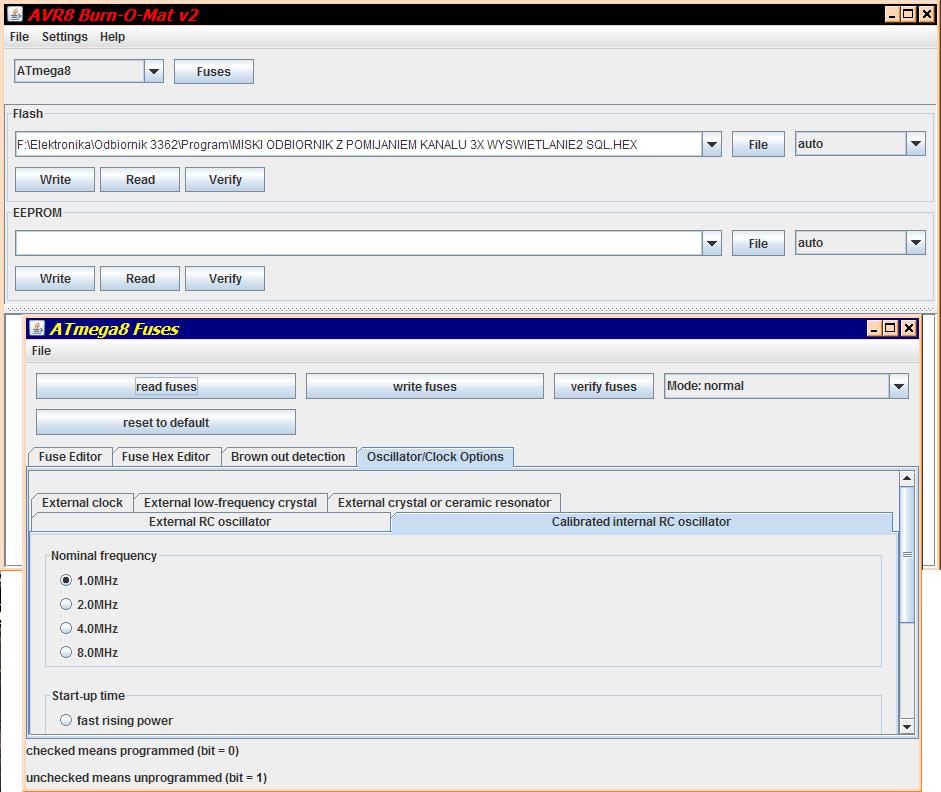
A tu jeszcze lepsza nakładka wymagająca jednak zainstalowania Javy
Przy programowaniu procków z zegarem 1MHz trzeba przełączyć programator na wolniejszą pracę.
Nie napisałeś w jakim systemie operacyjnym Jeżeli to jakaś dystrybucja linuxa to w terminalu:
1.sudo apt-get install avrdude (powoduje zainstalowanie avrdude)
2.sudo avrdude -c usbasp -p m8 -U flash:w:twoj_plik.hex (spowoduje zaprogramowanie procesora plikiem twoj_plik,hex)
P.S.
Oczywiście w czasie procesu programowania musisz sie znaleźć w katalogu, w którym znajduje się plik twoj_plik,hex (aby to wykonać w terminalu cd twoj_katalog)
avrdude.exe: Device signature = 0x000000
avrdude.exe: Yikes! Invalid device signature.
avrdude.exe: Expected signature for ATMEGA8 is 1E 93 07
avrdude.exe: NOTE: FLASH memory has been specified, an erase cycle will be performed
To disable this feature, specify the -D option.
avrdude.exe: erasing chip
avrdude.exe: error: programm enable: target doesn't answer. 1
avrdude.exe: reading input file "C:\Documents and Settings\ja\Pulpit\rgb.hex"
avrdude.exe: input file C:\Documents and Settings\ja\Pulpit\rgb.hex auto detected as Intel Hex
avrdude.exe: writing flash (64 bytes):
avrdude.exe: 64 bytes of flash written
avrdude.exe: verifying flash memory against C:\Documents and Settings\ja\Pulpit\rgb.hex:
avrdude.exe: load data flash data from input file C:\Documents and Settings\ja\Pulpit\rgb.hex:
avrdude.exe: input file C:\Documents and Settings\ja\Pulpit\rgb.hex auto detected as Intel Hex
avrdude.exe: input file C:\Documents and Settings\ja\Pulpit\rgb.hex contains 64 bytes
avrdude.exe: reading on-chip flash data:
Dyskusja dotyczy programowania mikrokontrolera ATmega8 za pomocą programatora USBasp i narzędzia AVRdude. Podstawowe kroki obejmują przygotowanie pliku wsadowego *.hex, uruchomienie nakładki graficznej na AVRdude (np. avrdude-gui.exe lub AVR8 Burn-O-Mat wymagającej Javy), ustawienie ścieżek do AVRdude i pliku hex, wybór procesora i programatora, a następnie wykonanie programowania. W przypadku systemów Linux można użyć terminala z poleceniem avrdude -c usbasp -p m8 -U flash:w:plik.hex. Problemy zgłaszane to brak rozpoznania programatora "usbasp" w starszych wersjach AVRdude, co wymaga pobrania nowszej wersji obsługującej USBasp (np. avrdude5.5). Dodatkowo pojawiły się błędy inicjalizacji i nieprawidłowego odczytu sygnatury urządzenia, co może wskazywać na problemy z połączeniem lub konfiguracją programatora. Przy programowaniu mikrokontrolerów z zegarem 1 MHz zaleca się zmniejszenie prędkości pracy programatora. Podsumowanie AI na podstawie dyskusji. Może zawierać błędy.





 Jeżeli to jakaś dystrybucja linuxa to w terminalu:


