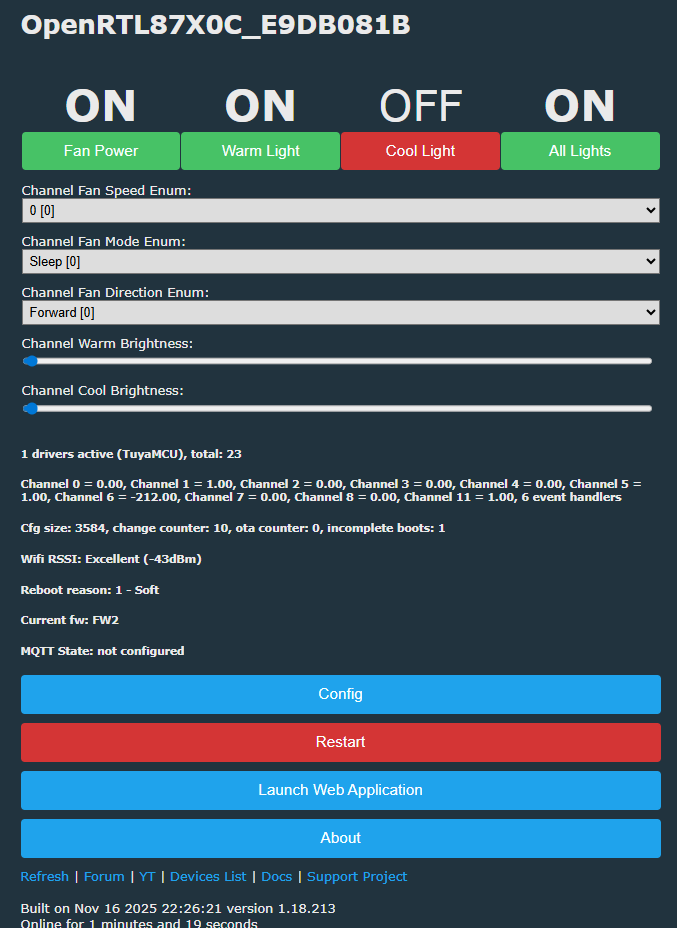
Witam, z powodzeniem przeportowałem exploit cloudcutter na RTL8720CF i sflashowałem mój wentylator sufitowy Carro za pomocą openbeken.
Jest to wentylator sufitowy TuyaMCU z podłączonym do niego światłem, z niezależnie sterowaną "białą" i "ciepłą" diodą LED. Wentylator jest również odwracalny i ma tryb oscylacji. Podobno istnieje timer oparty na DPID, ale nic, czym mógłbym sterować z pilota i nie jestem pewien, co robi.
Oto moja konfiguracja, którą zhakowałem: (autoexec.bat)
Nie jestem z niej w pełni zadowolony, ponieważ Fan Speed jest enumem, ale tak naprawdę powinna to być wartość między 0 a 10, po prostu nie mogłem wymyślić, jak sprawić, by działała.
Dla porównania, oto lokalna konfiguracja tuya, która pasuje do tego, co mam: https://github.com/make-all/tuya-local/issues/930
a także device.json z cloudcutter:
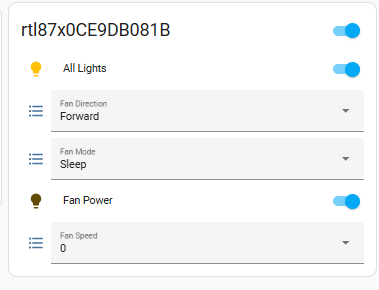
EDIT: Próbowałem wyczyścić mój skrypt, teraz wygląda na to, że zepsuł interfejs użytkownika. Nie mogę załadować strony bez resetowania połączenia. Widzę również, że uważa wentylator za ściemniacz, a nie wentylator w HomeAssistant:
EDIT2: Zepsuty interfejs użytkownika nie był spowodowany przez mój obecny skrypt, to była pozostałość konfiguracji. Po uruchomieniu polecenia ClearIO wszystko zaczęło działać ponownie. Oto mój obecny skrypt. Jedyne problemy, jakie mam, to prędkość wentylatora jako enum (bardziej drobna irytacja) oraz fakt, że homeassistant jest całkowicie zdezorientowany, co jest czym. Myśli, że jasność koloru jest ściemniaczem dla wentylatora (który myśli, że jest żarówką)! Byłoby miło, gdyby traktował to po prostu jako pojedynczą żarówkę z regulowaną jasnością i temperaturą barwową.
Jest to wentylator sufitowy TuyaMCU z podłączonym do niego światłem, z niezależnie sterowaną "białą" i "ciepłą" diodą LED. Wentylator jest również odwracalny i ma tryb oscylacji. Podobno istnieje timer oparty na DPID, ale nic, czym mógłbym sterować z pilota i nie jestem pewien, co robi.
Oto moja konfiguracja, którą zhakowałem: (autoexec.bat)
startDriver TuyaMCU

# ------------------------------------------------------
# Fan power (DP 1)
# ------------------------------------------------------
setChannelType 1 Toggle
SetChannelLabel 1 "Fan Power"
linkTuyaMCUOutputToChannel 1 1 1


# ------------------------------------------------------
# Fan speed (DP 3) - enum 1..10
# ------------------------------------------------------
setChannelType 2 Enum
SetChannelLabel 2 "Fan Speed"
SetChannelEnum 2 0:0 1:1 2:2 3:3 4:4 5:5 6:6 7:7 8:8 9:9 10:10
linkTuyaMCUOutputToChannel 3 4 2


# ------------------------------------------------------
# Fan mode (DP 2) - enum sleep/normal/nature
# ------------------------------------------------------
setChannelType 3 Enum
SetChannelLabel 3 "Fan Mode"
SetChannelEnum 3 0:Sleep 1:Normal 2:Nature
linkTuyaMCUOutputToChannel 2 4 3


# ------------------------------------------------------
# Fan direction (DP 103) - enum forward/reverse
# ------------------------------------------------------
setChannelType 4 Enum
SetChannelLabel 4 "Fan Direction"
SetChannelEnum 4 0:Forward 1:Reverse
linkTuyaMCUOutputToChannel 103 4 4


# ------------------------------------------------------
# Warm light (DP 9 switch, DP 10 brightness)
# ------------------------------------------------------
setChannelType 5 Toggle
SetChannelLabel 5 "Warm Light"
linkTuyaMCUOutputToChannel 9 1 5

setChannelType 6 Dimmer1000
SetChannelLabel 6 "Warm Brightness"
linkTuyaMCUOutputToChannel 10 2 6


# ------------------------------------------------------
# Cool light (DP 101 switch, DP 102 brightness)
# ------------------------------------------------------
setChannelType 7 Toggle
SetChannelLabel 7 "Cool Light"
linkTuyaMCUOutputToChannel 101 1 7

setChannelType 8 Dimmer1000
SetChannelLabel 8 "Cool Brightness"
linkTuyaMCUOutputToChannel 102 2 8


# ------------------------------------------------------
# Tell OBK our brightness scale
# ------------------------------------------------------
tuyaMcu_setDimmerRange 10 1000


# ------------------------------------------------------
# Countdown (DP 6 enum hours 0-8)
# ------------------------------------------------------
setChannelType 9 Enum
SetChannelLabel 9 "Countdown (h)"
SetChannelEnum 9 0:Off 1:"1h" 2:"2h" 3:"3h" 4:"4h" 5:"5h" 6:"6h" 7:"7h" 8:"8h"
linkTuyaMCUOutputToChannel 6 4 9


# ------------------------------------------------------
# Countdown remaining (DP 7 minutes, read-only)
# ------------------------------------------------------
setChannelType 10 ReadOnly
SetChannelLabel 10 "Countdown Left (min)"
linkTuyaMCUOutputToChannel 7 2 10
Nie jestem z niej w pełni zadowolony, ponieważ Fan Speed jest enumem, ale tak naprawdę powinna to być wartość między 0 a 10, po prostu nie mogłem wymyślić, jak sprawić, by działała.
Dla porównania, oto lokalna konfiguracja tuya, która pasuje do tego, co mam: https://github.com/make-all/tuya-local/issues/930
{
  "result": {
    "model": "{\"modelId\":\"0000003ncr\",\"services\":[{\"actions\":[],\"code\":\"\",\"description\":\"\",\"events\":[],\"name\":\"默认服务\",\"properties\":[
{\"abilityId\":1,\"accessMode\":\"rw\",\"code\":\"switch\",\"description\":\"【必选】\\n风扇开关\",\"extensions\":{\"iconName\":\"icon-power\",\"attribute\":\"1\"},\"name\":\"开关\",\"typeSpec\":{\"type\":\"bool\",\"typeDefaultValue\":false}},
{\"abilityId\":2,\"accessMode\":\"rw\",\"code\":\"mode\",\"description\":\"正常风\\n睡眠风\\n自然风\",\"extensions\":{\"iconName\":\"icon-fengli\"},\"name\":\"工作模式\",\"typeSpec\":{\"range\":[\"sleep\",\"normal\",\"nature\"],\"type\":\"enum\",\"typeDefaultValue\":\"sleep\"}},
{\"abilityId\":3,\"accessMode\":\"rw\",\"code\":\"fan_speed\",\"description\":\"【必选】可根据实际档位需求扩展\",\"extensions\":{\"iconName\":\"icon-a_fan_low\",\"attribute\":\"4\"},\"name\":\"风速\",\"typeSpec\":{\"range\":[\"1\",\"2\",\"3\",\"4\",\"5\",\"6\",\"7\",\"8\",\"9\",\"10\"],\"type\":\"enum\",\"typeDefaultValue\":\"1\"}},
{\"abilityId\":6,\"accessMode\":\"rw\",\"code\":\"countdown\",\"description\":\"0:取消\\n1:1小时\\n2:2小时\\n.....\",\"extensions\":{\"iconName\":\"icon-dp_time2\"},\"name\":\"倒计时\",\"typeSpec\":{\"range\":[\"0\",\"1\",\"2\",\"3\",\"4\",\"5\",\"6\",\"7\",\"8\"],\"type\":\"enum\",\"typeDefaultValue\":\"0\"}},
{\"abilityId\":7,\"accessMode\":\"ro\",\"code\":\"countdown_left\",\"description\":\"\",\"extensions\":{\"iconName\":\"icon-dp_time3\"},\"name\":\"倒计时剩余时间\",\"typeSpec\":{\"max\":480,\"min\":0,\"scale\":0,\"step\":1,\"type\":\"value\",\"typeDefaultValue\":0,\"unit\":\"分钟\"}},
{\"abilityId\":9,\"accessMode\":\"rw\",\"code\":\"light\",\"description\":\"黄灯开关\",\"extensions\":{\"iconName\":\"icon-tcl_function_light\",\"attribute\":\"20\"},\"name\":\"黄灯\",\"typeSpec\":{\"type\":\"bool\",\"typeDefaultValue\":false}},
{\"abilityId\":10,\"accessMode\":\"rw\",\"code\":\"bright_value\",\"description\":\"\",\"extensions\":{\"iconName\":\"icon-liangdu\"},\"name\":\"灯光亮度\",\"typeSpec\":{\"max\":1000,\"min\":10,\"scale\":0,\"step\":1,\"type\":\"value\",\"typeDefaultValue\":10,\"unit\":\"\"}},
{\"abilityId\":101,\"accessMode\":\"rw\",\"code\":\"whitelight_switch\",\"description\":\"\",\"extensions\":{\"iconName\":\"icon-tcl_function_light\",\"attribute\":\"20\"},\"name\":\"白灯\",\"typeSpec\":{\"type\":\"bool\",\"typeDefaultValue\":false}},
{\"abilityId\":102,\"accessMode\":\"rw\",\"code\":\"whitebright_value\",\"description\":\"\",\"name\":\"白光亮度\",\"typeSpec\":{\"max\":1000,\"min\":10,\"scale\":0,\"step\":1,\"type\":\"value\",\"typeDefaultValue\":10,\"unit\":\"%\"}},
{\"abilityId\":103,\"accessMode\":\"rw\",\"code\":\"fan_direction\",\"description\":\"正转\\n反转\",\"extensions\":{\"iconName\":\"icon-a_function_vs\",\"attribute\":\"4\"},\"name\":\"风向\",\"typeSpec\":{\"range\":[\"forward\",\"reverse\"],\"type\":\"enum\",\"typeDefaultValue\":\"forward\"}}]}]}"
  },
  "success": true,
  "t": 1690425453193,
  "tid": "89fcd1bf2c2611ee9fecaa50f188a4b0"
}
a także device.json z cloudcutter:
{
    "manufacturer": "Carro",
    "name": "Ceiling Fan v2.5.2",
    "key": "keyjkajwawthq4f5",
    "ap_ssid": "SmartLife",
    "github_issues": [],
    "image_urls": [
        "https://tuya-cloudcutter.github.io/images/tuya-generic-yd001-motion-night-light.jpg"
    ],
    "profiles": [{
            "slug": "rtl8720cf-common-user-config-ty-2.5.2-sdk-2.3.0-40.00",
            "name": "2.5.2 RTL8720CF",
            "type": "CLASSIC",
            "sub_name": "rtl8720cf_common_user_config_ty",
            "icon": "memory"
        }
    ],
    "schemas": {
        "0000003ncr": [{
                "mode": "rw",
                "property": {
                    "type": "bool"
                },
                "id": 1,
                "type": "obj"
            }, {
                "mode": "rw",
                "property": {
                    "range": ["sleep", "normal", "nature"],
                    "type": "enum"
                },
                "id": 2,
                "type": "obj"
            }, {
                "mode": "rw",
                "property": {
                    "range": ["1", "2", "3", "4", "5", "6", "7", "8", "9", "10"],
                    "type": "enum"
                },
                "id": 3,
                "type": "obj"
            }, {
                "mode": "rw",
                "property": {
                    "range": ["0", "1", "2", "3", "4", "5", "6", "7", "8"],
                    "type": "enum"
                },
                "id": 6,
                "type": "obj"
            }, {
                "mode": "ro",
                "property": {
                    "min": 0,
                    "max": 480,
                    "scale": 0,
                    "step": 1,
                    "type": "value"
                },
                "id": 7,
                "type": "obj"
            }, {
                "mode": "rw",
                "property": {
                    "type": "bool"
                },
                "id": 9,
                "type": "obj"
            }, {
                "mode": "rw",
                "property": {
                    "min": 10,
                    "max": 1000,
                    "scale": 0,
                    "step": 1,
                    "type": "value"
                },
                "id": 10,
                "type": "obj"
            }, {
                "mode": "rw",
                "property": {
                    "type": "bool"
                },
                "id": 101,
                "type": "obj"
            }, {
                "mode": "rw",
                "property": {
                    "min": 10,
                    "max": 1000,
                    "scale": 0,
                    "step": 1,
                    "type": "value"
                },
                "id": 102,
                "type": "obj"
            }, {
                "mode": "rw",
                "property": {
                    "range": ["forward", "reverse"],
                    "type": "enum"
                },
                "id": 103,
                "type": "obj"
            }
        ]
    },
    "slug": "rtl8720cf-common-user-config-ty-2.5.2-sdk-2.3.0-40.00",
    "image_url": "https://tuya-cloudcutter.github.io/images/thumbs/tuya-generic-yd001-motion-night-light.jpg"
}
EDIT: Próbowałem wyczyścić mój skrypt, teraz wygląda na to, że zepsuł interfejs użytkownika. Nie mogę załadować strony bez resetowania połączenia. Widzę również, że uważa wentylator za ściemniacz, a nie wentylator w HomeAssistant:
EDIT2: Zepsuty interfejs użytkownika nie był spowodowany przez mój obecny skrypt, to była pozostałość konfiguracji. Po uruchomieniu polecenia ClearIO wszystko zaczęło działać ponownie. Oto mój obecny skrypt. Jedyne problemy, jakie mam, to prędkość wentylatora jako enum (bardziej drobna irytacja) oraz fakt, że homeassistant jest całkowicie zdezorientowany, co jest czym. Myśli, że jasność koloru jest ściemniaczem dla wentylatora (który myśli, że jest żarówką)! Byłoby miło, gdyby traktował to po prostu jako pojedynczą żarówkę z regulowaną jasnością i temperaturą barwową.
startDriver TuyaMCU

# ------------------------------------------------------
# Fan power (DP 1)
# ------------------------------------------------------
setChannelType 1 Toggle
SetChannelLabel 1 "Fan"
linkTuyaMCUOutputToChannel 1 bool 1


# ------------------------------------------------------
# Fan speed (DP 3) - enum 1..10
# ------------------------------------------------------
setChannelType 2 Enum
SetChannelLabel 2 "Fan Speed"
SetChannelEnum 2 0:0 1:1 2:2 3:3 4:4 5:5 6:6 7:7 8:8 9:9 10:10
linkTuyaMCUOutputToChannel 3 enum 2


# ------------------------------------------------------
# Fan mode (DP 2) - enum sleep/normal/nature
# ------------------------------------------------------
setChannelType 3 Enum
SetChannelLabel 3 "Fan Mode"
SetChannelEnum 3 0:Sleep 1:Normal 2:Nature
linkTuyaMCUOutputToChannel 2 enum 3


# ------------------------------------------------------
# Fan direction (DP 103) - enum forward/reverse
# ------------------------------------------------------
setChannelType 4 Enum
SetChannelLabel 4 "Fan Direction"
SetChannelEnum 4 0:Forward 1:Reverse
linkTuyaMCUOutputToChannel 103 enum 4


# ------------------------------------------------------
# Warm light (DP 9 switch, DP 10 brightness)
# ------------------------------------------------------
setChannelType 5 Toggle
SetChannelLabel 5 "Warm Light"
SetChannelPrivate 5 1
linkTuyaMCUOutputToChannel 9 bool 5

setChannelType 6 Dimmer1000
SetChannelLabel 6 "Warm Brightness"
linkTuyaMCUOutputToChannel 10 val 6


# ------------------------------------------------------
# Cool light (DP 101 switch, DP 102 brightness)
# ------------------------------------------------------
setChannelType 7 Toggle
SetChannelLabel 7 "Cool Light"
SetChannelPrivate 7 1
linkTuyaMCUOutputToChannel 101 bool 7

setChannelType 8 Dimmer1000
SetChannelLabel 8 "Cool Brightness"
linkTuyaMCUOutputToChannel 102 val 8


# ------------------------------------------------------
# Tell OBK our brightness scale
# ------------------------------------------------------
tuyaMcu_setDimmerRange 10 1000

# ------------------------------------------------------
# All lights master toggle (bidirectional)
# ------------------------------------------------------
setChannelType 11 Toggle
SetChannelLabel 11 "Light"

# When All Lights is turned ON, turn both lights ON
AddChangeHandler Channel11 == 1 backlog SetChannel 5 1;SetChannel 7 1

# When All Lights is turned OFF, turn both lights OFF
AddChangeHandler Channel11 == 0 backlog SetChannel 5 0;SetChannel 7 0

# If either individual light is turned ON, set All Lights = ON
AddChangeHandler Channel5 == 1 SetChannel 11 1
AddChangeHandler Channel7 == 1 SetChannel 11 1

# If a light is turned OFF, and BOTH are now OFF, set All Lights = OFF
AddChangeHandler Channel5 == 0 if $CH5==0&&$CH7==0 then SetChannel 11 0
#AddChangeHandler Channel7 == 0 if $CH5==0&&$CH7==0 then SetChannel 11 0

# Optional: sync All Lights at boot based on current light states
if $CH5!=0||$CH7!=0 then SetChannel 11 1
if $CH5==0&&$CH7==0 then SetChannel 11 0