logo elektroda
logo elektroda
X
logo elektroda
REKLAMA
REKLAMA
Adblock/uBlockOrigin/AdGuard mogą powodować znikanie niektórych postów z powodu nowej reguły.

VPN - brak internetu przy działającym DHCP i LAN (router, tunel)

electric00 19 Cze 2018 10:34 1386 14
REKLAMA
  • #1 17284332
    electric00
    Poziom 12  
    Posty: 183
    Pomógł: 2
    Ocena: 4
    Witam
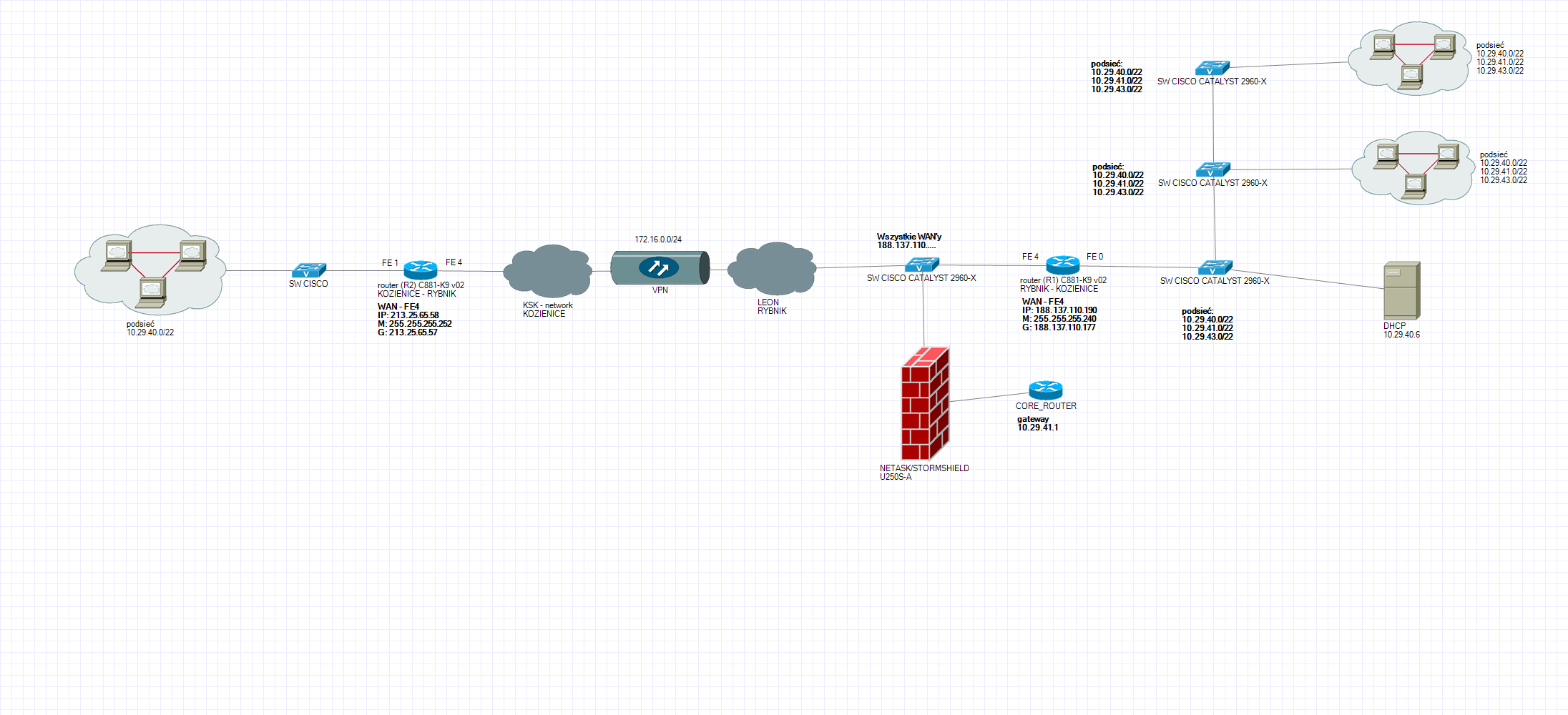
    Mam zestawione połączenie VPN pomiędzy 2-routerami, na routerze w drugiej lokalizacji przepuściłem ruch DHCP z lokalizacji pierwszej, adresację pobiera poprawnie widać sieć lan ale nie mam dostępu do internetu poprzez ten tunel.
    Pingując 8.8.8.8 nie dostaję odpowiedzi natomiast pingując hosty w sieci wewnętrznej odpowiedź jest od razu...?

    Ktoś coś pomoże :)

    Serdeczne dzięki
  • REKLAMA
  • #3 17284482
    pioflo
    Poziom 18  
    Posty: 204
    Pomógł: 26
    Ocena: 27
    Na obu routerach wprowadziłeś routingi dla tych sieci lokalnych po obu stronach tunelu?
  • REKLAMA
  • #5 17284665
    electric00
    Poziom 12  
    Posty: 183
    Pomógł: 2
    Ocena: 4
    no właśnie odpalony został VPN przepuszcza sieć lokalną ale nie ma interneta :)

    Dodano po 11 [minuty]:

    router R1 (serwerownia)
    ______________


    R1#sh config
    Using 2425 out of 262136 bytes
    !
    ! Last configuration change at 20:15:58 UTC Tue Jun 12 2018
    !
    version 15.5
    service timestamps debug datetime msec
    service timestamps log datetime msec
    no service password-encryption
    !
    hostname R1
    !
    boot-start-marker
    boot-end-marker
    !
    !
    enable secret 5 $1$Wm65$mOHhKRs4PRJq0gSDZvB0O.
    !
    no aaa new-model
    ethernet lmi ce
    !
    !
    !
    !
    !
    !
    !
    !
    !
    !
    !
    !
    !
    !
    !
    !
    !
    
    
    !
    ip dhcp relay information option
    !
    !
    !
    ip name-server 10.29.xxx.xxx
    ip name-server 10.29.xxx.xxx
    ip cef
    no ipv6 cef
    !
    !
    !
    !
    !
    multilink bundle-name authenticated
    !
    !
    !
    !
    !
    !
    !
    license udi pid C881-K9 sn FCZ2208E092
    !
    !
    !
    !
    !
    !
    !
    !
    !
    crypto isakmp policy 1
     encr 3des
     authentication pre-share
     group 2
    crypto isakmp key 12345 address 213.25.xxx.xxx
    crypto isakmp key 12345 address 0.0.0.0
    !
    !
    crypto ipsec transform-set ESP-AES-SHA esp-aes esp-sha-hmac
     mode tunnel
    !
    crypto ipsec profile VPN
     set transform-set ESP-AES-SHA
    !
    !
    !
    crypto map xxx local-address Vlan1
    crypto map xxx 1 ipsec-isakmp
     ! Incomplete
    crypto map xxx 2 ipsec-isakmp
     set peer 213.25.xxx.xxx
     match address 111
    !
    !
    !
    !
    !
    !
    interface Tunnel0
     ip address 172.16.0.1 255.255.255.0
     tunnel source 188.137.xxx.xxx
     tunnel mode ipsec ipv4
     tunnel destination 213.25.xxx.xxx
     tunnel protection ipsec profile VPN
    !
    interface FastEthernet0
     no ip address
    !
    interface FastEthernet1
     no ip address
    !
    interface FastEthernet2
     no ip address
    !
    interface FastEthernet3
     no ip address
    !
    interface FastEthernet4
     ip address 188.137.xxx.xxx 255.255.255.240
     ip nat outside
     ip virtual-reassembly in
     duplex auto
     speed auto
    !
    interface Vlan1
     ip address 10.29.xxx.xxx 255.255.252.0
     ip nat inside
     ip virtual-reassembly in
    !
    ip default-gateway 188.137.xxx.xxx
    no ip classless
    ip forward-protocol nd
    no ip http server
    no ip http secure-server
    !
    !
    ip nat inside source list 1 interface FastEthernet4 overload
    ip route 0.0.0.0 0.0.0.0 188.137.xxx.xxx
    ip route 10.29.xxx.xxx 255.255.255.240 Tunnel0
    !
    !
    access-list 1 permit any
    access-list 111 permit ip any any
    !
    control-plane
    !
    !
    !
    mgcp behavior rsip-range tgcp-only
    mgcp behavior comedia-role none
    mgcp behavior comedia-check-media-src disable
    mgcp behavior comedia-sdp-force disable
    !
    mgcp profile default
    !
    !
    !
    !
    !
    !
    !
    line con 0
     no modem enable
    line aux 0
     password xxx
     login
    line vty 0 4
     password xxx
     login
     transport input telnet
    line vty 5 15
     password xxx
     login
     transport input telnet
    !
    scheduler allocate 20000 1000
    !
    end
    
    R1#
    R1#


    Router R2 (oddział)
    _____________
    
    R2#sh config
    Using 2433 out of 262136 bytes
    !
    ! Last configuration change at 06:51:26 UTC Tue Jun 19 2018
    !
    version 15.5
    service timestamps debug datetime msec
    service timestamps log datetime msec
    no service password-encryption
    !
    hostname R2
    !
    boot-start-marker
    boot-end-marker
    !
    !
    !
    no aaa new-model
    ethernet lmi ce
    !
    !
    !
    !
    !
    !
    !
    !
    !
    !
    !
    !
    !
    !
    !
    !
    !
    
    
    !
    !
    !
    !
    ip domain name R2
    ip name-server 10.29.xxx.xxx
    ip name-server 10.29.xxx.xxx
    ip dhcp-server 10.29.xxx.xxx
    ip cef
    no ipv6 cef
    !
    !
    !
    !
    !
    multilink bundle-name authenticated
    !
    !
    !
    !
    !
    !
    !
    license udi pid C881-K9 sn FCZ2208E088
    !
    !
    !
    !
    !
    !
    !
    !
    !
    crypto isakmp policy 1
     encr 3des
     authentication pre-share
     group 2
    crypto isakmp key Cisco12345 address 188.137.xxx.xxx
    crypto isakmp key Cisco12345 address 213.25.xxx.xxx
    crypto isakmp key Cisco12345 address 0.0.0.0
    !
    !
    crypto ipsec transform-set ESP-AES-SHA esp-aes esp-sha-hmac
     mode tunnel
    !
    crypto ipsec profile VPN
     set transform-set ESP-AES-SHA
    !
    !
    crypto ipsec profile test
    !
    !
    crypto map xxx local-address FastEthernet0
    crypto map xxx 2 ipsec-isakmp
     set peer 188.137.xxx.xxx
     match address 111
    !
    !
    !
    !
    !
    !
    interface Tunnel0
     ip address 172.16.0.2 255.255.255.0
     tunnel source 213.25.xxx.xxx
     tunnel mode ipsec ipv4
     tunnel destination 188.137.xxx.xxx
     tunnel protection ipsec profile VPN
    !
    interface FastEthernet0
     no ip address
    !
    interface FastEthernet1
     no ip address
    !
    interface FastEthernet2
     no ip address
    !
    interface FastEthernet3
     no ip address
    !
    interface FastEthernet4
     ip address 213.25.xxx.xxx 255.255.255.252
     ip nat outside
     ip virtual-reassembly in
     duplex auto
     speed auto
    !
    interface Vlan1
     ip address 10.29.xxx.xxx 255.255.255.240
     ip helper-address 10.29.xxx.xxx
     ip helper-address 10.29.xxx.xxx
    !
    ip forward-protocol nd
    no ip http server
    no ip http secure-server
    !
    !
    ip nat inside source list 1 interface FastEthernet4 overload
    ip route 0.0.0.0 0.0.0.0 213.25.xxx.xxx
    ip route 10.29.xxx.xxx 255.255.254.0 Tunnel0
    ip ssh version 1
    ip ssh pubkey-chain
      username xxx
    !
    !
    access-list 1 permit any
    access-list 111 permit ip any any
    !
    control-plane
    !
    !
    !
    mgcp behavior rsip-range tgcp-only
    mgcp behavior comedia-role none
    mgcp behavior comedia-check-media-src disable
    mgcp behavior comedia-sdp-force disable
    !
    mgcp profile default
    !
    !
    !
    !
    !
    !
    !
    line con 0
     no modem enable
    line aux 0
    line vty 0 4
     password xxx
     login
     transport input telnet
    line vty 5 15
     password xxx
     login
     transport input telnet
    !
    scheduler allocate 20000 1000
    !
    end
    
    R2#
    
  • #6 17284695
    Szyszkownik Kilkujadek
    Poziom 37  
    Posty: 5015
    Pomógł: 211
    Ocena: 1011
    Rozumiem, że wrzuciłeś tę konfigurację: https://www.elektroda.pl/rtvforum/topic3462158.html#17225124 od kolegi @sanfran ?
  • #7 17284703
    electric00
    Poziom 12  
    Posty: 183
    Pomógł: 2
    Ocena: 4
    nie od podstaw była robiona
  • REKLAMA
  • REKLAMA
  • #9 17284736
    sanfran
    Specjalista Sieci, Internet
    Posty: 9932
    Pomógł: 958
    Ocena: 2994
    1. Dlaczego chcesz mieć dostęp w lokalizacji R2 do internetu przez tunel, skoro R2 ma dostęp do internetu?
    2. Wez zamiesc to konfiguracje jeszcze raz bez zamazywania adresow prywatnych - do nich nikt nie ma dostepu, a ich brak zaciemnia co mial autor na myśli. Zamazuje się jedynie adresy publiczne.
    3. Na teraz: Lista 1 jest zła - powinna obejmować TYLKO adresy NATowane a nie "permit any"
    4. Pokiełbaszone są routingi statyczne. Proszę o schemat sieci jakie adresacje PRYWATNE (np 192.168.1.0/24 i 192.168.100.0/28) maja tam być. Nie muszą być prawdziwe, ale żebys się potem nie pogubił. Adresy publiczne mnie nie interesują mozesz uzyc 1.1.1.1 i 2.2.2.2 dla lokalizacji R1 i R2 będzie wtedy łatwiej.
  • #10 17284775
    electric00
    Poziom 12  
    Posty: 183
    Pomógł: 2
    Ocena: 4
    R1
    
    R1#sh config
    Using 2425 out of 262136 bytes
    !
    ! Last configuration change at 20:15:58 UTC Tue Jun 12 2018
    !
    version 15.5
    service timestamps debug datetime msec
    service timestamps log datetime msec
    no service password-encryption
    !
    hostname R1
    !
    boot-start-marker
    boot-end-marker
    !
    !
    enable secret 5 $1$Wm65$mOHhKRs4PRJq0gSDZvB0O.
    !
    no aaa new-model
    ethernet lmi ce
    !
    !
    !
    !
    !
    !
    !
    !
    !
    !
    !
    !
    !
    !
    !
    !
    !
    
    
    !
    ip dhcp relay information option
    !
    !
    !
    ip name-server 10.29.40.6
    ip name-server 10.29.41.3
    ip cef
    no ipv6 cef
    !
    !
    !
    !
    !
    multilink bundle-name authenticated
    !
    !
    !
    !
    !
    !
    !
    license udi pid C881-K9 sn FCZ2208E092
    !
    !
    !
    !
    !
    !
    !
    !
    !
    crypto isakmp policy 1
     encr 3des
     authentication pre-share
     group 2
    crypto isakmp key Cisco12345 address 213.25.65.58
    crypto isakmp key Cisco12345 address 0.0.0.0
    !
    !
    crypto ipsec transform-set ESP-AES-SHA esp-aes esp-sha-hmac
     mode tunnel
    !
    crypto ipsec profile VPN
     set transform-set ESP-AES-SHA
    !
    !
    !
    crypto map xxx local-address Vlan1
    crypto map xxx 1 ipsec-isakmp
     ! Incomplete
    crypto map xxx 2 ipsec-isakmp
     set peer 213.25.65.58
     match address 111
    !
    !
    !
    !
    !
    !
    interface Tunnel0
     ip address 172.16.0.1 255.255.255.0
     tunnel source 188.137.110.190
     tunnel mode ipsec ipv4
     tunnel destination 213.25.65.58
     tunnel protection ipsec profile VPN
    !
    interface FastEthernet0
     no ip address
    !
    interface FastEthernet1
     no ip address
    !
    interface FastEthernet2
     no ip address
    !
    interface FastEthernet3
     no ip address
    !
    interface FastEthernet4
     ip address 188.137.110.190 255.255.255.240
     ip nat outside
     ip virtual-reassembly in
     duplex auto
     speed auto
    !
    interface Vlan1
     ip address 10.29.40.220 255.255.252.0
     ip nat inside
     ip virtual-reassembly in
    !
    ip default-gateway 188.137.110.117
    no ip classless
    ip forward-protocol nd
    no ip http server
    no ip http secure-server
    !
    !
    ip nat inside source list 1 interface FastEthernet4 overload
    ip route 0.0.0.0 0.0.0.0 188.137.110.177
    ip route 10.29.43.160 255.255.255.240 Tunnel0
    !
    !
    access-list 1 permit any
    access-list 111 permit ip any any
    !
    control-plane
    !
    !
    !
    mgcp behavior rsip-range tgcp-only
    mgcp behavior comedia-role none
    mgcp behavior comedia-check-media-src disable
    mgcp behavior comedia-sdp-force disable
    !
    mgcp profile default
    !
    !
    !
    !
    !
    !
    !
    line con 0
     no modem enable
    line aux 0
     password t00r#123
     login
    line vty 0 4
     password t00r#123
     login
     transport input telnet
    line vty 5 15
     password t00r#123
     login
     transport input telnet
    !
    scheduler allocate 20000 1000
    !
    end
    
    R1#


    ++++++++++++++++++++++++
    R1
    
    R2#sh config
    Using 2433 out of 262136 bytes
    !
    ! Last configuration change at 07:46:30 UTC Tue Jun 19 2018
    !
    version 15.5
    service timestamps debug datetime msec
    service timestamps log datetime msec
    no service password-encryption
    !
    hostname R2
    !
    boot-start-marker
    boot-end-marker
    !
    !
    !
    no aaa new-model
    ethernet lmi ce
    !
    !
    !
    !
    !
    !
    !
    !
    !
    !
    !
    !
    !
    !
    !
    !
    !
    
    
    !
    !
    !
    !
    ip domain name kozienice
    ip name-server 10.29.40.6
    ip name-server 10.29.41.3
    ip dhcp-server 10.29.40.6
    ip cef
    no ipv6 cef
    !
    !
    !
    !
    !
    multilink bundle-name authenticated
    !
    !
    !
    !
    !
    !
    !
    license udi pid C881-K9 sn FCZ2208E088
    !
    !
    !
    !
    !
    !
    !
    !
    !
    crypto isakmp policy 1
     encr 3des
     authentication pre-share
     group 2
    crypto isakmp key Cisco12345 address 188.137.110.190
    crypto isakmp key Cisco12345 address 213.25.65.58
    crypto isakmp key Cisco12345 address 0.0.0.0
    !
    !
    crypto ipsec transform-set ESP-AES-SHA esp-aes esp-sha-hmac
     mode tunnel
    !
    crypto ipsec profile VPN
     set transform-set ESP-AES-SHA
    !
    !
    crypto ipsec profile test
    !
    !
    crypto map xxx local-address FastEthernet0
    crypto map xxx 2 ipsec-isakmp
     set peer 188.137.110.190
     match address 111
    !
    !
    !
    !
    !
    !
    interface Tunnel0
     ip address 172.16.0.2 255.255.255.0
     tunnel source 213.25.65.58
     tunnel mode ipsec ipv4
     tunnel destination 188.137.110.190
     tunnel protection ipsec profile VPN
    !
    interface FastEthernet0
     no ip address
    !
    interface FastEthernet1
     no ip address
    !
    interface FastEthernet2
     no ip address
    !
    interface FastEthernet3
     no ip address
    !
    interface FastEthernet4
     ip address 213.25.65.58 255.255.255.252
     ip nat outside
     ip virtual-reassembly in
     duplex auto
     speed auto
    !
    interface Vlan1
     ip address 10.29.43.161 255.255.255.240
     ip helper-address 10.29.40.220
     ip helper-address 10.29.40.6
    !
    ip forward-protocol nd
    no ip http server
    no ip http secure-server
    !
    !
    ip nat inside source list 1 interface FastEthernet4 overload
    ip route 0.0.0.0 0.0.0.0 213.25.65.57
    ip route 10.29.40.0 255.255.254.0 Tunnel0
    ip ssh version 1
    ip ssh pubkey-chain
      username admin
    !
    !
    access-list 1 permit any
    access-list 111 permit ip any any
    !
    control-plane
    !
    !
    !
    mgcp behavior rsip-range tgcp-only
    mgcp behavior comedia-role none
    mgcp behavior comedia-check-media-src disable
    mgcp behavior comedia-sdp-force disable
    !
    mgcp profile default
    !
    !
    !
    !
    !
    !
    !
    line con 0
     no modem enable
    line aux 0
    line vty 0 4
     password t00r#123
     login
     transport input telnet
    line vty 5 15
     password t00r#123
     login
     transport input telnet
    !
    scheduler allocate 20000 1000
    !
    end
    
    R2#
    
  • #11 17284796
    sanfran
    Specjalista Sieci, Internet
    Posty: 9932
    Pomógł: 958
    Ocena: 2994
    Dalej ani schematu sieci ano odpowiedzi na pytania, ale trudno, nastaw się na "garbage in, garbage out"
    Na R2 fajnie by było zrobić VRF, ale można i bez tego.

    0. Jest błąd w założeniach (projekcie). Adresy VLAN1 na R1 i R2 się pokrywają, trzeba to naprawić inacze NIC nie będzie działać. A potem:
    1. Z R2 wywalasz niepotrzebny NAT
    2. Na R2 ustawiasz nastepujacy routing, a inne kasujesz:
    ip route 188.137.110.190 255.255.255.255 213.25.65.58
    ip route 0.0.0.0 0.0.0.0 172.16.0.1
    3. NA R1, na interface Tunnel0 komenda "ip nat inside"
    4. Na R1 lista 1 ma wygladac inaczej, po naprawieniu błedu z punku 0 napiszę

    i tyle.
  • #12 17284804
    electric00
    Poziom 12  
    Posty: 183
    Pomógł: 2
    Ocena: 4
    VPN - brak internetu przy działającym DHCP i LAN (router, tunel)
  • #14 17284960
    electric00
    Poziom 12  
    Posty: 183
    Pomógł: 2
    Ocena: 4
    tzn... w którym miejscu do poprawy
  • #15 17285012
    sanfran
    Specjalista Sieci, Internet
    Posty: 9932
    Pomógł: 958
    Ocena: 2994
    Wszędzie. Masz zduplikowaną adresacje IP.
    Nie istnieje coś takiego jak podsieć 10.29.41.0/22 oraz 10.29.43.0/22
    Owszem, istnieją 10.29.41.0/24 oraz 10.29.43.0/24 ale one są podsiecią 10.29.40.0/22 i jako takie nie mogą występować po dwóch różnych stronach routera tak jak w twoim projekcie.
    Tu się podstawy adresacji kłaniają i bez tej wiedzy wyskakują różne głupotki jak pokiełbaszone routingi.
    To by było na tyle. Sam tego nie ogarniesz, a ja darmowej fuchy nie zamierzam odwalać. Zatrudnij fachowca.

Podsumowanie tematu

✨ Użytkownik ma problem z dostępem do internetu przez tunel VPN pomiędzy dwoma routerami, mimo że ruch DHCP działa poprawnie. W odpowiedziach poruszono kwestie konfiguracji routingu, NAT oraz adresacji IP, wskazując na błędy w założeniach dotyczących adresów VLAN i podsieci. Użytkownik został poproszony o zamieszczenie pełnej konfiguracji routera oraz schematu sieci, aby lepiej zrozumieć problem. Wskazano również na konieczność poprawy adresacji IP, aby uniknąć duplikacji adresów w sieci.
Podsumowanie wygenerowane przez AI na podstawie treści dyskusji.
REKLAMA