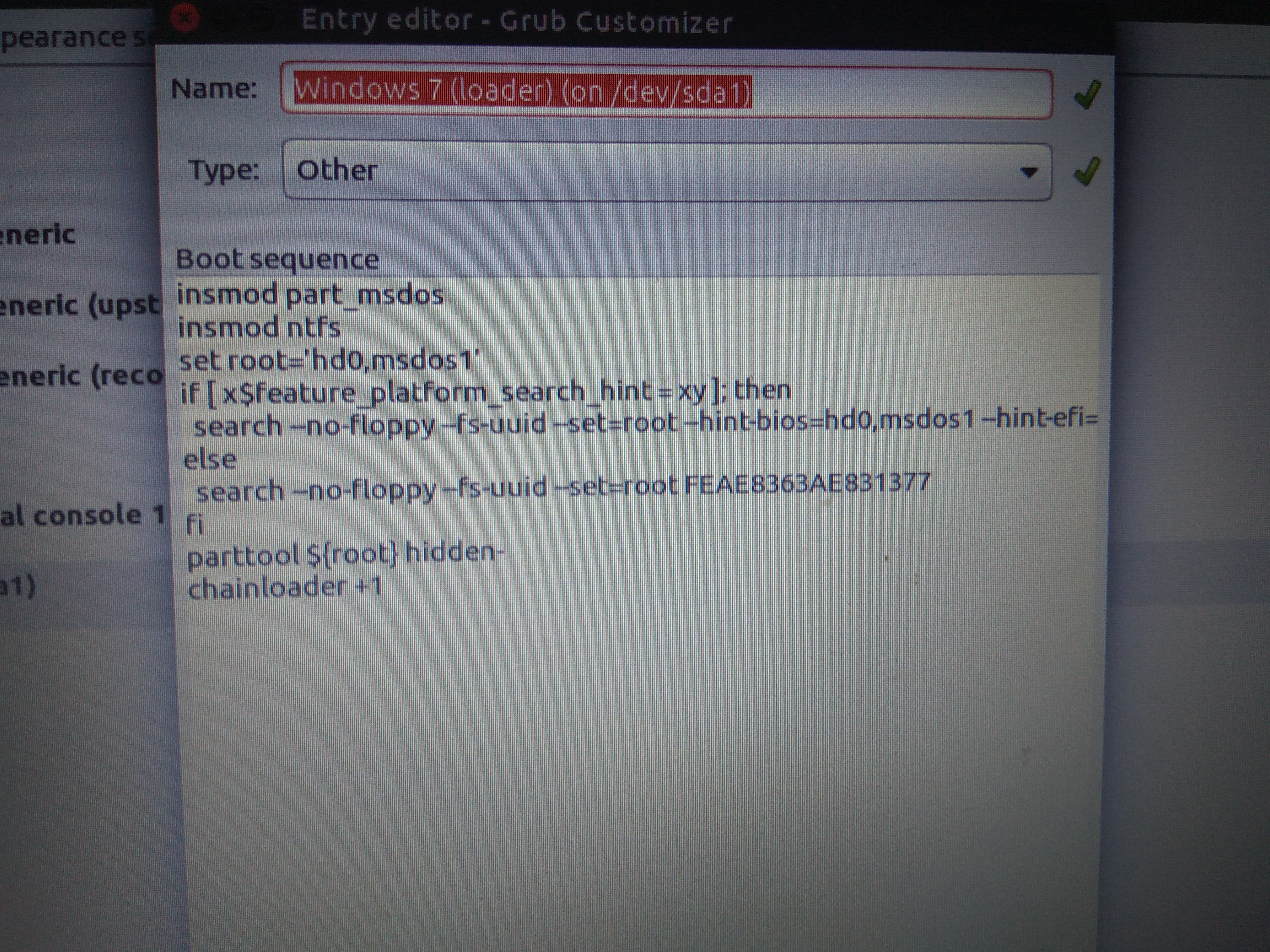
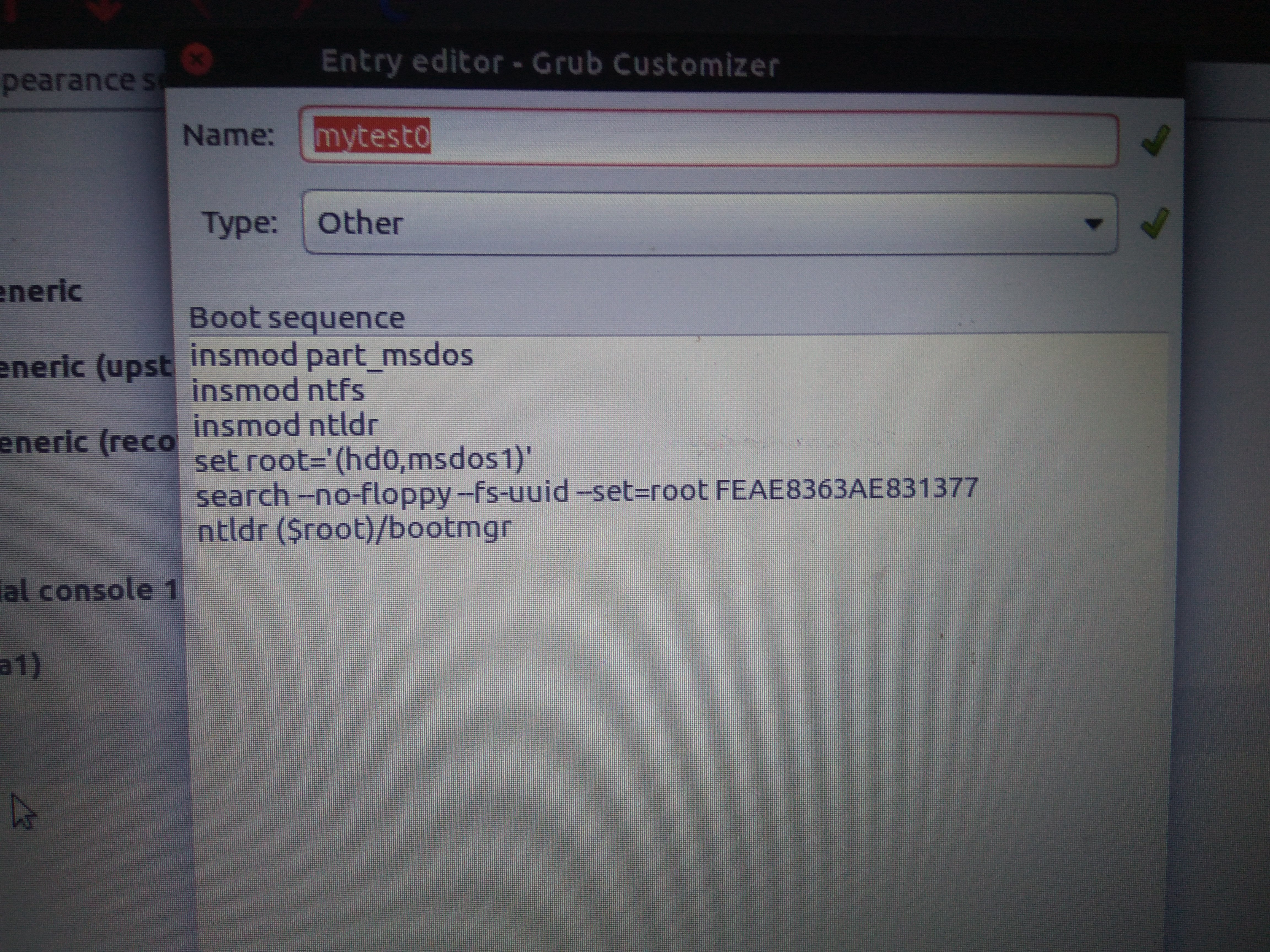
Witajcie moi drodzy.
Dziś chciałem doinstalować Ubuntu do Windows 7, ale niestety teraz po wybraniu w ekranie bootowania Windows 7 ekran na chwilę jest czarny po czym pojawia się spowrotem ekran bootowania. Ubuntu działa normalnie, a Windows mogę tylko bootować z poziomu Super Grub Disk 2.
Ale w skrócie:
1. Najpierw w Windowsie wykonałem Shrink na głównym dysku - zwolniłem 15GB
2. Nastepnie podłączyłem bootowalnego pendriva Ubuntu i dałem "Wypróbuj Ubuntu"
3. Podłaczyłem się do sieci wifi w Ubuntu
4. Dałem instalację, wybrałem by ściągnął aktualizacje
5. Ubuntu sam wykrył, że mam Windows 7, i zaproponował, że doinstaluje się jako drugi system.
6. Przy wyborze partycji wybrałem 4GB swap i resztę (10 GB) na dysk Ubuntu
7. Tu chyba wybrałem jako boot sda1.
8. Zainstalowało się, ale w trakcie pojawił się jakiś komunikat o błędzie raz (tylko że wystąpił błąd)
9. Od tego Ubuntu działa, ale Windows 7 nie wstaje, mimo iż jest na ekranie bootowania.
Tak wygląda ekran bootowania:
Oto rezultat komendy fdisk -l (jako sudo):
Rezultat skryptu bootinfo z githuba:
A w ten sposób da się uruchomić Windowsa z pomocą Super Grub Disk 2:
Ale przecież nie będę zawsze tak uruchamiać...
Jak to naprawić, by Windows 7 normalnie startował po wyborze go w boot menu? Dlaczego nie startuje teraz?
Pomogłem? Kup mi kawę.
Dziś chciałem doinstalować Ubuntu do Windows 7, ale niestety teraz po wybraniu w ekranie bootowania Windows 7 ekran na chwilę jest czarny po czym pojawia się spowrotem ekran bootowania. Ubuntu działa normalnie, a Windows mogę tylko bootować z poziomu Super Grub Disk 2.
Ale w skrócie:
1. Najpierw w Windowsie wykonałem Shrink na głównym dysku - zwolniłem 15GB
2. Nastepnie podłączyłem bootowalnego pendriva Ubuntu i dałem "Wypróbuj Ubuntu"
3. Podłaczyłem się do sieci wifi w Ubuntu
4. Dałem instalację, wybrałem by ściągnął aktualizacje
5. Ubuntu sam wykrył, że mam Windows 7, i zaproponował, że doinstaluje się jako drugi system.
6. Przy wyborze partycji wybrałem 4GB swap i resztę (10 GB) na dysk Ubuntu
7. Tu chyba wybrałem jako boot sda1.
8. Zainstalowało się, ale w trakcie pojawił się jakiś komunikat o błędzie raz (tylko że wystąpił błąd)
9. Od tego Ubuntu działa, ale Windows 7 nie wstaje, mimo iż jest na ekranie bootowania.
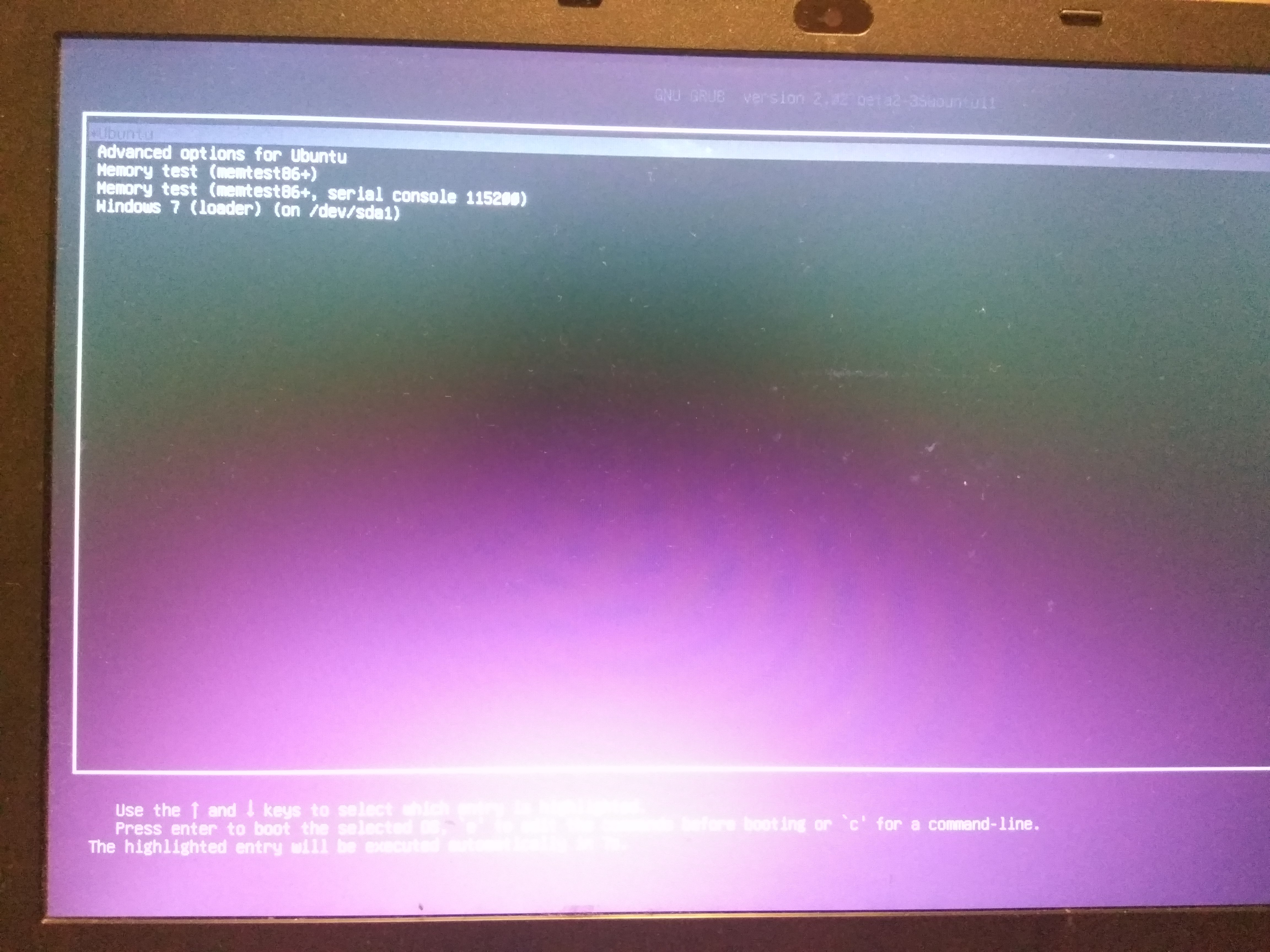
Tak wygląda ekran bootowania:
Oto rezultat komendy fdisk -l (jako sudo):
Spoiler:
Disk /dev/ram0: 64 MiB, 67108864 bytes, 131072 sectors
Units: sectors of 1 * 512 = 512 bytes
Sector size (logical/physical): 512 bytes / 4096 bytes
I/O size (minimum/optimal): 4096 bytes / 4096 bytes


Disk /dev/ram1: 64 MiB, 67108864 bytes, 131072 sectors
Units: sectors of 1 * 512 = 512 bytes
Sector size (logical/physical): 512 bytes / 4096 bytes
I/O size (minimum/optimal): 4096 bytes / 4096 bytes


Disk /dev/ram2: 64 MiB, 67108864 bytes, 131072 sectors
Units: sectors of 1 * 512 = 512 bytes
Sector size (logical/physical): 512 bytes / 4096 bytes
I/O size (minimum/optimal): 4096 bytes / 4096 bytes


Disk /dev/ram3: 64 MiB, 67108864 bytes, 131072 sectors
Units: sectors of 1 * 512 = 512 bytes
Sector size (logical/physical): 512 bytes / 4096 bytes
I/O size (minimum/optimal): 4096 bytes / 4096 bytes


Disk /dev/ram4: 64 MiB, 67108864 bytes, 131072 sectors
Units: sectors of 1 * 512 = 512 bytes
Sector size (logical/physical): 512 bytes / 4096 bytes
I/O size (minimum/optimal): 4096 bytes / 4096 bytes


Disk /dev/ram5: 64 MiB, 67108864 bytes, 131072 sectors
Units: sectors of 1 * 512 = 512 bytes
Sector size (logical/physical): 512 bytes / 4096 bytes
I/O size (minimum/optimal): 4096 bytes / 4096 bytes


Disk /dev/ram6: 64 MiB, 67108864 bytes, 131072 sectors
Units: sectors of 1 * 512 = 512 bytes
Sector size (logical/physical): 512 bytes / 4096 bytes
I/O size (minimum/optimal): 4096 bytes / 4096 bytes


Disk /dev/ram7: 64 MiB, 67108864 bytes, 131072 sectors
Units: sectors of 1 * 512 = 512 bytes
Sector size (logical/physical): 512 bytes / 4096 bytes
I/O size (minimum/optimal): 4096 bytes / 4096 bytes


Disk /dev/ram8: 64 MiB, 67108864 bytes, 131072 sectors
Units: sectors of 1 * 512 = 512 bytes
Sector size (logical/physical): 512 bytes / 4096 bytes
I/O size (minimum/optimal): 4096 bytes / 4096 bytes


Disk /dev/ram9: 64 MiB, 67108864 bytes, 131072 sectors
Units: sectors of 1 * 512 = 512 bytes
Sector size (logical/physical): 512 bytes / 4096 bytes
I/O size (minimum/optimal): 4096 bytes / 4096 bytes


Disk /dev/ram10: 64 MiB, 67108864 bytes, 131072 sectors
Units: sectors of 1 * 512 = 512 bytes
Sector size (logical/physical): 512 bytes / 4096 bytes
I/O size (minimum/optimal): 4096 bytes / 4096 bytes


Disk /dev/ram11: 64 MiB, 67108864 bytes, 131072 sectors
Units: sectors of 1 * 512 = 512 bytes
Sector size (logical/physical): 512 bytes / 4096 bytes
I/O size (minimum/optimal): 4096 bytes / 4096 bytes


Disk /dev/ram12: 64 MiB, 67108864 bytes, 131072 sectors
Units: sectors of 1 * 512 = 512 bytes
Sector size (logical/physical): 512 bytes / 4096 bytes
I/O size (minimum/optimal): 4096 bytes / 4096 bytes


Disk /dev/ram13: 64 MiB, 67108864 bytes, 131072 sectors
Units: sectors of 1 * 512 = 512 bytes
Sector size (logical/physical): 512 bytes / 4096 bytes
I/O size (minimum/optimal): 4096 bytes / 4096 bytes


Disk /dev/ram14: 64 MiB, 67108864 bytes, 131072 sectors
Units: sectors of 1 * 512 = 512 bytes
Sector size (logical/physical): 512 bytes / 4096 bytes
I/O size (minimum/optimal): 4096 bytes / 4096 bytes


Disk /dev/ram15: 64 MiB, 67108864 bytes, 131072 sectors
Units: sectors of 1 * 512 = 512 bytes
Sector size (logical/physical): 512 bytes / 4096 bytes
I/O size (minimum/optimal): 4096 bytes / 4096 bytes


Disk /dev/sda: 489,1 GiB, 525112713216 bytes, 1025610768 sectors
Units: sectors of 1 * 512 = 512 bytes
Sector size (logical/physical): 512 bytes / 512 bytes
I/O size (minimum/optimal): 512 bytes / 512 bytes
Disklabel type: dos
Disk identifier: 0x2d27e56c

Device     Boot      Start        End   Sectors   Size Id Type
/dev/sda1  *          2048     206847    204800   100M  7 HPFS/NTFS/exFAT
/dev/sda2           206848  209922047 209715200   100G  7 HPFS/NTFS/exFAT
/dev/sda3        209922048  994887679 784965632 374,3G  7 HPFS/NTFS/exFAT
/dev/sda4        994889726 1025609727  30720002  14,7G  5 Extended
/dev/sda5        994889728 1002700799   7811072   3,7G 82 Linux swap / Solaris
/dev/sda6       1002702848 1025609727  22906880  10,9G 83 Linux


Disk /dev/sdb: 1,8 TiB, 2000398934016 bytes, 3907029168 sectors
Units: sectors of 1 * 512 = 512 bytes
Sector size (logical/physical): 512 bytes / 4096 bytes
I/O size (minimum/optimal): 4096 bytes / 4096 bytes
Disklabel type: dos
Disk identifier: 0x6c50703b

Device     Boot Start        End    Sectors  Size Id Type
/dev/sdb1        2048 3907026943 3907024896  1,8T  7 HPFS/NTFS/exFAT
Rezultat skryptu bootinfo z githuba:
Spoiler:
                  Boot Info Script 0.61      [1 April 2012]


============================= Boot Info Summary: ===============================

 => Grub2 (v2.00) is installed in the MBR of /dev/sda and looks at sector 1 of
    the same hard drive for core.img. core.img is at this location and looks
    in partition 1 for (,msdos6)/boot/grub.
 => Windows 7/8/2012 is installed in the MBR of /dev/sdb.

sda1: __________________________________________________________________________

    File system:       ntfs
    Boot sector type:  Grub2 (v1.99-2.00)
    Boot sector info:  Grub2 (v2.00) is installed in the boot sector of sda1
                       and looks at sector 1011516480 of the same hard drive
                       for core.img. core.img is at this location and looks
                       in partition 1 for (,msdos6)/boot/grub. No errors
                       found in the Boot Parameter Block.
    Operating System:
    Boot files:        /bootmgr /Boot/BCD

sda2: __________________________________________________________________________

    File system:       ntfs
    Boot sector type:  Windows 7/2008: NTFS
    Boot sector info:  No errors found in the Boot Parameter Block.
    Operating System:
    Boot files:        /Windows/System32/winload.exe

sda3: __________________________________________________________________________

    File system:       ntfs
    Boot sector type:  Windows 7/2008: NTFS
    Boot sector info:  No errors found in the Boot Parameter Block.
    Operating System:
    Boot files:

sda4: __________________________________________________________________________

    File system:       Extended Partition
    Boot sector type:  -
    Boot sector info:

sda5: __________________________________________________________________________

    File system:       swap
    Boot sector type:  -
    Boot sector info:

sda6: __________________________________________________________________________

    File system:       ext4
    Boot sector type:  -
    Boot sector info:
    Operating System:  Ubuntu 16.10
    Boot files:        /boot/grub/grub.cfg /etc/fstab
                       /boot/grub/i386-pc/core.img

sdb1: __________________________________________________________________________

    File system:       ntfs
    Boot sector type:  Windows 7/2008: NTFS
    Boot sector info:  No errors found in the Boot Parameter Block.
    Operating System:
    Boot files:

============================ Drive/Partition Info: =============================

Drive: sda _____________________________________________________________________
Disk /dev/sda: 489,1 GiB, 525112713216 bytes, 1025610768 sectors
Units: sectors of 1 * 512 = 512 bytes
Sector size (logical/physical): 512 bytes / 512 bytes
I/O size (minimum/optimal): 512 bytes / 512 bytes
Disklabel type: dos

Partition  Boot  Start Sector    End Sector  # of Sectors  Id System

/dev/sda1    *          2,048       206,847       204,800   7 NTFS / exFAT / HPFS
/dev/sda2             206,848   209,922,047   209,715,200   7 NTFS / exFAT / HPFS
/dev/sda3         209,922,048   994,887,679   784,965,632   7 NTFS / exFAT / HPFS
/dev/sda4         994,889,726 1,025,609,727    30,720,002   5 Extended
/dev/sda5         994,889,728 1,002,700,799     7,811,072  82 Linux swap / Solaris
/dev/sda6       1,002,702,848 1,025,609,727    22,906,880  83 Linux


Drive: sdb _____________________________________________________________________
Disk /dev/sdb: 1,8 TiB, 2000398934016 bytes, 3907029168 sectors
Units: sectors of 1 * 512 = 512 bytes
Sector size (logical/physical): 512 bytes / 4096 bytes
I/O size (minimum/optimal): 4096 bytes / 4096 bytes
Disklabel type: dos

Partition  Boot  Start Sector    End Sector  # of Sectors  Id System

/dev/sdb1               2,048 3,907,026,943 3,907,024,896   7 NTFS / exFAT / HPFS


"blkid" output: ________________________________________________________________

Device           UUID                                   TYPE       LABEL

/dev/sda1        FEAE8363AE831377                       ntfs       Zastrzeżone przez system
/dev/sda2        02D6E382D6E373F7                       ntfs
/dev/sda3        6A164CA4164C735D                       ntfs       SSD
/dev/sda5        06091963-18cc-4fe4-9770-06e66a0e3d8a   swap
/dev/sda6        12e82496-436f-4e39-a98e-2bd0550ee067   ext4
/dev/sdb1        40E4EBACE4EBA280                       ntfs       DATA

================================ Mount points: =================================

Device           Mount_Point              Type       Options

/dev/sda6        /                        ext4       (rw,relatime,errors=remount-ro,data=ordered)


=========================== sda6/boot/grub/grub.cfg: ===========================

--------------------------------------------------------------------------------
#
# DO NOT EDIT THIS FILE
#
# It is automatically generated by grub-mkconfig using templates
# from /etc/grub.d and settings from /etc/default/grub
#

### BEGIN /etc/grub.d/00_header ###
if [ -s $prefix/grubenv ]; then
  set have_grubenv=true
  load_env
fi
if [ "${next_entry}" ] ; then
   set default="${next_entry}"
   set next_entry=
   save_env next_entry
   set boot_once=true
else
   set default="0"
fi

if [ x"${feature_menuentry_id}" = xy ]; then
  menuentry_id_option="--id"
else
  menuentry_id_option=""
fi

export menuentry_id_option

if [ "${prev_saved_entry}" ]; then
  set saved_entry="${prev_saved_entry}"
  save_env saved_entry
  set prev_saved_entry=
  save_env prev_saved_entry
  set boot_once=true
fi

function savedefault {
  if [ -z "${boot_once}" ]; then
    saved_entry="${chosen}"
    save_env saved_entry
  fi
}
function recordfail {
  set recordfail=1
  if [ -n "${have_grubenv}" ]; then if [ -z "${boot_once}" ]; then save_env recordfail; fi; fi
}
function load_video {
  if [ x$feature_all_video_module = xy ]; then
    insmod all_video
  else
    insmod efi_gop
    insmod efi_uga
    insmod ieee1275_fb
    insmod vbe
    insmod vga
    insmod video_bochs
    insmod video_cirrus
  fi
}

if [ x$feature_default_font_path = xy ] ; then
   font=unicode
else
insmod part_msdos
insmod ext2
set root='hd0,msdos6'
if [ x$feature_platform_search_hint = xy ]; then
  search --no-floppy --fs-uuid --set=root --hint-bios=hd0,msdos6 --hint-efi=hd0,msdos6 --hint-baremetal=ahci0,msdos6  12e82496-436f-4e39-a98e-2bd0550ee067
else
  search --no-floppy --fs-uuid --set=root 12e82496-436f-4e39-a98e-2bd0550ee067
fi
    font="/usr/share/grub/unicode.pf2"
fi

if loadfont $font ; then
  set gfxmode=auto
  load_video
  insmod gfxterm
  set locale_dir=$prefix/locale
  set lang=en_US
  insmod gettext
fi
terminal_output gfxterm
if [ "${recordfail}" = 1 ] ; then
  set timeout=30
else
  if [ x$feature_timeout_style = xy ] ; then
    set timeout_style=menu
    set timeout=10
  # Fallback normal timeout code in case the timeout_style feature is
  # unavailable.
  else
    set timeout=10
  fi
fi
### END /etc/grub.d/00_header ###

### BEGIN /etc/grub.d/05_debian_theme ###
set menu_color_normal=white/black
set menu_color_highlight=black/light-gray
if background_color 44,0,30,0; then
  clear
fi
### END /etc/grub.d/05_debian_theme ###

### BEGIN /etc/grub.d/10_linux ###
function gfxmode {
	set gfxpayload="${1}"
	if [ "${1}" = "keep" ]; then
		set vt_handoff=vt.handoff=7
	else
		set vt_handoff=
	fi
}
if [ "${recordfail}" != 1 ]; then
  if [ -e ${prefix}/gfxblacklist.txt ]; then
    if hwmatch ${prefix}/gfxblacklist.txt 3; then
      if [ ${match} = 0 ]; then
        set linux_gfx_mode=keep
      else
        set linux_gfx_mode=text
      fi
    else
      set linux_gfx_mode=text
    fi
  else
    set linux_gfx_mode=keep
  fi
else
  set linux_gfx_mode=text
fi
export linux_gfx_mode
menuentry 'Ubuntu' --class ubuntu --class gnu-linux --class gnu --class os $menuentry_id_option 'gnulinux-simple-12e82496-436f-4e39-a98e-2bd0550ee067' {
	recordfail
	load_video
	gfxmode $linux_gfx_mode
	insmod gzio
	if [ x$grub_platform = xxen ]; then insmod xzio; insmod lzopio; fi
	insmod part_msdos
	insmod ext2
	set root='hd0,msdos6'
	if [ x$feature_platform_search_hint = xy ]; then
	  search --no-floppy --fs-uuid --set=root --hint-bios=hd0,msdos6 --hint-efi=hd0,msdos6 --hint-baremetal=ahci0,msdos6  12e82496-436f-4e39-a98e-2bd0550ee067
	else
	  search --no-floppy --fs-uuid --set=root 12e82496-436f-4e39-a98e-2bd0550ee067
	fi
	linux	/boot/vmlinuz-4.8.0-22-generic root=UUID=12e82496-436f-4e39-a98e-2bd0550ee067 ro  quiet splash $vt_handoff
	initrd	/boot/initrd.img-4.8.0-22-generic
}
submenu 'Advanced options for Ubuntu' $menuentry_id_option 'gnulinux-advanced-12e82496-436f-4e39-a98e-2bd0550ee067' {
	menuentry 'Ubuntu, with Linux 4.8.0-22-generic' --class ubuntu --class gnu-linux --class gnu --class os $menuentry_id_option 'gnulinux-4.8.0-22-generic-advanced-12e82496-436f-4e39-a98e-2bd0550ee067' {
		recordfail
		load_video
		gfxmode $linux_gfx_mode
		insmod gzio
		if [ x$grub_platform = xxen ]; then insmod xzio; insmod lzopio; fi
		insmod part_msdos
		insmod ext2
		set root='hd0,msdos6'
		if [ x$feature_platform_search_hint = xy ]; then
		  search --no-floppy --fs-uuid --set=root --hint-bios=hd0,msdos6 --hint-efi=hd0,msdos6 --hint-baremetal=ahci0,msdos6  12e82496-436f-4e39-a98e-2bd0550ee067
		else
		  search --no-floppy --fs-uuid --set=root 12e82496-436f-4e39-a98e-2bd0550ee067
		fi
		echo	'Loading Linux 4.8.0-22-generic ...'
		linux	/boot/vmlinuz-4.8.0-22-generic root=UUID=12e82496-436f-4e39-a98e-2bd0550ee067 ro  quiet splash $vt_handoff
		echo	'Loading initial ramdisk ...'
		initrd	/boot/initrd.img-4.8.0-22-generic
	}
	menuentry 'Ubuntu, with Linux 4.8.0-22-generic (upstart)' --class ubuntu --class gnu-linux --class gnu --class os $menuentry_id_option 'gnulinux-4.8.0-22-generic-init-upstart-12e82496-436f-4e39-a98e-2bd0550ee067' {
		recordfail
		load_video
		gfxmode $linux_gfx_mode
		insmod gzio
		if [ x$grub_platform = xxen ]; then insmod xzio; insmod lzopio; fi
		insmod part_msdos
		insmod ext2
		set root='hd0,msdos6'
		if [ x$feature_platform_search_hint = xy ]; then
		  search --no-floppy --fs-uuid --set=root --hint-bios=hd0,msdos6 --hint-efi=hd0,msdos6 --hint-baremetal=ahci0,msdos6  12e82496-436f-4e39-a98e-2bd0550ee067
		else
		  search --no-floppy --fs-uuid --set=root 12e82496-436f-4e39-a98e-2bd0550ee067
		fi
		echo	'Loading Linux 4.8.0-22-generic ...'
		linux	/boot/vmlinuz-4.8.0-22-generic root=UUID=12e82496-436f-4e39-a98e-2bd0550ee067 ro  quiet splash $vt_handoff init=/sbin/upstart
		echo	'Loading initial ramdisk ...'
		initrd	/boot/initrd.img-4.8.0-22-generic
	}
	menuentry 'Ubuntu, with Linux 4.8.0-22-generic (recovery mode)' --class ubuntu --class gnu-linux --class gnu --class os $menuentry_id_option 'gnulinux-4.8.0-22-generic-recovery-12e82496-436f-4e39-a98e-2bd0550ee067' {
		recordfail
		load_video
		insmod gzio
		if [ x$grub_platform = xxen ]; then insmod xzio; insmod lzopio; fi
		insmod part_msdos
		insmod ext2
		set root='hd0,msdos6'
		if [ x$feature_platform_search_hint = xy ]; then
		  search --no-floppy --fs-uuid --set=root --hint-bios=hd0,msdos6 --hint-efi=hd0,msdos6 --hint-baremetal=ahci0,msdos6  12e82496-436f-4e39-a98e-2bd0550ee067
		else
		  search --no-floppy --fs-uuid --set=root 12e82496-436f-4e39-a98e-2bd0550ee067
		fi
		echo	'Loading Linux 4.8.0-22-generic ...'
		linux	/boot/vmlinuz-4.8.0-22-generic root=UUID=12e82496-436f-4e39-a98e-2bd0550ee067 ro recovery nomodeset
		echo	'Loading initial ramdisk ...'
		initrd	/boot/initrd.img-4.8.0-22-generic
	}
}

### END /etc/grub.d/10_linux ###

### BEGIN /etc/grub.d/20_linux_xen ###

### END /etc/grub.d/20_linux_xen ###

### BEGIN /etc/grub.d/20_memtest86+ ###
menuentry 'Memory test (memtest86+)' {
	insmod part_msdos
	insmod ext2
	set root='hd0,msdos6'
	if [ x$feature_platform_search_hint = xy ]; then
	  search --no-floppy --fs-uuid --set=root --hint-bios=hd0,msdos6 --hint-efi=hd0,msdos6 --hint-baremetal=ahci0,msdos6  12e82496-436f-4e39-a98e-2bd0550ee067
	else
	  search --no-floppy --fs-uuid --set=root 12e82496-436f-4e39-a98e-2bd0550ee067
	fi
	knetbsd	/boot/memtest86+.elf
}
menuentry 'Memory test (memtest86+, serial console 115200)' {
	insmod part_msdos
	insmod ext2
	set root='hd0,msdos6'
	if [ x$feature_platform_search_hint = xy ]; then
	  search --no-floppy --fs-uuid --set=root --hint-bios=hd0,msdos6 --hint-efi=hd0,msdos6 --hint-baremetal=ahci0,msdos6  12e82496-436f-4e39-a98e-2bd0550ee067
	else
	  search --no-floppy --fs-uuid --set=root 12e82496-436f-4e39-a98e-2bd0550ee067
	fi
	linux16	/boot/memtest86+.bin console=ttyS0,115200n8
}
### END /etc/grub.d/20_memtest86+ ###

### BEGIN /etc/grub.d/30_os-prober ###
menuentry 'Windows 7 (loader) (on /dev/sda1)' --class windows --class os $menuentry_id_option 'osprober-chain-FEAE8363AE831377' {
	insmod part_msdos
	insmod ntfs
	set root='hd0,msdos1'
	if [ x$feature_platform_search_hint = xy ]; then
	  search --no-floppy --fs-uuid --set=root --hint-bios=hd0,msdos1 --hint-efi=hd0,msdos1 --hint-baremetal=ahci0,msdos1  FEAE8363AE831377
	else
	  search --no-floppy --fs-uuid --set=root FEAE8363AE831377
	fi
	parttool ${root} hidden-
	chainloader +1
}
set timeout_style=menu
if [ "${timeout}" = 0 ]; then
  set timeout=10
fi
### END /etc/grub.d/30_os-prober ###

### BEGIN /etc/grub.d/30_uefi-firmware ###
### END /etc/grub.d/30_uefi-firmware ###

### BEGIN /etc/grub.d/40_custom ###
# This file provides an easy way to add custom menu entries.  Simply type the
# menu entries you want to add after this comment.  Be careful not to change
# the 'exec tail' line above.
### END /etc/grub.d/40_custom ###

### BEGIN /etc/grub.d/41_custom ###
if [ -f  ${config_directory}/custom.cfg ]; then
  source ${config_directory}/custom.cfg
elif [ -z "${config_directory}" -a -f  $prefix/custom.cfg ]; then
  source $prefix/custom.cfg;
fi
### END /etc/grub.d/41_custom ###
--------------------------------------------------------------------------------

=============================== sda6/etc/fstab: ================================

--------------------------------------------------------------------------------
# /etc/fstab: static file system information.
#
# Use 'blkid' to print the universally unique identifier for a
# device; this may be used with UUID= as a more robust way to name devices
# that works even if disks are added and removed. See fstab(5).
#
# <file system> <mount point>   <type>  <options>       <dump>  <pass>
# / was on /dev/sda6 during installation
UUID=12e82496-436f-4e39-a98e-2bd0550ee067 /               ext4    errors=remount-ro 0       1
# swap was on /dev/sda5 during installation
UUID=06091963-18cc-4fe4-9770-06e66a0e3d8a none            swap    sw              0       0
--------------------------------------------------------------------------------

=================== sda6: Location of files loaded by Grub: ====================

           GiB - GB             File                                 Fragment(s)


=============================== StdErr Messages: ===============================

cat: /tmp/BootInfo-HoHXMWYY/Tmp_Log: No such file or directory
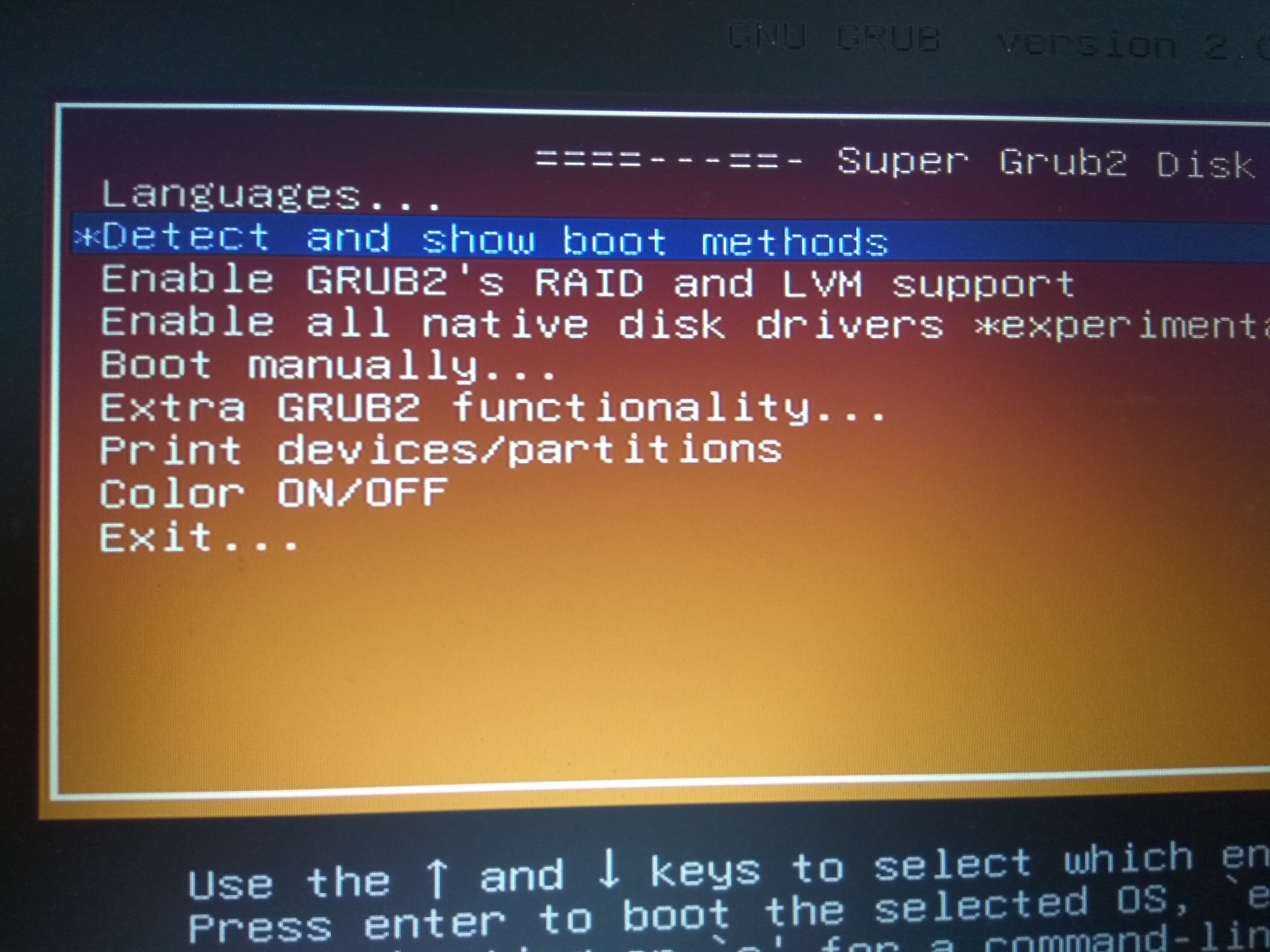
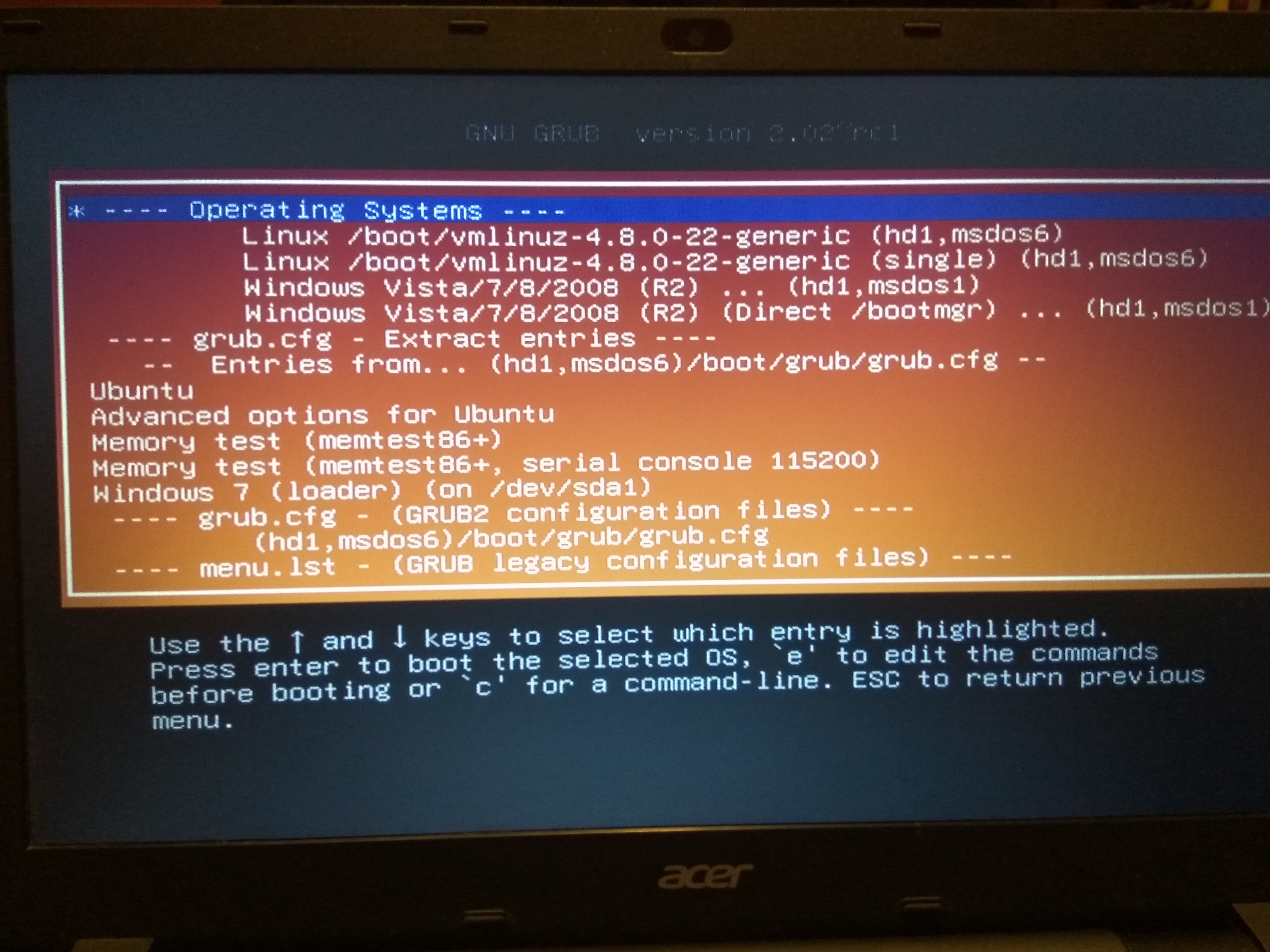
A w ten sposób da się uruchomić Windowsa z pomocą Super Grub Disk 2:
Ale przecież nie będę zawsze tak uruchamiać...
Jak to naprawić, by Windows 7 normalnie startował po wyborze go w boot menu? Dlaczego nie startuje teraz?