








Inicjowanie
Aby urządzenie bez akumulatora zapasowego mogło zachować czas, należy włączyć i skonfigurować protokół NTP. Poniższy skrypt skonfiguruje urządzenie flashowane OpenBeken dla określonej strefy czasowej i lokalizacji.
// NTP driver must be enabled for its functions to work
startDriver ntp

// It might be useful to configure a local NTP server on your LAN so that devices do not need to connect to the internet
ntp_setServer 192.168.1.12

// Set the local timezone as NTP server only provide UTC time
ntp_timeZoneOfs 11

// Setting the devices location will allow for calculating sunrise and sunset times
ntp_setLatlong -33.729720 151.160990

// Time values are available once NTP finishes initializing
waitFor NTPState 1
- Aby skonfigurować lokalny serwer NTP na hoście dokującym, możesz rozważyć: https://github.com/cturra/docker-ntp
- Przydatna strona internetowa do wyszukiwania wartości szerokości i długości geograficznej dla Twojej lokalizacji: https://tasmota-tz.cloudfree.io/
- Dostosowywanie przesunięcia strefy czasowej dla czasu letniego nie jest jeszcze obsługiwane. Można to zrobić w skrypcie lub dodać do tego funkcję w stylu Tasmota. Postaram się rozwiązać do kwietnia lub października :)
Stałe czasowe
Gdy sterownik NTP jest włączony, w skryptach dostępne są różne stałe związane z czasem. Można je znaleźć na stronie https://github.com/openshwprojects/OpenBK7231T_App/blob/main/docs/constants.md. W większości poniższych przykładów użyję scenariusza oświetlenia na werandzie, który obejmuje ściemnialną lampę LED podłączoną do Wi-Fi i podłączoną do zwykłego włącznika światła. Gdy urządzenie jest włączone, stałe czasowe są przydatne do ustalenia stanu początkowego, np. w ciągu dnia światło będzie wyłączone, lub po zmroku włączone, stan początkowy światła jest włączony. Aby wykonać obliczenia na podstawie aktualnego czasu, łatwiej jest mi przeliczyć bieżący czas na sekundy od północy. $sunrise i $sunset są już w tym formacie.
// sunset is typically still bright enough to see quite well, add another 30 mins to set the time we want the light to be on
setChannel 10 $sunset+1800

// set the current time as seconds after midnight for easy calculations
setChannel 11 $hour*3600+$minute*60

// Set initial light state to match the above clock events
// sunset - 21:00   lights set to high (evening activities)
// 21:00 - 23:00    lights set to low (sleepy mode: warmest temperature and very dim)
// 23:00 - sunrise  lights on for a short period (bedtime the lights should be off, but can be forced on for a period by switching device off and on)
// sunrise - sunset lights turned off (day time the lights should be off)
if $CH11>=$CH10&&$hour<21 then high_lights
if $hour>=21&&$hour<23 then low_lights
if $hour>=23||$CH11<$sunrise then timer_on_lights
if $CH11>=$sunrise&&$CH11<$CH10 then off_lights
Planowanie
W moim przypadku wolę zostawić urządzenie włączone i mieć skrypt, który automatycznie włącza, przyciemnia i wyłącza się o odpowiednich porach dnia. Główną przyczyną tego zachowania jest funkcja addClockEvent. Różne parametry są następujące:
addClockEvent
czas - Pora dnia, o której ma zostać uruchomione polecenie. Mogą to być różne formaty: TimerSeconds reprezentujące sekundy od północy, Ciągi czasu, tj. GG:mm, GG:mm:ss i wschód/zachód słońca.
dni tygodnia - flaga bitowa, gdzie każdy bit reprezentuje dzień tygodnia, który najłatwiej określić w postaci liczb szesnastkowych, np. 0x01 oznacza niedzielę, 0x02 oznacza poniedziałek, 0x7f lub 0xff oznacza każdy dzień tygodnia. (Ósmy bit jest ignorowany)
ID - jest unikalnym identyfikatorem umożliwiającym późniejsze usunięcie zdarzenia
Komenda - czynność do wykonania w określonym czasie
Obsługiwane są wyrażenia dla parametrów czasu i dni tygodnia. Zachowaj ostrożność przy określaniu wschodu i zachodu słońca, np. poniższe 2 zdarzenia nie ten sam:
// The following will trigger the command at the correct sunset time every day
addClockEvent sunset 0xff 31 echo good night

// The following the first trigger will be correct sunset time, but the following days will use the same time and will deviate from proper sunset time.
addclockEvent $sunset 0xff 32 echo same time as yesterday
Aby kontynuować mój przykład oświetlenia na werandzie, musimy codziennie aktualizować obliczony czas zdarzenia:
 // Create an alias to recalculate and update the clock event to trigger at the correct delayed sunset time
alias calc_sunset backlog setChannel 10 $sunset+1800; removeClockEvent 4; addClockEvent $CH10 0xff 4 high_lights; echo Lights will turn on at $CH10

// Trigger the calculation well before sunset, its also a good idea to avoid when daylight savings time get applied eg 2am & 3am
addClockEvent 3:30 0xff 1 calc_sunset
addClockEvent 21:00 0xff 2 low_lights
addClockEvent 23:00 0xff 3 off_lights
Inne przykłady planowania:
 // multiple expansions in time strings
addClockEvent $hour:$minute:59 0xff 35 ScheduledSomethingAtTheEndOfTheMinute

// single numeric represents seconds
addClockEvent 7 0xff 36 Scheduled7SecondsAfterMidnight

// numeric values greater than 24x60x60 (24hours) the overflow only is considered
addClockEvent 24*60*60+7 0xff 37 Scheduled7SecondsAfterMidnight

// expressions in days of week, eg week days + week end = every day of the week
setChannel 12 0x3e
setChannel 13 0x41
addClockEvent 12:00 $CH12+$CH13 38 LongWayToScheduleNoonEveryDay
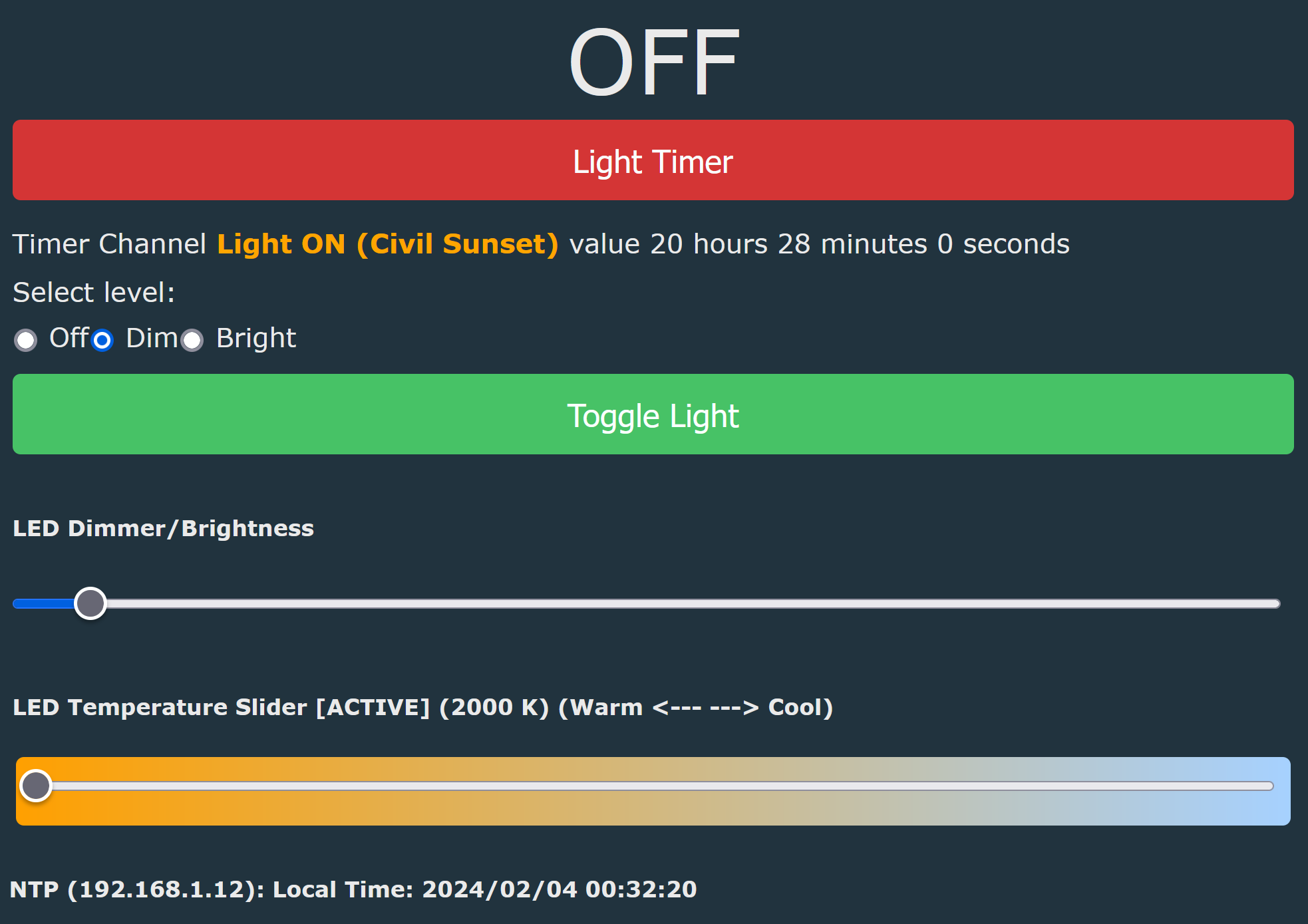
Dla porównania, tutaj jest pełna lista pliku autoexec.bat mojego światła na werandzie.
PowerSave 1
startDriver ntp
ntp_setServer 192.168.1.12
ntp_timeZoneOfs 11
ntp_setLatlong <latitude> <longitude>

// These log events tend to be very noisy when debugging my device.
logfeature 6 0
logfeature 7 0

// Channel 10: maintain sunset time (The time when the light should turn on)
setChannelLabel 10  "<b><span style='color:orange'\>Light ON (Civil Sunset)</span></b>"
setChannelType 10 TimerSeconds

// when using $sunset as an expression in addClockEvent, it needs to be re-calculated every day to take into account different sunset values
alias calc_sunset backlog setChannel 10 $sunset+1800; removeClockEvent 4; addClockEvent $CH10 0xff 4 high_lights; echo Lights will turn on at $CH10

// Channel 11: hidden register to store current time as TimerSeconds
setChannelType 11 TimerSeconds
setChannelPrivate 11 1
setChannelVisible 11 0

// Channel 12: trigger for timer_on_lights
setChannelLabel 12 "Light Timer"
setChannelType 12 Toggle
setChannel 12 0

alias timer_on_lights setChannel 12 1

// Channel 13: 3 way toggle for light settings
setChannelLabel 13 "Switch"
setChannelType 13 OffDimBright

alias off_lights setChannel 13 0
alias low_lights setChannel 13 1
alias high_lights setChannel 13 2

// timer trigger: lights will be on high for 5mins, then on low for a further 25mins, then turned off
addChangeHandler Channel12 == 1 backlog high_lights; addRepeatingEvent 300 1 low_lights; addRepeatingEvent 1500 1 off_lights

addChangeHandler Channel13 == 0 backlog led_enableAll 0; setChannel 12 0; echo lights_set_off
addChangeHandler Channel13 == 1 backlog led_temperature 500; led_dimmer 5; led_enableAll 1; echo lights_set_low
addChangeHandler Channel13 == 2 backlog led_temperature 300; led_dimmer 30; led_enableAll 1; echo lights_set_high

addClockEvent 3:30 0xff 1 calc_sunset
addClockEvent 21:00 0xff 2 low_lights
addClockEvent 23:00 0xff 3 off_lights

waitFor NTPState 1
waitFor MQTTState 1

calc_sunset

// set the current time as TimerSeconds in register for checks below
setChannel 11 $hour*3600+$minute*60

// Set initial light state to match the above clock events
// sunset - 21:00   lights set to high (evening activities)
// 21:00 - 23:00    lights set to low (sleepy mode: warmest temperature and very dim)
// 23:00 - sunrise  lights on for a short period (bedtime the lights should be off, but can be forced on for a period by switching off and on)
// sunrise - sunset lights turned off (day time the lights should be off)
if $CH11>=$CH10&&$hour<21 then high_lights
if $hour>=21&&$hour<23 then low_lights
if $hour>=23||$CH11<$sunrise then timer_on_lights
if $CH11>=$sunrise&&$CH11<$CH10 then off_lights
Fajne? Ranking DIY
