logo elektroda
logo elektroda
X
logo elektroda
REKLAMA
REKLAMA
Adblock/uBlockOrigin/AdGuard mogą powodować znikanie niektórych postów z powodu nowej reguły.

Tuya Wi-Fi Thermostat DTC2201 - problem z parowaniem z chmurą przez WBR1

GAAD 28 Gru 2024 22:23 2076 10
REKLAMA
  • #1 21366515
    GAAD
    Poziom 17  
    Posty: 289
    Pomógł: 3
    Ocena: 19
    Witam.
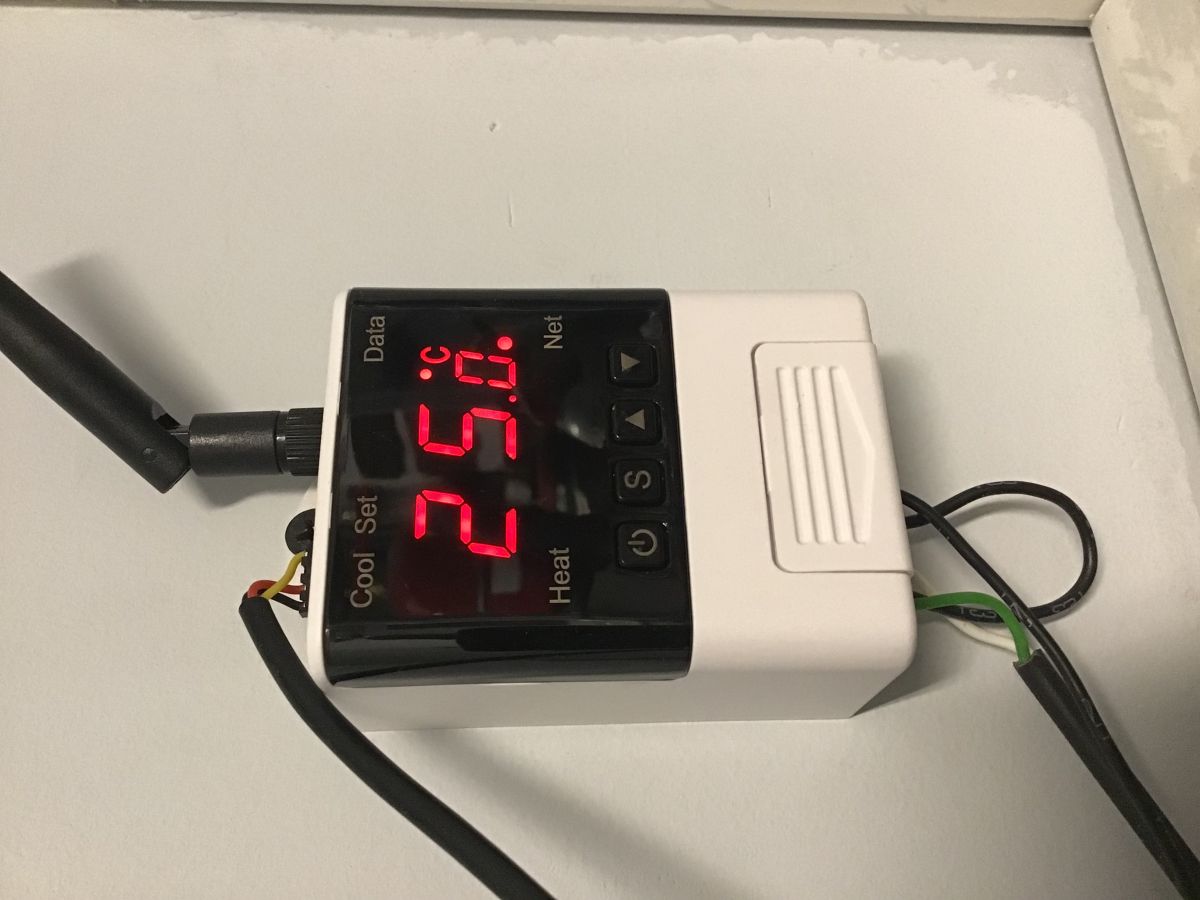
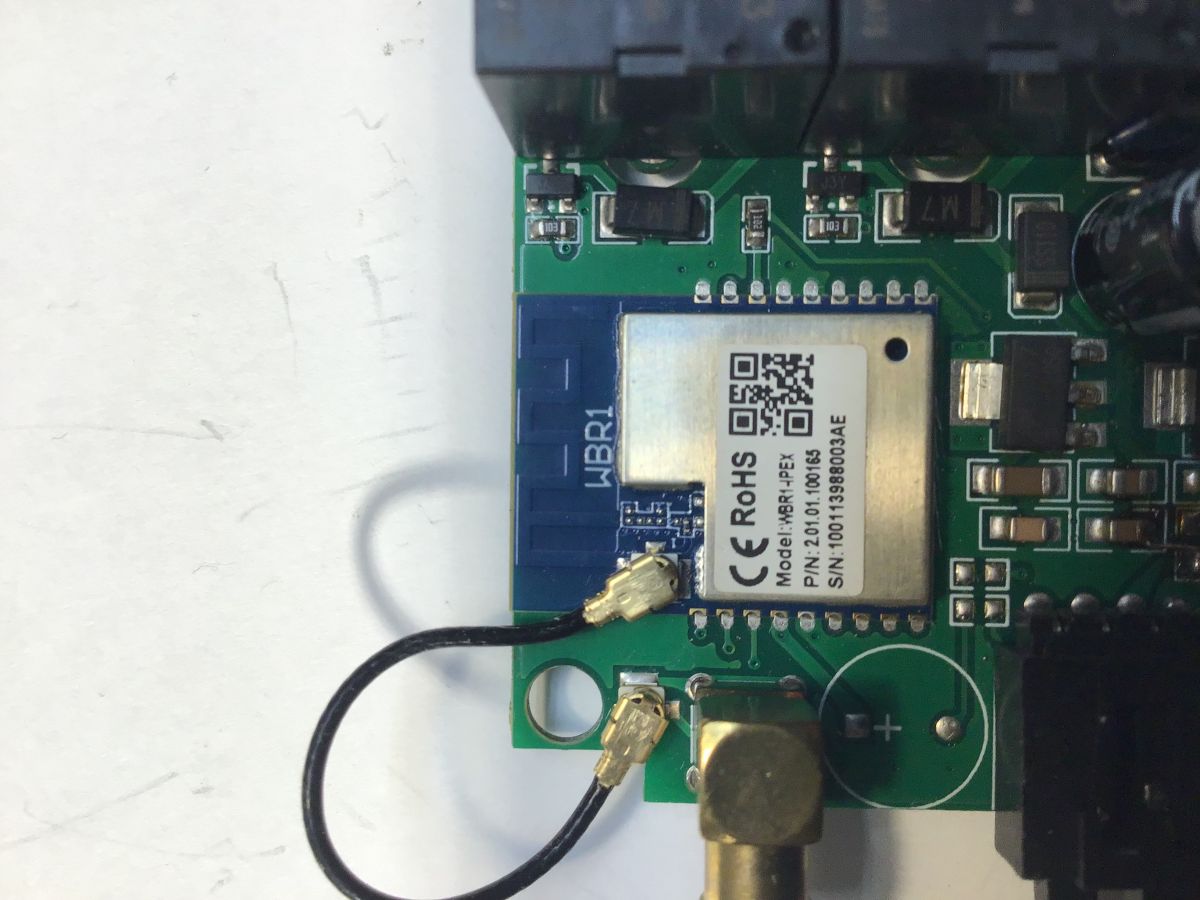
    Czy z modułem WBR1 da się coś zrobić? Jest możliwość wgrania OBK? Mam takie termostaty do sterowania ogrzewaniem podłogowym. Są wygodne, bo działają również bez chmury. Ta sztuka teoretycznie działa, stracił komunikację z chmurą i nie mogę dodać go ponownie. Włącza parowanie, aplikacja Tuya go wykrywa, ale zanim zdąży go dodać do chmury tryb parowania wyłącza się i operacja kończy się niepowodzeniem.

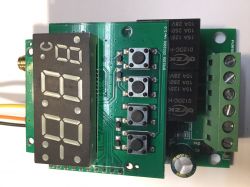
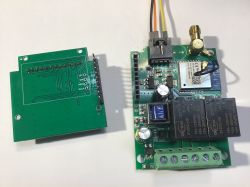
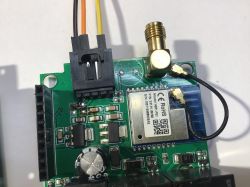
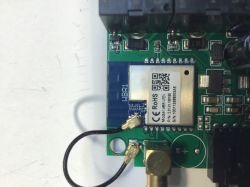
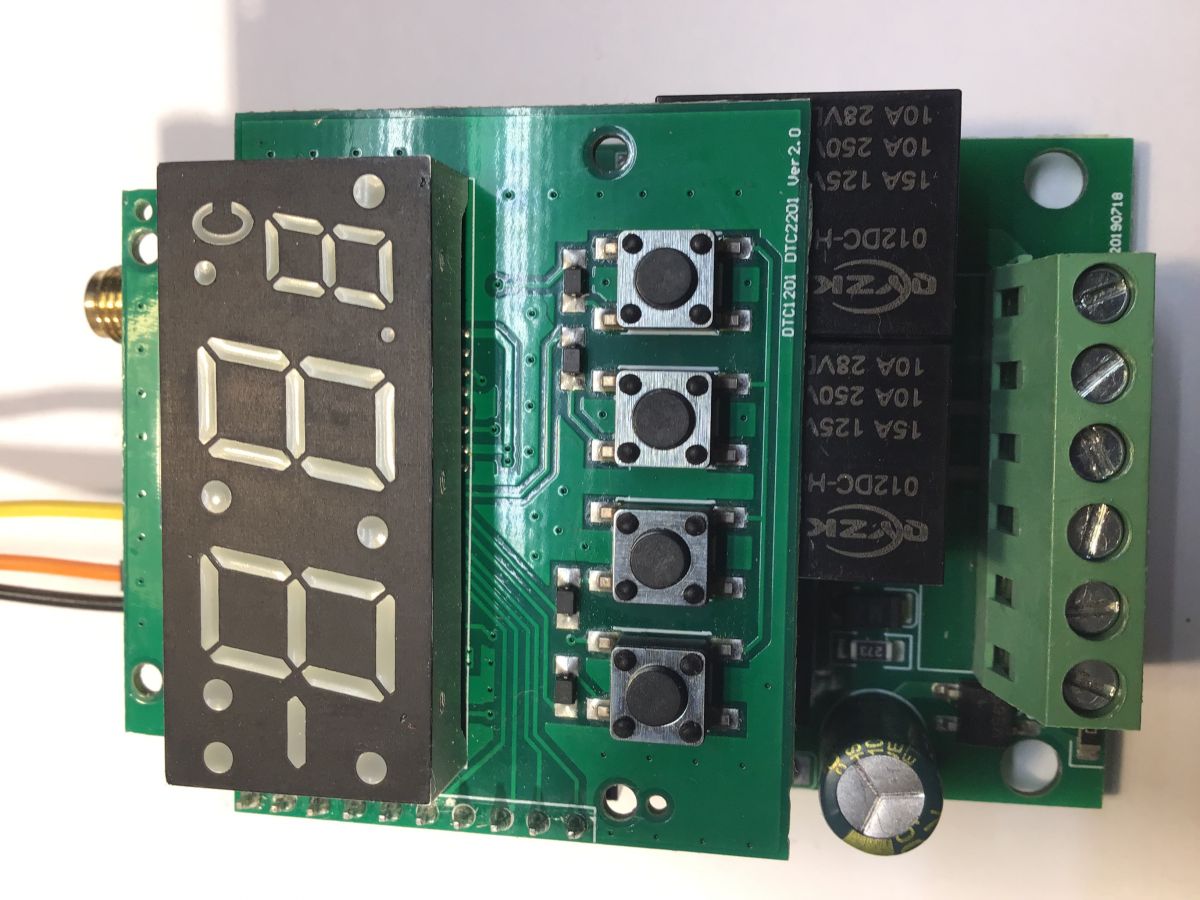
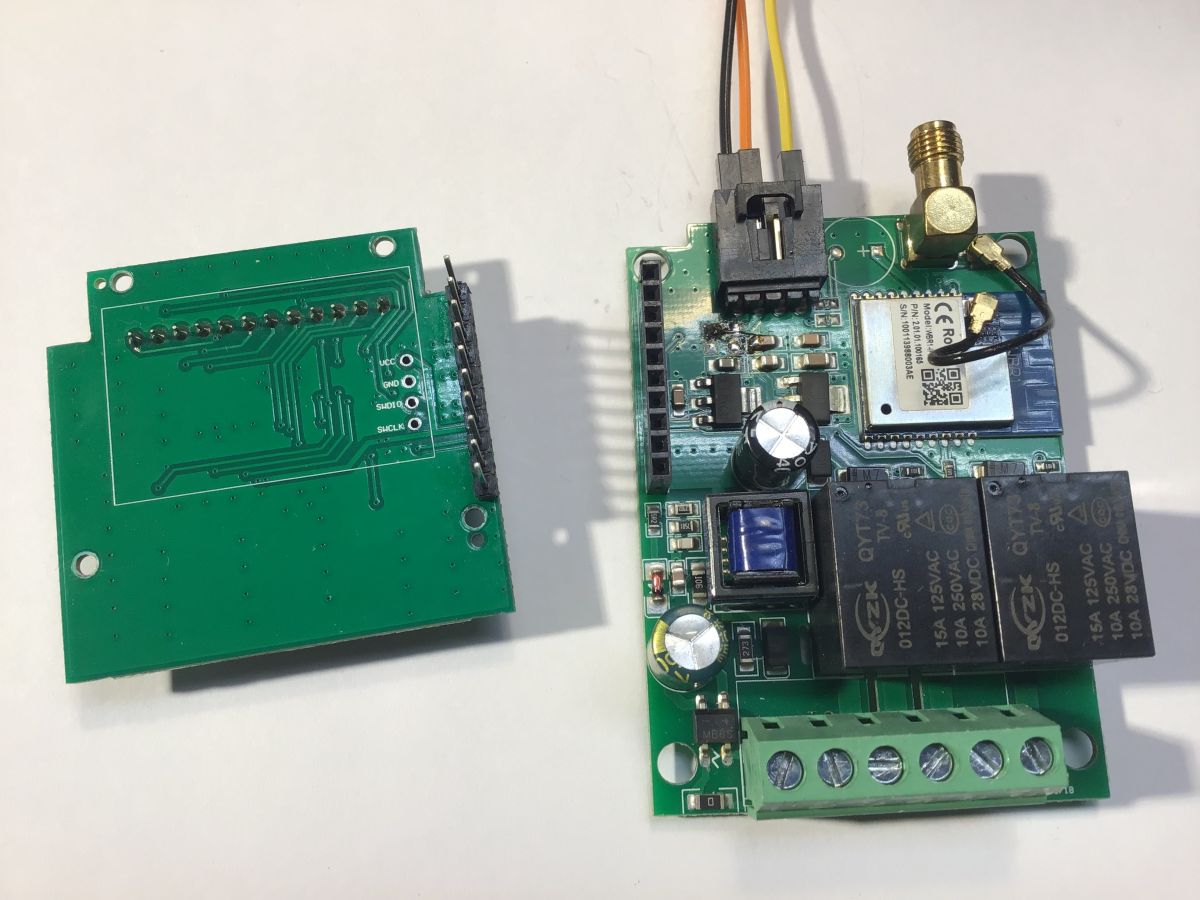
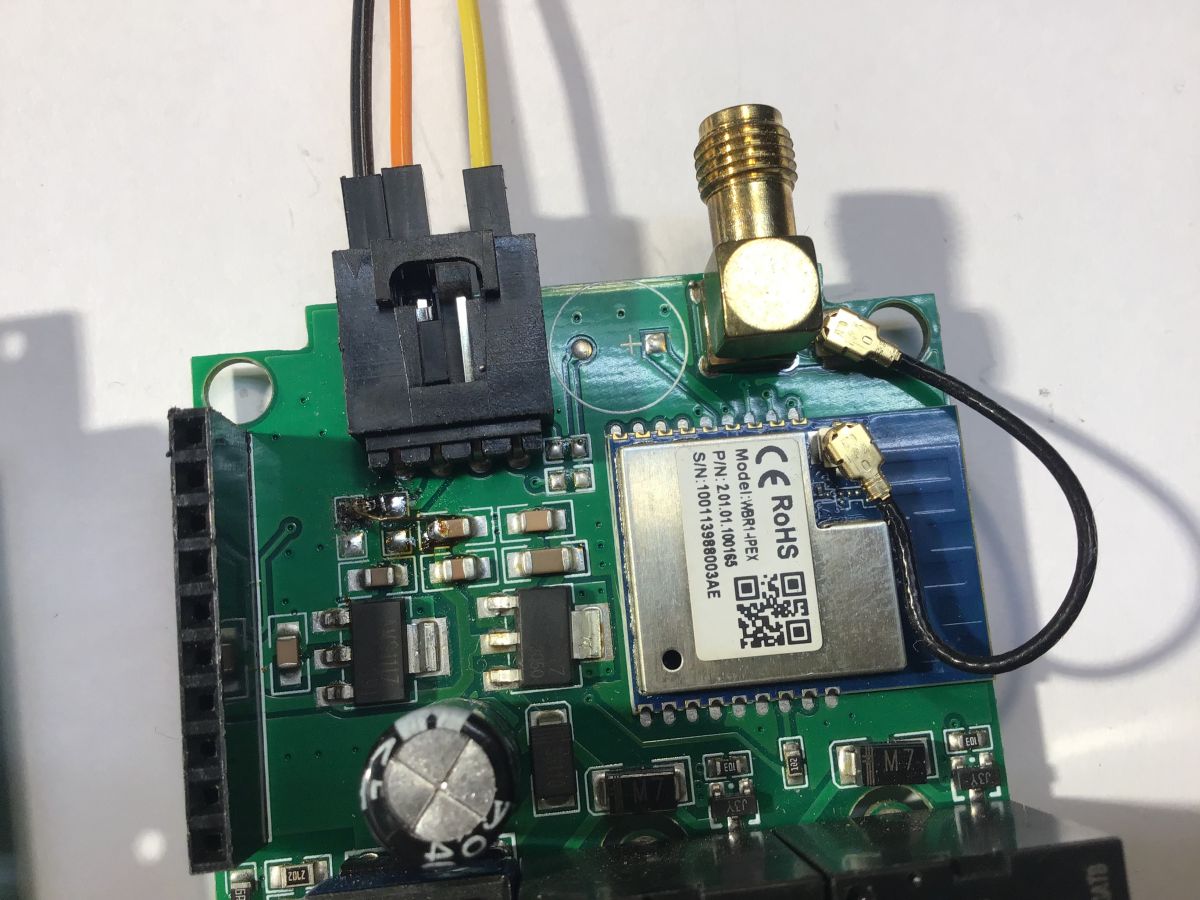
    Pod wyświetlaczem są układy scalone, zapewne jeden z nich to MCU. Po wyjęciu płytki z wyświetlaczem i MCU piny WBR1 są wolne.

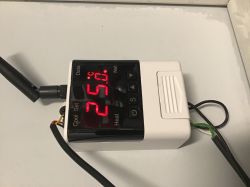
    Elektroniczny termostat z wyświetlaczem pokazującym temperaturę 25 stopni Celsjusza, anteną i przyciskami. Moduł elektroniczny z wyświetlaczem i przyciskami. Moduł elektroniczny z odkrytą płytką z układami scalonymi i złączami. Zbliżenie na płytkę drukowaną z modułem WBR1, anteną i złączem przewodowym. Moduł WBR1 na płytce drukowanej z widocznymi elementami elektronicznymi i pinami.
  • REKLAMA
  • #2 21369023
    GAAD
    Poziom 17  
    Posty: 289
    Pomógł: 3
    Ocena: 19
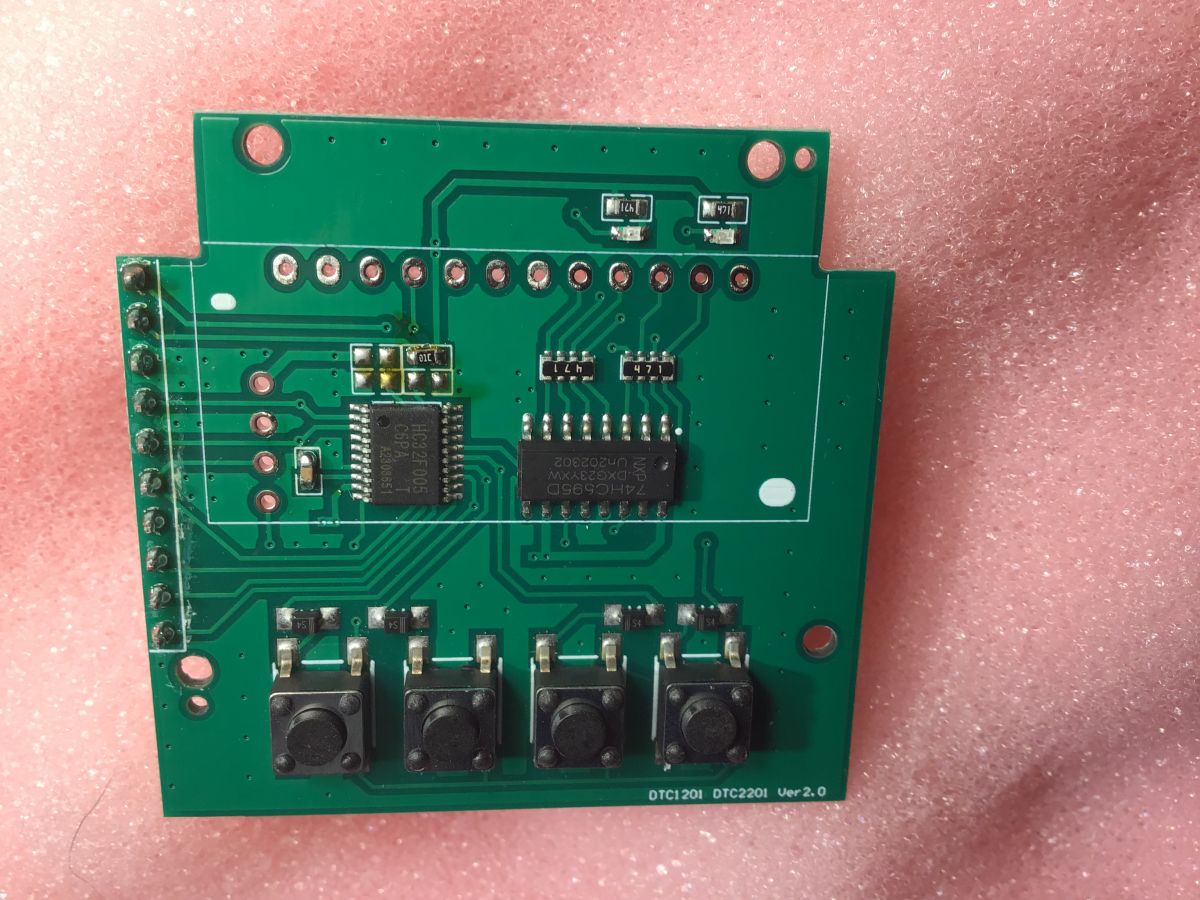
    Wyjąłem wyświetlacz, aby zobaczyć, co kryje się pod nim.
    HC32F005C6PA - to chyba będzie MCU, a 74HC595D - to driver do wyświetlacza.

    Płytka drukowana z elementami elektronicznymi na różowym tle.

    Kwestia połączenia z chmurą też już się wyjaśniła, mój WBR1 jest uszkodzony, bo dostał zasilanie 5 V. Przerabiałem zasilanie DS18B20 na 5 V, bo sterownik jest w kotłowni, a sam czujnik DS18B20 na długim kablu i przy 3,3 V zgłaszał błędy - nie zauważyłem, że podciągając DS-a pod 5 V zasilam też WBR-a. Działał tak ponad rok. Pytanie czy da się czymś zastąpić WBR1?
  • #3 21371186
    GAAD
    Poziom 17  
    Posty: 289
    Pomógł: 3
    Ocena: 19
    Zamiast WBR1 podłączyłem moduł Wi-Fi zdemontowany z innego urządzenia Tuya.
    Wgrane OBK.
    Wydaje mi się, że sam WBR1 służy tu wyłącznie do komunikacji, ma podłączone jedynie zasilanie, Rx, Tx do komunikacji z MCU i EN.
    Konfiguracja OBK:
    
    startDriver NTP
    ntp_setServer 192.168.1.253
    waitFor NTPState 1
    ntp_timeZoneOfs 1
    startDriver TuyaMCU
    startDriver tmSensor
    setChannelType 3 temperature_div10
    linkTuyaMCUOutputToChannel 3 val 3


    log z OBK dla Tuya MCU:
    
    Info:TuyaMCU:Received: 55 AA 03 04 00 00 06 
    Info:TuyaMCU:ProcessIncoming[v=3]: cmd 4 (WiFiReset) len 7
    Info:TuyaMCU:ProcessIncoming: 0x04 replying
    Info:TuyaMCU:Received: 55 AA 03 04 00 00 06 
    Info:TuyaMCU:ProcessIncoming[v=3]: cmd 4 (WiFiReset) len 7
    Info:TuyaMCU:ProcessIncoming: 0x04 replying
    Info:TuyaMCU:Received: 55 AA 03 04 00 00 06 
    Info:TuyaMCU:ProcessIncoming[v=3]: cmd 4 (WiFiReset) len 7
    Info:TuyaMCU:ProcessIncoming: 0x04 replying
    Info:TuyaMCU:Received: 55 AA 03 04 00 00 06 
    Info:TuyaMCU:ProcessIncoming[v=3]: cmd 4 (WiFiReset) len 7
    Info:TuyaMCU:ProcessIncoming: 0x04 replying
    Info:TuyaMCU:Received: 55 AA 03 07 00 08 03 02 00 04 00 00 00 F3 0D 
    Info:TuyaMCU:ProcessIncoming[v=3]: cmd 7 (State) len 15
    Info:TuyaMCU:ParseState: id 3 type 2-val len 4
    Info:TuyaMCU:ParseState: int32 243
    Info:TuyaMCU:Received: 55 AA 03 07 00 08 03 02 00 04 00 00 00 F7 11 
    Info:TuyaMCU:ProcessIncoming[v=3]: cmd 7 (State) len 15
    Info:TuyaMCU:ParseState: id 3 type 2-val len 4
    Info:TuyaMCU:ParseState: int32 247
    Info:TuyaMCU:Received: 55 AA 03 04 00 00 06 
    Info:TuyaMCU:ProcessIncoming[v=3]: cmd 4 (WiFiReset) len 7
    Info:TuyaMCU:ProcessIncoming: 0x04 replying
    Info:TuyaMCU:Received: 55 AA 03 07 00 08 03 02 00 04 00 00 00 F5 0F 
    Info:TuyaMCU:ProcessIncoming[v=3]: cmd 7 (State) len 15
    Info:TuyaMCU:ParseState: id 3 type 2-val len 4
    Info:TuyaMCU:ParseState: int32 245
    Info:TuyaMCU:Received: 55 AA 03 07 00 08 03 02 00 04 00 00 00 F3 0D 
    Info:TuyaMCU:ProcessIncoming[v=3]: cmd 7 (State) len 15
    Info:TuyaMCU:ParseState: id 3 type 2-val len 4
    Info:TuyaMCU:ParseState: int32 243
    Info:TuyaMCU:Received: 55 AA 03 07 00 08 03 02 00 04 00 00 00 F1 0B 
    Info:TuyaMCU:ProcessIncoming[v=3]: cmd 7 (State) len 15
    Info:TuyaMCU:ParseState: id 3 type 2-val len 4
    Info:TuyaMCU:ParseState: int32 241
    Info:TuyaMCU:Received: 55 AA 03 07 00 08 03 02 00 04 00 00 00 EE 08 
    Info:TuyaMCU:ProcessIncoming[v=3]: cmd 7 (State) len 15
    Info:TuyaMCU:ParseState: id 3 type 2-val len 4
    Info:TuyaMCU:ParseState: int32 238
    Info:TuyaMCU:Received: 55 AA 03 07 00 08 03 02 00 04 00 00 00 EC 06 
    Info:TuyaMCU:ProcessIncoming[v=3]: cmd 7 (State) len 15
    Info:TuyaMCU:ParseState: id 3 type 2-val len 4
    Info:TuyaMCU:ParseState: int32 236
    Info:TuyaMCU:Received: 55 AA 03 04 00 00 06 
    Info:TuyaMCU:ProcessIncoming[v=3]: cmd 4 (WiFiReset) len 7
    Info:TuyaMCU:ProcessIncoming: 0x04 replying
    Info:TuyaMCU:Received: 55 AA 03 07 00 08 03 02 00 04 00 00 00 EB 05 
    Info:TuyaMCU:ProcessIncoming[v=3]: cmd 7 (State) len 15
    Info:TuyaMCU:ParseState: id 3 type 2-val len 4
    Info:TuyaMCU:ParseState: int32 235
    Info:TuyaMCU:Received: 55 AA 03 07 00 08 03 02 00 04 00 00 00 E9 03 
    Info:TuyaMCU:ProcessIncoming[v=3]: cmd 7 (State) len 15
    Info:TuyaMCU:ParseState: id 3 type 2-val len 4
    Info:TuyaMCU:ParseState: int32 233
    Info:TuyaMCU:Received: 55 AA 03 04 00 00 06 
    Info:TuyaMCU:ProcessIncoming[v=3]: cmd 4 (WiFiReset) len 7
    Info:TuyaMCU:ProcessIncoming: 0x04 replying
    Info:TuyaMCU:Received: 55 AA 03 07 00 08 03 02 00 04 00 00 00 E7 01 
    Info:TuyaMCU:ProcessIncoming[v=3]: cmd 7 (State) len 15
    Info:TuyaMCU:ParseState: id 3 type 2-val len 4
    Info:TuyaMCU:ParseState: int32 231


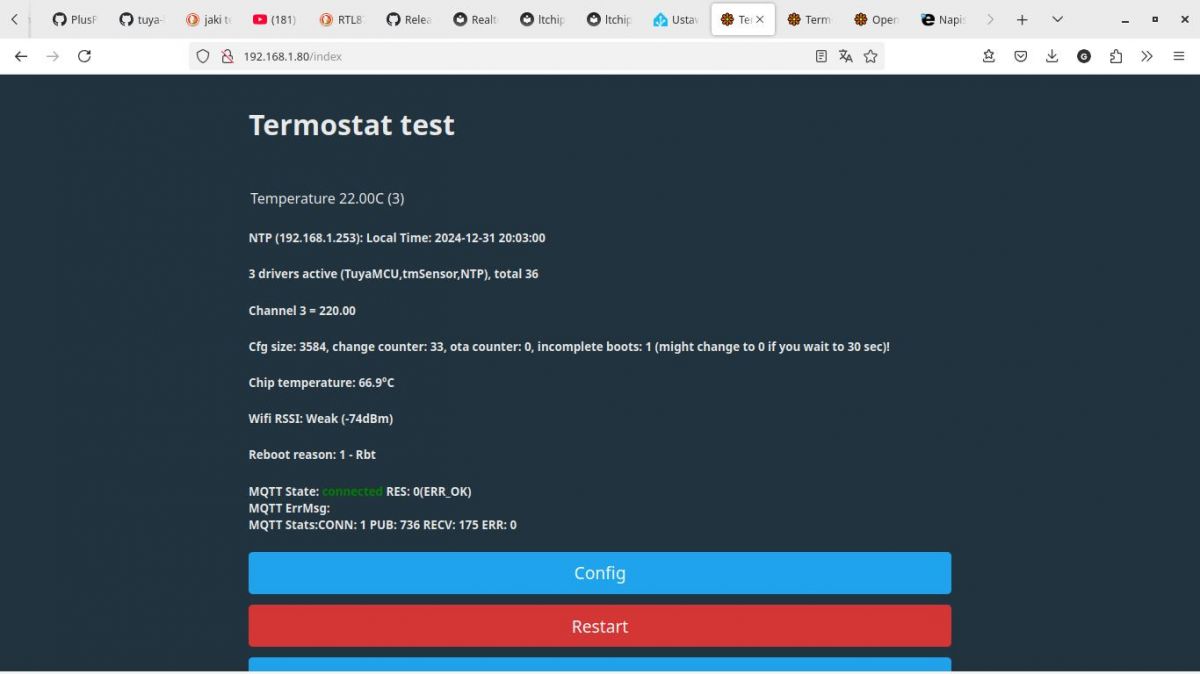
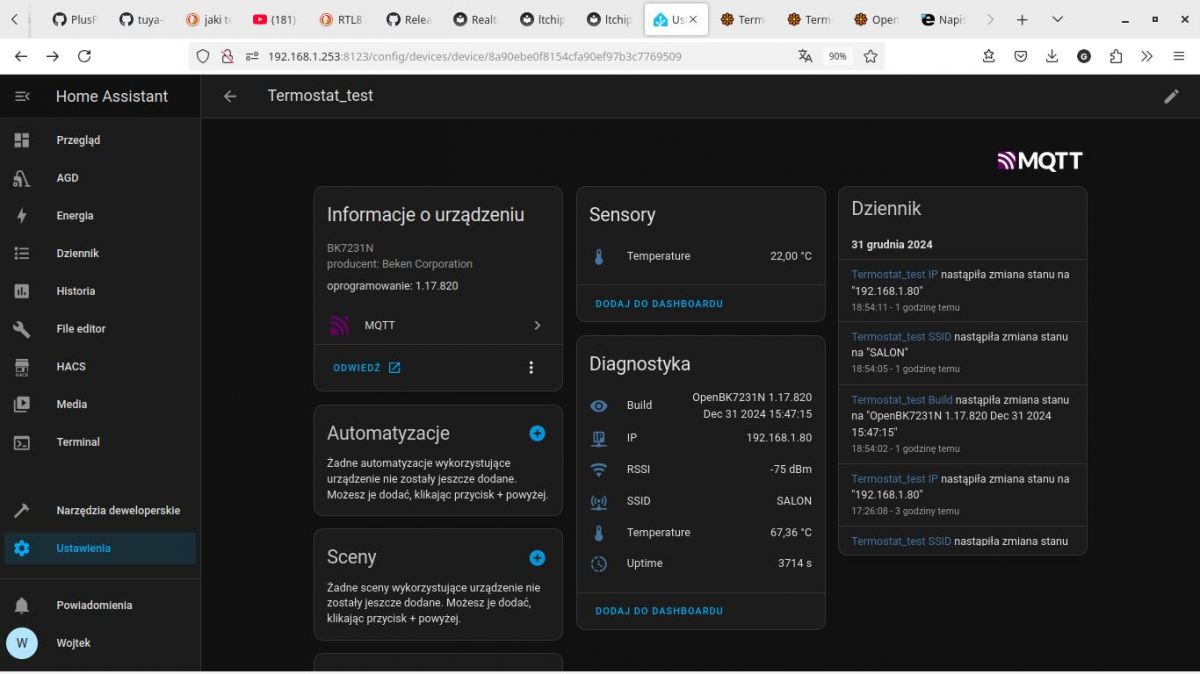
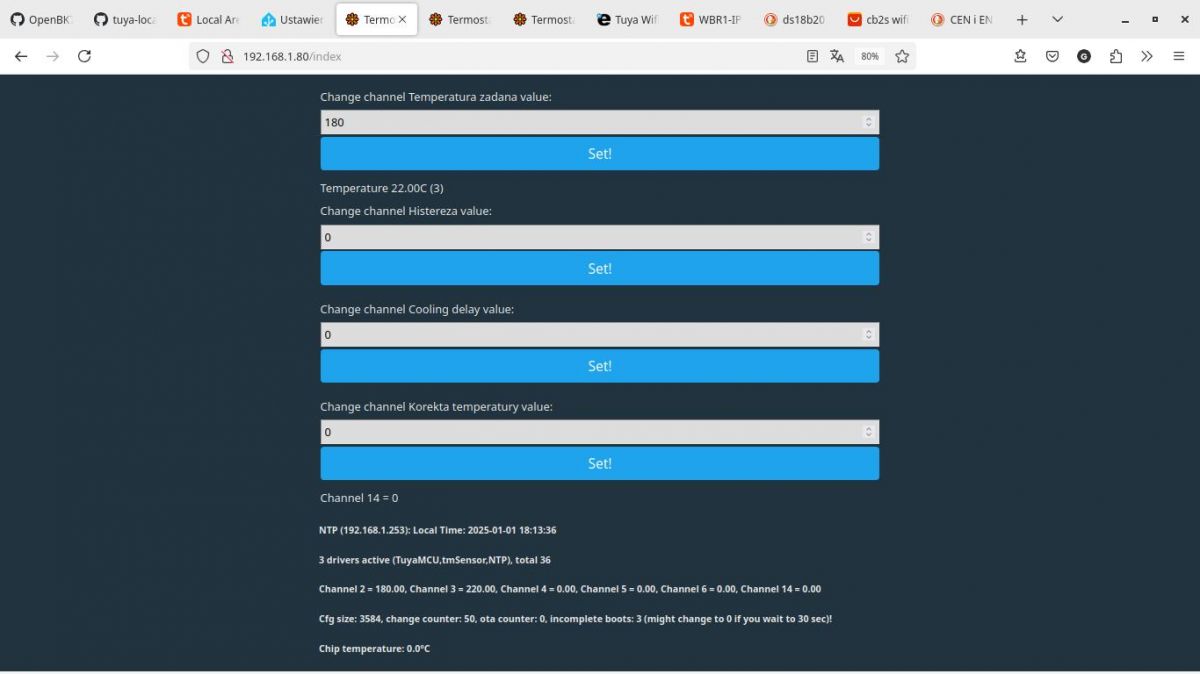
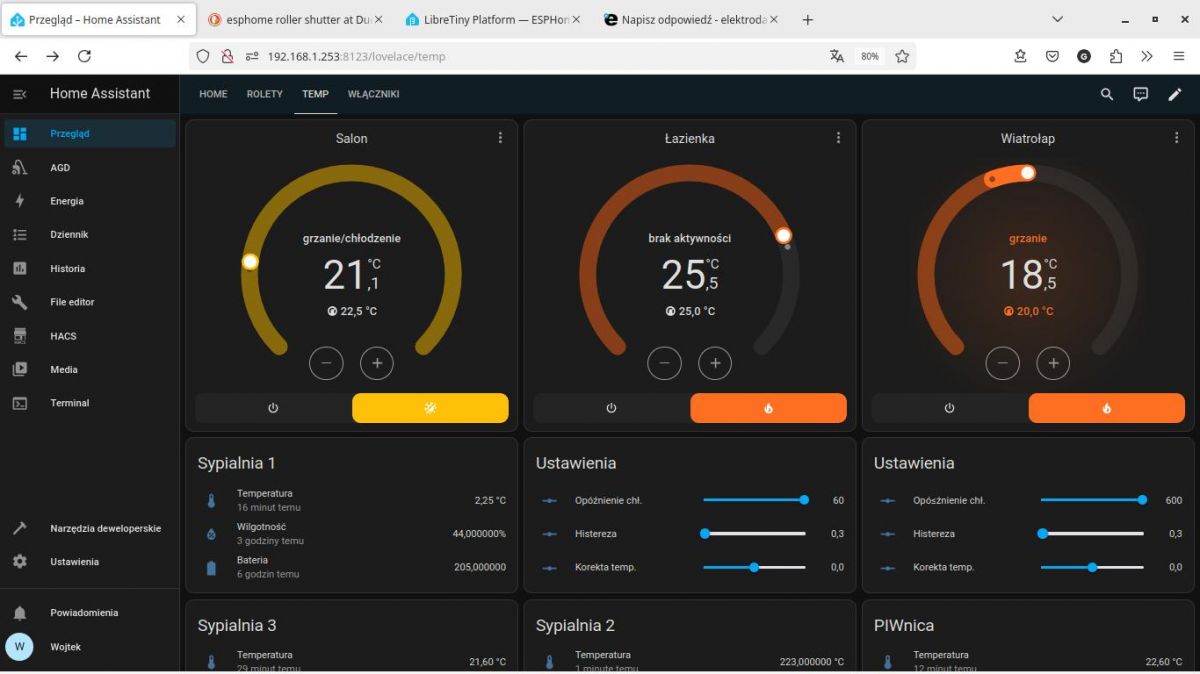
    Czyli pomiar temperatury działa, nawet się prawidłowo wyświetla w HA.
    Sam termostat "w trybie ręcznym" też.
    Czy jest szansa dopracować komendy aby był to w pełni funkcjonalny termostat w HA?

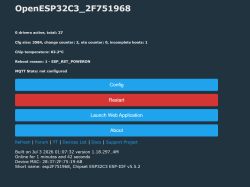
    Strona konfiguracji testu termostatu z informacjami o temperaturze i połączeniu.
    Interface użytkownika Home Assistant z informacjami o termostacie BK7231N
  • REKLAMA
  • #4 21372234
    GAAD
    Poziom 17  
    Posty: 289
    Pomógł: 3
    Ocena: 19
    Niestety, sam nie ogarnę, jest szansa aby zrobić z tego termostat w HA?

    MCU działa. Sam termostat posiada 4 parametry do konfiguracji z klawiatury:
    F1; temperatura zadana zakres od -40 do 99,9 stopnia precyzja 0,1 stopnia
    F2: Histereza zakres od 0,3 do 10 stopni precyzja 0,1 stopnia
    F3: Opóźnienie chłodzenia zakres od 1 do 10 minut precyzja 1 minuta
    F4: korekta temperatury zakres od -10 do +10 stopnia precyzja 0,1

    Z logów MCU wynika, że:
    kanał 2 to wartość nastawionej temp: parametr F1
    kanał 3 aktualna temperatura
    kanał 101 histereza parametr F2
    kanał 102 opóźnienie chłodzenia parametr F3
    kanał 103 korekta temperatury parametr F4
    kanał 14 stan przekaźnika grzania byte 1-wyłączony byte 0 -włączony

    Nie udało mi się zalogować zadziałania przekaźnika chłodzenia.

    Tylko kanał drugi z zadaną temperaturą udało mi się skonfigurować w OBK tak, że widać wartość i mogę ją nastawić, tylko, że bez przecinka czyli 25 stopni to wartość 250.


    Fragmenty logów:
    
    Info:TuyaMCU:ParseState: id 2 type 2-val len 4
    Info:TuyaMCU:ParseState: int32 184
    Info:TuyaMCU:Received: 55 AA 03 07 00 08 02 02 00 04 00 00 00 B7 D0 
    Info:TuyaMCU:ProcessIncoming[v=3]: cmd 7 (State) len 15
    Info:TuyaMCU:ParseState: id 2 type 2-val len 4
    Info:TuyaMCU:ParseState: int32 183
    Info:TuyaMCU:Received: 55 AA 03 07 00 08 02 02 00 04 00 00 00 B6 CF 
    Info:TuyaMCU:ProcessIncoming[v=3]: cmd 7 (State) len 15
    Info:TuyaMCU:ParseState: id 2 type 2-val len 4
    Info:TuyaMCU:ParseState: int32 182
    Info:TuyaMCU:Received: 55 AA 03 07 00 08 02 02 00 04 00 00 00 B5 CE 
    Info:TuyaMCU:ProcessIncoming[v=3]: cmd 7 (State) len 15
    Info:TuyaMCU:ParseState: id 2 type 2-val len 4
    Info:TuyaMCU:ParseState: int32 181
    Info:TuyaMCU:Received: 55 AA 03 07 00 08 02 02 00 04 00 00 00 B4 CD 
    Info:TuyaMCU:ProcessIncoming[v=3]: cmd 7 (State) len 15
    Info:TuyaMCU:ParseState: id 2 type 2-val len 4
    Info:TuyaMCU:ParseState: int32 180
    Info:TuyaMCU:Received: 55 AA 03 04 00 00 06 
    Info:TuyaMCU:ProcessIncoming[v=3]: cmd 4 (WiFiReset) len 7
    Info:TuyaMCU:ProcessIncoming: 0x04 replying
    Info:TuyaMCU:ParseState: id 101 type 2-val len 4
    Info:TuyaMCU:ParseState: int32 13
    Info:TuyaMCU:Received: 55 AA 03 07 00 08 65 02 00 04 00 00 00 0C 88 
    Info:TuyaMCU:ProcessIncoming[v=3]: cmd 7 (State) len 15
    Info:TuyaMCU:ParseState: id 101 type 2-val len 4
    Info:TuyaMCU:ParseState: int32 12
    Info:TuyaMCU:Received: 55 AA 03 07 00 08 65 02 00 04 00 00 00 03 7F 
    Info:TuyaMCU:ProcessIncoming[v=3]: cmd 7 (State) len 15
    Info:TuyaMCU:ParseState: id 101 type 2-val len 4
    Info:TuyaMCU:ParseState: int32 3
    Info:TuyaMCU:Received: 55 AA 03 04 00 00 06 
    Info:TuyaMCU:ParseState: id 102 type 2-val len 4
    Info:TuyaMCU:ParseState: int32 5
    Info:TuyaMCU:Received: 55 AA 03 07 00 08 66 02 00 04 00 00 00 06 83 
    Info:TuyaMCU:ProcessIncoming[v=3]: cmd 7 (State) len 15
    Info:TuyaMCU:ParseState: id 102 type 2-val len 4
    Info:TuyaMCU:ParseState: int32 6
    Info:TuyaMCU:Received: 55 AA 03 07 00 08 66 02 00 04 00 00 00 07 84 
    Info:TuyaMCU:ProcessIncoming[v=3]: cmd 7 (State) len 15
    Info:TuyaMCU:ParseState: id 102 type 2-val len 4
    Info:TuyaMCU:ParseState: int32 7
    Info:TuyaMCU:Received: 55 AA 03 07 00 08 66 02 00 04 00 00 00 0A 87 
    Info:TuyaMCU:ProcessIncoming[v=3]: cmd 7 (State) len 15
    Info:TuyaMCU:ParseState: id 102 type 2-val len 4
    Info:TuyaMCU:ParseState: int32 10
    Info:TuyaMCU:Received: 55 AA 03 04 00 00 06 
    Info:TuyaMCU:ParseState: id 103 type 2-val len 4
    Info:TuyaMCU:ParseState: int32 -8
    Info:TuyaMCU:Received: 55 AA 03 07 00 08 03 02 00 04 00 00 00 D2 EC 
    Info:TuyaMCU:ProcessIncoming[v=3]: cmd 7 (State) len 15
    Info:TuyaMCU:ParseState: id 3 type 2-val len 4
    Info:TuyaMCU:ParseState: int32 210
    Info:TuyaMCU:Received: 55 AA 03 07 00 08 67 02 00 04 FF FF FF F7 72 
    Info:TuyaMCU:ProcessIncoming[v=3]: cmd 7 (State) len 15
    Info:TuyaMCU:ParseState: id 103 type 2-val len 4
    Info:TuyaMCU:ParseState: int32 -9
    Info:TuyaMCU:Received: 55 AA 03 07 00 08 03 02 00 04 00 00 00 D0 EA 
    Info:TuyaMCU:ProcessIncoming[v=3]: cmd 7 (State) len 15
    Info:TuyaMCU:ParseState: id 3 type 2-val len 4
    Info:TuyaMCU:ParseState: int32 208
    Info:TuyaMCU:Received: 55 AA 03 07 00 08 67 02 00 04 FF FF FF F6 71 
    Info:TuyaMCU:ProcessIncoming[v=3]: cmd 7 (State) len 15
    Info:TuyaMCU:ParseState: id 103 type 2-val len 4
    Info:TuyaMCU:ParseState: int32 -10
    Info:TuyaMCU:Received: 55 AA 03 04 00 00 06 
    Info:TuyaMCU:ProcessIncoming[v=3]: cmd 4 (WiFiReset) len 7
    Info:TuyaMCU:ProcessIncoming: 0x04 replying
    Info:TuyaMCU:ParseState: id 14 type 4-enum len 1
    Info:TuyaMCU:ParseState: byte 1
    Info:TuyaMCU:Received: 55 AA 03 07 00 08 03 02 00 04 00 00 00 F3 0D 
    Info:TuyaMCU:ParseState: id 14 type 4-enum len 1
    Info:TuyaMCU:ParseState: byte 1
    Info:TuyaMCU:Received: 55 AA 03 04 00 00 06 
    Info:TuyaMCU:ParseState: id 2 type 2-val len 4
    Info:TuyaMCU:ParseState: int32 250
    Info:TuyaMCU:Received: 55 AA 03 07 00 08 02 02 00 04 00 00 00 FA 13 
    Info:TuyaMCU:ProcessIncoming[v=3]: cmd 7 (State) len 15
    Info:TuyaMCU:ParseState: id 2 type 2-val len 4
    Info:TuyaMCU:ParseState: int32 250
    Info:TuyaMCU:Received: 55 AA 03 07 00 05 0E 04 00 01 00 21 
    Info:TuyaMCU:ProcessIncoming[v=3]: cmd 7 (State) len 12
    Info:TuyaMCU:ParseState: id 14 type 4-enum len 1
    Info:TuyaMCU:ParseState: byte 0


    MCU cały czas sieje też błędami połączenia:

    
    Info:TuyaMCU:Received: 55 AA 03 04 00 00 06 
    Info:TuyaMCU:ProcessIncoming[v=3]: cmd 4 (WiFiReset) len 7
    Info:TuyaMCU:ProcessIncoming: 0x04 replying
    Info:GEN:dhcp=0 ip=192.168.1.80 gate=192.168.1.1 mask=255.255.255.0 mac=1c:90:ff:cd:73:cd
    Info:GEN:sta: 1, softap: 0, b/g/n
    Info:GEN:sta:rssi=-70,ssid=SALON,bssid=10:fe:ed:76:04:0c,channel=6,cipher_type:Error
    Info:TuyaMCU:Received: 55 AA 03 07 00 08 03 02 00 04 00 00 00 DB F5 
    Info:TuyaMCU:ProcessIncoming[v=3]: cmd 7 (State) len 15
    Info:TuyaMCU:ParseState: id 3 type 2-val len 4
    Info:TuyaMCU:ParseState: int32 219
    Info:GEN:CHANNEL_Set channel 3 has changed to 219 (flags 0)
    Info:TuyaMCU:Received: 55 AA 03 07 00 08 03 02 00 04 00 00 00 DA F4 
    Info:TuyaMCU:ProcessIncoming[v=3]: cmd 7 (State) len 15
    Info:TuyaMCU:ParseState: id 3 type 2-val len 4
    Info:TuyaMCU:ParseState: int32 218
    Info:GEN:CHANNEL_Set channel 3 has changed to 218 (flags 0)
    Info:TuyaMCU:Received: 55 AA 03 04 00 00 06 
    Info:TuyaMCU:ProcessIncoming[v=3]: cmd 4 (WiFiReset) len 7
    Info:TuyaMCU:ProcessIncoming: 0x04 replying
    Info:GEN:dhcp=0 ip=192.168.1.80 gate=192.168.1.1 mask=255.255.255.0 mac=1c:90:ff:cd:73:cd
    Info:GEN:sta: 1, softap: 0, b/g/n
    Info:GEN:sta:rssi=-69,ssid=SALON,bssid=10:fe:ed:76:04:0c,channel=6,cipher_type:Error
    Info:TuyaMCU:Received: 55 AA 03 04 00 00 06 
    Info:TuyaMCU:ProcessIncoming[v=3]: cmd 4 (WiFiReset) len 7
    Info:TuyaMCU:ProcessIncoming: 0x04 replying
    Info:TuyaMCU:Received: 55 AA 03 04 00 00 06 
    Info:TuyaMCU:ProcessIncoming[v=3]: cmd 4 (WiFiReset) len 7
    Info:TuyaMCU:ProcessIncoming: 0x04 replying
    Info:GEN:dhcp=0 ip=192.168.1.80 gate=192.168.1.1 mask=255.255.255.0 mac=1c:90:ff:cd:73:cd
    Info:GEN:sta: 1, softap: 0, b/g/n
    Info:GEN:sta:rssi=-69,ssid=SALON,bssid=10:fe:ed:76:04:0c,channel=6,cipher_type:Error
    Info:TuyaMCU:Received: 55 AA 03 04 00 00 06 
    Info:TuyaMCU:ProcessIncoming[v=3]: cmd 4 (WiFiReset) len 7
    Info:TuyaMCU:ProcessIncoming: 0x04 replying


    Czy przyczyną może być nie podłączone EN?

    autoexec:
    
    startDriver NTP
    ntp_setServer 192.168.1.253
    waitFor NTPState 1
    ntp_timeZoneOfs 1
    startDriver TuyaMCU
    startDriver tmSensor
    setChannelType 3 temperature_div10
    linkTuyaMCUOutputToChannel 3 val 3
    SetChannel 2 keywords
    SetChannelLabel 2 "Temperatura zadana"
    linkTuyaMCUOutputToChannel 2 val 2
    GetChannel 2
    SetChannel 4 keywords
    SetChannelLabel 4 "Histereza"
    linkTuyaMCUOutputToChannel 4 val 101
    SetChannel 5 keywords
    SetChannelLabel 5 "Cooling delay"
    linkTuyaMCUOutputToChannel 5 val 102
    SetChannel 6 keywords
    SetChannelLabel 6 "Korekta temperatury"
    linkTuyaMCUOutputToChannel 6 val 103


    Ekran konfiguracji termostatu z kanałami i wartościami.

    Czy da się skonfigurować kanały powyżej 100, aby odczytać/ustawić te parametry przez Wi-Fi? Nie jest to konieczne, ale może się da.
    Jak skonfigurować kanał 14 by odczytać stan działania przekaźnika grzania?

    Jak skonfigurować OBK, aby zgłosił się w HA jako termostat? Może udałoby się nim sterować przez BetterThermostat?
  • #5 21373539
    GAAD
    Poziom 17  
    Posty: 289
    Pomógł: 3
    Ocena: 19
    Podłączyłem WBR1 do ltchiptool komunikacja jest a zatem nie jest uszkodzony.
    Nie mogę jednak odczytać pamięci bo nie mam albo nie wiem jak gdzie jest CEN
    
    == Rtl8710c IoT Platform ==
    Chip VID: 5, Ver: 3
    ROM Version: v3.0
    
    == Boot Loader ==
    Dec  5 2019:14:02:18
    
    fwx SELE[fffffffc]
    fw SELE Bitidx 2, fw1 valid 1, sn 0, fw2 valid 1, sn 1
    fw1 USE, return sn 0
    
    == Rtl8710c IoT Platform ==
    Chip VID: 5, Ver: 3
    ROM Version: v3.0
    
    == Boot Loader ==
    Dec  5 2019:14:02:18
    
    fwx SELE[fffffffc]
    fw SELE Bitidx 2, fw1 valid 1, sn 0, fw2 valid 1, sn 1
    fw1 USE, return sn 0
    
    Boot Loader <==
    
    == RAM Start ==
    Build @ 14:39:51, Mar 14 2022
    interface 0 is initialized
    interface 1 is initialized
    [WIFI DEBUG]tuya[01-01 18:1_os_adapt_fl2:15 TUYA Iash_write er][lr:0x9b04r
    [WIFI DEbd8b] mqc aBUG]get counpp init ...try code:0
    [01-01 18:
    
    Initia12:15 TUYA Ilizing WIFI][lr:0x9b057 ...4cb] thread_create name:sys_timer,stackDepth:4096,totalstackDepth:4096,priority:5
    [01-01 18:12:15 TUYA I][lr:0x9b0574cb] thread_create name:cmmod,stackDepth:4096,totalstackDepth:8192,priority:4
    [01-01 18:12:15 TUYA D][lr:0x9b04bcad] mq_pro:5 cnt:1
    [01-01 18:12:15 TUYA D][lr:0x9b04bcad] mq_pro:31 cnt:2
    [01-01 18:12:15 TUYA D][lr:0x9b0778eb] svc online log init success
    [01-01 18:12:15 TUYA D][lr:0x9b057353] Thread:sys_timer Exec Start. Set to Running Stat
    [01-01 18:12:15 TUYA D][lr:0x9b07047b] read m:2 f:0 l:1
    [01-01 18:12:15 TUYA I][lr:0x9b0574cb] thread_create name:wk_th-0,stackDepth:5120,totalstackDepth:13312,priority:3
    [01-01 18:12:15 TUYA E][lr:0x9b05b30f] wd_protected_read fails gw_bi -23
    [01-01 18:12:15 TUYA D][lr:0x9b05b583] gw base read finish:-23
    [01-01 18:12:15 TUYA D][lr:0x9b072d1f] ty bt cmmod regist ok:1
    dev id key: 16
    d4 1d 8c d9 8f 00 b2 04 e9 80 09 98 ec f8 42 7e 
    [BT NOTICE]tuya_os_adapt_param_init mode:1
    [BT DEBUG]tuya_os_adapt_bt_stack_init
    [BT DEBUG]current_bt_mode:255, new bt_param->mode:1
    [BT DEBUG]###init ble slave###
    [01-01 18:12:15 TUYA D][lr:0x9b057353] Thread:cmmod Exec Start. Set to Running Stat
    [01-01 18:12:15 TUYA D][lr:0x9b057353] Thread:wk_th-0 Exec Start. Set to Running Stat
    
    WIFI initialized
    [WIFI DEBUG]get country code:0
    
    init_thread(65), Available heap 0x1BT BUILD Da71e8te: Mar 14 2022, 14:39:42 
    BT RESET LOG...
    read wifi mac:50:8b:b9:cd:98:08[BT NOTICE]BLE MAC: 0x50-0x8b-0xb9-0xcd-0x98-0x08
    BT Reset ok
    bt_iqk_efuse_valid: has data
    
    hci_tp_phy_efuse[0]=0,
    bt_dump_iqk:    DUMP,
    the IQK_xx  data is 0x108,
    the IQK_yy  data is 0x3f6,
    the QDAC   data is 0x1e,
    the IDAC   data is 0x1c,
    the QDAC2  data is 0x20,
    the IDAC2  data is 0x1d,
    hci_read_rom_check: rom_version 0x0003, bt_hci_chip_id 0x0004
    
    BT ADDRESS:
    50:8b:b9:cd:98:08:
    
     WRITE  physical FLATK=tx_flatk=efff 
    
    We use fw_buf=1002e008, fw_len = 1fb8, config_buf = 10012bd8, config_len= 32
    Set baudrate to 921600
    
    hci_tp_config:BT INIT success 7
    Start upperStack
    
    [BLE peripheral] GAP stack ready
    [BT DEBUG]###init ble slave succ###
    [01-01 18:12:15 TUYA N][lr:0x9b04868f] ble sdk re_inited
    [01-01 18:12:15 TUYA D][lr:0x9b073711] bt active init
    [01-01 18:12:15 TUYA N][lr:0x9b072e3b] ty bt sdk init success finish
    [01-01 18:12:15 TUYA D][lr:0x9b01a2c3] < TUYA IOT SDK V:2.3.3 BS:40.00_PT:2.2_LAN:3.4_CAD:1.0.5_CD:1.0.0 >
    < BUILD AT:2022_03_02_16_20_08 BY ci_manage FOR ty_iot_sdk AT rtl8720cf_ameba >
    IOT DEFS < WIFI_GW:1 DEBUG:1 KV_FILE:0 SHUTDOWN_MODE:0 LITTLE_END:1 TLS_MODE:2 ENABLE_CLOUD_OPERATION:0 OPERATING_SYSTEM:2 ENABLE_SYS_RPC:0 RELIABLE_TRANSFER:0 ENABLE_LAN_ENCRYPTION:1 ENABLE_LAN_LINKAGE:0 ENABLE_LAN_DEV:0 >
    
    [01-01 18:12:15 TUYA D][lr:0x9b01a2cd] rtl8720cf_common_user_config_ty:2.6.3
    [01-01 18:12:15 TUYA N][lr:0x9b06e5fb] key_addr: 0x1d8000   block_sz 4096
    [01-01 18:12:15 TUYA N][lr:0x9b06e683] get key:
    0x63 0x68 0x68 0x2c 0x90 0x5 0x37 0xde 0x64 0x84 0xe3 0xd 0xec 0x49 0x2d 0x1d 
    [01-01 18:12:15 TUYA N][lr:0x9b043a07] have actived over 15 min, not enter mf_init
    [01-01 18:12:15 TUYA N][lr:0x9b0192d3] mf_init succ


    może to pomogłoby w przeróbce tego termostatu?
  • #6 21374650
    GAAD
    Poziom 17  
    Posty: 289
    Pomógł: 3
    Ocena: 19
    Działa i to chyba tak jak chciałem ale na ESPHome.
    Nie skonfigurowałem chłodzenia bo steruję zaworami podłogówki wyłącznie jako ogrzewanie.

    Dashboard Home Assistant z danymi o temperaturze i ogrzewaniu w różnych pomieszczeniach.

    tak wygląda log z ESP przy odczycie MCU:
    
    [02:20:26][C][tuya:041]: Tuya:
    [02:20:26][C][tuya:056]:   Datapoint 1: switch (value: ON)
    [02:20:26][C][tuya:058]:   Datapoint 2: int value (value: 205)
    [02:20:26][C][tuya:058]:   Datapoint 3: int value (value: 229)
    [02:20:26][C][tuya:062]:   Datapoint 14: enum (value: 1)
    [02:20:26][C][tuya:064]:   Datapoint 13: bitmask (value: 0)
    [02:20:26][C][tuya:058]:   Datapoint 101: int value (value: 3)
    [02:20:26][C][tuya:058]:   Datapoint 102: int value (value: 600)
    [02:20:26][C][tuya:058]:   Datapoint 103: int value (value: 0)
    [02:20:27][C][tuya:074]:   Product: '{"p":"izsvppl83kwq3vu1","v":"1.0.0","m":2}'
    
  • REKLAMA
  • Pomocny post
    #7 21375328
    p.kaczmarek2
    Moderator Smart Home
    Posty: 14711
    Pomógł: 659
    Ocena: 12785
    Nie widziałem tego tematu, WBR1 jest wspierany od niedawna:
    WBR2, WBR3, WBRU, W701-VA2-CG pinout, karta katalogowa, flashowanie dla Home Assistant

    Kanały odczytujesz normalnie tematami get/set:
    https://github.com/openshwprojects/OpenBK7231T_App/blob/main/docs/mqttTopics.md
    jeśli chcesz mieć nietypową obsługę urządzenia w HA to możesz ręcznie napisać wpis do configuration.yaml i wtedy dowolnie całość oskryptujesz.
    Pomogłem? Kup mi kawę.
  • #8 21885999
    dinodf
    Poziom 2  
    Posty: 2
    >>21374650
    Drogi GAAD,
    cześć, jeśli dobrze rozumiem, udało Ci się sflashować termostat za pomocą ESPHome. Czy mógłbyś wyjaśnić, jak to zrobiłeś i powiedzieć mi, jak ustawić parametry w pliku YAML?
    Nie musisz mi mówić krok po kroku, jak to zrobić; po prostu powiedz mi podstawy konfiguracji.
    Dziękuję bardzo.
    Dino
  • #9 21886681
    GAAD
    Poziom 17  
    Posty: 289
    Pomógł: 3
    Ocena: 19
    Ja musiałem wymienić moduł WBR na ESP02.
    Ale z powodzeniem w wielu urządzeniach zastąpiłem oryginalne oprogramowanie.
    Najczęściej używam programatora:

    divadiow napisał:
    Uaktualnienie 2026
    Od 2026 r. ta platforma odczytu/zapisu jest również obsługiwana przez nasze narzędzie flash:
    https://github.com/openshwprojects/BK7231GUIFlashTool 
    Połączenie (lutowanie, przewody) jest takie samo, ale można użyć naszego narzędzia zamiast starszego.
    Sprawdź to i użyj go zamiast starszych narzędzi, daj nam znać, jak to działa!


    Potem kompiluje w ESP plik OTA zmieniam jego nazwę na OBK aby nie było konfliktu nazwy i wgrywam już jako aktualizacja OpenBeken.

    Mój yaml:
    
    esphome:
      name: "termostat-wiatrolap"
      friendly_name: "Termostat wiatrołap"
    
    esp8266:
      board: esp01_1m
    
    logger:
      level: verbose
      logs:
        component: error
    api:
      encryption:
        key: !secret api_key
      reboot_timeout: 1h
    
    ota:
      - platform: esphome
        id: my_ota
        password: !secret ota_password
    
    wifi:
      networks:
        - ssid: KOTLOWNIA
          password: !secret wifi_password_1
        - ssid: SALON
          password: !secret wifi_password_2
        - ssid: PODDASZE
          password: !secret wifi_password_3
        - ssid: PIWnica
          password: !secret wifi_password_4
      manual_ip:
        static_ip: 192.168.1.80
        gateway: 192.168.1.1
        subnet: 255.255.255.0
        dns1: 192.168.1.1
        dns2: 91.234.8.8
    #  power_save_mode: NONE
    #  output_power: 17dB
    # Enable fallback hotspot (captive portal) in case wifi connection fails
      ap:
        ssid: !secret wifi_ap_ssid
        password: !secret wifi_ap_password
      reboot_timeout: 1h
    
    captive_portal:
    web_server:
      port: 80
      version: 3
      auth:
        username: !secret web_username
        password: !secret web_password
    time:
      - id: time_provider
        platform: homeassistant
        on_time_sync:
          - logger.log: "Synchronized system clock"
    uart:
      rx_pin: GPIO3
      tx_pin: GPIO1
      baud_rate: 9600
      id: mcu_uart
    tuya:
      time_id: time_provider
    climate:
      - platform: tuya
        name: "Termostat"
        icon: mdi:heating-coil
        switch_datapoint: 1
        target_temperature_datapoint: 2
        current_temperature_datapoint: 3
        temperature_multiplier: 0.1
        visual:
         min_temperature: 10 °C      
         max_temperature: 30 °C      
         temperature_step: 0.1 °C
    switch:
      - platform: tuya
        name: "Power"
        icon: mdi:power
        switch_datapoint: 1           
        internal: True                
    sensor:
      - platform: tuya
        name: "Temperatura"
        device_class: "temperature"
        sensor_datapoint: 3
        unit_of_measurement: "°C"
        accuracy_decimals: 1
        filters:
          - multiply: 0.1
    text_sensor:
      - platform: wifi_info
        ip_address:
          name: ESP IP Address
        ssid:
          name: ESP Connected SSID
        mac_address:
          name: ESP Mac Wifi Address
        scan_results:
          name: ESP Latest Scan Results      
    number:
    - platform: "tuya"
      name: "Histereza"
      entity_category: config
      mode: box
      number_datapoint: 101
      min_value: 0.3
      max_value: 10.0
      step: 0.1
      multiply: 10
    - platform: "tuya"
      name: "Cool del"
      entity_category: config
      mode: box
      number_datapoint: 102
      min_value: 1
      max_value: 10
      step: 1
    - platform: "tuya"
      name: "Korekta T"
      entity_category: config
      mode: box
      number_datapoint: 103
      min_value: -10
      max_value: 10
      step: 0.1
      multiply: 10


    Musisz tylko zmienić piny UART
  • REKLAMA
  • #10 21886825
    dinodf
    Poziom 2  
    Posty: 2
    >>21886681
    Aha... Dzięki, teraz wszystko lepiej rozumiem, wcześniej umknęło mi, że wymieniłeś mikrokontroler
  • #11 21887332
    GAAD
    Poziom 17  
    Posty: 289
    Pomógł: 3
    Ocena: 19
    Tak ale na WBR też powinno zadziałać. ESPHome korzysta z Libretiny:

    
    # Example configuration entry for RTL87xx
    rtl87xx:
      board: generic-rtl8710bn-2mb-788k
    

Podsumowanie tematu

✨ Dyskusja dotyczy termostatu Tuya Wi‑Fi DTC2201 z modułem WBR1, który przestał łączyć się z chmurą Tuya po uszkodzeniu zasilaniem 5 V podanym przez linię DS18B20. Ustalono, że WBR1 komunikuje się z MCU przez Rx/Tx, EN i zasilanie, a sam moduł można zastąpić innym modułem Wi‑Fi z urządzenia Tuya z wgranym OpenBK/OBK. Zidentyfikowano MCU jako HC32F005C6PA oraz driver wyświetlacza jako 74HC595D. Odczyt logów TuyaMCU pozwolił przypisać datapointy: kanał 2 odpowiada za temperaturę zadaną, kanał 3 za temperaturę aktualną, kanały 101–103 za histerezę, opóźnienie chłodzenia i korektę temperatury, a kanał 14 za stan przekaźnika grzania. Ostatecznie urządzenie udało się uruchomić w ESPHome, z poprawnym odczytem danych z MCU i sterowaniem ogrzewaniem podłogowym; wsparcie dla WBR1 w OpenBK zostało potwierdzone jako dostępne od niedawna.
Podsumowanie AI na podstawie dyskusji. Może zawierać błędy.
REKLAMA