Albo Port Forwarding albo Port Triggering albo DMZ, nie wszystko naraz. Jak przy DMZ nie zadziała to nic nie pomoże.
Czytałeś artykuł który Ci podałem?
Cytat: 8. How can I host / join a game via TCP/IP?
---> If you want to host a game, you have to know your internet IP adress. Most of the sessions failed, because the host gave the joiner the WRONG IP adress.
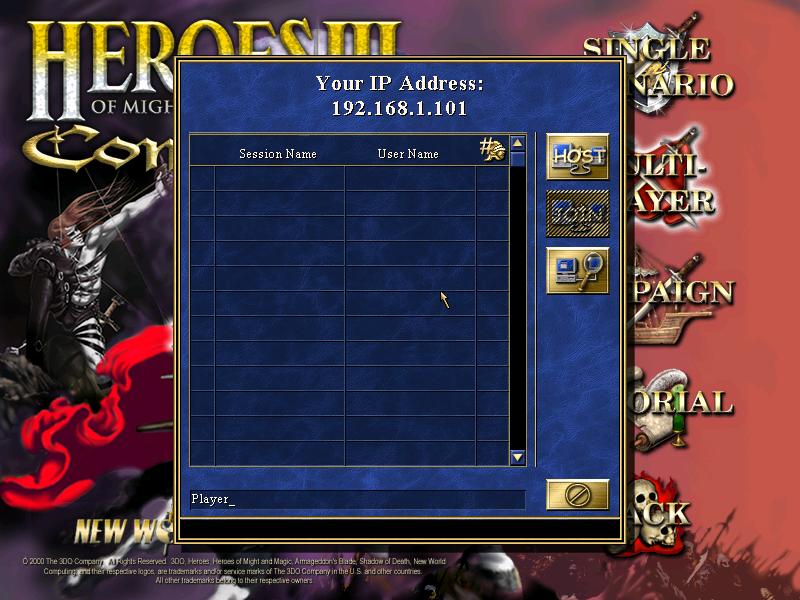
When the host starts his Heroes game, then clicks on "New", "Multiplayer", "TCP/IP", "Host", a blue window appears, which has your IP adress on the top. This is most of the times the WRONG IP adress, because this is the IP adress of your LOCAL network and not for the internet-network. Most of the times, this local IP starts with 192.....
If you want to figure out your current IP adress, the easiest way is to go to this site: IP-Check
It will instantly show your current internet IP.
But have in mind, this internet IP will change everytime you connect new to the internet, if u don't use a server.
Now you have figured out your IP adress, you can start the IP session like mentioned above (Start Heroes, New, Multiplayer, TCP/IP, Host). You don't have to give it a different name nor put in a password. When you have done this correctly, the scenario window of heroes will appear, where you can chose your scenario and the advanced options.
Now give the IP adress to your opponent. He has to make nearly the same steps as the host, except one: After clicking the "TCP/IP" button, he has to click the 3rd button on the right row, which is named "Search". In the appearing window he has to write the IP adress of the host and then press "ok". When everything works fine, he will occur on the players list in the scenario window.
Osobie przyłączającej się do gry musisz podać swój publiczny adres IP, a nie adres widniejący w oknie gry. Jedna osoba hostuje, pozostałe się do niej przyłączają. Osoba przyłączająca musi kliknąć przycisk Search (jest Host, Join i na końcu Search - trzy przyciski po prawej stronie listy) i w okienku jakie się pojawi wpisać Twój publiczny adres IP. Swój adres IP możesz sprawdzić w panelu Status routera bądź na stronie
http://checkip.dyndns.com/ .
Można też grać na serwerach Gamespy.