







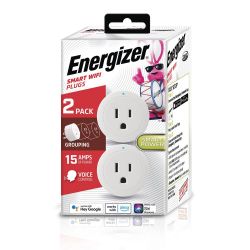
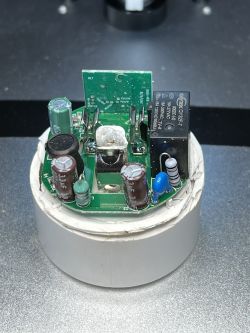
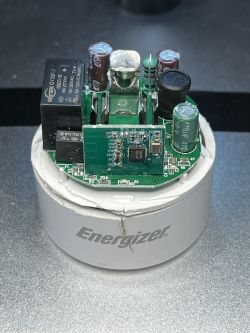
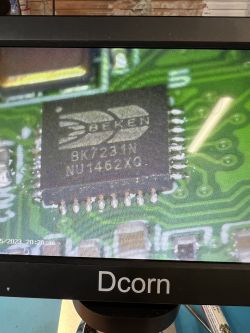
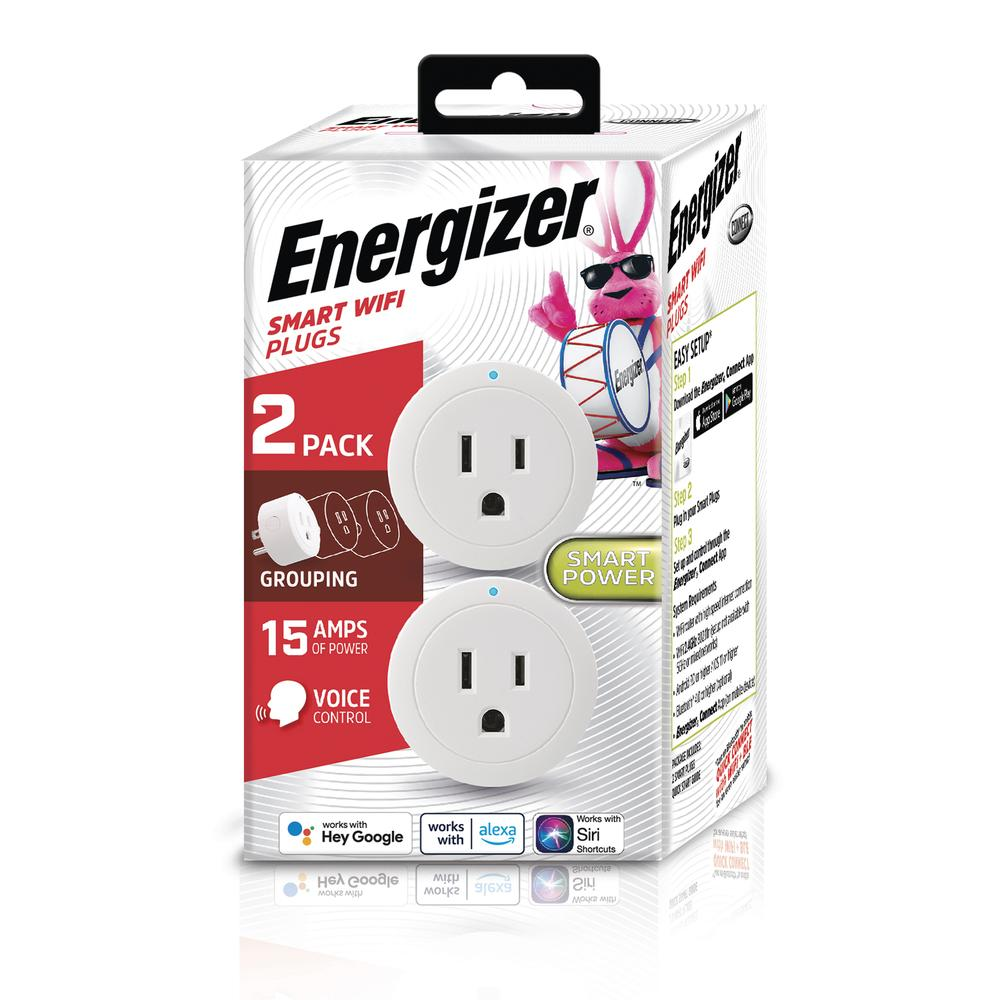
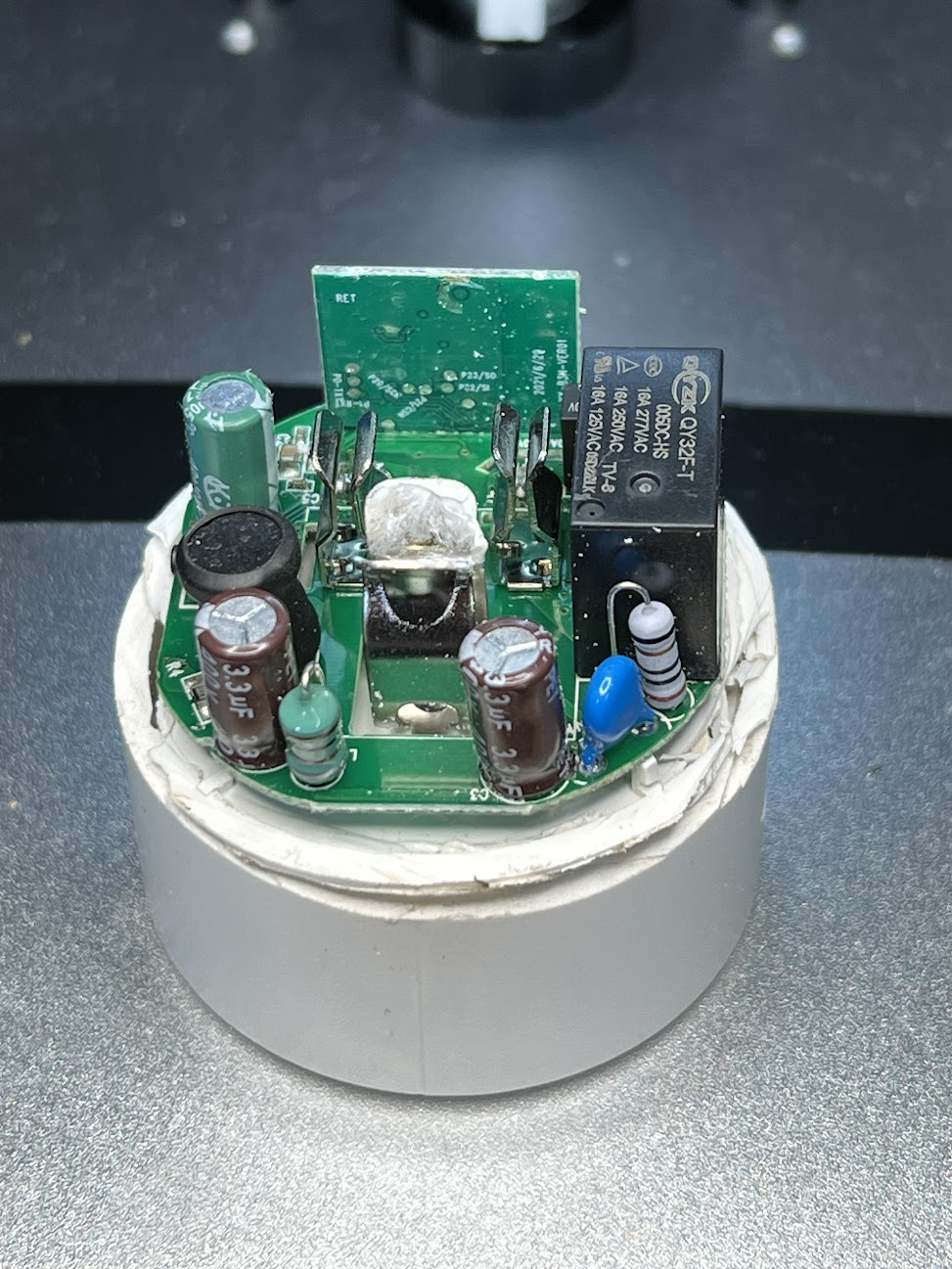
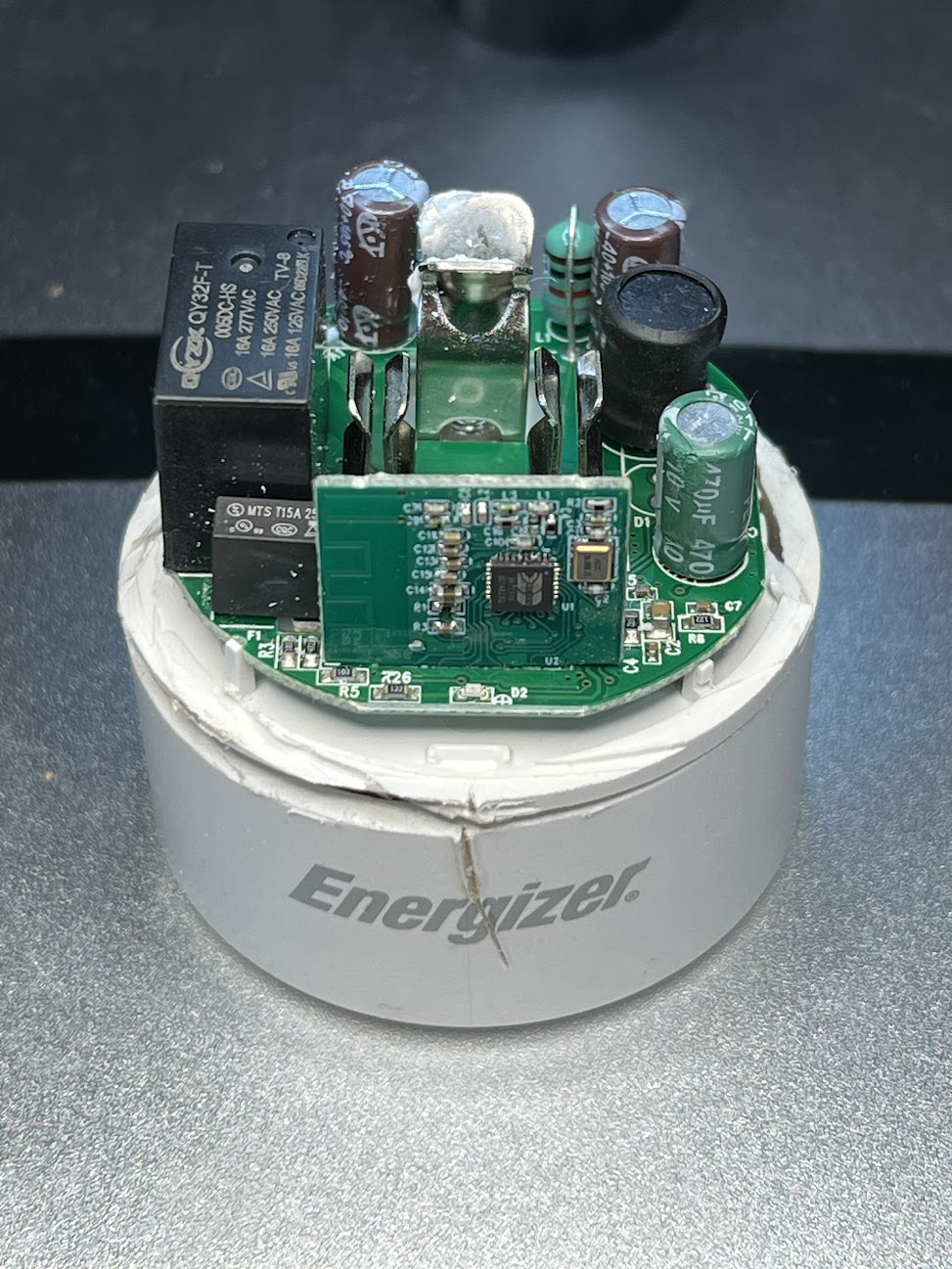
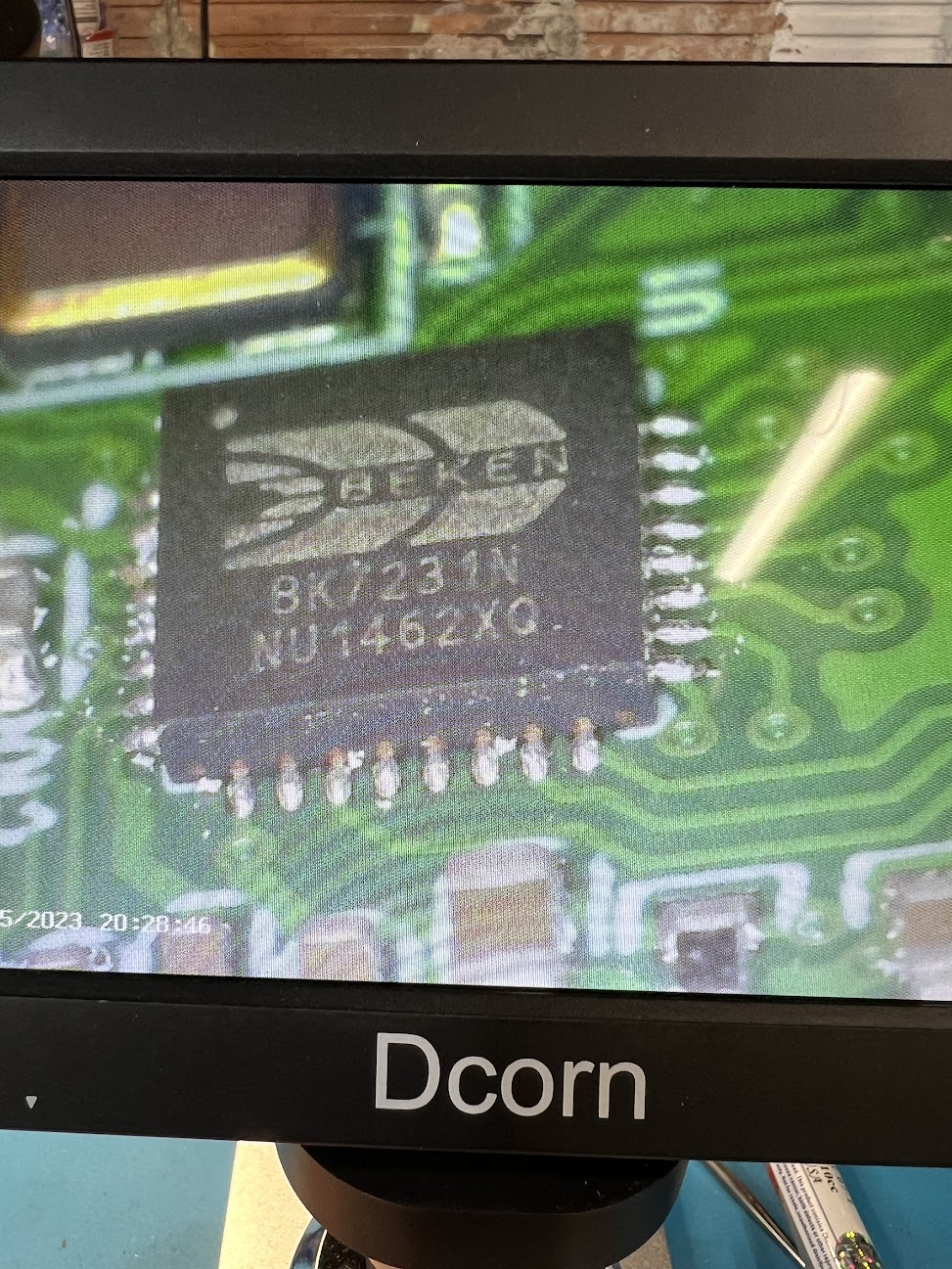
Próbuję wykonać cloudcut na tym urządzeniu. Zamurowałem pierwszy i rozciąłem go, żeby się przyjrzeć. Nie sflashowałem jeszcze tego seryjnego, ale próbuję CC drugiego. Udało mi się podłączyć go do Tuya i sprawdzić, czy wersja oprogramowania to 1.1.8. Jestem w stanie przejść przez pierwszy exploit, ale kiedy próbuje wysłać aktualizację, po prostu się zatrzymuje. Załączyłem dane wyjściowe sesji SSH. Mam kilka urządzeń CC i wydaje mi się, że te sprawiają mi najwięcej problemów. Każda pomoc byłaby bardzo mile widziana.
Dziękuję.
Dziękuję.
Starting Tuya-Cloudcutter.sh

Checking UDP port 53... Available.
Checking UDP port 67... Available.
Checking TCP port 80... Available.
Checking TCP port 443... Available.
Checking TCP port 1883... Available.
Checking TCP port 8886... Available.
Building cloudcutter docker image..
Sending build context to Docker daemon  24.62MB
Step 1/10 : FROM python:3.9-slim-buster AS base
 ---> 42cf550f4734
Step 2/10 : RUN apt-get -qq update && apt-get install -qy --no-install-recommends git hostapd rfkill dnsmasq build-essential libssl-dev iproute2 mosquitto
 ---> Using cache
 ---> 30167d963e25
Step 3/10 : FROM base AS python-deps
 ---> 30167d963e25
Step 4/10 : RUN pip install --upgrade pipenv
 ---> Using cache
 ---> bd0ceff4558a
Step 5/10 : COPY src/Pipfile /src/
 ---> Using cache
 ---> 5a577ffaed42
Step 6/10 : COPY src/Pipfile.lock /src/
 ---> Using cache
 ---> 8465b8114d78
Step 7/10 : RUN cd /src && PIPENV_VENV_IN_PROJECT=1 pipenv install --deploy
 ---> Using cache
 ---> f32ea90dfc78
Step 8/10 : FROM python-deps AS cloudcutter
 ---> f32ea90dfc78
Step 9/10 : COPY src /src
 ---> Using cache
 ---> 09bdac517e4a
Step 10/10 : WORKDIR /src
 ---> Using cache
 ---> 5ea1f9c86c07
Successfully built 5ea1f9c86c07
Successfully tagged cloudcutter:latest
Successfully built docker image
1) Detach from the cloud and run Tuya firmware locally
2) Flash 3rd Party Firmware
[?] Select your desired operation [1/2]: 2
Loading options, please wait...
[?] Select your custom firmware file: OpenBK7231N_UG_1.15.105.bin
 > OpenBK7231N_UG_1.15.105.bin
   OpenBK7231N_UG_1.17.11.bin
   OpenBK7231T_UG_1.15.305.bin

[?] How do you want to choose the device?: By firmware version and name
   By manufacturer/device name
 > By firmware version and name
   From device-profiles (i.e. custom profile)

[?] Select the firmware version and name: 1.1.8 - BK7231N / oem_bk7231n_plug
   1.1.6 - BK7231T / oem_bk7231s_switch1_zero_kjd
   1.1.7 - BK7231N / CL_DREAM_RGB_STRIP_19KEY_1KEY_5V_BK7231N
   1.1.7 - BK7231N / oem_bk7231n_ceiling_light_ty
   1.1.7 - BK7231N / oem_bk7231n_plug
   1.1.7 - BK7231T / oem_bk7231s_light_pir_ty
   1.1.71 - BK7231T / bk7231t_common_user_config_ty
 > 1.1.8 - BK7231N / oem_bk7231n_plug
   1.1.8 - BK7231T / oem_bk7231s_rnd_switch
   1.1.80 - BK7231T / bk7231t_common_user_config_ty
   1.1.9 - BK7231N / oem_bk7231n_water_sensor_plus
   1.1.9 - BK7231T / bk7231s_common_iot_config_ty
   1.1.9 - BK7231T / oem_bk7231s_ceiling_light_ty
   1.1.9 - BK7231T / oem_bk7231s_strip_ir_daybetter

[?] Select the brand of your device: Tuya Generic
   Atarm
   Aubess
   Baytion
   EasyLiv
   Enbrighten
   MOES
   Mirabella Genio
   Nous
   Pegant
   QNCX
   Topgreener
 > Tuya Generic

[?] Select the article number of your device: LSPA9 Plug v1.1.8
   BSD48 16A UK Smart Plug
   LSPA7 Plug
 > LSPA9 Plug v1.1.8
   WL-SW01-30A Switch

Selected Device Slug: tuya-generic-lspa9-plug-v1.1.8
Selected Profile: oem-bk7231n-plug-1.1.8-sdk-2.3.1-40.00
Selected Firmware: /work/custom-firmware/OpenBK7231N_UG_1.15.105.bin
==> Toggle Tuya device's power off and on again 6 times, with ~1 sec pauses in between, to enable AP mode. Repeat if your device's SSID doesn't show up within ~30 seconds. For smart plugs long press the reset button on the device for about 5 seconds. See https://support.tuya.com/en/help/_detail/K9hut3w10nby8 for more information.
Scanning for open Tuya SmartLife AP
.
Found access point name: "A-4247", trying to connect..
Device 'wlan0' successfully activated with '88fdebf9-c8b4-464d-8a98-8ec4a7abd3b4'.
Connected to access point.
Waiting 1 sec to allow device to set itself up..
Running initial exploit toolchain..
Exploit run, saved device config to!
output=/work/configured-devices/GEhkOGUnvG0l.deviceconfig
Saved device config in /work/configured-devices/GEhkOGUnvG0l.deviceconfig
==> Turn the device off and on again once. Repeat 6 more times if your device's SSID doesn't show up within ~5 seconds. For smart plugs long press the reset button on the device for about 5 seconds. See https://support.tuya.com/en/help/_detail/K9hut3w10nby8 for more information.
Scanning for open Tuya SmartLife AP
.
Found access point name: "A-4247", trying to connect..
Error: Connection activation failed: (53) The Wi-Fi network could not be found.
..
Found access point name: "A-4247", trying to connect..
Device 'wlan0' successfully activated with '88fdebf9-c8b4-464d-8a98-8ec4a7abd3b4'.
Connected to access point.
Configured device to connect to 'cloudcutterflash'
Device is connecting to 'cloudcutterflash' access point. Passphrase for the AP is 'abcdabcd' (without ')
Flashing custom firmware ..
==> Wait for 20-30 seconds for the device to connect to 'cloudcutterflash'. This script will then show the firmware upgrade requests sent by the device.
Using WLAN adapter: wlan0
May 16 02:09:06 dnsmasq[15]: started, version 2.80 cachesize 150
May 16 02:09:06 dnsmasq[15]: compile time options: IPv6 GNU-getopt DBus i18n IDN DHCP DHCPv6 no-Lua TFTP conntrack ipset auth DNSSEC loop-detect inotify dumpfile
May 16 02:09:06 dnsmasq-dhcp[15]: DHCP, IP range 10.42.42.10 -- 10.42.42.40, lease time 12h
May 16 02:09:06 dnsmasq-dhcp[15]: DHCP, sockets bound exclusively to interface wlan0
May 16 02:09:06 dnsmasq[15]: read /etc/hosts - 5 addresses
Configuration file: /dev/stdin
wlan0: Could not connect to kernel driver
Using interface wlan0 with hwaddr dc:a6:32:d5:de:b3 and ssid "cloudcutterflash"
wlan0: interface state UNINITIALIZED->ENABLED
wlan0: AP-ENABLED
May 16 02:09:11 dnsmasq-dhcp[15]: 1220565492 available DHCP range: 10.42.42.10 -- 10.42.42.40
May 16 02:09:11 dnsmasq-dhcp[15]: 1220565492 client provides name: wlan0
May 16 02:09:14 dnsmasq-dhcp[15]: 1220565492 DHCPDISCOVER(wlan0) cc:8c:bf:e0:42:47
May 16 02:09:14 dnsmasq-dhcp[15]: 1220565492 tags: wlan0
May 16 02:09:14 dnsmasq-dhcp[15]: 1220565492 DHCPOFFER(wlan0) 10.42.42.34 cc:8c:bf:e0:42:47
May 16 02:09:14 dnsmasq-dhcp[15]: 1220565492 requested options: 1:netmask, 3:router, 28:broadcast, 6:dns-server
May 16 02:09:14 dnsmasq-dhcp[15]: 1220565492 next server: 10.42.42.1
May 16 02:09:14 dnsmasq-dhcp[15]: 1220565492 sent size:  1 option: 53 message-type  2
May 16 02:09:14 dnsmasq-dhcp[15]: 1220565492 sent size:  4 option: 54 server-identifier  10.42.42.1
May 16 02:09:14 dnsmasq-dhcp[15]: 1220565492 sent size:  4 option: 51 lease-time  12h
May 16 02:09:14 dnsmasq-dhcp[15]: 1220565492 sent size:  4 option: 58 T1  6h
May 16 02:09:14 dnsmasq-dhcp[15]: 1220565492 sent size:  4 option: 59 T2  10h30m
May 16 02:09:14 dnsmasq-dhcp[15]: 1220565492 sent size:  4 option:  1 netmask  255.255.255.0
May 16 02:09:14 dnsmasq-dhcp[15]: 1220565492 sent size:  4 option: 28 broadcast  10.42.42.255
May 16 02:09:14 dnsmasq-dhcp[15]: 1220565492 sent size:  4 option:  3 router  10.42.42.1
May 16 02:09:14 dnsmasq-dhcp[15]: 1220565492 sent size:  4 option:  6 dns-server  10.42.42.1
May 16 02:09:14 dnsmasq-dhcp[15]: 1220565492 available DHCP range: 10.42.42.10 -- 10.42.42.40
May 16 02:09:14 dnsmasq-dhcp[15]: 1220565492 client provides name: wlan0
May 16 02:09:14 dnsmasq-dhcp[15]: 1220565492 DHCPDISCOVER(wlan0) cc:8c:bf:e0:42:47
May 16 02:09:14 dnsmasq-dhcp[15]: 1220565492 tags: wlan0
May 16 02:09:14 dnsmasq-dhcp[15]: 1220565492 DHCPOFFER(wlan0) 10.42.42.34 cc:8c:bf:e0:42:47
May 16 02:09:14 dnsmasq-dhcp[15]: 1220565492 requested options: 1:netmask, 3:router, 28:broadcast, 6:dns-server
May 16 02:09:14 dnsmasq-dhcp[15]: 1220565492 next server: 10.42.42.1
May 16 02:09:14 dnsmasq-dhcp[15]: 1220565492 sent size:  1 option: 53 message-type  2
May 16 02:09:14 dnsmasq-dhcp[15]: 1220565492 sent size:  4 option: 54 server-identifier  10.42.42.1
May 16 02:09:14 dnsmasq-dhcp[15]: 1220565492 sent size:  4 option: 51 lease-time  12h
May 16 02:09:14 dnsmasq-dhcp[15]: 1220565492 sent size:  4 option: 58 T1  6h
May 16 02:09:14 dnsmasq-dhcp[15]: 1220565492 sent size:  4 option: 59 T2  10h30m
May 16 02:09:14 dnsmasq-dhcp[15]: 1220565492 sent size:  4 option:  1 netmask  255.255.255.0
May 16 02:09:14 dnsmasq-dhcp[15]: 1220565492 sent size:  4 option: 28 broadcast  10.42.42.255
May 16 02:09:14 dnsmasq-dhcp[15]: 1220565492 sent size:  4 option:  3 router  10.42.42.1
May 16 02:09:14 dnsmasq-dhcp[15]: 1220565492 sent size:  4 option:  6 dns-server  10.42.42.1
May 16 02:09:14 dnsmasq-dhcp[15]: 1220565492 available DHCP range: 10.42.42.10 -- 10.42.42.40
May 16 02:09:14 dnsmasq-dhcp[15]: 1220565492 client provides name: wlan0
May 16 02:09:14 dnsmasq-dhcp[15]: 1220565492 DHCPREQUEST(wlan0) 10.42.42.34 cc:8c:bf:e0:42:47
May 16 02:09:14 dnsmasq-dhcp[15]: 1220565492 tags: wlan0
May 16 02:09:14 dnsmasq-dhcp[15]: 1220565492 DHCPACK(wlan0) 10.42.42.34 cc:8c:bf:e0:42:47 wlan0
May 16 02:09:14 dnsmasq-dhcp[15]: 1220565492 requested options: 1:netmask, 3:router, 28:broadcast, 6:dns-server
May 16 02:09:14 dnsmasq-dhcp[15]: 1220565492 next server: 10.42.42.1
May 16 02:09:14 dnsmasq-dhcp[15]: 1220565492 sent size:  1 option: 53 message-type  5
May 16 02:09:14 dnsmasq-dhcp[15]: 1220565492 sent size:  4 option: 54 server-identifier  10.42.42.1
May 16 02:09:14 dnsmasq-dhcp[15]: 1220565492 sent size:  4 option: 51 lease-time  12h
May 16 02:09:14 dnsmasq-dhcp[15]: 1220565492 sent size:  4 option: 58 T1  6h
May 16 02:09:14 dnsmasq-dhcp[15]: 1220565492 sent size:  4 option: 59 T2  10h30m
May 16 02:09:14 dnsmasq-dhcp[15]: 1220565492 sent size:  4 option:  1 netmask  255.255.255.0
May 16 02:09:14 dnsmasq-dhcp[15]: 1220565492 sent size:  4 option: 28 broadcast  10.42.42.255
May 16 02:09:14 dnsmasq-dhcp[15]: 1220565492 sent size:  4 option:  3 router  10.42.42.1
May 16 02:09:14 dnsmasq-dhcp[15]: 1220565492 sent size:  4 option:  6 dns-server  10.42.42.1
May 16 02:09:32 dnsmasq[15]: query[A] h3.iot-dns.com from 10.42.42.34
May 16 02:09:32 dnsmasq[15]: config h3.iot-dns.com is 10.42.42.1
Using PSK v1 - Received PSK ID version 01
[LOG (Client)] Request: HTTPServerRequest(protocol='https', host='h3.iot-dns.com', method='POST', uri='/v2/url_config', version='HTTP/1.1', remote_ip='10.42.42.34')
[LOG (Client)] ==== Request body ===
b'{"region":"AA","env":"","uuid":"GEhkOGUnvG0l","ts":64,"sign":"ZRSZt3YsVlyZgLHLxoMJHF77m5c2/ofpHIMHNrv47EU=","config":[{"key":"httpUrl","need_ca":false},{"key":"mqttUrl","need_ca":false},{"key":"httpsPSKUrl","need_ca":false},{"key":"mqttsPSKUrl","need_ca":false}]}'
[LOG (Client)] ==== End request body ===
[LOG (Server)] Response:  {"caArr":null,"httpUrl":{"addr":"http://10.42.42.1/d.json","ips":["10.42.42.1"]},"mqttUrl":{"addr":"10.42.42.1:1883","ips":["10.42.42.1"]},"ttl":600}
[I 230516 02:09:32 web:2271] 200 POST /v2/url_config (10.42.42.34) 94.61ms
[LOG (Client)] Request: HTTPServerRequest(protocol='http', host='10.42.42.1', method='POST', uri='/d.json?a=tuya.device.active&et=1&t=65&uuid=GEhkOGUnvG0l&v=4.4&sign=7b0f50d71a8273453fb950490871ceda', version='HTTP/1.1', remote_ip='10.42.42.34')
[LOG (Client)] ==== Request body ===
{'token': 'AAAAAA', 'softVer': '1.1.8', 'productKey': 'keyjup78v54myhan', 'protocolVer': '2.2', 'baselineVer': '40.00', 'productKeyStr': 'keyjup78v54myhan', 'devId': 'yybBfsf4ycIo7hdaUEWc', 'hid': 'cc8cbfe04247', 'modules': '[{"otaChannel":9,"softVer":"1.1.8","online":true}]', 'devAttribute': 579, 'cadVer': '1.0.3', 'cdVer': '1.0.0', 'options': '{"isFK":true,"otaChannel":0}', 't': 65}
[LOG (Client)] ==== End request body ===
[LOG (Server)] Response:  {'result': {'schema': '[{"type":"obj","mode":"rw","property":{"type":"bool"},"id":1},{"type":"obj","mode":"rw","property":{"min":0,"max":86400,"scale":0,"step":1,"type":"value"},"id":9},{"mode":"ro","property":{"min":0,"max":50000,"scale":3,"step":100,"type":"value"},"id":17,"type":"obj"},{"mode":"ro","property":{"min":0,"max":30000,"scale":0,"step":1,"type":"value"},"id":18,"type":"obj"},{"mode":"ro","property":{"min":0,"max":80000,"scale":1,"step":1,"type":"value"},"id":19,"type":"obj"},{"mode":"ro","property":{"min":0,"max":5000,"scale":1,"step":1,"type":"value"},"id":20,"type":"obj"},{"mode":"ro","property":{"min":0,"max":5,"scale":0,"step":1,"type":"value"},"id":21,"type":"obj"},{"mode":"ro","property":{"min":0,"max":1000000,"scale":0,"step":1,"type":"value"},"id":22,"type":"obj"},{"mode":"ro","property":{"min":0,"max":1000000,"scale":0,"step":1,"type":"value"},"id":23,"type":"obj"},{"mode":"ro","property":{"min":0,"max":1000000,"scale":0,"step":1,"type":"value"},"id":24,"type":"obj"},{"mode":"ro","property":{"min":0,"max":1000000,"scale":0,"step":1,"type":"value"},"id":25,"type":"obj"},{"mode":"ro","property":{"type":"bitmap","maxlen":6},"id":26,"type":"obj"},{"type":"obj","mode":"rw","property":{"range":["off","on","memory"],"type":"enum"},"id":38},{"mode":"rw","property":{"type":"bool"},"id":39,"type":"obj"},{"type":"obj","mode":"rw","property":{"range":["relay","pos","none","on"],"type":"enum"},"id":40},{"type":"obj","mode":"rw","property":{"type":"bool"},"id":41},{"type":"obj","mode":"rw","property":{"type":"string","maxlen":255},"id":42},{"type":"obj","mode":"rw","property":{"type":"string","maxlen":255},"id":43},{"mode":"rw","property":{"type":"string","maxlen":255},"id":44,"type":"obj"}]', 'devId': '3BYkuElSNVSRUDE4PC97', 'resetFactory': False, 'timeZone': '+02:00', 'capability': 1025, 'secKey': 'SIZrDR1CpuCtXsV4', 'stdTimeZone': '+01:00', 'schemaId': '000004rk93', 'dstIntervals': [], 'localKey': 'JRJP5FBp4JaL0rDd'}, 'success': True, 't': 1684202973}
[I 230516 02:09:33 web:2271] 200 POST /d.json?a=tuya.device.active&et=1&t=65&uuid=GEhkOGUnvG0l&v=4.4&sign=7b0f50d71a8273453fb950490871ceda (10.42.42.34) 106.74ms
[LOG (Client)] Request: HTTPServerRequest(protocol='http', host='10.42.42.1', method='POST', uri='/d.json?a=tuya.device.dynamic.config.get&devId=3BYkuElSNVSRUDE4PC97&et=1&t=1684202974&v=2.0&sign=0041d15b98c7935583e0e4d1101d3341', version='HTTP/1.1', remote_ip='10.42.42.34')
[LOG (Client)] ==== Request body ===
{'type': '["timezone"]', 't': 1684202974}
[LOG (Client)] ==== End request body ===
[LOG (Server)] Response:  {'result': {'ackId': '0-0', 'validTime': 1800, 'time': 1684202974, 'config': {'stdTimeZone': '+01:00', 'dstIntervals': [[1648342800, 1667091600], [1679792400, 1698541200]]}, 'timezone': {'ackId': '0-0', 'validTime': 1800, 'time': 1684202974, 'config': {'stdTimeZone': '+01:00', 'dstIntervals': [[1648342800, 1667091600], [1679792400, 1698541200]]}}}, 't': 1684202974, 'success': True}
[I 230516 02:09:34 web:2271] 200 POST /d.json?a=tuya.device.dynamic.config.get&devId=3BYkuElSNVSRUDE4PC97&et=1&t=1684202974&v=2.0&sign=0041d15b98c7935583e0e4d1101d3341 (10.42.42.34) 106.53ms
[LOG (Client)] Request: HTTPServerRequest(protocol='http', host='10.42.42.1', method='POST', uri='/d.json?a=tuya.device.uuid.pskkey.get&et=1&t=1684202976&uuid=GEhkOGUnvG0l&v=1.0&sign=14981d121160b4a1cb280928328c7044', version='HTTP/1.1', remote_ip='10.42.42.34')
[LOG (Client)] ==== Request body ===
{'t': 1684202976}
[LOG (Client)] ==== End request body ===
[LOG (Server)] Response:  {'result': {'pskKey': ''}, 't': 1684202977, 'success': True}
[I 230516 02:09:37 web:2271] 200 POST /d.json?a=tuya.device.uuid.pskkey.get&et=1&t=1684202976&uuid=GEhkOGUnvG0l&v=1.0&sign=14981d121160b4a1cb280928328c7044 (10.42.42.34) 137.30ms
Sending firmware update message {"data":{"firmwareType":0},"protocol":15,"t":1684202979} using protocol 2.2
Firmware update messages triggered. Device will download and reset. Exiting in 30 seconds.
[LOG (Client)] Request: HTTPServerRequest(protocol='http', host='10.42.42.1', method='POST', uri='/d.json?a=tuya.device.upgrade.get&devId=3BYkuElSNVSRUDE4PC97&et=1&t=1684202978&v=4.4&sign=c266e8ddd4b1e3add0197e285c072d2d', version='HTTP/1.1', remote_ip='10.42.42.34')
[LOG (Client)] ==== Request body ===
{'type': 0, 't': 1684202978}
[LOG (Client)] ==== End request body ===
[LOG (Server)] Response:  {'result': {'url': 'http://10.42.42.1:80/files/OpenBK7231N_UG_1.15.105.bin', 'hmac': '5847F7ACBD7CEF4BCCB801E676B162DB626FA9B27F2F111FDE8DBA18AC974DE5', 'version': '9.0.0', 'size': '586048', 'type': 0}, 'success': True, 't': 1684202979}
[I 230516 02:09:39 web:2271] 200 POST /d.json?a=tuya.device.upgrade.get&devId=3BYkuElSNVSRUDE4PC97&et=1&t=1684202978&v=4.4&sign=c266e8ddd4b1e3add0197e285c072d2d (10.42.42.34) 22.34ms
[LOG (Client)] Request: HTTPServerRequest(protocol='http', host='10.42.42.1', method='POST', uri='/d.json?a=tuya.device.upgrade.status.update&devId=3BYkuElSNVSRUDE4PC97&et=1&t=1684202979&v=4.1&sign=dcee93277f65726c24daeb0610c9fd23', version='HTTP/1.1', remote_ip='10.42.42.34')
[LOG (Client)] ==== Request body ===
{'type': 0, 'upgradeStatus': 2, 't': 1684202979}
[LOG (Client)] ==== End request body ===
!!! Endpoint default response not found - tuya.device.upgrade.status.update
[LOG (Server)] Response:  {'success': True, 't': 1684202980}
[I 230516 02:09:40 web:2271] 200 POST /d.json?a=tuya.device.upgrade.status.update&devId=3BYkuElSNVSRUDE4PC97&et=1&t=1684202979&v=4.1&sign=dcee93277f65726c24daeb0610c9fd23 (10.42.42.34) 7.23ms
[LOG (Client)] Request: HTTPServerRequest(protocol='http', host='10.42.42.1', method='POST', uri='/d.json?a=atop.online.debug.log&devId=3BYkuElSNVSRUDE4PC97&et=1&t=1684202984&sign=44362441d49474310601f504d5184d19', version='HTTP/1.1', remote_ip='10.42.42.34')
[LOG (Client)] ==== Request body ===
{'data': '0', 't': 1684202984}
[LOG (Client)] ==== End request body ===
[LOG (Server)] Response:  {'result': True, 't': 1684202985, 'success': True}
[I 230516 02:09:45 web:2271] 200 POST /d.json?a=atop.online.debug.log&devId=3BYkuElSNVSRUDE4PC97&et=1&t=1684202984&sign=44362441d49474310601f504d5184d19 (10.42.42.34) 98.37ms
[LOG (Client)] Request: HTTPServerRequest(protocol='http', host='10.42.42.1', method='POST', uri='/d.json?a=tuya.device.dynamic.config.get&devId=3BYkuElSNVSRUDE4PC97&et=1&t=1684202985&v=2.0&sign=352e9e9d3f291c950c371a239e2f0eb0', version='HTTP/1.1', remote_ip='10.42.42.34')
[LOG (Client)] ==== Request body ===
{'type': '["timezone","rateRule"]', 't': 1684202985}
[LOG (Client)] ==== End request body ===
[LOG (Server)] Response:  {'result': {'ackId': '0-0', 'validTime': 1800, 'time': 1684202985, 'config': {'stdTimeZone': '+01:00', 'dstIntervals': [[1648342800, 1667091600], [1679792400, 1698541200]]}, 'timezone': {'ackId': '0-0', 'validTime': 1800, 'time': 1684202985, 'config': {'stdTimeZone': '+01:00', 'dstIntervals': [[1648342800, 1667091600], [1679792400, 1698541200]]}}}, 't': 1684202985, 'success': True}
[I 230516 02:09:45 web:2271] 200 POST /d.json?a=tuya.device.dynamic.config.get&devId=3BYkuElSNVSRUDE4PC97&et=1&t=1684202985&v=2.0&sign=352e9e9d3f291c950c371a239e2f0eb0 (10.42.42.34) 102.71ms
[LOG (Client)] Request: HTTPServerRequest(protocol='http', host='10.42.42.1', method='POST', uri='/d.json?a=tuya.device.dynamic.config.ack&devId=3BYkuElSNVSRUDE4PC97&et=1&t=1684202985&v=2.0&sign=b495b719af1699f681bdfd9c5a94cd6e', version='HTTP/1.1', remote_ip='10.42.42.34')
[LOG (Client)] ==== Request body ===
{'ackList': [{'type': 'timezone', 'ackId': '0-0'}], 't': 1684202985}
[LOG (Client)] ==== End request body ===
[LOG (Server)] Response:  {'t': 1684202985, 'success': True}
[I 230516 02:09:45 web:2271] 200 POST /d.json?a=tuya.device.dynamic.config.ack&devId=3BYkuElSNVSRUDE4PC97&et=1&t=1684202985&v=2.0&sign=b495b719af1699f681bdfd9c5a94cd6e (10.42.42.34) 102.53ms
[LOG (Client)] Request: HTTPServerRequest(protocol='http', host='10.42.42.1', method='POST', uri='/d.json?a=tuya.device.upgrade.silent.get&devId=3BYkuElSNVSRUDE4PC97&et=1&t=1684202988&v=4.4&sign=fb49b860084acfda9b9cc7d1895c1718', version='HTTP/1.1', remote_ip='10.42.42.34')
[LOG (Client)] ==== Request body ===
{'subId': None, 't': 1684202988}
[LOG (Client)] ==== End request body ===
[LOG (Server)] Response:  {'result': {'url': 'http://10.42.42.1:80/files/OpenBK7231N_UG_1.15.105.bin', 'hmac': '5847F7ACBD7CEF4BCCB801E676B162DB626FA9B27F2F111FDE8DBA18AC974DE5', 'version': '9.0.0', 'size': '586048', 'type': 0}, 'success': True, 't': 1684202990}
[I 230516 02:09:50 web:2271] 200 POST /d.json?a=tuya.device.upgrade.silent.get&devId=3BYkuElSNVSRUDE4PC97&et=1&t=1684202988&v=4.4&sign=fb49b860084acfda9b9cc7d1895c1718 (10.42.42.34) 105.42ms
Sending firmware update message {"data":{"firmwareType":0},"protocol":15,"t":1684202990} using protocol 2.2
Firmware update messages triggered. Device will download and reset. Exiting in 30 seconds.
[I 230516 02:09:50 web:2271] 200 GET /files/OpenBK7231N_UG_1.15.105.bin (10.42.42.34) 10572.80ms
[DEVICE OTA] Responding to device OTA HTTP request range: bytes=0-586047/586048
[LOG (Client)] Request: HTTPServerRequest(protocol='http', host='10.42.42.1', method='POST', uri='/d.json?a=tuya.device.timer.count&devId=3BYkuElSNVSRUDE4PC97&et=1&t=1684202990&v=4.0&sign=01dc3bc8acfb67dc7e996bcd8f2ae5c2', version='HTTP/1.1', remote_ip='10.42.42.34')
[LOG (Client)] ==== Request body ===
{'devId': '3BYkuElSNVSRUDE4PC97', 'lastFetchTime': '0', 't': 1684202990}
[LOG (Client)] ==== End request body ===
[LOG (Server)] Response:  {'result': {'devId': '3BYkuElSNVSRUDE4PC97', 'count': 0, 'lastFetchTime': 0}, 't': 1684202990, 'success': True}
[I 230516 02:09:50 web:2271] 200 POST /d.json?a=tuya.device.timer.count&devId=3BYkuElSNVSRUDE4PC97&et=1&t=1684202990&v=4.0&sign=01dc3bc8acfb67dc7e996bcd8f2ae5c2 (10.42.42.34) 199.86ms
[I 230516 02:09:55 web:2271] 206 GET /files/OpenBK7231N_UG_1.15.105.bin (10.42.42.34) 132.29ms
[DEVICE OTA] Responding to device OTA HTTP request range: bytes=317472-586047/586048
[I 230516 02:10:00 web:2271] 206 GET /files/OpenBK7231N_UG_1.15.105.bin (10.42.42.34) 129.01ms
[DEVICE OTA] Responding to device OTA HTTP request range: bytes=317472-586047/586048
[I 230516 02:10:05 web:2271] 206 GET /files/OpenBK7231N_UG_1.15.105.bin (10.42.42.34) 129.88ms
[DEVICE OTA] Responding to device OTA HTTP request range: bytes=317472-586047/586048

