logo elektroda
logo elektroda
X
logo elektroda
REKLAMA
REKLAMA
Adblock/uBlockOrigin/AdGuard mogą powodować znikanie niektórych postów z powodu nowej reguły.

Skrypt zdarzeń zegara BK7231N: Konfigurowalny czas dla impulsu wyłączenia przekaźnika

tinkertechie 11 Lip 2024 15:30 1446 5
REKLAMA
Treść została przetłumaczona angielski » polski Zobacz oryginalną wersję tematu
  • #1 21150984
    tinkertechie
    Poziom 2  
    Posty: 11
    Mam kolejny scenariusz "restartu" ze skryptami OpenBK, tym razem próbując dać impuls wyłączenia na kilka sekund w konfigurowalnym czasie.

    Próbuję użyć zdarzenia zegara, aby wyłączyć przekaźnik w ten sposób:

    addClockEvent $CH5:$CH7 0xFF 567 turn_off_relay

    przy czym CH5 i CH7 można konfigurować z GUI, ale z jego zachowania wnioskuję, że $CH5 i $CH7 nie są rozszerzane. Jeśli wprowadzę czytelny czas, taki jak 18:23, działa dobrze.

    Mogę oczywiście po prostu zmienić kod, aby ustawić nowy czas, ale chciałbym, aby klient mógł to dostosować samodzielnie.

    Czy ktoś mógłby potwierdzić, czy takie rozszerzenie jest w jakiś sposób możliwe z istniejącą bazą kodu? Nie zagłębiałem się jeszcze w parser i interpreter na tyle, by zobaczyć, jak to się robi.

    Dzięki!
  • REKLAMA
  • #2 21151448
    p.kaczmarek2
    Moderator Smart Home
    Posty: 14439
    Pomógł: 650
    Ocena: 12405
    Myślę, że jest wyłączona, ale mogę się temu przyjrzeć.

    Alternatywnie, może niestandardowy prosty kod C może pomóc? Widziałeś:
    https://www.elektroda.com/rtvforum/topic4056286.html
    Pomogłem? Kup mi kawę.
  • REKLAMA
  • #3 21151728
    tinkertechie
    Poziom 2  
    Posty: 11
    >>21151448 Widziałem to, właściwie mam to otwarte w innej zakładce, ale nie miałem czasu tego przetrawić. Rozszerzenie i tak wydaje się pomocne ;) ale zerknę też na opcję niestandardowego sterownika.
  • REKLAMA
  • #4 21152576
    tinkertechie
    Poziom 2  
    Posty: 11
    >>21151448

    Oto skrypt, którego próbowałem użyć. Nie przejrzałem go do końca w celu prezentacji i uważam, że jest w porządku, ale na wszelki wypadek, gdybyś chciał go umieścić w przykładach, oto on :)

    // A pulse-off script designed to reset a device once a day.
    // Based on the "advanced delay script" example script
    // See: https://www.elektroda.com/rtvforum/topic4032982.html
    
    // When the relay is turned off off, relay will turn back on after delay
    // The current delay value is displayed on www gui
    // The off time delay value, and the hour and minute at which it should occur,
    // is displayed on www gui and fully adjustable and remembered between reboots 
    // NTP is used for this and would presumably need to synchronise at least once in order 
    // to operate at the correct time. Timezone needs to be ajusted in the code.
    
    
    // Used channels:
    // Channel 1 - relay and button
    // Channel 2 - current countdown value
    // Channel 3 - preset time for countdown
    // Channel 4 - new hour for auto off
    // Channel 5 - actual hour for auto off
    // Channel 6 - new minutes for auto off
    // Channel 7 - actual minutes for auto off
    
    // this will make channel 3,4 and 6 save in memory
    setStartValue 3 -1
    setStartValue 4 -1
    setStartValue 5 0
    setStartValue 6 -1
    setStartValue 7 0
    
    // if channel 3 is not set (default first case), set it to 15 seconds
    if $CH3==0 then setChannel 3 15
    
    // other sanity checks for times are done in the main loop
    
    // display fields for channels 3-7 on www page
    setChannelType 3 TextField
    setChannelType 4 TextField
    setChannelType 5 TimerSeconds
    setChannelType 6 TextField
    setChannelType 7 TimerSeconds
    
    // set label
    setChannelLabel 3 "Off Duration"
    setChannelLabel 4 "Auto Off Hour"
    setChannelLabel 6 "Auto Off Minute"
    
    // set starting values for auto reset time
    setChannel 5 $CH4
    setChannel 7 $CH6
    
    // display timer seconds (read only) for channel 2 on www page
    setChannelType 2 TimerSeconds
    
    // All the variables are set up. Now turn on the outlet
    SetChannel 1 1
    
    // Get rid of old handlers
    clearAllHandlers
    
    // shorthand for setting channel 2 to value of channel 3
    alias start_timer backlog setChannel 2 $CH3
    
    // shorthand for clearing current timer value
    alias stop_timer setChannel 2 0
    
    // shorthand to set relay on or off
    alias turn_on_relay setChannel 1 1
    alias turn_off_relay setChannel 1 0
    
    // check used to turn on relay when countdown value reaches 0
    alias do_check if $CH2==0 then turn_on_relay 
    
    // an update command; it decreases current countdown by 1 and checks for 0
    alias do_tick backlog addChannel 2 -1; do_check
    
    // this doesn't currently work because the expansion of $CH variables doesn't seem to be done
    // for addClockEvent
    
    // alias new_time backlog setChannel 5 $CH4; setChannel 7 $CH6; addClockEvent $CH5:$CH7 0xFF 567 turn_off_relay
    
    // currently using a hard coded time
    alias new_time backlog setChannel 5 $CH4; setChannel 7 $CH6; addClockEvent 04:04 0xFF 567 turn_off_relay
    
    // event triggers for channel 1 changing to 0 and 1
    addChangeHandler Channel1 == 1 stop_timer
    addChangeHandler Channel1 == 0 start_timer
    
    // Don't make any progress until WiFi connects - we need that for NTP
    // wait for wifi to become WIFI_STA_CONNECTED
    // waitFor WiFiState 4
    
    // Start the NTP driver and set the time zone to Melbourne. Not adjusting for DST at this point.
    startDriver NTP
    ntp_timeZoneOfs 10
    
    turn_on_relay
    
    new_time
    
    // main loop - infinite
    again:
    if $CH2!=0 then do_tick
    
    // Sanity check in case anything has been set to a silly value
    
    if $CH3<=0 then "setChannel 3 1"
    if $CH3>120 then "setChannel 3 120"
    
    if $CH4<0 then "setChannel 4 0"
    if $CH4>23 then "setChannel 4 23"
    
    if $CH6<0 then "setChannel 6 0"
    if $CH6>59 then "setChannel 6 59"
    
    // if the reset time changes, update the handler
    if $CH4!=$CH5 then new_time
    if $CH6!=$CH7 then new_time
    
    delay_s 1
    goto again
  • REKLAMA
  • #5 21153148
    p.kaczmarek2
    Moderator Smart Home
    Posty: 14439
    Pomógł: 650
    Ocena: 12405
    Dziękuję, ale oto mała aktualizacja z mojej strony.
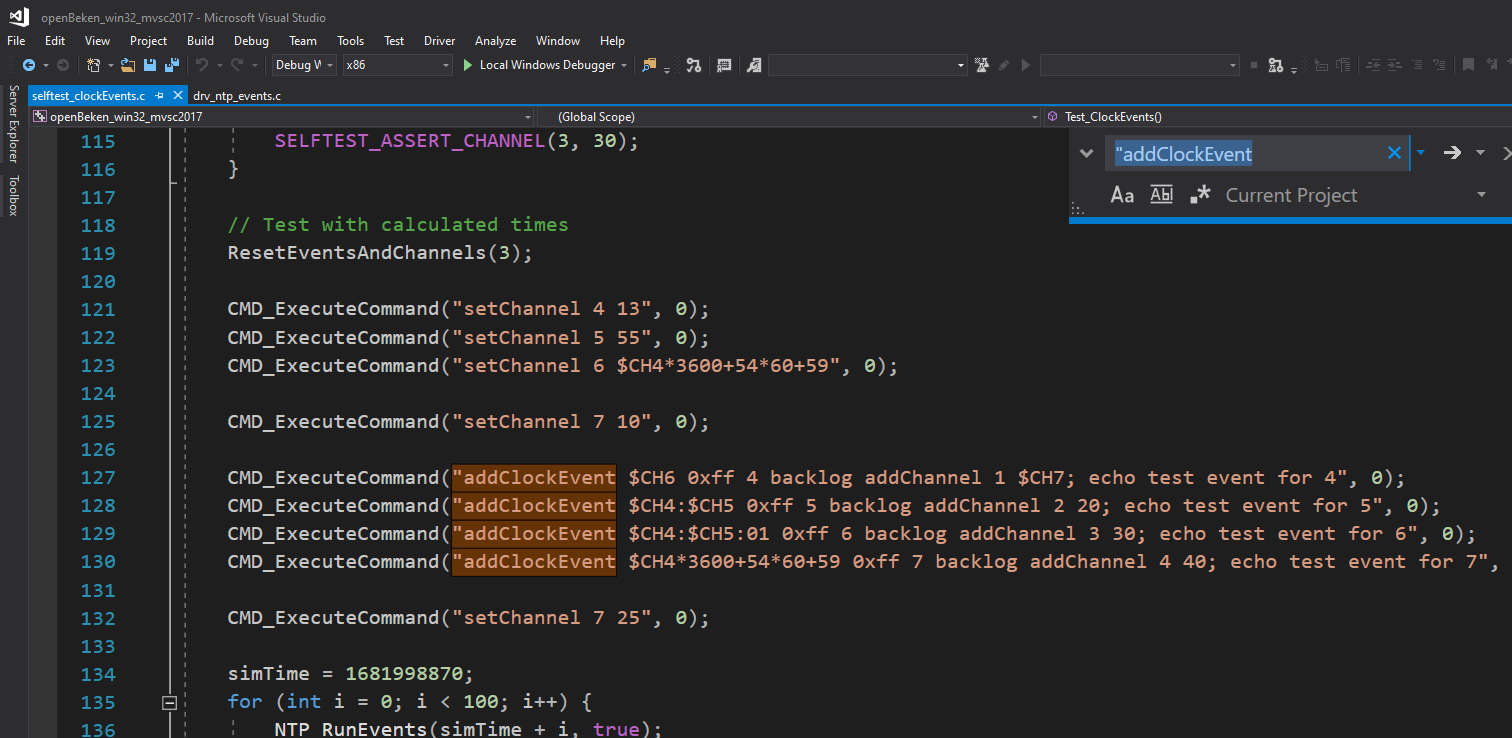
    Sprawdziłem kod automatycznego autotestu i najwyraźniej addClockEvent już rozszerza vars na początku:
    Kod C w edytorze Visual Studio z funkcjami związanymi z addClockEvent. .
    Więc problem musi leżeć gdzie indziej...
    Pomogłem? Kup mi kawę.
  • #6 21153565
    tinkertechie
    Poziom 2  
    Posty: 11
    Dzięki za sprawdzenie! Nie pomyślałem, żeby spojrzeć na kod testowy 🤦‍♂️

    Sprawdzę jeszcze raz wersję firmware. Może jestem nieaktualny. Wywołania addClockEvent nie pojawiały się w dzienniku, nawet na poziomie debugowania, ale wersja z jawnym czasem tak.

    Jeśli okaże się, że nastąpiły zmiany w kodzie, ponownie opublikuję skrypt, ale mam nadzieję, że to tylko oprogramowanie układowe. Tak czy inaczej, dam ci znać, co znajdę.

    Jeszcze raz dzięki, jak zawsze!
REKLAMA